Limited Time Offer!
For Less Than the Cost of a Starbucks Coffee, Access All DevOpsSchool Videos on YouTube Unlimitedly.
Master DevOps, SRE, DevSecOps Skills!
1) What “page size” means and what’s changing
A memory page is the basic unit the OS uses to map and manage RAM. For years, most Android devices used 4 KB pages. Newer devices and Android 15 introduce support for 16 KB pages. Practically, that means your app, especially if it ships native code (.so libraries), must be packaged and built so those libraries load and run correctly on devices configured with 16 KB pages. ()
Why this matters
- Some apps will simply not load their native libraries on 16 KB devices if they were built assuming 4 KB page alignment.
- If your app is Java/Kotlin only (no .so files), you’re probably fine, but you should still test on a 16 KB device or emulator. ()
2) Google Play requirement and timing
Starting November 1, 2025, new apps and updates targeting Android 15 (API 35) or higher must support 16 KB page sizes. This is a publishing requirement on Google Play, not just a best practice. ()
3) What counts as “affected”
You’re affected if your app includes native code. That includes:
- Direct NDK usage (C/C++).
- Third-party SDKs that ship .so files (games, media, crypto, database, analytics, etc.).
- Cross-platform frameworks that package native binaries.
If you have no .so files at all, your risk is low, but still test once on a 16 KB setup. ()
4) The performance angle (why Google is doing this)
Google cites measurable gains on devices using 16 KB pages: faster cold and hot app starts, lower power during launch, and quicker camera and system boot times. You won’t get these benefits just by flipping a switch, but being compatible ensures users on those devices see the improvements. ()
5) How to become 16 KB compatible
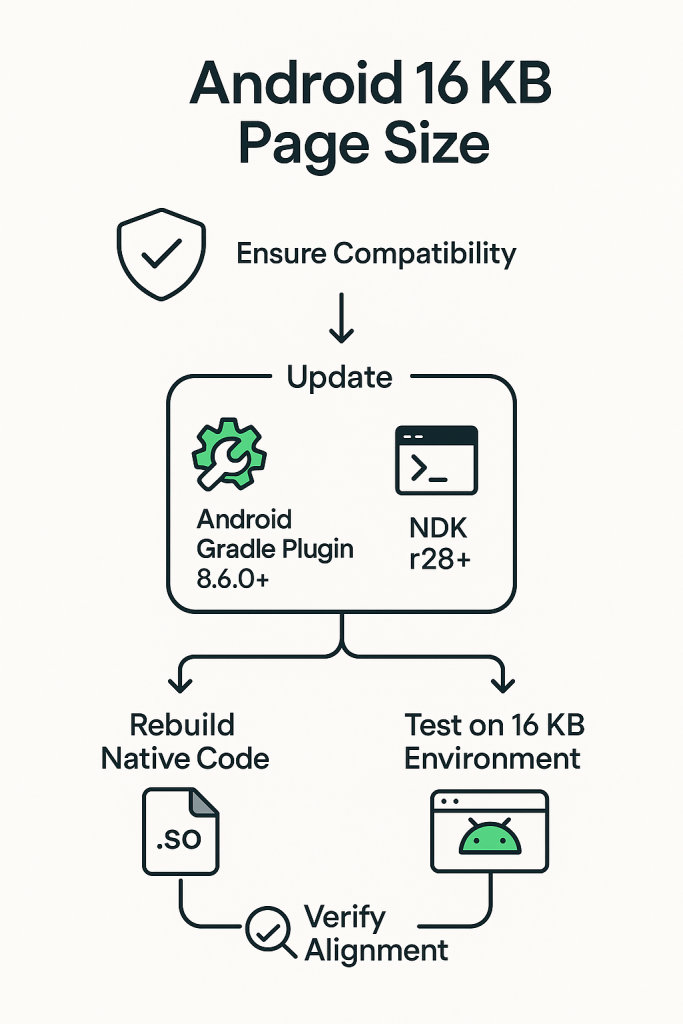
5.1 Update your build and packaging tools
- Use Android Gradle Plugin 8.5.1 or higher. This ensures correct handling of shared libraries and proper zip alignment when using uncompressed libs. If you’re on 8.3–8.5, some pipelines may not align bundles correctly for 16 KB. The recommended path is to update AGP. As a workaround on older AGP, you can fall back to compressed native libraries (described below). ()
Temporary workaround on older AGP (if you can’t upgrade yet)
Enable legacy packaging so .so files are compressed inside the APK/AAB:
- Groovy:
android { packagingOptions { jniLibs { useLegacyPackaging true } } } - Kotlin DSL:
android { packagingOptions { jniLibs { useLegacyPackaging = true } } }
Trade-off: larger install size and potential install-space issues. Treat this as short-term. ()
5.2 Update your NDK and flags
- Preferred: NDK r28 or newer. These toolchains produce binaries aligned for flexible page sizes by default. ()
- If you must use NDK r27: enable flexible page sizes explicitly.
- ndk-build:
APP_SUPPORT_FLEXIBLE_PAGE_SIZES := true - CMake:
-DANDROID_SUPPORT_FLEXIBLE_PAGE_SIZES=ON - External native build (Gradle): pass the CMake argument above. ()
- ndk-build:
- If you’re stuck on older NDKs: add a linker flag such as
-Wl,-z,max-page-size=16384and plan an upgrade soon. Compatibility is less predictable on older toolchains. ()
5.3 Rebuild all native dependencies
Every .so in your app must be rebuilt or updated for 16 KB support. That includes third-party SDKs. If a vendor supplies only 4 KB–aligned binaries, ask for an updated drop; don’t ship mixed alignment if you can avoid it. ()
5.4 Remove hard-coded 4 KB assumptions in code
Audit native code for:
- Constants like
4096used as page size. - Direct uses of
PAGE_SIZEwhere you really mean “alignment multiple.” Usegetpagesize()orsysconf(_SC_PAGESIZE)if you truly need the OS page size. Adjustmmapalignment and buffer math accordingly. ()
6) Packaging and alignment details you must get right
6.1 ELF segment alignment
Your .so files need ELF segments aligned for 16 KB on devices that use it. When you inspect the ELF program headers, LOAD segments should show an alignment of 2**14 (16384). If you see 2**12 (4096), that’s 4 KB only and will trigger compat mode or worse. ()
6.2 APK/AAB zip alignment
If you ship uncompressed .so files, the package itself must be zip-aligned for 16 KB pages. You can verify this with zipalign and build pipelines that support -P 16 verification. Prefer upgrading AGP so the pipeline does the right thing by default. ()
7) Testing on 16 KB devices and emulators
7.1 Choose a 16 KB test environment
- Android Emulator: use an image that explicitly indicates 16 KB page support. Community CI configs commonly use an image variant tagged for 16 KB with API 35. ()
- Physical devices: certain devices on Android 15+ expose a developer setting to boot with 16 KB pages for testing. ()
7.2 Verify the actual page size
Run:
adb shell getconf PAGE_SIZE
Expect 16384 on a 16 KB setup. ()
7.3 Verify APK alignment with zipalign
Run:
zipalign -c -P 16 -v 4 path/to/app-release.apk
The -P 16 check ensures 16 KB alignment where applicable. ()
7.4 Back-compat mode
If your app isn’t properly aligned, Android can attempt a “compat mode” on 16 KB devices so it still runs. Treat this only as a safety net. Users may see warnings and performance can differ. The goal remains: rebuild correctly and avoid compat mode. ()
8) Android Emulator with a 16 KB-based System Image
Purpose
You must test your app on a system environment that actually uses 16 KB pages. The emulator provides this capability so you do not need special physical hardware to verify compatibility.
Steps to Set Up a 16 KB Emulator
Step 1: In Android Studio, click Tools > SDK Manager.
Step 2: In the SDK Platforms tab, check Show Package Details, then expand the Android VanillaIceCream or higher section and select one or both of the following emulator system images, depending on the virtual devices you want to create:
- Google APIs Experimental 16 KB Page Size ARM 64 v8a System Image
- Google APIs Experimental 16 KB Page Size Intel x86_64 Atom System Image
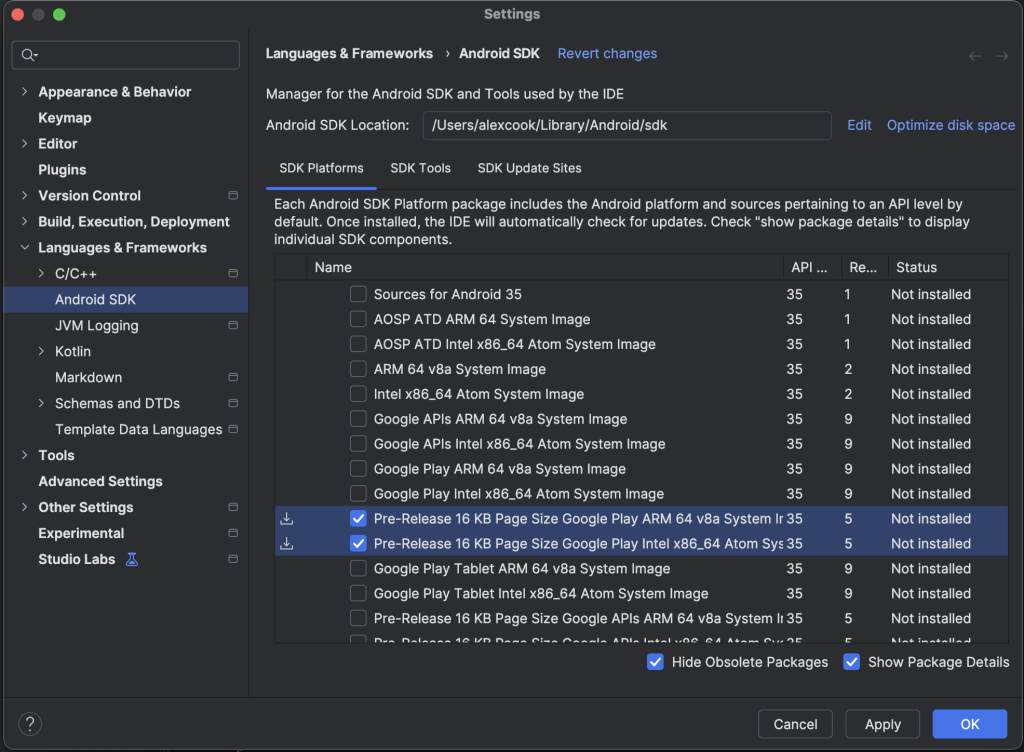
Step 3: Click Apply > OK to download whichever system images you selected.
Step 4: Update Android Studio to the latest available stable version.
Step 5: Open Device Manager inside Android Studio.
Step 6: Create a new virtual device using a supported architecture (usually ARM64 or x86_64).
Step 7: When selecting a system image, choose:
- Android 15 or higher
- A system image marked as supporting 16 KB page size (these images are labeled or documented in the SDK image notes).
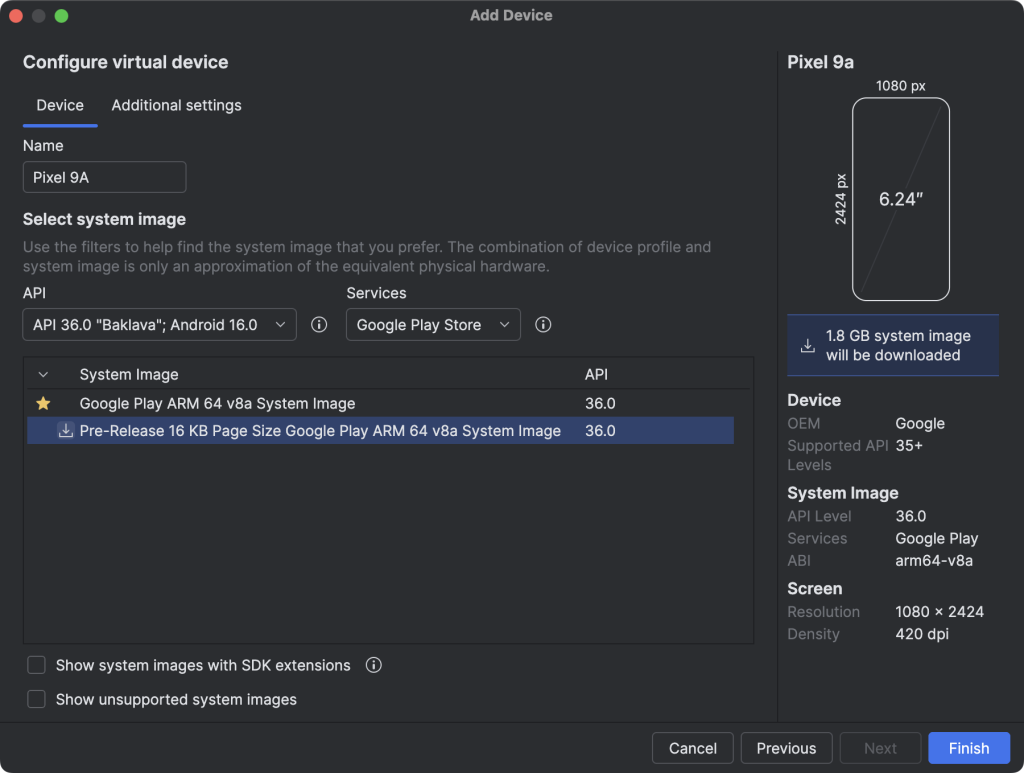
Step 8: Finish setup and launch the emulator.
Verify the Emulator is using 16 KB pages
Run:
adb shell getconf PAGE_SIZE
Expected output:
16384
which confirms that memory pages are indeed 16 KB.
What to Test on This Emulator
- App install and startup behavior
- JNI or NDK-based components loading
- Media, video, image processing modules
- Game engines or native frameworks
- Any modules using mmap or manual memory alignment
If your app fails to load, crashes on launch, or logs shared library loading errors, it is almost always due to .so alignment or old NDK builds.
9) Step-by-step: identify native libraries with APK Analyzer
This is the quick, repeatable checklist your team can use on any build.
Step 1: Build a release or debug APK/AAB locally from Android Studio.
Step 2: In Android Studio, open the build:
- Menu: Build → Analyze APK…
Select yourapp-release.apkor a split/arch APK.
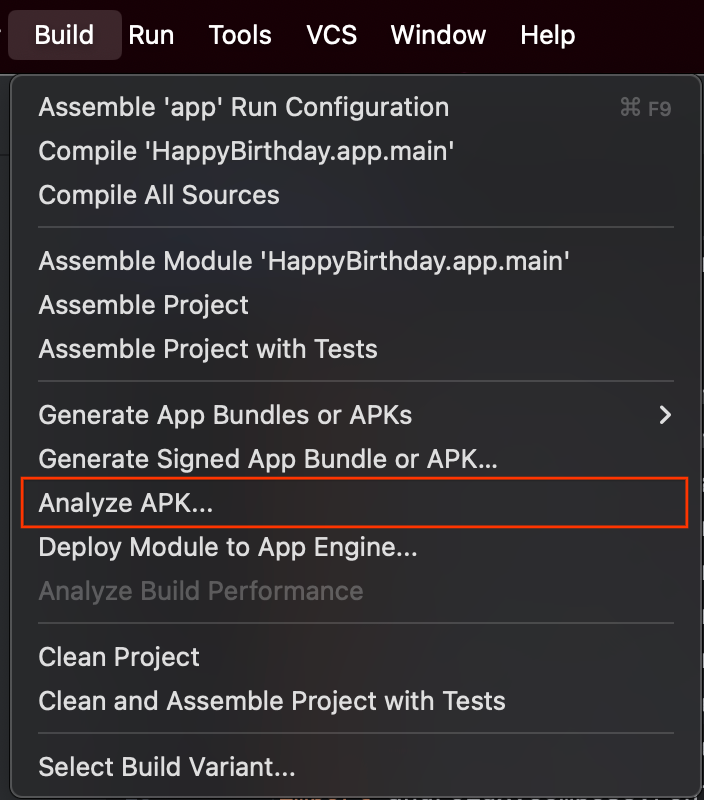
Step 3: In the APK Analyzer tree, expand the lib/ directory.
- You’ll see ABI folders such as
arm64-v8a,armeabi-v7a,x86_64depending on your build. - Inside each ABI directory are one or more
.sofiles. These are your native libraries. If you see no.sofiles, your app likely doesn’t ship native code. ()
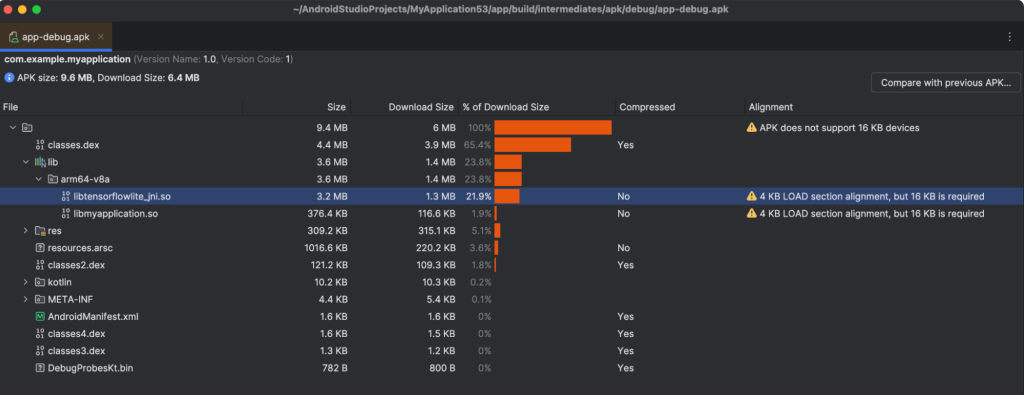
Step 4: Note any third-party package names. If you see vendor-named .so files (for example, from ads, analytics, media, database, crypto, game engines), mark them for verification with the vendor to ensure 16 KB support. ()
Step 5: Inspect alignment warnings:
- The Analyzer shows attributes like file alignment and may flag when alignment is not ideal for page boundaries. Record anything suspicious for follow-up. ()
Step 6: Optional deep-dive on a specific .so:
- Extract the .so and inspect its ELF headers with
readelf -l yourlib.so. - Look for
LOADsegments and confirmalign 2**14. If you see2**12, plan a rebuild with the correct NDK and flags. ()
Step 7: Repeat for all ABIs. You must ensure every ABI you ship is compliant.
10) End-to-end upgrade recipe
Step 1: Upgrade to Android Gradle Plugin 8.6.0+ and Gradle compatible versions.
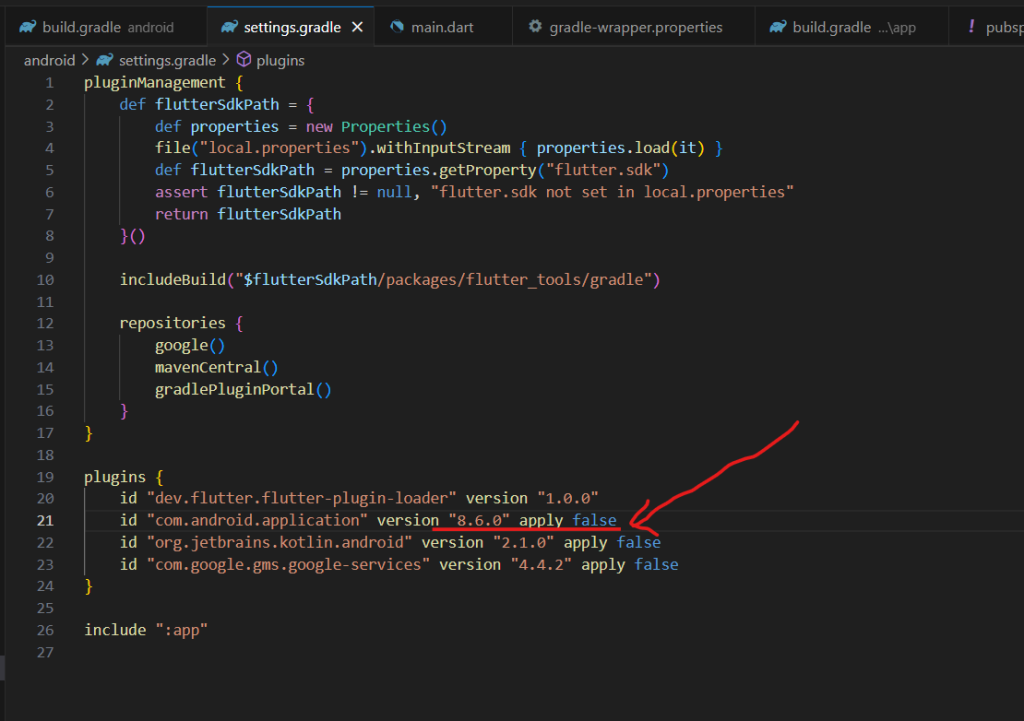
Step 2: Upgrade the NDK to r28+ (or r27 with flexible page-size flag). Update CI images accordingly. ()
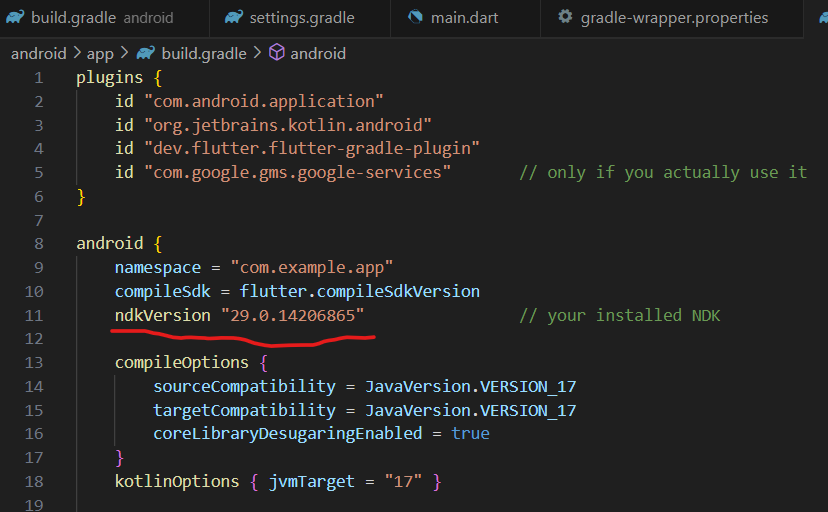
Step 3: Rebuild your app and every included native dependency for all ABIs you ship.
Step 4: Remove any hard-coded 4096 assumptions in native code. Use OS page-size queries only when truly needed.
Step 5: If you can’t update AGP immediately, temporarily enable compressed native libs via useLegacyPackaging to avoid mis-alignment in bundles; plan to remove this once you’re on 8.6.0+.
Step 6: Validate with APK Analyzer and readelf that all .so files show 16 KB-friendly alignment.
Step 7: Verify package alignment with zipalign -c -P 16 -v 4.
Step 8: Test on an emulator/device running with 16 KB pages and verify behavior across critical flows.
Step 9: Ship, and monitor crash/ANR metrics for native load errors on 16 KB devices.
11) Common pitfalls and how to avoid them
- Old NDKs: upgrade; don’t rely on ad-hoc linker flags forever. ()
- Third-party SDK lag: ask vendors for updated 16 KB-ready .so files, and track them in your dependency list.
- Mis-aligned bundles: older pipelines may not zip-align for 16 KB; verify with
zipalignand prefer AGP 8.5.1+. - Accidental 4 KB constants: grep your codebase for 4096 and audit each use.
- Incomplete ABI coverage: ensure every ABI you publish is rebuilt and checked.
12) Quick developer checklist
- Determine if your app ships any .so files.
- Upgrade AGP and NDK as above.
- Rebuild all native code and third-party .so files.
- Remove 4 KB assumptions from code.
- Check ELF alignment (2**14) and zip alignment (
-P 16). - Test on a 16 KB device/emulator and verify
adb shell getconf PAGE_SIZE == 16384. - Publish before the deadline with confidence.
If you want, I can turn this into a one-page internal runbook or a release-engineering checklist for your team. Want me to create that as a printable PDF?
Key references used for accuracy: Android’s official 16 KB page-size guidance and testing tools, the Android Developers blog announcement about the Nov 1, 2025 Play requirement, platform notes on 16 KB alignment in Android 15, and community guidance on emulator images and NDK flags. ()