Limited Time Offer!
For Less Than the Cost of a Starbucks Coffee, Access All DevOpsSchool Videos on YouTube Unlimitedly.
Master DevOps, SRE, DevSecOps Skills!
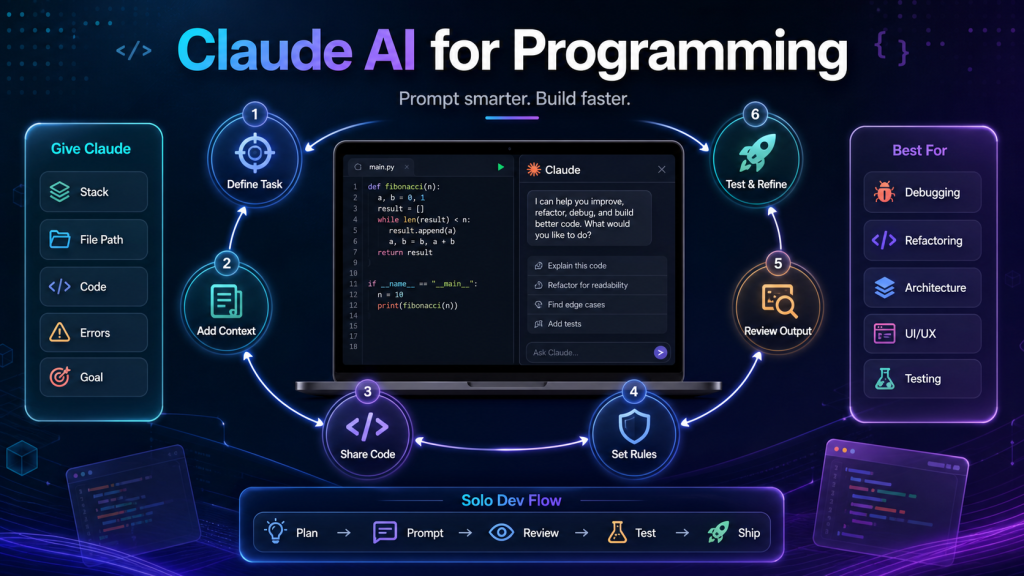
As a solo developer, the best way to use Claude or any AI coding assistant is not to ask it like:
“Create complete project.”
Instead, treat Claude like a senior coding partner. You give it proper context, clear requirements, existing code, rules, and ask it to work step-by-step.
Below is a practical guide you can follow.
1. First, understand what Claude is best for
Claude is very useful for:
- Understanding old code
- Refactoring code
- Writing controllers, services, Blade files, API logic
- Debugging Laravel errors
- Creating database structure
- Writing clean prompts for new features
- Explaining architecture
- Creating test cases
- Improving UI/UX
- Reviewing code before production
- Writing documentation
But Claude should not be trusted blindly for production code. You should always review:
- Security
- Database impact
- Existing logic
- Performance
- Edge cases
- Error handling
- Role/permission checks
2. Always give Claude proper project context
Before asking for code, provide this information:
Project Stack:
- Laravel version:
- PHP version:
- Database:
- Frontend:
- Authentication:
- Server:
- Existing module name:
- Existing route/controller/model names:
Example:
I am working on a Laravel 10 project with PHP 8.3 and MySQL.
This is a vehicle rental platform.
I already have bookings, vehicles, renters, and partners.
I want to add real-time vehicle availability without breaking existing booking logic.
This helps Claude understand your environment.
3. Give Claude the exact file path
Claude gives better output when you provide exact file names and paths.
Example:
File path:
app/Http/Controllers/BookingController.php

Current issue:
When two users book the same vehicle at the same time, double booking can happen.

Please review this function and suggest the safest fix without breaking existing status flow.
This is better than saying:
Fix booking issue in Laravel.
4. Provide current code, not only the problem
Claude performs best when you paste the actual code.
Example:
Here is my current booking function:[paste function here]
Please do: 1. Identify the issue 2. Explain why it happens 3. Give me corrected function 4. Do not remove existing status logic 5. Add transaction and locking if needed
This gives you useful output instead of generic advice.
5. Use this prompt structure for programming
You can use this format again and again:
Act as a senior Laravel architect with 10+ years of production experience.

Project Context:
[Explain project/module]

Current Requirement:
[Explain what you want]

Existing Logic:
[Explain current behavior/status/flow]

Files Involved:
[List file paths]

Current Code:
[Paste code]

Important Rules:
- Do not break existing functionality
- Keep current database columns unless absolutely required
- Use Laravel best practices
- Add validation and error handling
- Consider security and performance
- Explain step-by-step
- Give me full updated code that I can paste
- Mention which file needs to be changed
This is one of the best prompt formats for development.
6. Ask Claude to work in phases, not all at once
For big features, do not ask:
Build complete booking system.
Instead ask in phases:
Phase 1: Analyze current booking flow.
Phase 2: Suggest database changes.
Phase 3: Create migration.
Phase 4: Update model relationships.
Phase 5: Update controller logic.
Phase 6: Add validation.
Phase 7: Add frontend changes.
Phase 8: Add testing checklist.
This gives much better and safer output.
7. For solo developer productivity, use this AI workflow
Step 1: Requirement clarification
Ask Claude:
Here is my feature requirement. Please convert it into clear technical requirements, user flow, database impact, API changes, and edge cases.
Step 2: Architecture review
Ask:
Suggest the best architecture for this feature in Laravel. Explain database tables, relationships, services, controllers, and risks.
Step 3: Database design
Ask:
Create production-level database design for this feature with indexes, constraints, and explanation.
Step 4: Code generation
Ask:
Now create the migration, model, controller function, request validation, and route step-by-step.
Step 5: Code review
Ask:
Review this code for bugs, security issues, race conditions, performance problems, and Laravel best practices.
Step 6: Testing
Ask:
Give me a manual testing checklist and edge cases for this feature before production deployment.
This workflow is very powerful for a solo developer.
8. Always tell Claude what not to change
This is very important for your type of work.
Use this line:
Do not remove, rename, or break any existing variable, route, status, database column, or frontend behavior unless required. If change is required, explain first.
For Laravel projects, also say:
Keep the existing Blade design and only improve the required section.
or:
Return the full updated function, not only the changed lines.
9. Use Claude for debugging Laravel errors
When you get an error, provide:
Error:[paste full error]
File:
[file path]
Code around error:
[paste 30-50 lines]
Laravel version: PHP version: Please explain: 1. Root cause 2. Exact fix 3. Corrected code 4. Commands to run after fix
Example commands Claude may suggest:
composer dump-autoload
php artisan config:clear
php artisan cache:clear
php artisan route:clear
php artisan view:clear
10. Use Claude as a code reviewer before production
Before pushing code, paste your function and ask:
Please review this code like a senior production engineer.

Check:
- Security issues
- SQL injection
- Race condition
- Missing validation
- Permission issue
- Performance issue
- Laravel best practices
- Possible production failure
- What can break existing logic?

Then give me the improved version.
This habit will save you many production bugs.
11. For UI/UX improvement, give screenshot + code + goal
For frontend or Blade design, provide:
I want to improve this UI to enterprise-level design.
This page is for [user type].
Current problem:
[explain]
Here is screenshot:
[attach screenshot]
Here is Blade code:
[paste code]
Please improve: – Professional layout – Better spacing – Mobile responsive – Do not use icons – Do not break backend variables – Give full updated Blade section
Since you often prefer no icons, mention clearly:
Do not use icons or emojis.
12. For database changes, force Claude to think safely
Use this prompt:
Before giving migration, first analyze whether a new table is needed or existing table can handle this.
Explain:
1. Current problem
2. Recommended table design
3. Indexes needed
4. Data migration risk
5. Backward compatibility
6. Final migration code
This is very important for production projects.
13. For API development, give request/response format
Example:
Create API for booking confirmation.

Request:
POST /api/bookings/{id}/confirm-payment

Input:
{
  "payment_status": "verified",
  "transaction_id": "ABC123"
}

Expected Response:
{
  "success": true,
  "message": "Payment verified successfully",
  "booking_status": "Vehicle Ready"
}

Rules:
- Only partner/admin can verify
- Booking must be in Awaiting Payment status
- Use transaction
- Return proper error messages
Claude will produce much better API code.
14. Do not ask Claude only for code; ask for reasoning also
Good prompt:
Before writing code, explain the best approach and possible risks. After that, give me the final code.
This helps you avoid wrong implementation.
15. Best Claude prompt for your daily development
You can save this prompt and reuse it:
Act as a senior Laravel architect and production engineer with 10+ years of experience.

I am a solo developer working on a production project. I want a safe, scalable, and clean solution.

Project Context:
[Write project details]

Requirement:
[Write requirement]

Existing Code:
[Paste code]

Important Instructions:
1. Do not break existing logic.
2. Do not remove existing variables or routes.
3. Follow Laravel best practices.
4. Consider security, validation, performance, and edge cases.
5. Use database transactions where needed.
6. Explain the root cause and solution.
7. Give full updated code file-wise.
8. Mention exact commands to run.
9. Mention testing checklist.
10. If anything is risky, clearly warn me.

Now provide the best production-ready solution.
16. Best way to use AI as a solo developer
Your workflow should be:
Requirement → AI analysis → Your review → AI code → Your testing → AI review → Git commit → Production deployment
Do not directly copy-paste AI code to production.
Use AI to move faster, but keep yourself as the final architect.
17. What you should provide Claude every time
| What to Provide | Why It Matters |
|---|---|
| Project stack | Helps generate compatible code |
| Exact requirement | Avoids generic answers |
| Current code | Gives accurate fix |
| File path | Helps file-wise output |
| Database schema | Prevents wrong column names |
| Existing flow/status | Protects business logic |
| Error logs | Helps root cause analysis |
| Screenshot | Helps UI improvement |
| Expected output | Makes result match your need |
| Constraints | Prevents breaking existing system |
18. What not to do with Claude
Avoid these prompts:
Make this better.
Fix my project.
Create complete website.
Give me best code.
These are too broad.
Use specific prompts:
Improve this Laravel booking function to prevent double booking using DB transaction and row-level locking. Keep existing status flow unchanged.
19. Your best AI productivity setup
For your work style, I recommend this pattern:
For new feature
First ask for architecture.
Then ask for database.
Then ask for backend code.
Then ask for frontend code.
Then ask for testing checklist.
For bug
Paste error + file path + code.
Ask root cause + fixed code + commands.
For UI
Send screenshot + Blade code.
Ask for enterprise-level responsive UI without breaking variables.
For performance
Send page URL behavior, asset sizes, server stack, slow section, and current code.
Ask for diagnosis + practical fix plan.
20. Final recommendation for you
As a 5+ years experienced programmer, your goal should not be to let AI replace your thinking. Your goal should be:
Use Claude for speed, structure, review, debugging, documentation, and code generation — but keep architecture, production safety, and final approval in your control.
Best rule:
Claude writes fast.
You verify deeply.
Production only gets reviewed code.
This is how you can become a much faster solo developer without losing control of your project.