
Limited Time Offer!
For Less Than the Cost of a Starbucks Coffee, Access All DevOpsSchool Videos on YouTube Unlimitedly.
Master DevOps, SRE, DevSecOps Skills!
Introduction
In the modern landscape of software development, the speed of delivery is often prioritized over everything else. We are constantly shipping features, pushing updates, and scaling infrastructure to meet user demand. However, this velocity often comes at a steep price: security. When security testing is reserved for the final stage of development, we treat it as a bottleneck. We find vulnerabilities right before a release, forcing engineers to scramble, rewrite code, and delay deployments. This cycle is unsustainable.
Software security failures are increasing in frequency and severity. From supply chain compromises to critical infrastructure vulnerabilities, the cost of fixing a bug after it reaches production is exponentially higher than catching it during the design or coding phase. This is where the concept of Shift-Left Security in DevSecOps becomes vital. It is not just about moving security tools earlier in the process; it is about shifting the culture of engineering.
At DevSecOpsSchool, we believe that security should be a foundational pillar of software engineering, not an afterthought. By integrating security checks directly into the development workflow, teams can identify risks earlier, reduce remediation costs, and build a culture of shared accountability. Whether you are a developer, a cloud engineer, or a security leader, understanding these principles is no longer optional—it is a requirement for professional growth and secure delivery.
What Is Shift-Left Security in DevSecOps?
Shift-Left Security is the practice of moving security processes and testing to the earliest possible stages of the software development lifecycle (SDLC). Traditionally, security was the last gatekeeper before software was pushed to production. In a Shift-Left approach, we integrate security into planning, design, and coding.
In beginner-friendly terms, imagine building a house. Traditional security is like hiring a building inspector to check the foundation, plumbing, and electrical wiring only after the house is fully constructed. If they find a flaw in the foundation, you have to tear down the walls to fix it. Shift-Left Security is like having that inspector review the blueprints and check the materials as they arrive at the construction site. You identify the risk before the first brick is laid.
DevSecOps adopted this approach because the modern CI/CD pipeline moves too fast for manual security audits. By embedding automated security checks into the pipeline—where code is committed, built, and tested—we create a safety net that protects the integrity of the application without slowing down the developers.
Why Shift-Left Security Matters
The primary goal of Shift-Left Security is to create a more resilient software supply chain. Here is why it has become the standard for high-performing engineering teams:
- Faster Vulnerability Detection: Identifying a security flaw in the IDE or at the commit stage allows developers to fix it while the context is fresh in their minds.
- Lower Remediation Cost: Fixing a vulnerability during coding is inexpensive. Fixing it after a breach, or even after the code is in production, involves incident response, emergency patching, and potential downtime.
- Faster Releases: By automating security, you remove the “security gate” that creates delays. Security becomes part of the pipeline speed rather than a blocker.
- Better Developer Accountability: It empowers developers to own the security of their code. They gain visibility into what they are building and how to secure it.
- Stronger Compliance Posture: Automated logs and security gates provide clear audit trails, making it easier to maintain compliance with industry standards like SOC2, HIPAA, or PCI-DSS.
Traditional Security vs Shift-Left Security
The following table highlights the core differences between the legacy approach and the modern Shift-Left methodology.
| Feature | Traditional Security | Shift-Left Security |
| Timing | End of development (Pre-prod) | Throughout the SDLC |
| Speed | Slow, manual, creates bottlenecks | Fast, automated, integrated |
| Developer Involvement | Minimal (Security team handles it) | High (Shared responsibility) |
| Cost of Remediation | High (Requires major rework) | Low (Immediate fixes) |
| Automation | Rare or light | Heavily automated |
| Feedback Cycles | Long (Weeks/Months) | Short (Minutes/Hours) |
Understanding the Shift-Left Security Lifecycle
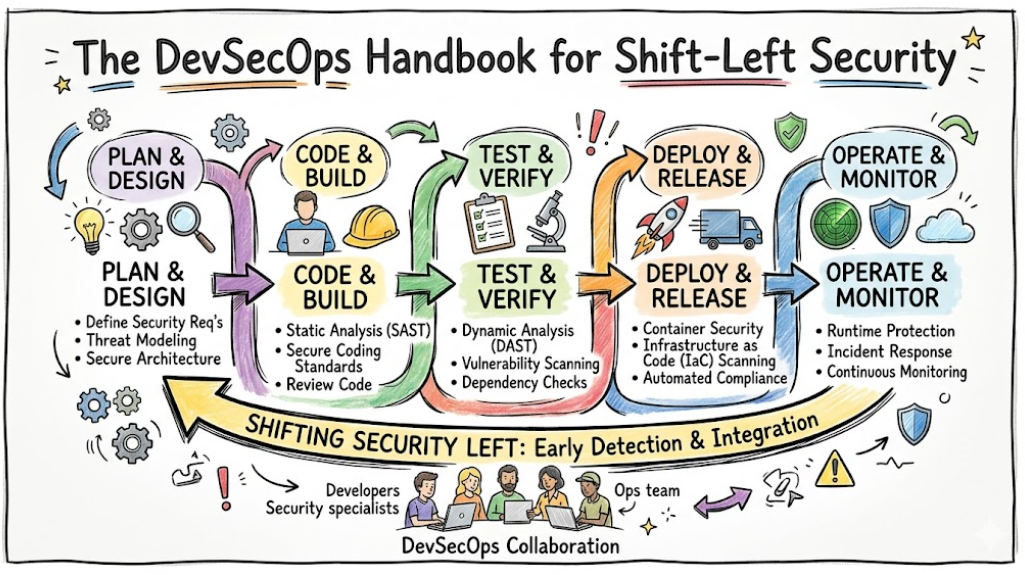
To implement Shift-Left Security effectively, you must understand how security integrates into every phase of the development journey.
Step 1: Secure Planning and Threat Modeling
Security starts before a single line of code is written. During the planning phase, your team should perform threat modeling. This involves identifying potential threats to your application, analyzing your attack surface, and determining security requirements. You are essentially asking: “What are we building, what could go wrong, and how do we prevent it?”
Step 2: Secure Coding Practices
Developers are the first line of defense. Secure coding practices involve using IDE plugins that highlight insecure patterns, performing peer code reviews with a security lens, and ensuring that no secrets (API keys, passwords) are hardcoded in the repository.
Step 3: Static Application Security Testing (SAST)
SAST tools scan your source code to find vulnerabilities like SQL injection, buffer overflows, or cross-site scripting (XSS) before the code is even compiled. Tools like SonarQube, Checkmarx, and Semgrep are industry standards here. They provide immediate feedback to the developer.
Step 4: Software Composition Analysis (SCA)
Modern applications rely heavily on open-source libraries. SCA tools scan your dependencies to check for known vulnerabilities. If you are using a library with a critical CVE (Common Vulnerability and Exposure), tools like Snyk or OWASP Dependency-Check will flag it immediately.
Step 5: Container Security in CI/CD
If you are working with Docker or Kubernetes, container security is non-negotiable. You must scan your images for vulnerabilities, misconfigurations, and outdated packages before pushing them to a container registry. Tools like Trivy and Aqua Security are essential for this layer.
Step 6: Dynamic Application Security Testing (DAST)
DAST tools test the application while it is running. Unlike SAST, which looks at the code, DAST attacks the application from the outside, similar to how a hacker would. This identifies issues like runtime configuration errors. Tools like OWASP ZAP and Burp Suite are commonly used here.
Step 7: Infrastructure as Code (IaC) Security
If you define your infrastructure using Terraform, CloudFormation, or Kubernetes manifests, you must scan these files for misconfigurations. Tools like Checkov and tfsec can detect insecure settings, such as open S3 buckets or overly permissive IAM roles, before the infrastructure is deployed.
Step 8: Runtime Monitoring and Continuous Security
Security does not end at deployment. Continuous monitoring ensures that if a new vulnerability is discovered for a library already in production, or if an anomalous pattern appears in your traffic, your security team is alerted immediately.
Shift-Left Security Workflow in CI/CD
A standard Shift-Left security pipeline automates these steps to ensure continuous protection.
- Code Commit: The developer pushes code to the repository.
- SAST & Linting: Automated scanners check the code for syntax errors and common security flaws.
- Dependency Scan (SCA): The pipeline checks if any open-source libraries have known vulnerabilities.
- Build Phase: The application is compiled.
- Container Scan: The build artifact (e.g., Docker image) is scanned for OS-level vulnerabilities.
- IaC Scanning: Configuration files are scanned for infrastructure risks.
- DAST (Integration/Staging): The application is deployed to a staging environment, and automated penetration tests are run.
- Deployment Approval: If all security gates pass, the code is promoted to production.
- Runtime Monitoring: Continuous observation of the live environment.
Popular Shift-Left Security Tools
Choosing the right tool depends on your stack, language, and budget.
| Tool | Best For | Complexity | Enterprise Usage |
| SonarQube | Code Quality & SAST | Medium | High |
| Semgrep | Fast SAST/Custom Rules | Low | High |
| Snyk | SCA & Container Security | Low | Very High |
| Trivy | Container & IaC Scanning | Low | Very High |
| OWASP ZAP | DAST | High | Medium |
| HashiCorp Vault | Secrets Management | High | High |
| Checkov | IaC Scanning | Low | High |
Real-World Example of Shift-Left Security in Action
Let us visualize a typical scenario in a cloud-native startup.
A developer, Alex, writes a new microservice feature. Alex commits the code to the Git repository.
- Trigger: The commit triggers the CI/CD pipeline.
- SAST Scan: Semgrep runs, flagging a potential hardcoded secret. The pipeline fails immediately. Alex receives a notification, removes the secret, and replaces it with a reference to a secrets manager (e.g., Vault).
- Resubmission: Alex pushes the fix.
- Dependency Check: Snyk scans the
package.jsonfile and detects that a library version is outdated and vulnerable. The pipeline suggests the updated version. Alex updates the dependency. - Build & Container Scan: The Docker image is built. Trivy scans it and finds no high-severity vulnerabilities.
- IaC Scan: Checkov scans the Kubernetes deployment manifest and detects that the container is running with root privileges. Alex updates the
securityContextin the manifest. - Approval: The build is cleared for the staging environment.
This entire process took less than ten minutes, and the software was secured without a manual security review meeting.
Benefits of Shift-Left Security in DevSecOps
- Faster Security Testing: Automation replaces manual checklists.
- Reduced Breach Risks: By fixing flaws early, you reduce the attack surface before the code reaches customers.
- Lower Fixing Costs: Remediation happens in the IDE, not during a post-incident review.
- Better Compliance: Automated workflows create a paper trail for every build.
- Stronger Engineering Culture: Developers feel empowered by having security context early.
Common Challenges in Shift-Left Security
Even with the best intentions, you may face hurdles during implementation:
- Developer Resistance: Developers may feel that security tools slow them down. The solution is to integrate tools directly into their IDEs so they get feedback instantly.
- False Positives: Automated tools can be noisy. Invest time in fine-tuning rulesets to reduce alert fatigue.
- Slow Pipelines: Running too many scans at once can increase build times. Optimize by running critical scans on commit and deeper scans asynchronously.
- Security Skill Gaps: Developers are not security experts. Provide training and clear documentation on how to interpret security alerts.
- Tool Complexity: Trying to implement too many tools at once can overwhelm the team. Start with one or two essential tools (e.g., SAST and SCA) and scale from there.
Common Beginner Mistakes
Avoid these pitfalls when starting your Shift-Left journey:
- The “End-of-Line” Mentality: Implementing security only when the product is ready to ship.
- Ignoring Open-Source Risks: Using third-party libraries without checking for known vulnerabilities.
- Hardcoding Secrets: Storing credentials in plaintext in code or configuration files.
- Neglecting IaC: Assuming the cloud infrastructure is secure by default without scanning the configuration code.
- Ignoring Alerts: Allowing builds to pass even when critical security vulnerabilities are found.
Best Practices for Implementing Shift-Left Security Properly
- Train Developers: Invest in security awareness training so developers understand why they are fixing vulnerabilities.
- Automate Everything: If a security check is manual, it will become a bottleneck.
- Start Small: Pick one application to pilot your Shift-Left strategy before rolling it out to the entire organization.
- Monitor Continuously: Security is a state, not a destination. Maintain visibility into your production environment.
- Integrate Compliance: If your industry requires compliance, bake those requirements into your CI/CD pipeline as “Policy-as-Code.”
Shift-Left Security for Cloud-Native Applications
In a cloud-native world, perimeter security is insufficient. You must secure the entire stack:
- Containers: Treat containers as immutable. If a vulnerability is found, do not patch the container; update the image and redeploy.
- Kubernetes: Use Pod Security Admissions and network policies to enforce least privilege.
- Microservices: Implement mTLS (mutual TLS) for communication between services to ensure zero trust.
- Multi-Cloud: Use tools that provide a unified security view across different cloud providers.
Role of DevSecOpsSchool in Learning Shift-Left Security
At DevSecOpsSchool, we provide the practical environment necessary to master these concepts. We move beyond theory by focusing on hands-on labs where you can:
- Build secure CI/CD pipelines from scratch.
- Configure automated security tools like Snyk, Trivy, and SonarQube.
- Perform threat modeling in realistic scenarios.
- Learn how to secure Kubernetes and cloud infrastructure.
By working through real-world projects, you gain the confidence to lead DevSecOps transformations in your own organization.
Industries Benefiting from Shift-Left Security
- Banking & Finance: Meeting strict regulatory requirements like PCI-DSS while maintaining high uptime.
- Healthcare: Protecting sensitive patient data and complying with HIPAA.
- E-Commerce: Preventing account takeovers and protecting payment gateways.
- SaaS Platforms: Ensuring multi-tenant isolation and data privacy.
- Telecom: Securing high-traffic infrastructure against large-scale attacks.
- Enterprise IT: Managing thousands of microservices across hybrid cloud environments.
Career Opportunities in Shift-Left Security and DevSecOps
The demand for professionals who understand both security and automation is skyrocketing.
- DevSecOps Engineer: Bridges the gap between development, operations, and security.
- Application Security Engineer: Focuses on the security of the software itself throughout the lifecycle.
- Cloud Security Engineer: Specializes in securing cloud-native infrastructure (AWS, Azure, GCP).
- Security Automation Engineer: Writes code to automate security testing and response.
- Kubernetes Security Engineer: Focuses specifically on container orchestration security.
These roles require a blend of coding skills, cloud knowledge, and a security-first mindset.
Certifications & Learning Paths
To advance your career, consider focusing on these domains:
| Certification | Best For | Skill Level | Focus Area |
| CKA/CKS | Kubernetes Security | Advanced | Container/Orchestration |
| AWS Security Specialty | Cloud Security | Advanced | Cloud-Native Protection |
| OSCP | Penetration Testing | Advanced | Security Mindset |
| DevSecOps Professional | CI/CD Integration | Intermediate | Automation |
Future of Shift-Left Security
The future of Shift-Left Security is intelligent and autonomous. We are moving toward:
- AI-Powered Vulnerability Detection: Tools that learn your codebase and suggest fixes, not just identify problems.
- Policy-as-Code: Automatically enforcing security governance across the organization via code.
- Autonomous Security Testing: Systems that self-heal and adapt to new threats without manual intervention.
- Zero Trust Architecture: Moving from network-based security to identity-based, micro-segmented security.
FAQs
1. What is the biggest advantage of Shift-Left Security?
The biggest advantage is the massive reduction in the cost and time required to remediate vulnerabilities. By fixing issues early, you avoid the “crunch” of pre-release security testing.
2. Does Shift-Left Security slow down development?
Initially, it may feel slower because of the added checks. However, by catching bugs early, you prevent the massive delays caused by post-production hotfixes and security incidents.
3. Do developers need to be security experts?
No, but they do need to be “security-aware.” Developers should know how to use security tools, understand basic threat vectors, and know how to write secure code.
4. What is the difference between SAST and DAST?
SAST scans the source code (white-box testing) while the application is not running. DAST tests the running application (black-box testing) to find vulnerabilities that only appear during execution.
5. How do I start with Shift-Left Security if I have a legacy application?
Start by identifying the most critical components. Begin with basic dependency scanning (SCA) and simple SAST. You do not need to rewrite the entire application to start shifting left.
6. Is threat modeling necessary for every feature?
For significant features, yes. For minor UI changes, a quick review is sufficient. Focus threat modeling on features that touch sensitive data or authentication.
7. Can automated tools replace security professionals?
No. Tools are excellent at catching known vulnerabilities, but security professionals are needed for complex logic flaws, architecture reviews, and incident response.
8. What is “Policy-as-Code”?
It is the practice of defining security and compliance rules in code (e.g., using OPA – Open Policy Agent). This allows you to enforce security policies automatically across your CI/CD pipeline.
9. Why is container security part of Shift-Left?
Because containers are the building blocks of modern applications. If your container image is insecure, every service deployed from it inherits those vulnerabilities.
10. How often should we update security dependencies?
Ideally, you should have an automated process that alerts you to vulnerabilities immediately. Updates should be part of your regular maintenance cycle.
11. Is DevSecOps the same as Shift-Left?
Shift-Left is a practice within DevSecOps. DevSecOps is the broader philosophy of integrating security, development, and operations.
12. What role does culture play in Shift-Left?
Culture is the most important factor. If developers feel that security is “not their job,” no amount of tooling will help. Shift-Left is about shared responsibility.
13. Are open-source tools reliable for security?
Many industry-standard security tools are open-source or have excellent open-source versions (e.g., Trivy, OWASP ZAP). They are highly reliable if maintained correctly.
14. What if my team is resistant to security gates?
Start with “advisory” mode, where the pipeline warns developers of issues without failing the build. Once the team gets used to the feedback, switch to “enforcement” mode.
15. Where can I find more resources on Shift-Left implementation?
Platforms like DevSecOpsSchool provide structured learning paths, labs, and community resources to help you master these techniques.
Final Thoughts
Implementing Shift-Left Security is not a “quick fix.” It is a transformative journey that requires commitment from both leadership and engineering teams. It is about shifting from a culture of “gatekeeping” to a culture of “empowerment.” When you provide developers with the right tools, training, and processes, they become the strongest allies in your security strategy.
Security is not a roadblock to delivery; it is a quality requirement. By moving security to the left, you are not just preventing breaches—you are building better, more reliable, and more scalable software. Start small, iterate often, and remember that every vulnerability caught early is a win for your users and your company.