Limited Time Offer!
For Less Than the Cost of a Starbucks Coffee, Access All DevOpsSchool Videos on YouTube Unlimitedly.
Master DevOps, SRE, DevSecOps Skills!
Going live is not only a deployment activity. It is a security decision.
A server may pass functional testing, load testing, and application QA, but still fail badly in production because SSH is exposed, logs are not monitored, backups are untested, secrets are stored in plain text, or unused services are running quietly in the background.
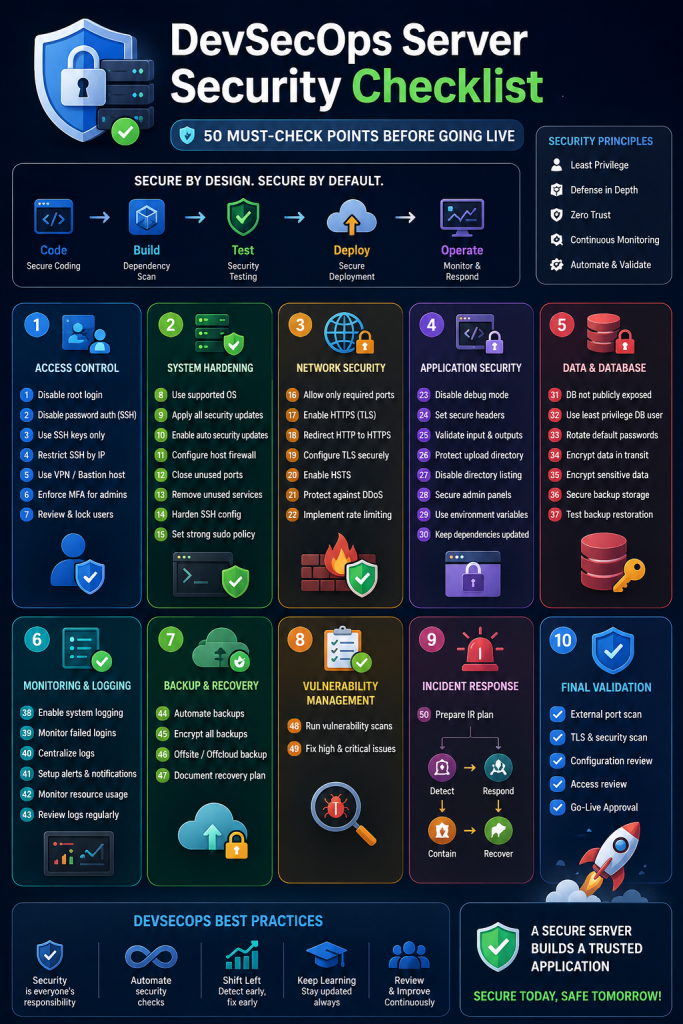
This DevSecOps server security checklist is written for advanced Linux engineers, DevOps teams, system administrators, cloud engineers, and security-focused developers who are preparing a Linux server for production. The goal is practical: before you expose a server to real users, real traffic, and real attackers, you should be able to verify these 50 security points with confidence.
The checklist follows widely accepted server hardening principles from NIST, CIS Controls, OWASP DevSecOps guidance, and secure-by-default practices. NIST describes server security as a combination of secure installation, configuration, and ongoing maintenance, while CIS Controls focus on prioritized safeguards such as asset inventory, secure configuration, access control, vulnerability management, logging, and incident response.
Quick Checklist Summary
Access Control: SSH keys, root login disabled, MFA, sudo review
System Hardening: OS updates, firewall, unused services removed
Network Security: HTTPS, TLS, open port scan, rate limiting
Application Security: Debug off, secure headers, upload protection
Database Security: Private DB access, least privilege user, encrypted backups
Monitoring: Logs, alerts, failed login tracking
Recovery: Backup restore testing and incident response plan
Why DevSecOps Server Security Matters Before Going Live
A production server is different from a development machine. It is exposed to the internet, connected to real databases, handling user data, and often integrated with third-party services, payment systems, APIs, queues, storage, and identity providers.
In real environments, most incidents do not happen because of one “big mistake.” They happen because of multiple small gaps:
- A default SSH port left open to the world
- Password login enabled for root
- Old packages not patched
- Public storage folders exposing private files
- Missing firewall rules
- Incorrect file permissions
- Debug mode left enabled
- Logs not monitored
- Backups never tested
- Secrets committed in code or stored in readable files
DevSecOps matters because security should not be a final manual activity after deployment. It should be built into the same workflow that handles code, infrastructure, CI/CD, monitoring, and release approval. OWASP describes DevSecOps as a way to introduce security practices and tools into the development pipeline and promote a shift-left security culture.
For advanced Linux teams, the question is not “Is the server working?” The real question is:
Can this server safely survive production traffic, automated scans, credential attacks, misconfigurations, and operational mistakes?
Core Explanation: What Is a DevSecOps Server Security Checklist?
A DevSecOps server security checklist is a structured verification list used before a Linux server goes live. It confirms that the operating system, network access, application runtime, secrets, logs, backups, permissions, and monitoring are secure enough for production.
Simple meaning:
Before users access the server, you verify that attackers cannot easily abuse it.
Technical meaning:
A server security checklist validates the security posture across multiple layers:
- Host layer: OS, kernel, users, SSH, packages, services
- Network layer: firewall, ports, DNS, TLS, WAF, rate limits
- Application layer: environment files, debug mode, upload paths, framework permissions
- Data layer: database access, backups, encryption, credentials
- Operational layer: monitoring, alerting, logging, incident response, rollback
A strong checklist is not just a document. It becomes part of your release gate. For example, your team may block production deployment unless:
- SSH password login is disabled
- Only required ports are open
- TLS is valid and renewed automatically
- Application debug mode is disabled
- Database is not publicly exposed
- Backups are automated and restoration has been tested
- Logs are centralized or at least actively monitored
- High-risk vulnerabilities are fixed or formally accepted
This is where DevSecOps becomes useful. It turns security from an opinion into a repeatable engineering process.
DevSecOps Server Security Checklist: 50 Must-Check Points Before Going Live
Below is a practical checklist you can use before launching a Linux server into production.
1. Confirm Server Ownership and Asset Inventory
Before hardening anything, confirm what the server is, who owns it, what application it runs, and what data it handles.
Check:
- Hostname
- Public IP and private IP
- Cloud provider or data center
- OS version
- Application name
- Business owner
- Technical owner
- Criticality level
- Data classification
This aligns with CIS-style inventory thinking: you cannot secure what you do not track. (CIS)
2. Use a Supported Linux Distribution
Do not launch production workloads on an unsupported OS.
Check:
cat /etc/os-release
uname -a
Use supported versions of Ubuntu LTS, Debian stable, RHEL, AlmaLinux, Rocky Linux, Amazon Linux, or another enterprise-supported distribution.
Avoid:
- End-of-life OS versions
- Unofficial images
- Random marketplace images
- Old AMIs or VM templates copied for years
3. Apply All Security Updates Before Go-Live
A fresh server can still contain outdated packages.
For Debian/Ubuntu:
sudo apt update
sudo apt upgrade -y
sudo apt autoremove -y
For RHEL-based systems:
sudo dnf update -y
Also verify whether a reboot is required:
test -f /var/run/reboot-required && cat /var/run/reboot-required
Do not ignore kernel updates before production release.
4. Enable Automatic Security Updates Carefully
Automatic security updates reduce exposure time, but they should be configured properly.
On Ubuntu:
sudo apt install unattended-upgrades
sudo dpkg-reconfigure unattended-upgrades
For critical production servers, define a patching strategy:
- Auto-apply low-risk security patches
- Schedule maintenance windows for kernel and major dependency updates
- Test updates in staging first
- Keep rollback snapshots or images
5. Disable Root SSH Login
Root login over SSH is a common brute-force target.
Edit:
sudo nano /etc/ssh/sshd_config
Set:
PermitRootLogin no
Restart SSH:
sudo systemctl restart ssh
Use a named sudo user instead of direct root login.
6. Disable SSH Password Authentication
Use SSH keys instead of passwords.
In /etc/ssh/sshd_config:
PasswordAuthentication no
PubkeyAuthentication yes
Restart SSH:
sudo systemctl restart ssh
Before closing your current session, open a second terminal and verify key-based login works.
7. Use Strong SSH Key Management
SSH keys should be treated like production secrets.
Check:
- No shared private keys
- No old employee keys
- No weak RSA 1024-bit keys
- Use Ed25519 or strong RSA keys
- Use passphrases for private keys
- Review
~/.ssh/authorized_keys
Command:
find /home -name authorized_keys -type f -exec ls -l {} \;
8. Restrict SSH Access by IP Where Possible
If admins connect from fixed office VPNs or jump hosts, restrict SSH.
Using UFW:
sudo ufw allow from YOUR_TRUSTED_IP to any port 22 proto tcp
Using cloud security groups, allow SSH only from trusted IPs.
Avoid exposing SSH to 0.0.0.0/0 unless there is a strong reason and additional controls.
9. Consider Moving SSH Behind VPN or Bastion
For high-value servers, direct SSH exposure is unnecessary.
Better options:
- VPN-only SSH
- Bastion host
- Zero Trust access gateway
- AWS Systems Manager Session Manager
- Tailscale/WireGuard private access
This reduces attack surface significantly.
10. Install and Configure a Host Firewall
Even if your cloud provider has security groups, configure a host firewall.
Ubuntu UFW example:
sudo ufw default deny incoming
sudo ufw default allow outgoing
sudo ufw allow 80/tcp
sudo ufw allow 443/tcp
sudo ufw allow from YOUR_IP to any port 22 proto tcp
sudo ufw enable
sudo ufw status verbose
Only open ports that are truly required.
11. Verify Open Ports Before Launch
Run:
sudo ss -tulpen
Also scan externally from another machine:
nmap -Pn your-server-ip
Expected public ports are usually:
- 80 HTTP
- 443 HTTPS
- Restricted SSH, if required
Unexpected ports like 3306, 5432, 6379, 9200, 8080, 9000, or 11211 should be investigated immediately.
12. Remove Unused Services
Every running service is a potential entry point.
Check:
systemctl --type=service --state=running
Disable what is not needed:
sudo systemctl disable service-name
sudo systemctl stop service-name
Common unnecessary services may include old FTP servers, unused mail daemons, test databases, or development tools.
13. Disable Unused User Accounts
List users:
cut -d: -f1 /etc/passwd
Check login-capable users:
awk -F: '$7 !~ /(nologin|false)$/ {print $1, $7}' /etc/passwd
Lock unused accounts:
sudo usermod -L username
Production servers should not carry old developer accounts.
14. Enforce Least Privilege Sudo Access
Review:
sudo cat /etc/sudoers
sudo ls -l /etc/sudoers.d/
Avoid:
username ALL=(ALL) NOPASSWD:ALL
Use group-based access and remove unnecessary sudo rights.
15. Configure Proper File and Directory Permissions
Incorrect permissions can expose secrets or allow privilege escalation.
Check application directory:
ls -la /var/www/app
Common safe pattern:
- Code owned by deploy user or root
- Web server only has write access to required folders
.envnot world-readable- Upload folders separated from executable code
Avoid:
chmod -R 777 /var/www/app
That is not a fix. It is a vulnerability.
16. Secure Environment Files and Secrets
For Laravel, Node, Python, and other apps, environment files often contain database passwords, API keys, SMTP credentials, JWT secrets, and OAuth secrets.
Check:
ls -l .env
Recommended:
chmod 600 .env
chown deploy:www-data .env
Never expose .env through web root.
17. Remove Secrets from Git History
Before go-live, check whether secrets were committed.
Use tools such as:
- gitleaks
- trufflehog
- git-secrets
Example:
gitleaks detect --source .
If secrets were committed, rotating the secret is more important than only deleting it from the file.
18. Disable Application Debug Mode
Debug mode can expose stack traces, environment variables, paths, SQL queries, and internal logic.
Laravel:
APP_DEBUG=false
APP_ENV=production
Node:
NODE_ENV=production
Django:
DEBUG = False
Verify by intentionally hitting a non-existing route and checking the error page.
19. Set Correct Application URL and Trusted Hosts
Misconfigured host settings can create redirect issues, cookie problems, and host header vulnerabilities.
Check:
APP_URL- reverse proxy headers
- trusted proxy settings
- allowed hosts
- canonical domain
- HTTP to HTTPS redirects
For frameworks, configure trusted proxies carefully when using load balancers or Cloudflare.
20. Enforce HTTPS Everywhere
Production applications should not allow plain HTTP sessions.
Check:
- Valid TLS certificate
- HTTP to HTTPS redirect
- Strong TLS configuration
- No mixed content
- HSTS if appropriate
Nginx redirect example:
server {
    listen 80;
    server_name example.com www.example.com;
    return 301 https://example.com$request_uri;
}
21. Configure TLS Certificate Auto-Renewal
If using Let’s Encrypt:
sudo certbot renew --dry-run
Check timer:
systemctl list-timers | grep certbot
Certificate expiry should never be discovered by customers.
22. Harden Web Server Configuration
For Nginx or Apache, remove unnecessary information leakage.
Nginx:
server_tokens off;
Apache:
ServerTokens Prod
ServerSignature Off
Also configure:
- Request body size limits
- Timeout values
- Secure headers
- Correct document root
- No directory listing
23. Disable Directory Listing
Directory listing may expose files, backups, uploads, or source artifacts.
Nginx:
autoindex off;
Apache:
Options -Indexes
Test by accessing directories directly in browser.
24. Protect Upload Directories
Upload directories are high-risk areas.
Rules:
- Do not allow script execution in upload folders
- Rename uploaded files
- Validate MIME type and extension
- Store private uploads outside public web root
- Use object storage with signed URLs where possible
For Nginx, block PHP execution in uploads:
location ~* /uploads/.*\.php$ {
    deny all;
}
25. Secure Database Access
Databases should not be publicly exposed unless explicitly designed for it.
Check:
sudo ss -tulpen | grep -E '3306|5432|27017|6379'
Database should bind to localhost or private network:
127.0.0.1
Avoid public database ports.
26. Use Separate Database Users Per Application
Do not use root database credentials in production applications.
Create dedicated users with only required privileges.
Example MySQL principle:
GRANT SELECT, INSERT, UPDATE, DELETE ON app_db.* TO 'app_user'@'localhost';
Avoid giving SUPER, FILE, or global privileges unless absolutely required.
27. Rotate Default and Temporary Passwords
Remove:
- Default passwords
- Temporary setup passwords
- Shared team passwords
- Old vendor credentials
CISA secure-by-design guidance emphasizes eliminating default passwords and using stronger authentication mechanisms such as MFA where applicable. (CISA)
28. Configure Strong Password and MFA Policy
For admin panels, cloud consoles, Git hosting, CI/CD tools, and server access platforms:
- Enable MFA
- Enforce strong passwords
- Disable shared admin accounts
- Use SSO where possible
- Review inactive users
Server hardening fails if the cloud account or deployment pipeline is compromised.
29. Secure CI/CD Deployment Credentials
Deployment keys and tokens should be scoped and rotated.
Check:
- CI variables are masked
- Tokens have minimum required permission
- Production secrets are not available to all branches
- Pull requests from forks cannot access secrets
- Deployment requires approval for production
OWASP DevSecOps guidance promotes security controls inside the delivery pipeline, not only on the final server.
30. Run Dependency Vulnerability Scans
Before release, scan application dependencies.
Examples:
Node:
npm audit
PHP:
composer audit
Python:
pip-audit
Containers:
trivy image image-name
Do not blindly accept all vulnerability results. Prioritize internet-facing, exploitable, high-impact issues first.
31. Remove Development Packages from Production
Production servers should not include unnecessary build tools unless required.
Review:
- compilers
- debug tools
- test packages
- sample apps
- unused language runtimes
- old backup archives
A smaller server is easier to defend.
32. Validate Cron Jobs and Scheduled Tasks
List cron jobs:
crontab -l
sudo ls -la /etc/cron.*
sudo cat /etc/crontab
Check:
- Who owns the cron job
- What command runs
- Whether output is logged
- Whether paths are absolute
- Whether secrets are exposed in command arguments
33. Secure Systemd Services
Review custom services:
systemctl list-units --type=service
systemctl cat service-name
Use hardening options where suitable:
NoNewPrivileges=true
PrivateTmp=true
ProtectSystem=full
ProtectHome=true
Do not run application services as root unless absolutely necessary.
34. Configure Log Collection
At minimum, monitor:
/var/log/auth.logor/var/log/secure- Web server access and error logs
- Application logs
- Database logs
- Firewall logs
- Systemd journal
Commands:
journalctl -p warning -n 100
sudo tail -f /var/log/auth.log
Logs must be useful during incidents, not only after everything is lost.
35. Enable Log Rotation
Uncontrolled logs can fill disk and crash services.
Check:
ls -la /etc/logrotate.d/
Verify application logs are included. For Laravel, Node, and custom apps, ensure logs do not grow forever.
36. Monitor Failed Login Attempts
Install tools such as Fail2ban where appropriate.
Example:
sudo apt install fail2ban
sudo systemctl enable fail2ban
sudo systemctl start fail2ban
Check status:
sudo fail2ban-client status
This is especially useful when SSH or web admin panels are exposed.
37. Set Up Resource Monitoring
Monitor:
- CPU
- RAM
- disk space
- inode usage
- network traffic
- process count
- load average
Commands:
df -h
df -i
free -m
uptime
top
ss -s
Security incidents often appear first as unusual resource usage.
38. Configure Security Monitoring and Alerts
At minimum, alerts should exist for:
- Server down
- Disk usage above threshold
- High CPU/load
- Repeated failed SSH attempts
- TLS certificate expiry
- Application 500 errors
- Database connection failures
- Backup failure
A silent failure is still a failure.
39. Verify Backup Automation
Backups should run automatically.
Check:
- Database backups
- File uploads
- configuration files
- environment files or secret references
- SSL certificates if needed
- infrastructure definitions
Do not rely on manual backup habits.
40. Test Backup Restoration
A backup that has never been restored is only a hope.
Test:
- Restore database to staging
- Restore uploaded files
- Validate application boots after restore
- Confirm backup encryption key is available
- Document recovery time
This is one of the most ignored but most important go-live checks.
41. Encrypt Sensitive Backups
Backups often contain the same sensitive data as production.
Use:
- encrypted object storage
- GPG encryption
- cloud KMS
- restricted bucket policies
- lifecycle rules
Do not store backups in public folders or inside the same application web root.
42. Check Public Storage and Bucket Permissions
If using S3, object storage, or public file hosting, verify:
- No public bucket unless intentionally public
- No directory listing
- Private files use signed URLs
- Uploads are separated by access level
- Old test files are removed
Many data leaks happen through storage misconfiguration, not application code.
43. Validate Security Headers
Important headers include:
Strict-Transport-Security
Content-Security-Policy
X-Frame-Options
X-Content-Type-Options
Referrer-Policy
Permissions-Policy
Do not copy a strict Content Security Policy blindly. Test it with your actual frontend, CDN, analytics, fonts, and APIs.
44. Configure Rate Limiting
Rate limiting protects login forms, APIs, OTP endpoints, search endpoints, and expensive requests.
Nginx example:
limit_req_zone $binary_remote_addr zone=login:10m rate=5r/m;
Application-level rate limits should also exist for:
- login
- password reset
- OTP send
- API token generation
- checkout/payment actions
45. Protect Admin Panels
Admin panels should not be treated like normal public pages.
Use:
- MFA
- IP restriction
- VPN access
- strong session timeout
- audit logs
- role-based permissions
- login rate limiting
Never leave /admin, /phpmyadmin, /server-status, or internal dashboards exposed without strong controls.
46. Disable or Protect phpMyAdmin and Similar Tools
Tools like phpMyAdmin, Adminer, Redis Commander, and database dashboards are useful but risky.
Best practice:
- Do not install them on production unless required
- Restrict by IP or VPN
- Use strong authentication
- Remove after maintenance
- Never expose them publicly
47. Verify Application Session Security
Check cookies:
HttpOnlySecureSameSite- proper domain
- reasonable expiration
- session rotation after login
- invalidation after password change
Session weaknesses can remain even when the server itself is hardened.
48. Confirm Error Pages Do Not Leak Internal Details
Test:
- 404 page
- 403 page
- 500 page
- invalid API route
- malformed request
- database connection failure in staging
Production errors should not reveal:
- stack traces
- file paths
- SQL queries
- environment values
- framework versions
- secret names
49. Prepare Incident Response Basics
Before go-live, define:
- Who responds to alerts
- How to disable compromised users
- How to rotate secrets
- How to block IPs
- How to restore backups
- How to take server snapshots
- How to preserve logs
- How to communicate downtime
Incident response should not be invented during an incident.
50. Perform Final External Security Validation
Before launch, run final checks from outside the server.
Useful validations:
- Port scan
- TLS scan
- HTTP security header check
- vulnerability scan
- authenticated application testing
- backup restore test
- access review
- log review
A server may look secure internally but expose unexpected services externally.
Common Mistakes, Myths, and Misconceptions
Mistake 1: Thinking Cloud Security Groups Are Enough
Cloud firewalls are important, but they are not a replacement for host-level hardening. If a security group is accidentally changed, a host firewall can still reduce exposure.
Mistake 2: Using chmod 777 to Fix Permission Issues
This is one of the most dangerous shortcuts. It may fix a write error, but it gives excessive permission to files and directories. Fix ownership and specific write paths instead.
Mistake 3: Leaving Debug Mode Enabled Temporarily
Temporary debug settings often become permanent. Debug mode in production can expose sensitive application details.
Mistake 4: Protecting SSH but Ignoring CI/CD
Many modern compromises happen through deployment tokens, Git credentials, exposed secrets, or compromised pipelines. Server access is not the only access path.
Mistake 5: Having Backups Without Restore Testing
Backups are only useful if restoration works. Test restores before go-live, not after a disaster.
Mistake 6: Monitoring Only Uptime
A server can be “up” and still be compromised, overloaded, leaking data, or failing background jobs. Monitor logs, resources, errors, authentication events, and backup status.
Mistake 7: Assuming Security Is Finished After Launch
Go-live security is the baseline. Real security requires continuous patching, monitoring, review, and improvement.
Best Practices and Expert Recommendations
Use a Release Gate for Security
Do not treat this checklist as optional documentation. Convert it into a go-live approval process.
A production release should require confirmation for:
- Access control
- firewall rules
- patch status
- backup status
- TLS status
- logging and monitoring
- secrets management
- rollback plan
Keep Production Minimal
The fewer packages, services, users, and open ports you have, the easier the server is to protect.
Minimal production servers are not only cleaner. They are safer.
Automate Repeated Checks
Use scripts, Ansible, Terraform, OpenSCAP, Lynis, Trivy, or custom CI/CD checks to automate repeatable validations.
Manual review is useful, but manual-only security does not scale.
Separate Environments Properly
Development, staging, and production should not share:
- database credentials
- API keys
- storage buckets
- SSH keys
- application secrets
- debug settings
Environment separation prevents one low-security environment from compromising production.
Document Every Exception
Sometimes a port must remain open. Sometimes a package cannot be upgraded immediately. Sometimes a legacy service must run.
That is acceptable only if documented with:
- reason
- owner
- risk
- mitigation
- review date
Undocumented exceptions become permanent vulnerabilities.
Review Security After Every Major Change
Repeat important parts of this checklist after:
- OS upgrade
- framework upgrade
- web server migration
- database migration
- cloud migration
- new admin panel
- new payment integration
- new authentication system
- CI/CD change
Security posture changes whenever infrastructure changes.
Frequently Asked Questions
1. What is a DevSecOps server security checklist?
A DevSecOps server security checklist is a structured list of technical checks used to verify whether a server is safe for production. It covers Linux hardening, SSH, firewall rules, patches, secrets, logs, backups, monitoring, application configuration, and incident readiness.
2. Is this checklist only for cloud servers?
No. It applies to cloud servers, VPS servers, dedicated servers, on-premise Linux machines, and hybrid environments. The exact tools may differ, but the security principles remain the same.
3. Should SSH be completely disabled before going live?
Not always. SSH may be required for administration, but it should be restricted. At minimum, disable root login, disable password authentication, use SSH keys, restrict access by IP, and consider VPN or bastion-based access.
4. What are the most critical checks before production deployment?
The most critical checks are patching, SSH hardening, firewall configuration, HTTPS, secrets protection, debug mode disabled, database not publicly exposed, backup automation, restore testing, and active monitoring.
5. How often should server security be reviewed?
Review security before every major release, after infrastructure changes, and on a fixed schedule such as monthly or quarterly. Critical patches and exposed vulnerabilities should be handled immediately.
6. Which tools are useful for Linux server security checks?
Common tools include Lynis, OpenSCAP, Trivy, gitleaks, fail2ban, auditd, nmap, ufw, iptables/nftables, Wazuh, OSSEC, Prometheus, Grafana, and cloud-native monitoring tools.
7. Is server hardening enough for DevSecOps?
No. Server hardening is only one part of DevSecOps. You also need secure coding, dependency scanning, CI/CD security, secrets management, access control, logging, monitoring, vulnerability management, and incident response.
Conclusion
A secure production server is not created by one tool, one firewall rule, or one final scan. It is created through disciplined engineering.
Before going live, your Linux server should be patched, minimal, monitored, backed up, access-controlled, encrypted, and configured with least privilege. SSH should be hardened, public ports should be intentional, secrets should be protected, debug mode should be disabled, and recovery should be tested.
The strongest DevSecOps teams do not wait for security reviews at the end. They make security part of deployment readiness.
Use this DevSecOps server security checklist as a practical release gate. If a server cannot pass these 50 checks, it is not truly production-ready.