Limited Time Offer!
For Less Than the Cost of a Starbucks Coffee, Access All DevOpsSchool Videos on YouTube Unlimitedly.
Master DevOps, SRE, DevSecOps Skills!
Introduction
In the current software development landscape, there is a constant tension between two conflicting goals: the business need for speed and the critical requirement for security. Organizations are under pressure to release features daily, or even hourly, while simultaneously defending against increasingly sophisticated cyber threats. Traditional security approaches, which often treat security as a final gatekeeper, inevitably break under this pressure.
This is where the practice of DevSecOps becomes indispensable. It is not just a methodology but a culture shift that integrates security practices directly into the software development lifecycle. When done correctly, this integration does not slow down development; instead, it removes the bottlenecks associated with manual security reviews, resulting in faster and more secure software delivery. At DevOpsSchool, we emphasize that successful organizations treat security as a shared responsibility rather than an isolated function. By embedding security into every stage of the pipeline, teams can deploy code with confidence, knowing that vulnerabilities are caught long before they reach production.
What Is DevSecOps?
DevSecOps is the philosophy of integrating security practices within the DevOps process. Traditionally, security was an afterthought—a final, manual check performed right before a product release. This “bolted-on” approach created friction and delays. DevSecOps flips this model by making security a continuous, automated part of the development lifecycle.
In a DevSecOps environment, security is integrated into every phase, from initial planning and coding to build, test, and release. This means that developers, security professionals, and operations teams work together on a unified workflow. It is a shared responsibility model where security is not the sole job of a dedicated security team, but a core component of the engineering process.
Why Traditional Deployments Are Slow and Risky
In traditional IT organizations, the deployment process is often linear and gated. A developer writes code, pushes it to a repository, and then it sits in a queue waiting for a security audit.
The Bottlenecks
- Late-Stage Testing: Security teams often perform penetration testing or vulnerability scanning only after the code is fully built and deployed to a staging environment. If a vulnerability is found at this stage, the code must be sent all the way back to development, leading to massive context switching and delays.
- Manual Approval Gates: Organizations often require manual sign-offs for deployments. These approvals create wait times, often lasting days or weeks.
- Information Silos: Developers and security teams often work in isolation, using different tools and speaking different languages. This lack of collaboration leads to misunderstandings about security requirements and remediation priorities.
This traditional model creates an environment where speed and security are viewed as mutually exclusive. You either release fast and risk a breach, or you release securely and move slowly.
How DevSecOps Drives Faster and Safer Deployments
DevSecOps eliminates the trade-off between speed and security by automating the security verification process.
| DevSecOps Practice | Deployment Benefit |
| Shift-Left Security | Detects and fixes bugs early in the IDE, reducing rework. |
| CI/CD Automation | Eliminates manual errors and ensures consistent security checks. |
| Infrastructure as Code (IaC) | Ensures environmental consistency and auditable configurations. |
| Continuous Monitoring | Provides real-time feedback on security posture. |
| Automated Compliance | Codifies policy checks to ensure regulatory standards are met automatically. |
Shift-Left Security
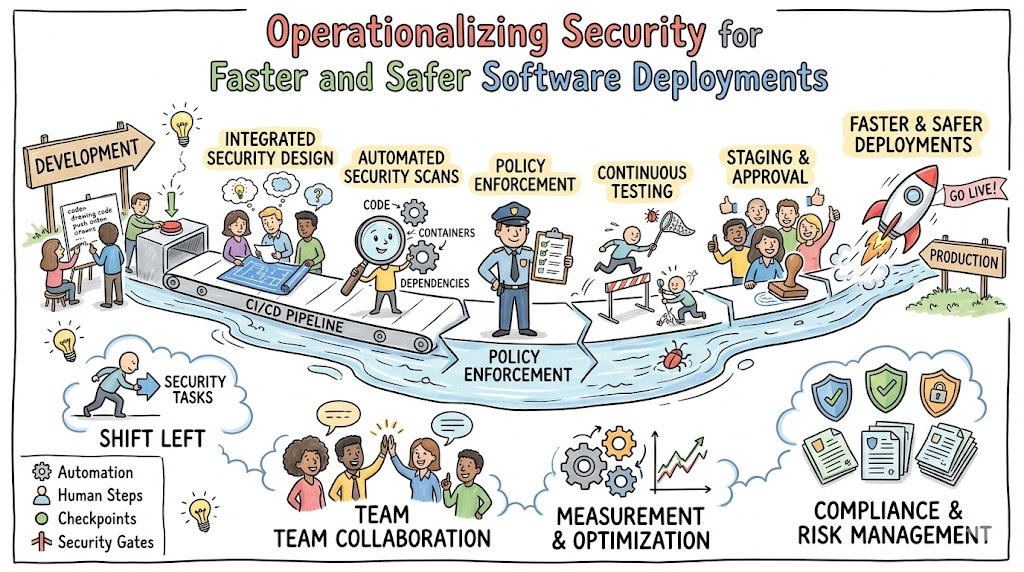
This practice encourages teams to perform security activities as early as possible. By running automated scans on code commits, developers can fix issues while the code is fresh in their minds, rather than discovering them weeks later.
Continuous Testing
By integrating security testing tools directly into the CI/CD pipeline, security checks run in parallel with functional testing. If a scan fails, the build breaks immediately, preventing insecure code from progressing to the next stage.
Role of CI/CD Pipelines in Faster Deployments
The CI/CD pipeline is the engine of modern software delivery. By embedding security tools into this pipeline, you create a system that validates security every time code changes.
Automated Builds
Every time a developer pushes code, the pipeline triggers an automated build. If the build succeeds, it immediately moves to testing.
Security-Integrated Testing
Within the pipeline, you can run tools like:
- Static Application Security Testing (SAST): Scanning the source code for vulnerabilities.
- Software Composition Analysis (SCA): Checking third-party libraries for known vulnerabilities (CVEs).
By automating these processes, organizations using tools like Jenkins, GitHub Actions, or GitLab CI/CD can maintain a high velocity of releases while ensuring that each release meets security standards.
Shift-Left Security in DevSecOps Deployments
Shift-left security is the practice of moving security checks to the beginning of the development process. When security is an afterthought, fixing a vulnerability discovered in production is expensive and time-consuming. When shifted left, fixing the same issue takes minutes.
For example, a developer writing a function using an insecure library will receive an immediate notification from an IDE plugin or a pre-commit hook. They can swap the library or update the version before the code is even committed to the main repository. This transforms security from a reactive bottleneck into a proactive, developer-friendly workflow.
Security Automation Improves Deployment Speed
Automation removes the human element from repetitive security checks, which is essential for scaling deployments.
- Automated Code Scanning: Tools automatically inspect every pull request for common coding errors like SQL injection or cross-site scripting (XSS).
- Dependency Scanning: Applications are often composed of 80% open-source code. Automated tools monitor these dependencies and block deployments if a library with a known high-severity vulnerability is included.
- Secret Scanning: Automation prevents credentials, API keys, or passwords from being accidentally committed to version control, which is a common source of data breaches.
These automations ensure that security compliance is verified at machine speed rather than human speed.
Security Testing in DevSecOps Pipelines
Security testing is no longer a one-time event; it is continuous.
- SAST (Static Application Security Testing): Analyzes the application source code without executing it. It is excellent for finding syntax-related security flaws early.
- DAST (Dynamic Application Security Testing): Tests the application in its running state. It simulates attacks against the application to find runtime vulnerabilities like configuration issues or authentication flaws.
- SCA (Software Composition Analysis): Focuses on the supply chain by identifying vulnerable open-source components.
- Container Security Scanning: Scans Docker images or Kubernetes manifests for misconfigurations and vulnerabilities before deployment.
Infrastructure as Code (IaC) for Safer Deployments
Infrastructure as Code (IaC) allows engineers to define infrastructure (servers, networks, firewalls) using code instead of manual configuration. Tools like Terraform and Kubernetes allow for consistent, repeatable deployments.
When security is included in IaC, you can enforce security policies before a server is even provisioned. For example, you can write a policy that prevents an S3 bucket from being created with public read access. If a developer tries to deploy such infrastructure, the pipeline will fail, preventing a potential security incident. This ensures that infrastructure is secure by design.
Real-World Example: Traditional Deployment Workflow
- Code Development: Developer finishes a feature.
- Manual Pull Request: Code is reviewed for functionality, but security is not checked.
- Merge: Code is merged to the main branch.
- Security Review: A security team performs a manual scan (often takes 3–5 days).
- Finding: A critical vulnerability is found. The ticket is sent back to the developer.
- Fix & Retest: Developer fixes the issue, waits for the queue, and the cycle repeats.
- Outcome: The release is delayed by a week, causing frustration and context switching.
Real-World Example: DevSecOps Deployment Workflow
- Code Development: Developer works in their IDE with security plugins enabled.
- Commit: Developer pushes code to the repository.
- Automated Pipeline: The CI/CD pipeline triggers. It automatically runs SAST, SCA, and unit tests.
- Validation: If all tests pass, the pipeline proceeds. If a vulnerability is detected, the developer gets an alert in Slack or the IDE within minutes.
- Deployment: The code is deployed to a staging environment where automated DAST occurs.
- Production: The code is deployed automatically, and continuous monitoring begins.
- Outcome: The deployment happens in hours with high confidence in the security posture.
Benefits of DevSecOps for Faster and Safer Deployments
- Faster Time-to-Market: By removing manual gates, features reach customers faster.
- Better Security Posture: Continuous scanning results in fewer vulnerabilities escaping to production.
- Reduced Remediation Costs: Fixing issues early is exponentially cheaper than fixing them post-deployment.
- Improved Team Morale: Developers and security teams work in alignment, reducing finger-pointing and burnout.
- Customer Trust: A secure product builds long-term reputation and brand loyalty.
Common Challenges in DevSecOps Adoption
- Skill Gaps: Developers often lack deep security knowledge, and security professionals often lack automation skills.
- Tool Complexity: Managing a modern DevSecOps toolchain requires significant engineering effort.
- False Positives: Automated security tools can sometimes flag non-issues, leading to “alert fatigue” among developers.
- Cultural Resistance: Moving away from traditional, gated processes requires buy-in from management and a shift in team mindset.
Common Beginner Misunderstandings
- “Security slows development down”: When implemented correctly, DevSecOps actually speeds up development by eliminating rework.
- “DevSecOps replaces the security team”: No, it empowers the security team to focus on architecture and strategy rather than manual reviews.
- “Automation solves everything”: Automation requires human oversight, policy setting, and continuous tuning.
- “Faster deployments mean less security”: Speed and security are not zero-sum; automation allows for high velocity with high security.
Best Practices for Faster and Safer Deployments
- Embed Security Early: Start security checks at the design and coding phase.
- Automate Everything: If a process is manual, it is prone to error. Automate scans, testing, and deployment.
- Standardize Tooling: Use a consistent stack for security tools to reduce friction.
- Provide Training: Invest in secure coding training for developers.
- Monitor Continuously: Security is a continuous process; use monitoring tools to detect threats in production.
- Implement Feedback Loops: Ensure security teams and developers review scan results and improve the pipeline together.
Role of DevOpsSchool in Learning DevSecOps
Learning the nuances of DevSecOps requires a blend of theory and hands-on practice. It involves understanding how to integrate diverse security tools into CI/CD pipelines, how to manage cloud-native security, and how to foster a culture of collaboration. Hands-on exposure is critical; you need to see how a pipeline breaks, how to configure security scanning, and how to write policy-as-code. Through structured learning, professionals can master these complex workflows and move from theoretical understanding to practical implementation in enterprise environments.
Career Importance of DevSecOps Skills
The demand for DevSecOps professionals is skyrocketing. As organizations move to the cloud, the need for engineers who understand both deployment pipelines and security architecture is paramount.
- DevSecOps Engineer: Focuses on pipeline security and automation.
- Security Engineer: Deepens expertise in vulnerability research and defensive architecture.
- DevOps Engineer: Strengthens their value by adding security integration to their infrastructure work.
- Cloud Security Engineer: Specializes in securing cloud environments like AWS, Azure, or GCP.
- SRE Engineer: Leverages reliability and security practices to ensure uptime.
Skills like Jenkins, GitLab, Terraform, Kubernetes, SAST/DAST tools, and cloud-native security are highly sought after by top employers globally.
Industries Benefiting from DevSecOps Deployments
- Banking & Finance: Handling sensitive financial data requires strict, automated compliance and security.
- Healthcare: Ensuring patient data privacy and system availability is non-negotiable.
- SaaS Platforms: Frequent feature releases demand automated, secure pipelines to maintain competitive advantage.
- E-Commerce: Protecting customer transactions and identity requires continuous security monitoring.
- Telecom: Managing massive infrastructure scales effectively with IaC and automated security.
Future of Secure Deployments
The future of DevSecOps lies in intelligence and self-healing. We are moving toward:
- AI-Assisted Security: Using machine learning to filter out false positives from security scans.
- Policy-as-Code: Automatically enforcing complex security policies across entire cloud environments.
- Automated Remediation: Systems that not only detect a vulnerability but also automatically patch or isolate the affected component.
- Self-Healing Infrastructure: Systems that detect configuration drift or security anomalies and automatically reset to a known secure state.
FAQs
- What is the primary goal of DevSecOps?
The primary goal is to integrate security practices into the development lifecycle to enable faster, more secure releases. - Does DevSecOps require specialized tools?
Yes, it requires tools that can integrate into CI/CD pipelines, such as SAST, DAST, SCA, and policy enforcement tools. - How does it change the developer workflow?
It shifts security responsibilities earlier, meaning developers fix security issues during the coding and testing phases rather than at the end. - Can small teams adopt this?
Absolutely. Smaller teams often have the advantage of agility, allowing them to implement DevSecOps practices faster than large, legacy organizations. - What is the difference between DevOps and DevSecOps?
DevOps focuses on development and operations collaboration; DevSecOps adds security as a core, integrated pillar of that collaboration. - Is security testing part of the build?
Yes, in a mature DevSecOps pipeline, security testing is an automated step that runs alongside functional builds and tests. - How do you handle false positives?
You tune the tools, use baseline policies, and maintain a feedback loop between the security and development teams to reduce noise. - What is Infrastructure as Code (IaC)?
IaC is managing and provisioning infrastructure through machine-readable definition files, rather than manual configuration. - Why is shift-left important?
It detects issues early when they are cheap and easy to fix, preventing them from becoming expensive production problems. - How does DevSecOps affect release velocity?
It increases velocity by removing manual, time-consuming security gates and automating compliance checks. - What metrics matter most?
Key metrics include deployment frequency, lead time for changes, mean time to recovery (MTTR) from security incidents, and change failure rate. - Is container security included?
Yes, it is a critical part of modern DevSecOps, involving image scanning and runtime security for containers. - How does automation reduce risk?
Automation ensures consistent policy application, removes human configuration errors, and provides an auditable trail of all changes. - What are the common cultural barriers?
Resistance to change, fear of slowing down, and organizational silos are the most common challenges. - Can automated tools replace human review?
Automation handles the high-volume, repetitive tasks, allowing human experts to focus on complex threat modeling and architectural security.
Final Thoughts
The journey toward faster and safer deployments is not achieved through a single tool or a specific software package. It is achieved through a sustained commitment to integrating security into the DNA of the software development lifecycle. By automating the mundane, shifting security checks to the beginning of the process, and fostering a culture of collaboration, teams can stop treating security as a bottleneck. Instead, they can view it as a foundational enabler of reliable, high-velocity delivery. Whether you are a developer, an operations engineer, or a security professional, the move toward DevSecOps is the most effective path forward in modern software engineering.
