Limited Time Offer!
For Less Than the Cost of a Starbucks Coffee, Access All DevOpsSchool Videos on YouTube Unlimitedly.
Master DevOps, SRE, DevSecOps Skills!
A security solution that tracks and filters HTTP traffic to and from websites or web applications is called a web application firewall (WAF). It is usually installed via a reverse proxy in front of websites or apps and can be host-, network-, or cloud-based. The WAF examines Layer 7 online application logic to filter out potentially hazardous traffic by scanning each packet and utilizing a rule basis. This protects against a variety of attacks, including malware, impersonation, and zero-day vulnerabilities. Because WAFs may identify and stop web application security vulnerabilities that conventional firewalls and intrusion detection/prevention systems might overlook, they are essential for businesses that provide online services like e-commerce and online banking.
What is a Web Application Firewall (WAF)?
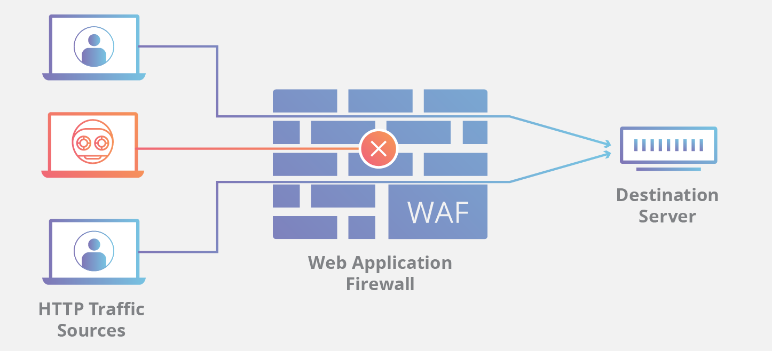
By monitoring and filtering HTTP traffic, an online Application Firewall (WAF) protects online applications from threats such as cross-site forgery, XSS, file inclusion, and SQL injection. Known as a layer 7 protection, it is not a one-size-fits-all solution but rather a component of an all-encompassing security plan. By serving as a reverse proxy, it creates a firewall between the web application and the Internet, blocking harmful traffic according to pre-established rules. Because of its adaptability, policies may be quickly changed to address new risks, such rate limitation during DDoS assaults.
How does a web application firewall (WAF) work?
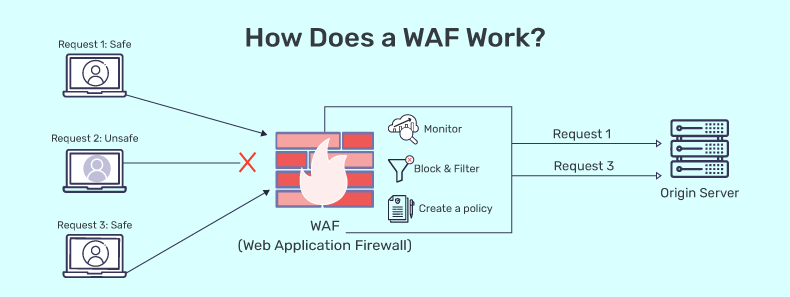
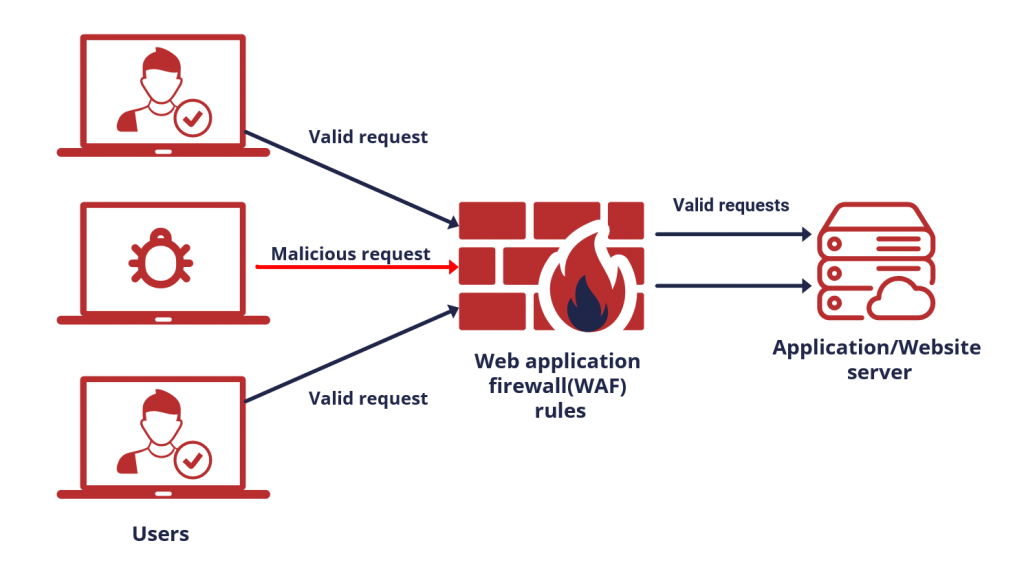
By filtering, monitoring, and blocking any malicious HTTP/S traffic heading towards the web application and preventing any unauthorized data from exiting the app, a WAF safeguards your web apps. It accomplishes this by abiding by a set of rules that aid in identifying safe and malicious communications. Similar to how a proxy server serves as a middleman to safeguard a client’s identity, a WAF functions similarly in the opposite way—it is referred to as a reverse proxy—by serving as a middleman to shield the web app server from a potentially dangerous client.
WAFs can be provided as a service, as an appliance, or as software. You can modify policies to suit the particular requirements of your online application or collection of web apps. While updates to the rules are often necessary for many WAFs to handle newly discovered vulnerabilities, some WAFs can update automatically thanks to developments in machine learning. The complexity and ambiguity of the threat landscape are only increasing, making this automation more and more important.
A WAF detects malicious traffic by examining HTTP requests and using pre-established rules. It might be a service, an equipment, or software. The following crucial elements of HTTP chats are examined by the WAF:
- Requests in the GET format are used to obtain data from the server.
- POST requests: To modify the status of the server, these requests transmit data to it.
- PUT requests: These transfer information to the server for creation or updating.
- Delete requests: They are demands for data deletion.
Additionally, the WAF looks for malicious patterns in the HTTP request body, query strings, and headers. Should a match be discovered, the WAF will stop the request and notify the security team.
Why is WAF security important?
WAFs are essential to internet enterprises’ security. They satisfy compliance standards like the Payment Card Industry Data Security Standard (PCI DSS), safeguard confidential information, stop leaks, and stop malicious malware from being injected into the server. As more businesses employ IoT devices and online apps, criminals are attempting to exploit these weaknesses. A strong defensive plan is produced by integrating a WAF with additional security technologies such as Cisco Duo 2FA and Cisco malware protection.
For businesses that provide online services such as social networking and banking, a WAF is essential because it guards web applications against attacks that aim to steal sensitive data from backend databases. The usage of a firewall is frequently required by compliance standards like PCI DSS, hence WAFs are crucial for adhering to such regulations. More transactions are being made through web applications due to the growth of mobile apps and IoT, which emphasizes the need of WAFs in contemporary security models. A WAF is most effective when combined with other security components like as NGFWs, IPSes, and IDSes, even if it is successful when used alone.
How does WAF contribute to web app security?
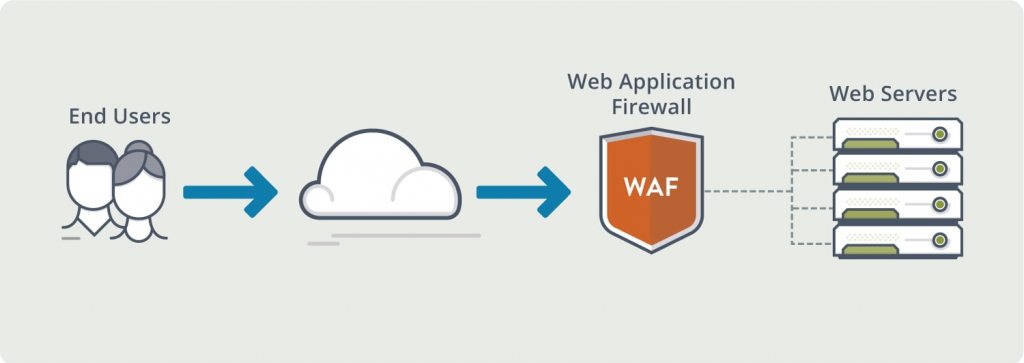
These days, a lot of apps are made with a mix of open-source, third-party, and in-house code. By obstructing typical attack vectors and preventing malicious traffic from accessing the application, WAFs improve safe design standards and give an additional layer of protection to poorly constructed or older systems. The following is a list of noteworthy benefits that are unique to WAFs.
- Before harmful traffic even reaches a web application, WAFs may stop it, averting assaults and data breaches.
- WAFs can aid in preventing unwanted access to sensitive data, including credit card details and personally identifiable information (PII) about customers.
- By preventing traffic that deviates from compliance standards, such PCI DSS, WAFs can assist in meeting those requirements.
- A more effective layered defense against assaults may be created by combining WAFs with additional security solutions like firewalls, intrusion prevention systems (IPS), and intrusion detection systems (IDS).
What are network-based, host-based, and cloud-based WAFs?
There are three approaches to install a WAF, each with advantages and disadvantages of its own.
- Hardware is often the foundation of a network-based WAF. Local installation reduces latency; nevertheless, network-based WAFs are the most costly solution and need the storage and upkeep of real equipment.
- The software of an application may completely incorporate a host-based WAF. Compared to a network-based WAF, this solution is more affordable and customizable. The use of local server resources, implementation complexity, and maintenance expenses are the drawbacks of a host-based WAF. These parts can be expensive and usually need engineering effort.
- Cloud-based WAFs provide an easy-to-use and reasonably priced solution; most provide a turnkey installation that just requires rerouting traffic through a DNS change. Due to the fact that customers pay monthly or yearly for security as a service, cloud-based WAFs also offer a low upfront cost. Additionally, cloud-based WAFs can provide a solution that is automatically updated to defend against the most recent threats without requiring the user to perform any extra work or pay any extra fees. A cloud-based WAF has the disadvantage of transferring user accountability to a third party, which means that some functions may be hidden from users. (One kind of cloud firewall is a cloud-based WAF; find out more about cloud firewalls.)
What are the method of Deploying WAF?
The three most popular methods for deploying WAF are as follows:
- WAF that is network-based: Typically, a network-based WAF is built on hardware. These WAFs are the priciest option and need physical equipment storage and maintenance, but because they are deployed locally, they reduce latency.
- WAF depending on hosts: Usually, a host-based WAF is included into the software of an application. In comparison to a network-based WAF, it is more affordable and customizable. It does have several disadvantages, though, such the need for local server resources, administrative challenges, and maintenance expenses.
- cloud-based WAF: Turnkey cloud-based WAF installation is as simple as rerouting traffic with a DNS update. Because cloud-based WAF users pay for security as a service on a monthly or annual basis, they have little upfront costs. Additionally, cloud-based WAFs provide a service that updates automatically to defend against the latest threats without needing additional effort from the client. Clients may not be aware of every aspect of a cloud-based WAF since they cede control to a third party.
Conclusion:
A vital security solution that may be installed via host-, network-, or cloud-based deployments is a Web Application Firewall (WAF), which protects web applications from a variety of online threats. At the application layer of the OSI model, Web Application Firewalls (WAFs) keep an eye on and filter HTTP traffic, examining requests and answers to identify and prevent attacks like cross-site scripting, SQL injection, and XSS. WAFs maintain compliance with industry standards such as PCI DSS and prevent unauthorized access to sensitive data housed in backend databases by applying predetermined rules or policies. They are a crucial part of contemporary web application security methods because of their capacity to stop data breaches, uphold regulatory compliance, and shield businesses and their clients from a variety of online dangers.