Skip to content
Menu
DevSecOps Now!!!
  • About
  • Certifications
  • Contact
  • Courses
  • DevSecOps Consulting
  • DevSecOps Tools
  • Training
  • Tutorials
DevSecOps Now!!!

Incorrect definition of table mysql.column_stats

Posted on April 8, 2026

Limited Time Offer!

For Less Than the Cost of a Starbucks Coffee, Access All DevOpsSchool Videos on YouTube Unlimitedly.
Master DevOps, SRE, DevSecOps Skills!
Enroll Now

If you are running a Laravel, PHP, or any backend application and suddenly your MySQL or MariaDB server starts throwing errors like:

Incorrect definition of table mysql.column_stats: expected column ‘min_value’ to have type varbinary(255), found varchar(255)

then you are dealing with a system-level database issue, not an application bug.

This problem is very common in:

  • Server migrations
  • XAMPP / LAMPP environments
  • MySQL โ†” MariaDB switching
  • Version upgrades or downgrades

In this guide, we will walk step-by-step through:

  • What the error actually means
  • Why it happens
  • How to diagnose it properly
  • Safe production fixes
  • Advanced debugging strategies
  • Prevention best practices

Understanding the Error

From your logs:

The error repeatedly says:

  • Expected: varbinary(255)
  • Found: varchar(255)

This mismatch exists in:

mysql.column_stats

This is not your application table โ€” it is a MariaDB system table.


What is mysql.column_stats?

This table is used internally by MariaDB for:

  • Query optimization
  • Statistics calculation
  • Execution planning

If this table structure is wrong, MySQL/MariaDB may:

  • Log errors continuously
  • Fail optimization
  • Cause performance issues
  • In rare cases, fail to start

Root Cause (Real Scenario)

Based on your environment:

  • MariaDB Version: 10.4.28
  • Path: /opt/lampp/var/mysql

This clearly indicates:

You are using LAMPP (XAMPP for Linux).

Most likely causes:

  1. Database files copied from another server
  2. MariaDB version changed but system tables not upgraded
  3. Mix of MySQL and MariaDB data directories
  4. Incomplete upgrade using mysql_upgrade
  5. Manual data directory replacement

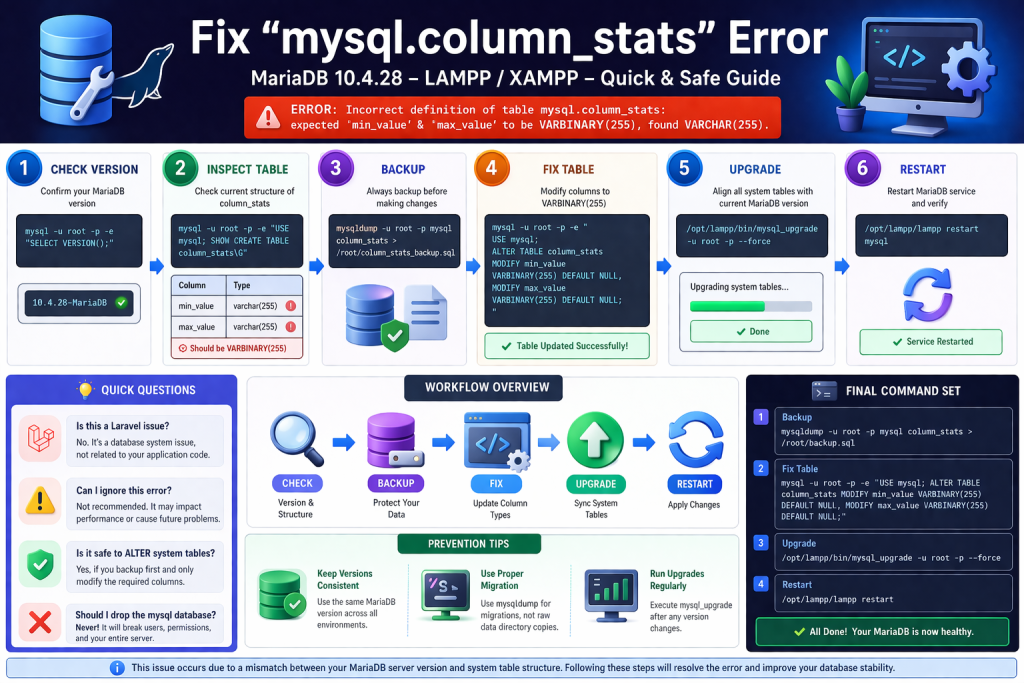
Step 1: Verify Your Database Version

Run:

mysql -u root -p -e "SELECT VERSION();"

Your output:

10.4.28-MariaDB

This confirms:

  • You are on MariaDB 10.4
  • Your system tables must match this version

Step 2: Check Table Structure

Run:

mysql -u root -p -e "USE mysql; SHOW CREATE TABLE column_stats\G"

If you see:

min_value varchar(255)
max_value varchar(255)

Then the issue is confirmed.


Step 3: Why This Mismatch Happens

MariaDB expects:

min_value VARBINARY(255)
max_value VARBINARY(255)

But your table has:

VARCHAR(255)

Why this is a problem

  • VARCHAR stores text with collation
  • VARBINARY stores raw binary

MariaDB uses binary for performance and precision in statistics.


Step 4: Safe Fix (Production Recommended)

Backup First (VERY IMPORTANT)

mysqldump -u root -p mysql column_stats > /root/column_stats_backup.sql

Fix the Table

Run:

mysql -u root -p -e "
USE mysql;
ALTER TABLE column_stats
MODIFY min_value VARBINARY(255) DEFAULT NULL,
MODIFY max_value VARBINARY(255) DEFAULT NULL;
"

Restart MariaDB (LAMPP)

/opt/lampp/lampp restartmysql

Verify Fix

tail -n 50 /opt/lampp/var/mysql/*.err

If no errors โ†’ issue resolved.


Step 5: Run Upgrade Tool (Recommended)

Even after fixing manually, always run:

/opt/lampp/bin/mysql_upgrade -u root -p --force

This will:

  • Fix all system tables
  • Align schema with current version
  • Prevent future errors

Restart again:

/opt/lampp/lampp restart

Step 6: If Error Still Persists

Then your system tables are more deeply inconsistent.

Run:

mysqlcheck -u root -p --all-databases --repair

Advanced Fix (Last Option)

If nothing works:

  1. Backup all databases
  2. Stop MySQL
  3. Reinitialize system tables
  4. Restore data

Real-World Debugging Insight

In production systems like yours (Laravel + Keycloak + Microservices), this issue can:

  • Break authentication indirectly
  • Cause query performance degradation
  • Trigger unexpected logs
  • Affect API response times

Even if your app โ€œworksโ€, this error must be fixed.


Common Questions

Is this a Laravel issue?

No. This is a database engine issue, not application code.


Can I ignore this error?

Not recommended. It may:

  • Affect performance
  • Lead to future crashes

Is it safe to run ALTER on system tables?

Yes, if:

  • You take backup
  • You only modify expected columns

Should I drop mysql database?

Never.

This will break:

  • Users
  • Permissions
  • Authentication

Why clearing browser cache sometimes “fixes” issues?

Because your system has:

  • Multiple layers (Keycloak + API + DB)

Sometimes UI works, but DB is still inconsistent.


Prevention Best Practices

1. Never mix MySQL and MariaDB data directories

2. Always run upgrade after version change

mysql_upgrade

3. Avoid copying raw /var/mysql directories

Instead use:

mysqldump โ†’ restore

4. Keep consistent environments

  • Same MariaDB version in dev and prod
  • Avoid XAMPP โ†’ production migration without cleanup

5. Monitor logs regularly

tail -f /opt/lampp/var/mysql/*.err

Final Summary

This issue happens because:

  • Your MariaDB expects VARBINARY
  • Your system table has VARCHAR

Fix is:

  1. Backup
  2. ALTER table
  3. Run mysql_upgrade
  4. Restart server

Final Production Command Set

mysqldump -u root -p mysql column_stats > /root/backup.sql

mysql -u root -p -e "
USE mysql;
ALTER TABLE column_stats
MODIFY min_value VARBINARY(255) DEFAULT NULL,
MODIFY max_value VARBINARY(255) DEFAULT NULL;
"

/opt/lampp/bin/mysql_upgrade -u root -p --force

/opt/lampp/lampp restart

Closing Note

This is a classic server-level issue that many developers misinterpret as an application bug. Fixing it correctly improves:

  • Stability
  • Performance
  • Reliability

Post Views: 368
  • Incorrect definition
  • Incorrect definition of table mysql.column_stats
  • laravel
  • MySql
  • mysql.column_stats
  • php
Subscribe
Login
Notify of
guest
guest
0 Comments
Oldest
Newest Most Voted
Inline Feedbacks
View all comments
  • Canada PR CRS Calculator: Express Entry Points System Explained
  • Austria PR Points Calculator: Ultimate Guide to Navigating the Red-White-Red Card System
  • The Essential Guide to Enterprise DevSecOps Implementation
  • How to Set Up Claude Code Agent on a Local Windows Laptop and Use claude Command from Anywhere
  • DevOps and DevSecOps Explained: Bridging the Gap Between Speed and Security
  • Comprehensive Manual on DevOps Methodologies and Cloud Native Engineering
  • The Master Guide to Immigration Points: Calculating Your Path to Canada, Australia, and Beyond
  • How to Skip the Activation Email and Password Reset After Google Login in Keycloak Auto-Link Existing Users in First Broker Login
  • Free SSL Certificate Generation Tutorial for Any Website Using Certbot and Apache
  • The Ultimate Guide to Certified FinOps Professional: Skills, Levels, and Career Impact
  • Certified FinOps Manager: Essential Skills for Modern Cloud Operations
  • How to Use Claude AI for Programming: Complete Guide for Developers to Boost Productivity
  • The Definitive Guide to Certified FinOps Engineer: Master Cloud Value Engineering
  • A Comprehensive Guide to the Certified FinOps Architect Certification and Training
  • Linux Server Diagnostic Commands: Complete Guide for Performance, Network & System Troubleshooting
  • The Ultimate Guide to CDOM โ€“ Certified DataOps Manager Certification
  • The Practical Path to AI Reliability: A Guide to the Certified MLOps Manager
  • Master the Machine Learning Lifecycle:Guide to Becoming a Certified MLOps Architect
  • How to Build a Project-Level AI Memory System That Works Across Codex, Claude, and Other AI Coding Tools
  • Certified MLOps Professional: A Deep Dive into the Certified MLOps Professional Certification
  • Certified MLOps Engineer : The Comprehensive Guide to Mastering Machine Learning Operations
  • Codex vs Claude: A Complete Practical Guide for Modern Developers (2026)
  • Certified AIOps Professional Program A Guide to Career Growth
  • Keycloak Multi-Client Architecture with Project-Based Email Validation (Student, Trainer, Company, Consulting)
  • Incorrect definition of table mysql.column_stats
  • Mautic and PHP 8.3 Compatibility Guide (2026)
  • Certified AIOps Engineer: The Complete Career Path and Certification Guide
  • How to Rename Apache Virtual Host Files Safely (Step-by-Step Guide for Linux)
  • AIOps Foundation Certification: Everything You Need to Know to Get Certified
  • DevOps to Certified Site Reliability Professional: A Senior Mentorโ€™s Guide

Recent Comments

  1. emmy day on SQLSTATE[42S22]: Column not found: 1054 Unknown column ‘provider’ in ‘field list’
  2. digital banking on Complete Tutorial: Setting Up Laravel Telescope Correctly (Windows + XAMPP + Custom Domain)
  3. SAHIL DHINGRA on How to Uninstall Xampp from your machine when it is not visible in Control panel programs & Feature ?
  4. Abhishek on MySQL: List of Comprehensive List of approach to secure MySQL servers.
  5. Kristina on Best practices to followed in .httacess to avoid DDOS attack?

Archives

  • May 2026
  • April 2026
  • March 2026
  • February 2026
  • January 2026
  • December 2025
  • November 2025
  • October 2025
  • September 2025
  • August 2025
  • July 2025
  • June 2025
  • May 2025
  • April 2025
  • March 2025
  • February 2025
  • January 2025
  • December 2024
  • November 2024
  • October 2024
  • September 2024
  • August 2024
  • July 2024
  • June 2024
  • May 2024
  • April 2024
  • March 2024
  • February 2024
  • January 2024
  • December 2023
  • November 2023
  • October 2023
  • September 2023
  • August 2023
  • July 2023
  • May 2023
  • April 2023
  • March 2023
  • February 2023
  • January 2023
  • December 2022

Categories

  • Ai
  • AI Blogging
  • AiOps
  • ajax
  • Android Studio
  • Antimalware
  • Antivirus
  • Apache
  • Api
  • API Security
  • Api Testing
  • APK
  • Aws
  • Bike Rental Services
  • ChatGPT
  • Code Linting
  • Composer
  • cPanel
  • Cyber Threat Intelligence
  • Cybersecurity
  • Data Loss Prevention
  • Database
  • dataops
  • Deception Technology
  • DeepSeek
  • Devops
  • DevSecOps
  • DevTools
  • Digital Asset Management
  • Digital Certificates
  • Docker
  • Drupal
  • emulator
  • Encryption Tools
  • Endpoint Security Tools
  • Error
  • facebook
  • Firewalls
  • Flutter
  • git
  • GITHUB
  • Google Antigravity
  • Google play console
  • Google reCAPTCHA
  • Gradle
  • Guest posting
  • health and fitness
  • IDE
  • Identity and Access Management
  • Incident Response
  • Instagram
  • Intrusion Detection and Prevention Systems
  • jobs
  • Joomla
  • Keycloak
  • Laravel
  • Law News
  • Lawyer Discussion
  • Legal Advice
  • Linkedin
  • Linkedin Api
  • Linux
  • Livewire
  • Mautic
  • Medical Tourism
  • MlOps
  • MobaXterm
  • Mobile Device Management
  • Multi-Factor Authentication
  • MySql
  • Network Traffic Analysis tools
  • Paytm
  • Penetration Testing
  • php
  • PHPMyAdmin
  • Pinterest Api
  • Quora
  • SAST
  • SecOps
  • Secure File Transfer Protocol
  • Security Analytics Tools
  • Security Auditing Tools
  • Security Information and Event Management
  • Seo
  • Server Management Tools
  • Single Sign-On
  • Site Reliability Engineering
  • soft 404
  • software
  • SSL
  • SuiteCRM
  • SysOps
  • Threat Model
  • Twitter
  • Twitter Api
  • ubuntu
  • Uncategorized
  • Virtual Host
  • Virtual Private Networks
  • VPNs
  • Vulnerability Assessment Tools
  • Web Application Firewalls
  • Windows Processor
  • Wordpress
  • WSL (Windows Subsystem for Linux)
  • X.com
  • Xampp
  • Youtube
©2026 DevSecOps Now!!! | WordPress Theme: EcoCoded
wpDiscuz