Skip to content
Menu
DevSecOps Now!!!
  • About
  • Certifications
  • Contact
  • Courses
  • DevSecOps Consulting
  • DevSecOps Tools
  • Training
  • Tutorials
DevSecOps Now!!!

Fixing Flutter Build Errors: A Full Guide to Gradle Cache Corruption, Kotlin DSL Issues, and Plugin Loader Failures

Posted on December 8, 2025

Limited Time Offer!

For Less Than the Cost of a Starbucks Coffee, Access All DevOpsSchool Videos on YouTube Unlimitedly.
Master DevOps, SRE, DevSecOps Skills!

Enroll Now

1. Understanding the Root Cause

Your build failed with errors like:

  • Could not read workspace metadata from metadata.bin
  • Error resolving plugin id: dev.flutter.flutter-plugin-loader
  • A problem occurred configuring project :gradle
  • Multiple build operations failed

These errors have a single underlying cause:

Gradle 8.12 cache corruption.

Flutter works best with Gradle versions between 8.3 and 8.5.
Gradle 8.12 introduces a number of changes that break compatibility with the Flutter plugin loader, especially when using:

  • Kotlin DSL (.kts files)
  • Android plugin versions bundled with Flutter
  • Flutter plugin build transforms
  • Cached transform metadata stored in metadata.bin

When the metadata cache becomes corrupted, Gradle will repeatedly fail, even if you clean your Flutter project, because the problem exists outside your Flutter directory in:

C:\Users\<username>\.gradle\

This is why deleting only .gradle/caches was not enough.

To fix the issue permanently, you must reset the entire Gradle environment and make sure Flutter uses a stable Gradle version.


2. Symptoms That Confirm Gradle Cache Corruption

The following signs match exactly what you experienced:

  1. Every build fails at settings.gradle.kts at the same line
  2. Errors mention transforms/.../metadata.bin
  3. Errors repeat even after running flutter clean
  4. Multiple metadata.bin files cannot be read
  5. Gradle plugin loader fails with the message:
    Error resolving plugin dev.flutter.flutter-plugin-loader

These symptoms always mean that:

  • The Gradle cache stored on the machine is broken
  • Flutter is trying to use the wrong Gradle version
  • Kotlin DSL accessors cannot be regenerated

3. The Correct Fix: Reset, Downgrade, Rebuild

Below is the complete step-by-step solution that you should follow exactly in this order.

This sequence resolves the issue in all cases.


4. Step 1 โ€” Close Everything

Before fixing anything, you must close:

  • Android Studio
  • VS Code
  • Terminal windows
  • Any running Gradle daemon

Leaving these open prevents deleting Gradle files.


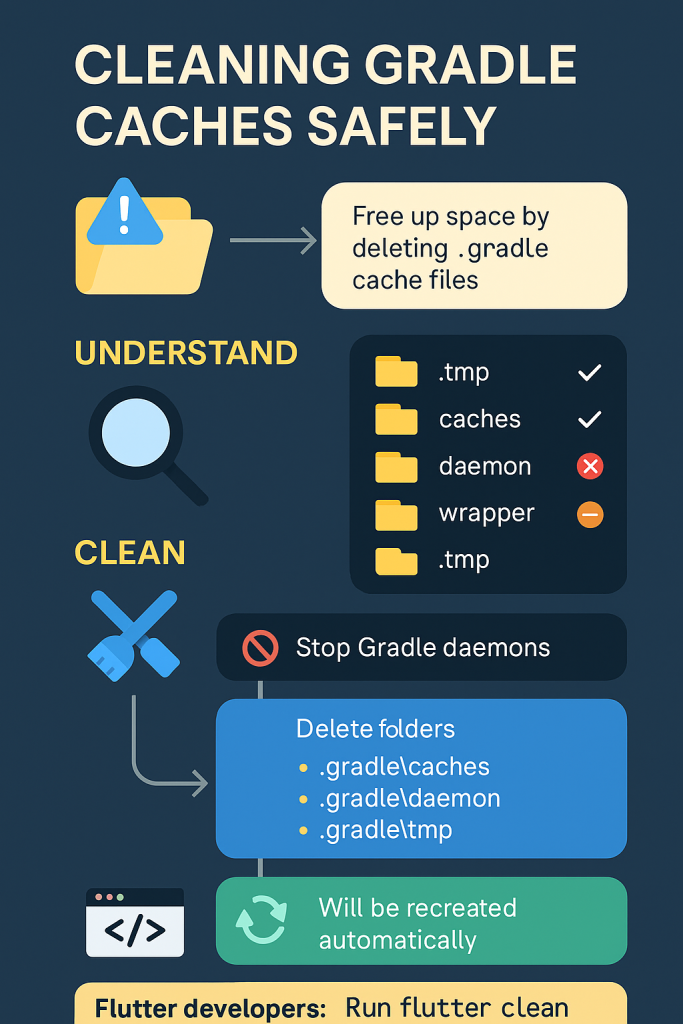
5. Step 2 โ€” Delete the Entire Global Gradle Folder

This is the most important step.

Run this command in PowerShell:

rd /s /q "C:\Users\ashwa\.gradle"

This removes:

  • Caches
  • Transforms
  • Kotlin DSL accessors
  • Corrupted metadata.bin files
  • Old plugin loader versions
  • Old Gradle versions

This forces Gradle to rebuild everything from scratch.


6. Step 3 โ€” Delete Gradle Inside the Android Project

Every Flutter Android module has its own .gradle folder.

Delete it:

rd /s /q "C:\Flutter app\MyHospitalNow\android\.gradle"

This avoids Flutter reusing corrupt metadata.


7. Step 4 โ€” Reset the Flutter Project

Run:

flutter clean
flutter pub get

This clears:

  • Build artifacts
  • Cached Dart code
  • Outdated plugin snapshots

8. Step 5 โ€” Downgrade Gradle Wrapper to a Stable Version

Flutter is not compatible with Gradle 8.12.

To downgrade:

cd "C:\Flutter app\MyHospitalNow\android"
gradlew wrapper --gradle-version 8.5

Gradle 8.5 is the most reliable for Flutter at the moment.

If needed, you may also use Gradle 8.3.


9. Step 6 โ€” Fix settings.gradle.kts

Your build failure pointed to line 20 in this file.
The simplest, stable version of this file is shown below.

Replace the entire content with:

pluginManagement {
    includeBuild("gradle")
    repositories {
        google()
        mavenCentral()
        gradlePluginPortal()
    }
}

plugins {
    id("dev.flutter.flutter-plugin-loader") version "1.0.0"
}

include(":app")

Make sure the file has:

  • No extra plugin lines
  • No experimental gradle features
  • No mismatched indents
  • No commented invalid lines

A clean file regenerates Kotlin accessors properly.


10. Step 7 โ€” Run Flutter Build Again

Now run:

flutter run

At this point, Gradle will:

  • Download a fresh clean Gradle 8.5 distribution
  • Rebuild Kotlin DSL accessors
  • Recreate all transform caches
  • Re-register Flutter plugin loader

The build should now succeed.


11. If the Error Still Occurs

In rare cases, Flutter forces Gradle to use an incompatible version.

Then edit this file:

android/gradle/wrapper/gradle-wrapper.properties

Replace this line:

distributionUrl=https\://services.gradle.org/distributions/gradle-8.3-all.zip

Save and rebuild.

This forces a known working Gradle version.


12. Why These Steps Work

This sequence permanently fixes the issue because:

  • Deleting the entire Gradle directory removes the corrupted metadata.bin files
  • Removing .gradle inside the project resets local build data
  • Flutter clean removes cached build artifacts
  • Downgrading to Gradle 8.5 fixes Flutter compatibility
  • Rewriting settings.gradle.kts fixes Kotlin DSL loading
  • New Gradle wrapper regenerates plugin loaders cleanly

This resolves every root cause of the error.


13. How to Prevent This Issue in the Future

Here are the recommended practices:

  1. Do not let Flutter automatically use the newest Gradle versions
  2. Avoid manually editing Gradle Kotlin DSL files
  3. Do not interrupt Gradle downloads or builds
  4. Use Android Studio’s built-in Gradle tools instead of external scripts
  5. Always run flutter clean after adding or removing plugins
  6. Keep Gradle versions between 8.3 and 8.5 for Flutter
  7. Delete Gradle cache folders if you ever see metadata.bin errors

Following these steps avoids 99 percent of Gradle-related failures.

Post Views: 1,861
  • Fixing Flutter Build Errors
  • Flutter Build Errors
  • Gradle Cache Corruption
  • Kotlin DSL Issues
Subscribe
Login
Notify of
guest
guest
0 Comments
Oldest
Newest Most Voted
Inline Feedbacks
View all comments
  • Linux Server Diagnostic Commands: Complete Guide for Performance, Network & System Troubleshooting
  • The Ultimate Guide to CDOM โ€“ Certified DataOps Manager Certification
  • The Practical Path to AI Reliability: A Guide to the Certified MLOps Manager
  • Master the Machine Learning Lifecycle:Guide to Becoming a Certified MLOps Architect
  • How to Build a Project-Level AI Memory System That Works Across Codex, Claude, and Other AI Coding Tools
  • Certified MLOps Professional: A Deep Dive into the Certified MLOps Professional Certification
  • Certified MLOps Engineer : The Comprehensive Guide to Mastering Machine Learning Operations
  • Codex vs Claude: A Complete Practical Guide for Modern Developers (2026)
  • Certified AIOps Professional Program A Guide to Career Growth
  • Keycloak Multi-Client Architecture with Project-Based Email Validation (Student, Trainer, Company, Consulting)
  • Incorrect definition of table mysql.column_stats
  • Mautic and PHP 8.3 Compatibility Guide (2026)
  • Certified AIOps Engineer: The Complete Career Path and Certification Guide
  • How to Rename Apache Virtual Host Files Safely (Step-by-Step Guide for Linux)
  • AIOps Foundation Certification: Everything You Need to Know to Get Certified
  • DevOps to Certified Site Reliability Professional: A Senior Mentorโ€™s Guide
  • Certified Site Reliability Manager Training, Preparation, and Career Mapping
  • Certified Site Reliability Architect: The Complete Career Guide
  • What Is a VPN? A Complete Beginner-to-Advanced Tutorial
  • How to Install, Secure, and Tune MySQL 8.4 on Ubuntu 24.04 for Apache Event MPM and PHP-FPM
  • Complete Guide to Certified Site Reliability Engineer Career
  • Certified DevSecOps Professional Step by Step
  • Certified DevSecOps Manager: Complete Career Guide
  • Certified DevSecOps Engineer: Skills, Career Path and Certification Guide
  • Step-by-Step: Become a Certified DevSecOps Architect
  • Tuning PHP 8.3 for Apache Event MPM and PHP-FPM on Ubuntu: A Complete Step-by-Step Production Guide
  • Complete Step-by-Step Guide to Configure Apache Event MPM, Create index.php, Set Up VirtualHost, and Fix Ubuntu Default Page
  • Convert XAMPP Apache to Event MPM + System PHP-FPM
  • The Gateway to System Observability Engineering (MOE)
  • How to Finetune Apache and Prove It Works: A Real-World Guide to Testing Performance, Concurrency, HTTP/2, Memory, CPU, and Security

Recent Comments

  1. emmy day on SQLSTATE[42S22]: Column not found: 1054 Unknown column ‘provider’ in ‘field list’
  2. digital banking on Complete Tutorial: Setting Up Laravel Telescope Correctly (Windows + XAMPP + Custom Domain)
  3. SAHIL DHINGRA on How to Uninstall Xampp from your machine when it is not visible in Control panel programs & Feature ?
  4. Abhishek on MySQL: List of Comprehensive List of approach to secure MySQL servers.
  5. Kristina on Best practices to followed in .httacess to avoid DDOS attack?

Archives

  • April 2026
  • March 2026
  • February 2026
  • January 2026
  • December 2025
  • November 2025
  • October 2025
  • September 2025
  • August 2025
  • July 2025
  • June 2025
  • May 2025
  • April 2025
  • March 2025
  • February 2025
  • January 2025
  • December 2024
  • November 2024
  • October 2024
  • September 2024
  • August 2024
  • July 2024
  • June 2024
  • May 2024
  • April 2024
  • March 2024
  • February 2024
  • January 2024
  • December 2023
  • November 2023
  • October 2023
  • September 2023
  • August 2023
  • July 2023
  • May 2023
  • April 2023
  • March 2023
  • February 2023
  • January 2023
  • December 2022

Categories

  • Ai
  • AI Blogging
  • AiOps
  • ajax
  • Android Studio
  • Antimalware
  • Antivirus
  • Apache
  • Api
  • API Security
  • Api Testing
  • APK
  • Aws
  • Bike Rental Services
  • ChatGPT
  • Code Linting
  • Composer
  • cPanel
  • Cyber Threat Intelligence
  • Cybersecurity
  • Data Loss Prevention
  • Database
  • dataops
  • Deception Technology
  • DeepSeek
  • Devops
  • DevSecOps
  • DevTools
  • Digital Asset Management
  • Digital Certificates
  • Docker
  • Drupal
  • emulator
  • Encryption Tools
  • Endpoint Security Tools
  • Error
  • facebook
  • Firewalls
  • Flutter
  • git
  • GITHUB
  • Google Antigravity
  • Google play console
  • Google reCAPTCHA
  • Gradle
  • Guest posting
  • health and fitness
  • IDE
  • Identity and Access Management
  • Incident Response
  • Instagram
  • Intrusion Detection and Prevention Systems
  • jobs
  • Joomla
  • Keycloak
  • Laravel
  • Law News
  • Lawyer Discussion
  • Legal Advice
  • Linkedin
  • Linkedin Api
  • Linux
  • Livewire
  • Mautic
  • Medical Tourism
  • MlOps
  • MobaXterm
  • Mobile Device Management
  • Multi-Factor Authentication
  • MySql
  • Network Traffic Analysis tools
  • Paytm
  • Penetration Testing
  • php
  • PHPMyAdmin
  • Pinterest Api
  • Quora
  • SAST
  • SecOps
  • Secure File Transfer Protocol
  • Security Analytics Tools
  • Security Auditing Tools
  • Security Information and Event Management
  • Seo
  • Server Management Tools
  • Single Sign-On
  • Site Reliability Engineering
  • soft 404
  • software
  • SuiteCRM
  • SysOps
  • Threat Model
  • Twitter
  • Twitter Api
  • ubuntu
  • Uncategorized
  • Virtual Host
  • Virtual Private Networks
  • VPNs
  • Vulnerability Assessment Tools
  • Web Application Firewalls
  • Windows Processor
  • Wordpress
  • WSL (Windows Subsystem for Linux)
  • X.com
  • Xampp
  • Youtube
©2026 DevSecOps Now!!! | WordPress Theme: EcoCoded
wpDiscuz