Limited Time Offer!
For Less Than the Cost of a Starbucks Coffee, Access All DevOpsSchool Videos on YouTube Unlimitedly.
Master DevOps, SRE, DevSecOps Skills!
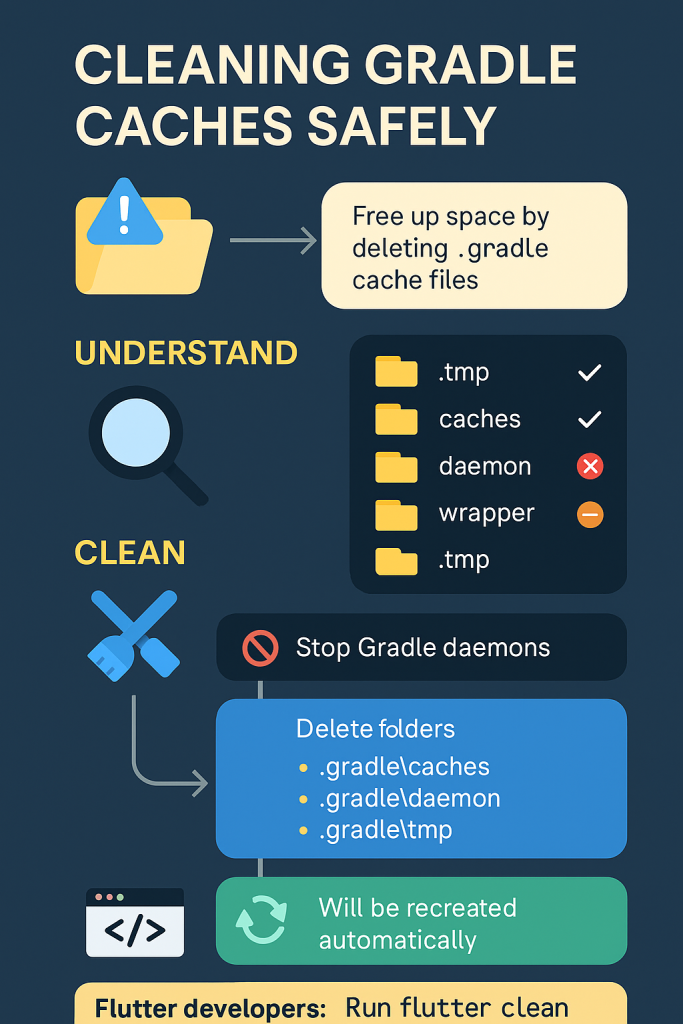
If you develop Android or Flutter apps on Windows, chances are your C:\Users\<username>\.gradle folder has quietly grown to consume tens of gigabytes. It’s normal — Gradle stores downloaded dependencies, compiled caches, and temporary build files there.
But after months (or years) of active development, you can reclaim 10–35 GB of space safely without breaking your setup.
This tutorial explains, step-by-step, how to safely clean up Gradle and Flutter caches, understand what each folder does, and use simple scripts to automate it.
Locating the .gradle Directory
On Windows, the Gradle home directory lives here:
C:\Users\<your-username>\.gradle
In your case:
C:\Users\ashwa\.gradle
When you open it, you’ll see folders such as:
.tmp
android
caches
daemon
jdks
kotlin-profile
native
notifications
workers
wrapper
android.lock
Each of these has a purpose — some can be safely deleted, others should remain.
Understanding Each Folder (and What’s Safe to Delete)
| Folder | Purpose | Can I Delete It? | Notes |
|---|---|---|---|
.tmp | Temporary Gradle files | ✅ Safe | Will be recreated automatically |
caches | Stores old build caches, plugin downloads, dependency jars | ✅ Safe | Frees 10–20 GB |
daemon | Background Gradle processes | ✅ Safe | Stop Gradle first (gradle --stop) |
native | Native build artifacts | ✅ Safe | Regenerated when needed |
workers | Metadata about worker threads | ✅ Safe | Recreated automatically |
jdks | Gradle-downloaded JDKs | ⚠️ Partially safe | Keep one version currently in use |
android | Android build system files | ⚠️ Keep | Needed if you build Android apps |
wrapper | Gradle wrapper distributions | ❌ Keep | Used for project version matching |
notifications | Build-related notifications | ✅ Safe | Recreated as needed |
android.lock | Lock file | ✅ Safe | Usually 0 KB; harmless to delete |
Cleaning Gradle Caches Safely
Before deleting anything, close Android Studio, VS Code, and all Flutter terminals to prevent Gradle from running in the background.
Option A — Command-Line Cleanup (Recommended)
Open PowerShell or Command Prompt:
# Stop all Gradle daemons
gradle --stop

# Remove unnecessary Gradle folders
rd /s /q "%USERPROFILE%\.gradle\caches"
rd /s /q "%USERPROFILE%\.gradle\daemon"
rd /s /q "%USERPROFILE%\.gradle\native"
rd /s /q "%USERPROFILE%\.gradle\workers"
rd /s /q "%USERPROFILE%\.gradle\.tmp"
Gradle will rebuild everything it needs automatically the next time you build a project.
Option B — Manual Deletion
If you prefer a graphical approach:
- Open
C:\Users\ashwa\.gradlein File Explorer. - Select and delete the folders:
caches daemon native workers .tmp - Empty the Recycle Bin.
That’s it — your next Gradle or Flutter build will recreate the necessary files.
How Gradle and Flutter Rebuild Caches Automatically
When you delete .gradle\caches and .gradle\.tmp, Gradle doesn’t lose critical project data — it simply removes downloaded and compiled artifacts.
At your next build or flutter run, Gradle:
- Checks which dependencies are needed.
- Re-downloads them from Maven or Google repositories.
- Re-compiles and caches them locally again.
This first build after cleanup might take a bit longer (since it’s downloading fresh artifacts), but everything remains 100 % functional.
Cleaning Flutter-Specific Caches
Flutter maintains its own package and build cache separately.
To clear it:
flutter clean
flutter pub cache repair
If you want a deeper cleanup:
rd /s /q "%APPDATA%\Pub\Cache\git"
rd /s /q "%APPDATA%\Pub\Cache\hosted"
These commands remove old package versions from your Dart/Flutter cache.
Managing Old Gradle Versions in the Wrapper
You may also notice inside:
C:\Users\ashwa\.gradle\wrapper\dists
that there are many folders like:
gradle-5.4.1-all
gradle-6.8-all
gradle-7.6.3-bin
gradle-8.10-all
gradle-8.12-all
...
Each folder corresponds to a Gradle version downloaded by your projects’ wrappers.
Every project includes a file:
<project>\gradle\wrapper\gradle-wrapper.properties
Inside, you’ll find a line like:
distributionUrl=https\://services.gradle.org/distributions/gradle-8.7-bin.zip
This tells you which version your project uses.
If all your current projects use Gradle 8.x, you can safely delete older 5.x, 6.x, 7.x folders. Gradle will re-download any missing version automatically if a project requires it later.
PowerShell Script to Automate Cleanup
You can create a script cleanup-gradle.ps1 that performs the cleanup automatically:
Write-Host "Stopping Gradle daemons..."
gradle --stop 2>$null

$paths = @(
  "$env:USERPROFILE\.gradle\caches",
  "$env:USERPROFILE\.gradle\daemon",
  "$env:USERPROFILE\.gradle\native",
  "$env:USERPROFILE\.gradle\workers",
  "$env:USERPROFILE\.gradle\.tmp"
)

foreach ($p in $paths) {
  if (Test-Path $p) {
    Write-Host "Removing $p"
    Remove-Item -Recurse -Force $p
  }
}

Write-Host "Gradle cleanup complete ✅"
To run it:
- Save the script as
cleanup-gradle.ps1. - Right-click → Run with PowerShell.
- Wait for it to finish.
This script only removes safe folders — you keep your Android, wrapper, and JDK files intact.
Cleaning Up Old Gradle Distributions Automatically
To go further, here’s an advanced PowerShell snippet that deletes all old Gradle versions (below 8.x) or unused ones automatically:
# Adjust this to where your projects are located
$Root = "C:\Users\ashwa"

gradle --stop 2>$null

# Detect versions actually in use by your projects
$wrappers = Get-ChildItem -Path $Root -Filter gradle-wrapper.properties -Recurse -ErrorAction SilentlyContinue
$inUse = [System.Collections.Generic.HashSet[string]]::new()
$wrappers | ForEach-Object {
  $text = Get-Content $_.FullName -Raw
  if ($text -match 'gradle-([0-9]+\.[0-9]+(\.[0-9]+)?)\-(all|bin)\.zip') {
    $null = $inUse.Add($Matches[1])
  }
}

Write-Host "Gradle versions referenced by your projects:" ($inUse | Sort-Object)

$dists = Join-Path $env:USERPROFILE ".gradle\wrapper\dists"
$toDelete = Get-ChildItem $dists -Directory | Where-Object {
  if ($_.Name -match 'gradle-([0-9]+)\.([0-9]+)(\.[0-9]+)?-') {
    $major = [int]$Matches[1]
    $ver = "$($Matches[1]).$($Matches[2])"
    -not $inUse.Contains($ver) -or $major -lt 8
  }
}

# Preview first
$toDelete | Select-Object -ExpandProperty FullName
# Remove -WhatIf to actually delete
$toDelete | ForEach-Object { Remove-Item $_.FullName -Recurse -Force -WhatIf }
Run once with -WhatIf to preview, then again without it to delete for real.
Extra Space-Saving Tips for Developers
To reclaim even more space:
| Component | Typical Location | Safe Cleanup Action |
|---|---|---|
| Android SDK | %LOCALAPPDATA%\Android\Sdk | Delete old system images & unused build-tools |
| Temp files | %LOCALAPPDATA%\Temp | Use Disk Cleanup or manually delete |
| npm cache | %APPDATA%\npm-cache | npm cache clean --force |
| VS Code cache | %APPDATA%\Code\Cache | Safe to delete |
| Docker images | if you use Docker | docker system prune -a |
Expected Space Savings
| Cleanup Type | Approx. Space Recovered |
|---|---|
.gradle\caches | 10–20 GB |
| Flutter pub cache | 1–5 GB |
| Android SDK cleanup | 5–10 GB |
| Windows temp & others | 2–5 GB |
Total potential reclaimed: 20–35 GB.
After Cleanup — What to Expect
- First Gradle or Flutter build will take longer since dependencies are re-downloaded.
- After the first build, performance returns to normal.
- All deleted folders will reappear as Gradle rebuilds what’s needed.
- You’ll enjoy a lighter, cleaner development environment with plenty of disk space reclaimed.
Summary
Cleaning Gradle and Flutter caches is completely safe as long as you understand what each folder does.
You can always delete:
.gradle\caches.gradle\.tmp.gradle\daemon.gradle\native.gradle\workers- Old Gradle versions (5.x, 6.x, 7.x) under
.gradle\wrapper\dists
Gradle and Flutter will automatically restore anything necessary.
Performing this maintenance once every few months is a great habit for keeping your Windows development machine healthy and responsive.
