Limited Time Offer!
For Less Than the Cost of a Starbucks Coffee, Access All DevOpsSchool Videos on YouTube Unlimitedly.
Master DevOps, SRE, DevSecOps Skills!
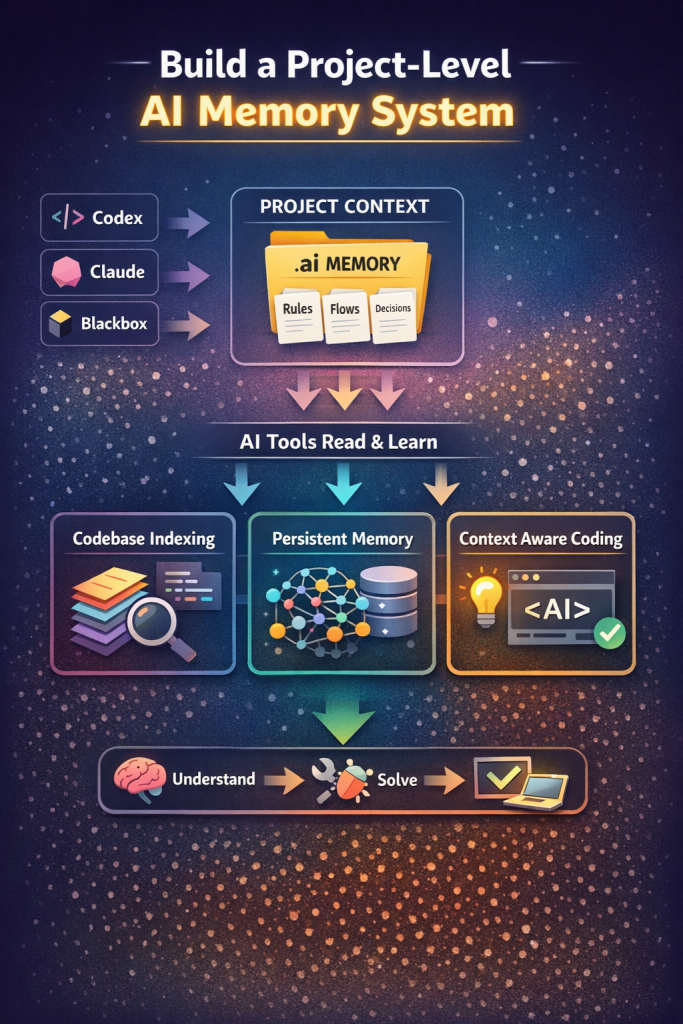
If you are actively using AI coding tools like OpenAI Codex, Claude, or Blackbox AI, you have likely faced a frustrating limitation: once the conversation reaches its token limit or resets, the AI loses all understanding of your project.
This creates a repetitive cycle where you must explain the same architecture, flows, and decisions again and again. For developers working on complex systems such as microservices, authentication flows, or enterprise applications, this becomes a major productivity bottleneck.
The reality is simple. AI tools today are session-based and stateless. They do not remember your project unless you give them structured context every time. The solution is not switching tools, but designing a system where your project itself becomes the source of memory.
This tutorial will guide you step-by-step to build a practical, scalable, and free solution that allows AI tools to behave like they understand your project from the start, without repeating yourself.
Understanding the Core Problem
Before jumping into solutions, it is important to understand what is actually happening.
AI tools operate within a limited context window. They can only process the information you provide in the current session. Once the session ends or the token limit is reached, that context disappears.
This leads to three major issues:
- Loss of architectural understanding
- Repeated explanations across tools
- Inconsistent outputs due to missing history
Many developers try to solve this by copying entire conversations, but that is inefficient and does not scale.
The correct approach is to convert conversations into structured project knowledge.
The Real Solution: Project-Level AI Memory System
Instead of relying on chat history, you build a system where:
- Your project stores its own knowledge
- AI tools read that knowledge automatically
- Context is reusable across all tools
This approach is used by experienced engineers working with AI at scale.
Step 1: Shift from Conversation to Structured Knowledge
The biggest mistake developers make is treating AI conversations as memory.
Conversations are temporary. Decisions are permanent.
Instead of saving chats, extract key outcomes such as:
- Architecture decisions
- Flow definitions
- API structures
- Debugging insights
This becomes your project memory.
Step 2: Create a Dedicated AI Memory Layer in Your Project
Inside your project root, create a structured directory:
.ai/
Inside this folder, create the following files:
.ai/
  rules.md
  flows.md
  decisions.md
  context.md
Each file serves a specific purpose.
Step 3: Define Clear Project Rules
In rules.md, define how your project operates.
Example:
Project Rules:

- Use Keycloak for authentication
- Avoid direct Laravel authentication
- Use Redis for caching
- APIs follow /api/v1 structure
- Maintain microservice architecture
This file ensures that every AI tool follows the same standards.
Step 4: Document System Flows
In flows.md, describe how your system works.
Example:
Authentication Flow:

1. User logs in via Keycloak
2. Token is generated
3. Token stored in session
4. Silent SSO is used for re-authentication

OTP Flow:

1. Generate OTP
2. Store in cache (10 minutes)
3. Verify OTP
4. Allow password setup
Flows replace long explanations and allow AI to instantly understand system behavior.
Step 5: Capture Engineering Decisions
In decisions.md, store all important technical decisions.
Example:
Decisions:

- Selected Keycloak for centralized authentication
- Implemented Redis to reduce database load
- Reduced repeated SSO checks to improve performance
This is the most powerful file. It tells AI why things are built a certain way.
Step 6: Maintain a High-Level Context File
In context.md, provide a summary of your project.
Example:
Project Overview:

- Healthcare platform with multiple services
- Includes patients, doctors, hospitals
- Built using Laravel microservices
- Authentication handled via Keycloak
- Current issue: slow homepage due to repeated SSO checks
This acts as an entry point for any AI tool.
Step 7: Use AI Tools That Understand Codebases
To make this system effective, use tools that can read your entire project.
Two highly effective options are:
- Cursor IDE
- Continue.dev
These tools:
- Analyze your full codebase
- Read markdown files
- Provide context-aware responses
When combined with your .ai folder, they behave like persistent project assistants.
Step 8: Standardize Your Prompt for All Tools
Whenever you switch tools, use a consistent instruction:
Read the entire project including the .ai folder.
Understand flows, rules, and decisions before answering.

Now solve:
[Your problem]
This removes the need to re-explain anything.
Step 9: Convert Conversations into Knowledge (Critical Step)
After every AI interaction, do not save the chat. Instead:
- Extract the solution
- Update the relevant file
For example:
If you fix an OTP issue, update:
- flows.md (if flow changed)
- decisions.md (if logic changed)
This keeps your project intelligence up to date.
Step 10: Optional Advanced Setup (For Serious Engineers)
If you want to go further, you can build a memory system using:
- Vector databases (for semantic search)
- Redis (for fast retrieval)
- LangChain (for context management)
This allows your system to:
- Retrieve relevant past decisions
- Inject them automatically into AI prompts
At this stage, your project becomes a true AI-powered system.
Why This Approach Works
This method solves all your original problems:
- No repeated explanations
- Works across all AI tools
- Scales with project complexity
- Improves AI accuracy over time
Instead of relying on chat memory, you build a system where memory is part of your project.
Common Mistakes to Avoid
Avoid these patterns:
Relying on chat history
Copy-pasting entire conversations
Switching tools without structured context
Writing unstructured notes
These approaches do not scale and will continue to waste time.
Real-World Workflow
A professional workflow looks like this:
Start working in your AI tool
Discuss problem and get solution
Extract key points
Update .ai files
Continue development
When switching tools, simply instruct the new AI to read the project.
No repetition is required.
Final Thoughts
The problem you are facing is not a limitation of any single AI tool. It is a limitation of how AI systems are designed today.
The solution is not to find a better AI tool, but to create a better system around AI.
Once you implement a project-level memory structure, your workflow changes completely. AI tools stop behaving like temporary assistants and start acting like engineers who understand your system.
This is how experienced developers are scaling AI usage in real-world projects today.