Skip to content
Menu
DevSecOps Now!!!
  • About
  • Certifications
  • Contact
  • Courses
  • DevSecOps Consulting
  • DevSecOps Tools
  • Training
  • Tutorials
DevSecOps Now!!!

Top 10 Commands with explanation of “dpkg-query” commands

Posted on February 4, 2025

Limited Time Offer!

For Less Than the Cost of a Starbucks Coffee, Access All DevOpsSchool Videos on YouTube Unlimitedly.
Master DevOps, SRE, DevSecOps Skills!
Enroll Now

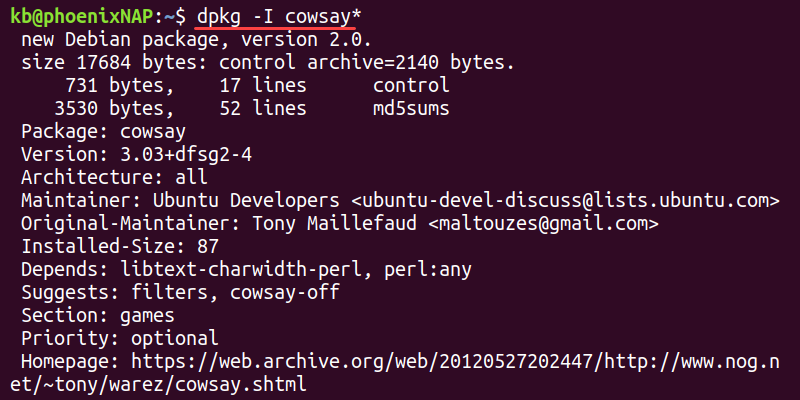
The dpkg-query command is used in Debian-based Linux distributions (like Ubuntu, Debian, Kali Linux) to query the dpkg database for information about installed packages. It is useful when you need to check package details, file locations, or dependencies.

Unlike dpkg, which is mainly used for installing or removing packages, dpkg-query is purely for querying the package database.


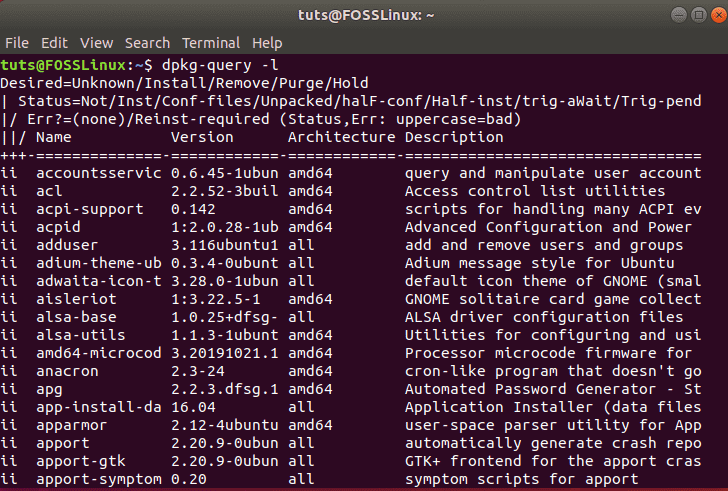
1. List All Installed Packages

dpkg-query -l

โœ” What it does:

  • -l โ†’ Lists all installed packages with their status, version, and architecture.

๐Ÿ“Œ Example Output:

ii  git                      2.34.1         amd64
ii  google-chrome-stable     96.0.4664.45   amd64
ii  apache2                  2.4.41-4ubuntu amd64
  • ii โ†’ Means the package is installed properly.
  • rc โ†’ Means the package was removed, but config files remain.

๐Ÿ’ก Great for checking which packages are installed on your system.


2. Check If a Specific Package is Installed

dpkg-query -l package-name

โœ” What it does:

  • Searches for a specific package in the installed package list.

๐Ÿ“Œ Example:

dpkg-query -l git

๐Ÿ“Œ Output (if installed):

ii  git  2.34.1  amd64  Distributed version control system

๐Ÿ“Œ If the package is not installed, output:

No packages found matching git.

๐Ÿ’ก Useful before installing a package to see if it’s already installed.


3. Get Detailed Information About a Package

dpkg-query -s package-name

โœ” What it does:

  • -s (status) โ†’ Displays detailed information about the installed package.

๐Ÿ“Œ Example:

dpkg-query -s apache2

๐Ÿ“Œ Output Example:

Package: apache2
Status: install ok installed
Version: 2.4.41-4ubuntu
Architecture: amd64
Maintainer: Ubuntu Developers
Description: Apache HTTP Server

๐Ÿ’ก Useful for checking the installed version, maintainer, and description.


4. List Files Installed by a Package

dpkg-query -L package-name

โœ” What it does:

  • -L (list files) โ†’ Shows all files installed by a package.

๐Ÿ“Œ Example:

dpkg-query -L apache2

๐Ÿ“Œ Sample Output:

/.
/etc/apache2
/etc/apache2/apache2.conf
/usr/sbin/apache2
/usr/lib/apache2

๐Ÿ’ก Useful when searching for a packageโ€™s configuration files or executables.


5. Find the Package That Owns a Specific File

dpkg-query -S /path/to/file

โœ” What it does:

  • -S (search) โ†’ Finds which installed package owns a specific file.

๐Ÿ“Œ Example:

dpkg-query -S /usr/bin/git

๐Ÿ“Œ Output:

git: /usr/bin/git

๐Ÿ’ก Useful for discovering which package installed a particular file.


6. Show Package Dependencies

dpkg-query -W -f='${Package} ${Depends}\n' package-name

โœ” What it does:

  • -W โ†’ Queries the package database.
  • -f='${Package} ${Depends}\n' โ†’ Formats the output to show package dependencies.

๐Ÿ“Œ Example:

dpkg-query -W -f='${Package} ${Depends}\n' apache2

๐Ÿ“Œ Output Example:

apache2 apache2-bin, apache2-data, apache2-utils

๐Ÿ’ก Useful for checking dependencies before installing or troubleshooting missing packages.


7. Check Package Version

dpkg-query -W -f='${Package} ${Version}\n' package-name

โœ” What it does:

  • Retrieves the installed version of a package.

๐Ÿ“Œ Example:

dpkg-query -W -f='${Package} ${Version}\n' firefox

๐Ÿ“Œ Output:

firefox 96.0+build1-0ubuntu

๐Ÿ’ก Helps to check if you need an update.


8. List Only Installed Packages (No Removed or Config Leftovers)

dpkg-query -W -f='${db:Status-Status}\t${Package}\n' | grep installed

โœ” What it does:

  • Filters the list to show only installed packages, excluding removed ones.

๐Ÿ“Œ Example Output:

installed  git
installed  apache2
installed  vim

๐Ÿ’ก Useful for listing active installed packages only.


9. List Installed Packages with Specific Architecture

dpkg-query -l | grep :amd64

โœ” What it does:

  • Filters installed packages by architecture (e.g., amd64, i386, arm64).

๐Ÿ“Œ Example Output:

ii  firefox:amd64   96.0+build1-0ubuntu  amd64
ii  google-chrome-stable:amd64  96.0.4664.45   amd64

๐Ÿ’ก Useful for checking which packages are installed for a specific CPU architecture.


10. Export Installed Packages List

dpkg-query -W -f='${Package}\n' > installed_packages.txt

โœ” What it does:

  • Exports a list of installed packages into installed_packages.txt.

๐Ÿ“Œ To restore on another system:

xargs sudo apt install -y < installed_packages.txt

๐Ÿ’ก Great for backups or system migration.


Final Thoughts

  • dpkg-query is powerful for searching and analyzing installed packages.
  • Itโ€™s faster than dpkg when querying package details.
  • Combine it with grep, awk, or cut for advanced filtering.
Post Views: 2,030
  • Commands
  • dpkg-query
  • dpkg-query command
  • Top 10 Commands
  • Top 10 Commands with explanation of "dpkg-query" command
  • Top 10 Linux Commands
Subscribe
Login
Notify of
guest
guest
0 Comments
Oldest
Newest Most Voted
Inline Feedbacks
View all comments
  • The Ultimate Guide to Certified FinOps Professional: Skills, Levels, and Career Impact
  • Certified FinOps Manager: Essential Skills for Modern Cloud Operations
  • How to Use Claude AI for Programming: Complete Guide for Developers to Boost Productivity
  • The Definitive Guide to Certified FinOps Engineer: Master Cloud Value Engineering
  • A Comprehensive Guide to the Certified FinOps Architect Certification and Training
  • Linux Server Diagnostic Commands: Complete Guide for Performance, Network & System Troubleshooting
  • The Ultimate Guide to CDOM โ€“ Certified DataOps Manager Certification
  • The Practical Path to AI Reliability: A Guide to the Certified MLOps Manager
  • Master the Machine Learning Lifecycle:Guide to Becoming a Certified MLOps Architect
  • How to Build a Project-Level AI Memory System That Works Across Codex, Claude, and Other AI Coding Tools
  • Certified MLOps Professional: A Deep Dive into the Certified MLOps Professional Certification
  • Certified MLOps Engineer : The Comprehensive Guide to Mastering Machine Learning Operations
  • Codex vs Claude: A Complete Practical Guide for Modern Developers (2026)
  • Certified AIOps Professional Program A Guide to Career Growth
  • Keycloak Multi-Client Architecture with Project-Based Email Validation (Student, Trainer, Company, Consulting)
  • Incorrect definition of table mysql.column_stats
  • Mautic and PHP 8.3 Compatibility Guide (2026)
  • Certified AIOps Engineer: The Complete Career Path and Certification Guide
  • How to Rename Apache Virtual Host Files Safely (Step-by-Step Guide for Linux)
  • AIOps Foundation Certification: Everything You Need to Know to Get Certified
  • DevOps to Certified Site Reliability Professional: A Senior Mentorโ€™s Guide
  • Certified Site Reliability Manager Training, Preparation, and Career Mapping
  • Certified Site Reliability Architect: The Complete Career Guide
  • What Is a VPN? A Complete Beginner-to-Advanced Tutorial
  • How to Install, Secure, and Tune MySQL 8.4 on Ubuntu 24.04 for Apache Event MPM and PHP-FPM
  • Complete Guide to Certified Site Reliability Engineer Career
  • Certified DevSecOps Professional Step by Step
  • Certified DevSecOps Manager: Complete Career Guide
  • Certified DevSecOps Engineer: Skills, Career Path and Certification Guide
  • Step-by-Step: Become a Certified DevSecOps Architect

Recent Comments

  1. emmy day on SQLSTATE[42S22]: Column not found: 1054 Unknown column ‘provider’ in ‘field list’
  2. digital banking on Complete Tutorial: Setting Up Laravel Telescope Correctly (Windows + XAMPP + Custom Domain)
  3. SAHIL DHINGRA on How to Uninstall Xampp from your machine when it is not visible in Control panel programs & Feature ?
  4. Abhishek on MySQL: List of Comprehensive List of approach to secure MySQL servers.
  5. Kristina on Best practices to followed in .httacess to avoid DDOS attack?

Archives

  • May 2026
  • April 2026
  • March 2026
  • February 2026
  • January 2026
  • December 2025
  • November 2025
  • October 2025
  • September 2025
  • August 2025
  • July 2025
  • June 2025
  • May 2025
  • April 2025
  • March 2025
  • February 2025
  • January 2025
  • December 2024
  • November 2024
  • October 2024
  • September 2024
  • August 2024
  • July 2024
  • June 2024
  • May 2024
  • April 2024
  • March 2024
  • February 2024
  • January 2024
  • December 2023
  • November 2023
  • October 2023
  • September 2023
  • August 2023
  • July 2023
  • May 2023
  • April 2023
  • March 2023
  • February 2023
  • January 2023
  • December 2022

Categories

  • Ai
  • AI Blogging
  • AiOps
  • ajax
  • Android Studio
  • Antimalware
  • Antivirus
  • Apache
  • Api
  • API Security
  • Api Testing
  • APK
  • Aws
  • Bike Rental Services
  • ChatGPT
  • Code Linting
  • Composer
  • cPanel
  • Cyber Threat Intelligence
  • Cybersecurity
  • Data Loss Prevention
  • Database
  • dataops
  • Deception Technology
  • DeepSeek
  • Devops
  • DevSecOps
  • DevTools
  • Digital Asset Management
  • Digital Certificates
  • Docker
  • Drupal
  • emulator
  • Encryption Tools
  • Endpoint Security Tools
  • Error
  • facebook
  • Firewalls
  • Flutter
  • git
  • GITHUB
  • Google Antigravity
  • Google play console
  • Google reCAPTCHA
  • Gradle
  • Guest posting
  • health and fitness
  • IDE
  • Identity and Access Management
  • Incident Response
  • Instagram
  • Intrusion Detection and Prevention Systems
  • jobs
  • Joomla
  • Keycloak
  • Laravel
  • Law News
  • Lawyer Discussion
  • Legal Advice
  • Linkedin
  • Linkedin Api
  • Linux
  • Livewire
  • Mautic
  • Medical Tourism
  • MlOps
  • MobaXterm
  • Mobile Device Management
  • Multi-Factor Authentication
  • MySql
  • Network Traffic Analysis tools
  • Paytm
  • Penetration Testing
  • php
  • PHPMyAdmin
  • Pinterest Api
  • Quora
  • SAST
  • SecOps
  • Secure File Transfer Protocol
  • Security Analytics Tools
  • Security Auditing Tools
  • Security Information and Event Management
  • Seo
  • Server Management Tools
  • Single Sign-On
  • Site Reliability Engineering
  • soft 404
  • software
  • SuiteCRM
  • SysOps
  • Threat Model
  • Twitter
  • Twitter Api
  • ubuntu
  • Uncategorized
  • Virtual Host
  • Virtual Private Networks
  • VPNs
  • Vulnerability Assessment Tools
  • Web Application Firewalls
  • Windows Processor
  • Wordpress
  • WSL (Windows Subsystem for Linux)
  • X.com
  • Xampp
  • Youtube
©2026 DevSecOps Now!!! | WordPress Theme: EcoCoded
wpDiscuz