Limited Time Offer!
For Less Than the Cost of a Starbucks Coffee, Access All DevOpsSchool Videos on YouTube Unlimitedly.
Master DevOps, SRE, DevSecOps Skills!
Want to open a URL like https://www.wizbrand.com/login directly in a mobile browser from your Flutter app?
What You Want:
When a user clicks a button in your Flutter app, the app should open the website in Chrome (Android), Safari (iOS), or another browser — outside of your app.
The Right Way to Do It (Step-by-Step)
1. Install url_launcher Package
Open your pubspec.yaml and add:
dependencies:
  url_launcher: ^6.2.5  # Or latest version
Then run:
flutter pub get
2. Import the Package
In the Dart file where you want to open the browser, import:
import 'package:url_launcher/url_launcher.dart';
3. Write the Function (THE RIGHT WAY)
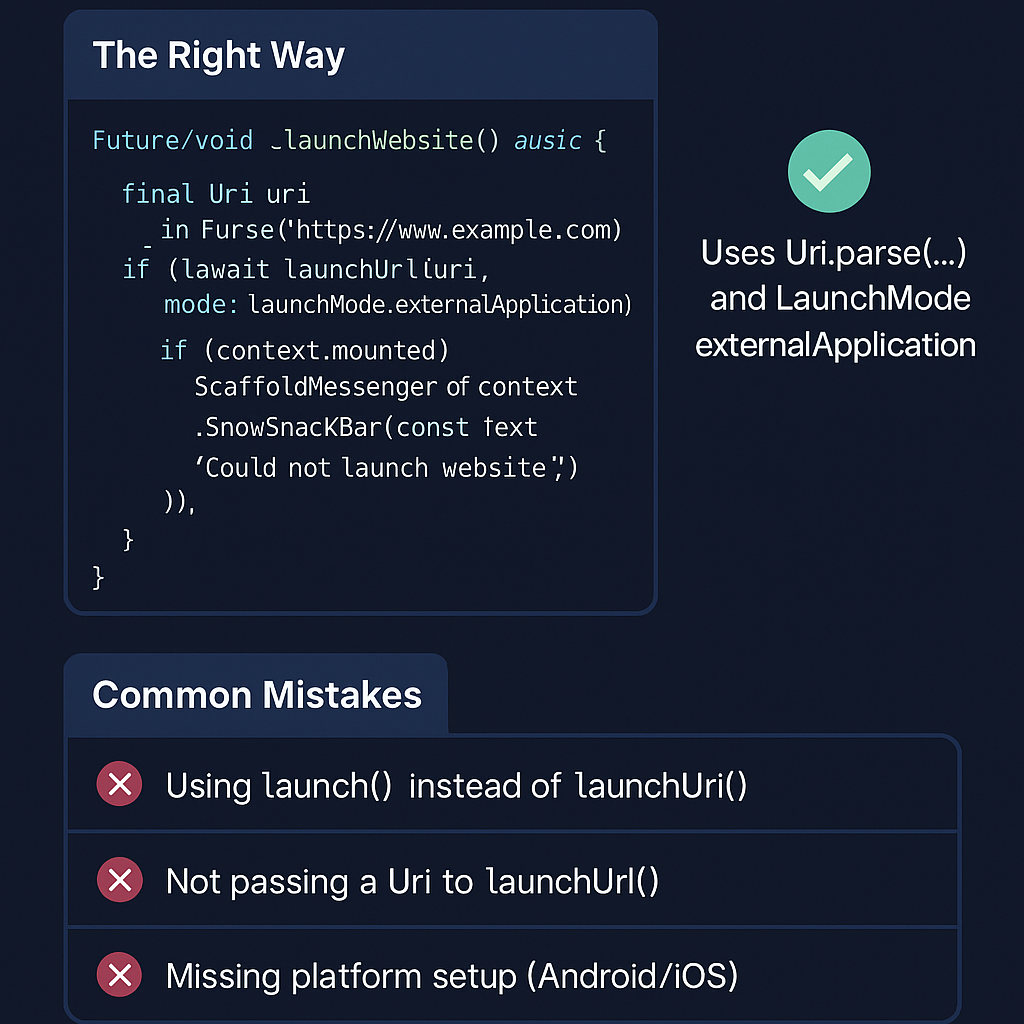
Here’s the correct and safe way to launch a website in the browser:
Future<void> _launchWebsite() async {
  final Uri uri = Uri.parse('https://www.wizbrand.com/login');

  if (!await launchUrl(uri, mode: LaunchMode.externalApplication)) {
    if (context.mounted) {
      ScaffoldMessenger.of(context).showSnackBar(
        const SnackBar(content: Text('Could not launch website')),
      );
    }
  }
}
Why This Works:
Uri.parse(...)ensures the URL is valid and safe.launchUrl(..., mode: LaunchMode.externalApplication)tells Flutter to open it in a browser, not inside your app.context.mountedavoids errors when showingSnackBarafter the widget is disposed.SnackBarprovides user feedback if something goes wrong.
4. Call It From a Button
ElevatedButton(
  onPressed: _launchWebsite,
  child: Text('Open Wizbrand Login'),
)
The WRONG Way (Common Mistakes to Avoid)
Mistake 1: Using launch Instead of launchUrl
// ❌ Deprecated or outdated
await launch('https://www.wizbrand.com');
👉 This used to work in older versions of url_launcher, but it’s now outdated.
Mistake 2: Not Using Uri.parse(...)
// ❌ Wrong: passing a String instead of Uri
await launchUrl('https://www.wizbrand.com');
Will give a type error — launchUrl() needs a Uri, not a plain string.
Mistake 3: Forgetting Platform Permissions
If you don’t do platform setup, it won’t open on Android/iOS.
Android:
In android/app/src/main/AndroidManifest.xml:
<uses-permission android:name="android.permission.INTERNET"/>
Also, ensure your minSdkVersion is at least 21 in build.gradle.
iOS:
In ios/Runner/Info.plist, add:
<key>LSApplicationQueriesSchemes</key>
<array>
  <string>https</string>
</array>
<key>NSAppTransportSecurity</key>
<dict>
  <key>NSAllowsArbitraryLoads</key>
  <true/>
</dict>
Bonus: Clickable Text URL
Want to make a text link clickable too?
InkWell(
  onTap: _launchWebsite,
  child: Text(
    'www.wizbrand.com/login',
    style: TextStyle(
      color: Colors.blue,
      decoration: TextDecoration.underline,
    ),
  ),
)
Final Thoughts
Opening URLs in the browser may seem small, but doing it the right way ensures:
- Users get a smooth experience
- Your app works on all platforms (Android, iOS, Web)
- You’re future-proof with Flutter’s latest standards