Skip to content
Menu
DevSecOps Now!!!
  • About
  • Certifications
  • Contact
  • Courses
  • DevSecOps Consulting
  • DevSecOps Tools
  • Training
  • Tutorials
DevSecOps Now!!!

Flutter Tutorial: How to Open a Website in the Browser

Posted on June 13, 2025

Limited Time Offer!

For Less Than the Cost of a Starbucks Coffee, Access All DevOpsSchool Videos on YouTube Unlimitedly.
Master DevOps, SRE, DevSecOps Skills!
Enroll Now

Want to open a URL like https://www.wizbrand.com/login directly in a mobile browser from your Flutter app?


What You Want:

When a user clicks a button in your Flutter app, the app should open the website in Chrome (Android), Safari (iOS), or another browser โ€” outside of your app.


The Right Way to Do It (Step-by-Step)

1. Install url_launcher Package

Open your pubspec.yaml and add:

dependencies:
  url_launcher: ^6.2.5  # Or latest version

Then run:

flutter pub get

2. Import the Package

In the Dart file where you want to open the browser, import:

import 'package:url_launcher/url_launcher.dart';

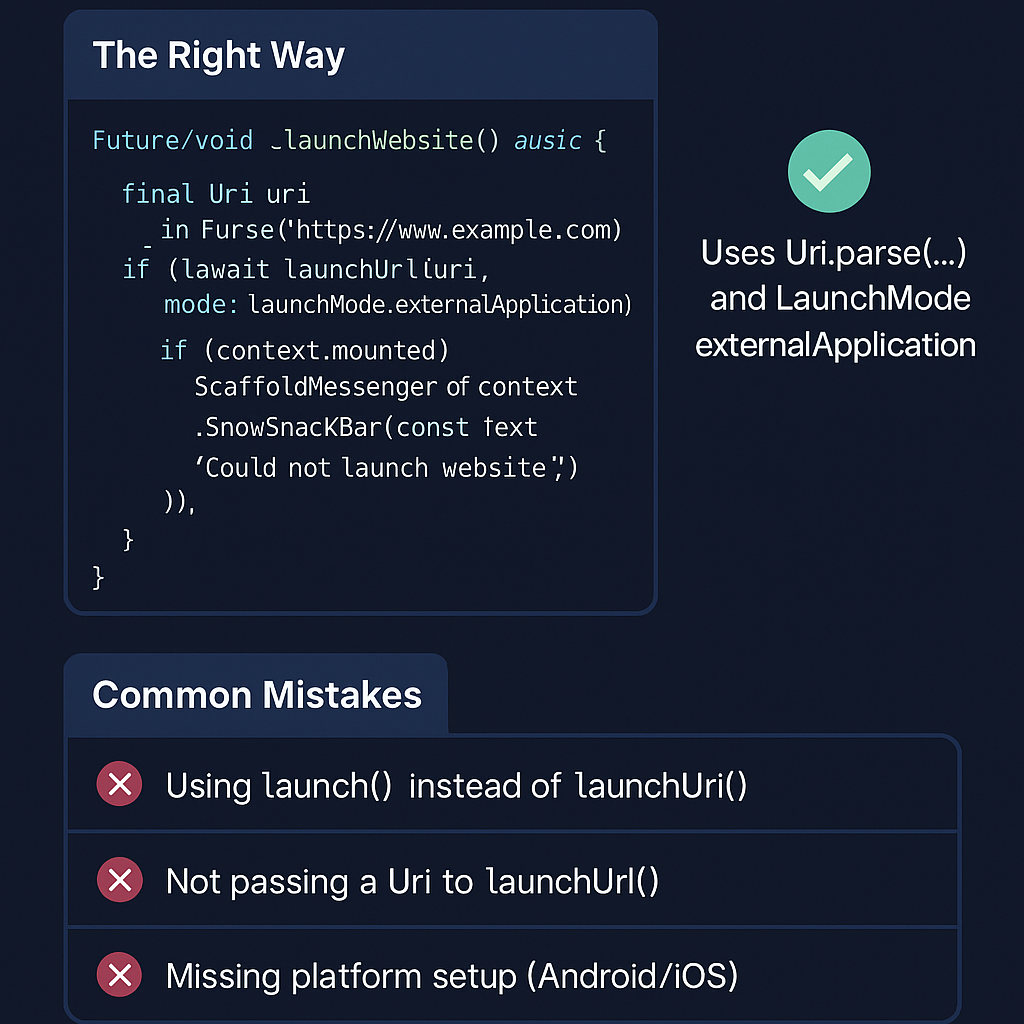
3. Write the Function (THE RIGHT WAY)

Hereโ€™s the correct and safe way to launch a website in the browser:

Future<void> _launchWebsite() async {
  final Uri uri = Uri.parse('https://www.wizbrand.com/login');

  if (!await launchUrl(uri, mode: LaunchMode.externalApplication)) {
    if (context.mounted) {
      ScaffoldMessenger.of(context).showSnackBar(
        const SnackBar(content: Text('Could not launch website')),
      );
    }
  }
}

Why This Works:

  • Uri.parse(...) ensures the URL is valid and safe.
  • launchUrl(..., mode: LaunchMode.externalApplication) tells Flutter to open it in a browser, not inside your app.
  • context.mounted avoids errors when showing SnackBar after the widget is disposed.
  • SnackBar provides user feedback if something goes wrong.

4. Call It From a Button

ElevatedButton(
  onPressed: _launchWebsite,
  child: Text('Open Wizbrand Login'),
)

The WRONG Way (Common Mistakes to Avoid)

Mistake 1: Using launch Instead of launchUrl

// โŒ Deprecated or outdated
await launch('https://www.wizbrand.com'); 

๐Ÿ‘‰ This used to work in older versions of url_launcher, but it’s now outdated.


Mistake 2: Not Using Uri.parse(...)

// โŒ Wrong: passing a String instead of Uri
await launchUrl('https://www.wizbrand.com'); 

Will give a type error โ€” launchUrl() needs a Uri, not a plain string.


Mistake 3: Forgetting Platform Permissions

If you don’t do platform setup, it wonโ€™t open on Android/iOS.

Android:

In android/app/src/main/AndroidManifest.xml:

<uses-permission android:name="android.permission.INTERNET"/>

Also, ensure your minSdkVersion is at least 21 in build.gradle.


iOS:

In ios/Runner/Info.plist, add:

<key>LSApplicationQueriesSchemes</key>
<array>
  <string>https</string>
</array>
<key>NSAppTransportSecurity</key>
<dict>
  <key>NSAllowsArbitraryLoads</key>
  <true/>
</dict>

Bonus: Clickable Text URL

Want to make a text link clickable too?

InkWell(
  onTap: _launchWebsite,
  child: Text(
    'www.wizbrand.com/login',
    style: TextStyle(
      color: Colors.blue,
      decoration: TextDecoration.underline,
    ),
  ),
)

Final Thoughts

Opening URLs in the browser may seem small, but doing it the right way ensures:

  • Users get a smooth experience
  • Your app works on all platforms (Android, iOS, Web)
  • You’re future-proof with Flutter’s latest standards

Post Views: 911
  • Flutter Tutorial
  • future
  • How to Open a Website in the Browser
  • void
  • Which is Building the Future of Web Applications?
Subscribe
Login
Notify of
guest
guest
0 Comments
Oldest
Newest Most Voted
Inline Feedbacks
View all comments
  • The Master Guide to Immigration Points: Calculating Your Path to Canada, Australia, and Beyond
  • How to Skip the Activation Email and Password Reset After Google Login in Keycloak Auto-Link Existing Users in First Broker Login
  • Free SSL Certificate Generation Tutorial for Any Website Using Certbot and Apache
  • The Ultimate Guide to Certified FinOps Professional: Skills, Levels, and Career Impact
  • Certified FinOps Manager: Essential Skills for Modern Cloud Operations
  • How to Use Claude AI for Programming: Complete Guide for Developers to Boost Productivity
  • The Definitive Guide to Certified FinOps Engineer: Master Cloud Value Engineering
  • A Comprehensive Guide to the Certified FinOps Architect Certification and Training
  • Linux Server Diagnostic Commands: Complete Guide for Performance, Network & System Troubleshooting
  • The Ultimate Guide to CDOM โ€“ Certified DataOps Manager Certification
  • The Practical Path to AI Reliability: A Guide to the Certified MLOps Manager
  • Master the Machine Learning Lifecycle:Guide to Becoming a Certified MLOps Architect
  • How to Build a Project-Level AI Memory System That Works Across Codex, Claude, and Other AI Coding Tools
  • Certified MLOps Professional: A Deep Dive into the Certified MLOps Professional Certification
  • Certified MLOps Engineer : The Comprehensive Guide to Mastering Machine Learning Operations
  • Codex vs Claude: A Complete Practical Guide for Modern Developers (2026)
  • Certified AIOps Professional Program A Guide to Career Growth
  • Keycloak Multi-Client Architecture with Project-Based Email Validation (Student, Trainer, Company, Consulting)
  • Incorrect definition of table mysql.column_stats
  • Mautic and PHP 8.3 Compatibility Guide (2026)
  • Certified AIOps Engineer: The Complete Career Path and Certification Guide
  • How to Rename Apache Virtual Host Files Safely (Step-by-Step Guide for Linux)
  • AIOps Foundation Certification: Everything You Need to Know to Get Certified
  • DevOps to Certified Site Reliability Professional: A Senior Mentorโ€™s Guide
  • Certified Site Reliability Manager Training, Preparation, and Career Mapping
  • Certified Site Reliability Architect: The Complete Career Guide
  • What Is a VPN? A Complete Beginner-to-Advanced Tutorial
  • How to Install, Secure, and Tune MySQL 8.4 on Ubuntu 24.04 for Apache Event MPM and PHP-FPM
  • Complete Guide to Certified Site Reliability Engineer Career
  • Certified DevSecOps Professional Step by Step

Recent Comments

  1. emmy day on SQLSTATE[42S22]: Column not found: 1054 Unknown column ‘provider’ in ‘field list’
  2. digital banking on Complete Tutorial: Setting Up Laravel Telescope Correctly (Windows + XAMPP + Custom Domain)
  3. SAHIL DHINGRA on How to Uninstall Xampp from your machine when it is not visible in Control panel programs & Feature ?
  4. Abhishek on MySQL: List of Comprehensive List of approach to secure MySQL servers.
  5. Kristina on Best practices to followed in .httacess to avoid DDOS attack?

Archives

  • May 2026
  • April 2026
  • March 2026
  • February 2026
  • January 2026
  • December 2025
  • November 2025
  • October 2025
  • September 2025
  • August 2025
  • July 2025
  • June 2025
  • May 2025
  • April 2025
  • March 2025
  • February 2025
  • January 2025
  • December 2024
  • November 2024
  • October 2024
  • September 2024
  • August 2024
  • July 2024
  • June 2024
  • May 2024
  • April 2024
  • March 2024
  • February 2024
  • January 2024
  • December 2023
  • November 2023
  • October 2023
  • September 2023
  • August 2023
  • July 2023
  • May 2023
  • April 2023
  • March 2023
  • February 2023
  • January 2023
  • December 2022

Categories

  • Ai
  • AI Blogging
  • AiOps
  • ajax
  • Android Studio
  • Antimalware
  • Antivirus
  • Apache
  • Api
  • API Security
  • Api Testing
  • APK
  • Aws
  • Bike Rental Services
  • ChatGPT
  • Code Linting
  • Composer
  • cPanel
  • Cyber Threat Intelligence
  • Cybersecurity
  • Data Loss Prevention
  • Database
  • dataops
  • Deception Technology
  • DeepSeek
  • Devops
  • DevSecOps
  • DevTools
  • Digital Asset Management
  • Digital Certificates
  • Docker
  • Drupal
  • emulator
  • Encryption Tools
  • Endpoint Security Tools
  • Error
  • facebook
  • Firewalls
  • Flutter
  • git
  • GITHUB
  • Google Antigravity
  • Google play console
  • Google reCAPTCHA
  • Gradle
  • Guest posting
  • health and fitness
  • IDE
  • Identity and Access Management
  • Incident Response
  • Instagram
  • Intrusion Detection and Prevention Systems
  • jobs
  • Joomla
  • Keycloak
  • Laravel
  • Law News
  • Lawyer Discussion
  • Legal Advice
  • Linkedin
  • Linkedin Api
  • Linux
  • Livewire
  • Mautic
  • Medical Tourism
  • MlOps
  • MobaXterm
  • Mobile Device Management
  • Multi-Factor Authentication
  • MySql
  • Network Traffic Analysis tools
  • Paytm
  • Penetration Testing
  • php
  • PHPMyAdmin
  • Pinterest Api
  • Quora
  • SAST
  • SecOps
  • Secure File Transfer Protocol
  • Security Analytics Tools
  • Security Auditing Tools
  • Security Information and Event Management
  • Seo
  • Server Management Tools
  • Single Sign-On
  • Site Reliability Engineering
  • soft 404
  • software
  • SSL
  • SuiteCRM
  • SysOps
  • Threat Model
  • Twitter
  • Twitter Api
  • ubuntu
  • Uncategorized
  • Virtual Host
  • Virtual Private Networks
  • VPNs
  • Vulnerability Assessment Tools
  • Web Application Firewalls
  • Windows Processor
  • Wordpress
  • WSL (Windows Subsystem for Linux)
  • X.com
  • Xampp
  • Youtube
©2026 DevSecOps Now!!! | WordPress Theme: EcoCoded
wpDiscuz