How to Set path of php version in linux?

Limited Time Offer!

For Less Than the Cost of a Starbucks Coffee, Access All DevOpsSchool Videos on YouTube Unlimitedly.
Master DevOps, SRE, DevSecOps Skills!

Enroll Now

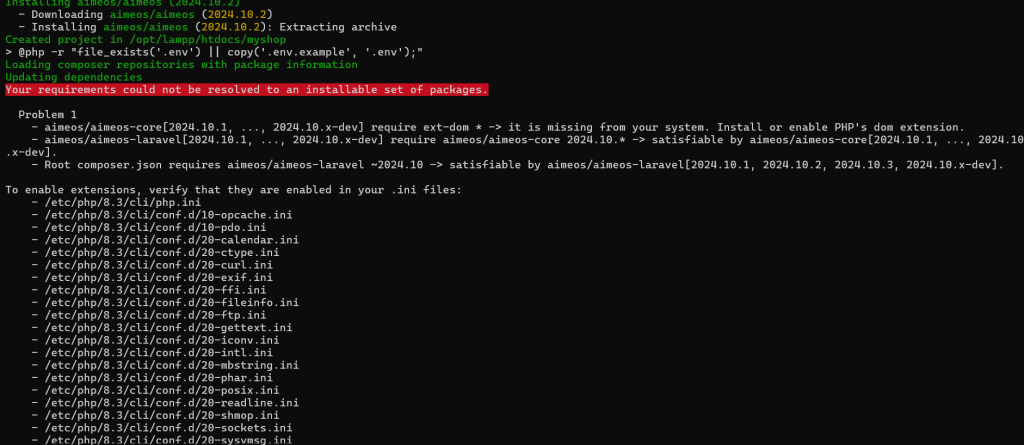
Your system is still using the system-installed PHP (/usr/bin/php) instead of LAMPP’s PHP (/opt/lampp/bin/php). You need to explicitly set LAMPP’s PHP as the default.


Solution: Set LAMPP PHP as Default

Step 1: Update the PATH

Run the following command to add LAMPP’s PHP binary to your shell’s environment:

export PATH=/opt/lampp/bin:$PATH

To make this change permanent, add it to your shell configuration file:

  • For Bash: echo 'export PATH=/opt/lampp/bin:$PATH' >> ~/.bashrc
  • source ~/.bashrc
  • For Zsh (if using Zsh): echo 'export PATH=/opt/lampp/bin:$PATH' >> ~/.zshrc source ~/.zshrc

Step 2: Verify PHP Path

After running the above commands, check if the correct PHP binary is being used:

which php

Expected output:

/opt/lampp/bin/php

Step 3: Check PHP Version

To confirm LAMPP’s PHP version, run:

php -v

It should show the PHP version that comes with LAMPP.

Step 4: Verify php.ini Path

Run:

php --ini

It should now display:

Loaded Configuration File: /opt/lampp/etc/php.ini

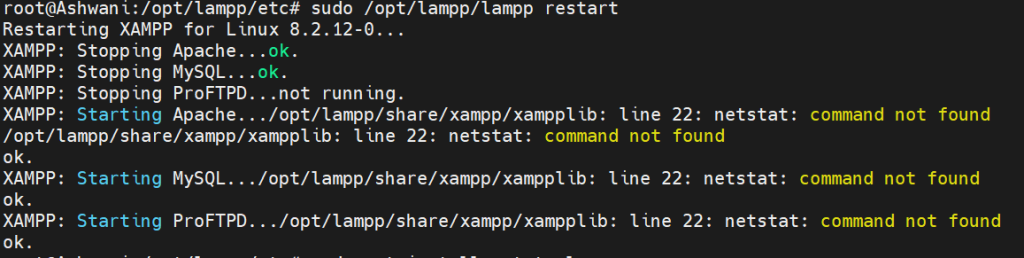
Step 5: Restart LAMPP

Restart LAMPP for the changes to take effect:

sudo /opt/lampp/lampp restart

Alternate Method: Alias (Temporary)

If you don’t want to change system paths permanently, you can use an alias:

alias php='/opt/lampp/bin/php'

To make this alias permanent:

echo "alias php='/opt/lampp/bin/php'" >> ~/.bashrc
source ~/.bashrc

Final Check

After completing the steps, ensure:

which php  # Should return /opt/lampp/bin/php
php --ini  # Should show /opt/lampp/etc/php.ini

Now, LAMPP’s PHP is set as default, and it will use /opt/lampp/etc/php.ini. 🚀

Senior Software Development Engineer at Cotocus

Related Posts

Tuning PHP 8.3 for Apache Event MPM and PHP-FPM on Ubuntu: A Complete Step-by-Step Production Guide

Limited Time Offer! For Less Than the Cost of a Starbucks Coffee, Access All DevOpsSchool Videos on YouTube Unlimitedly. Master DevOps, SRE, DevSecOps Skills! Enroll Now Moving…

Read More

How to Use XAMPP’s PHP and Composer on Linux

Limited Time Offer! For Less Than the Cost of a Starbucks Coffee, Access All DevOpsSchool Videos on YouTube Unlimitedly. Master DevOps, SRE, DevSecOps Skills! Enroll Now XAMPP…

Read More

Complete Guide: How to Download, Install, and Run Drupal

Limited Time Offer! For Less Than the Cost of a Starbucks Coffee, Access All DevOpsSchool Videos on YouTube Unlimitedly. Master DevOps, SRE, DevSecOps Skills! Enroll Now Introduction…

Read More

SuiteCRM Lead Integration with PayPal Payment using PHP

Limited Time Offer! For Less Than the Cost of a Starbucks Coffee, Access All DevOpsSchool Videos on YouTube Unlimitedly. Master DevOps, SRE, DevSecOps Skills! Enroll Now 1….

Read More

require ext-dom * -> it is missing from your system. Install or enable PHP’s dom extension.

Limited Time Offer! For Less Than the Cost of a Starbucks Coffee, Access All DevOpsSchool Videos on YouTube Unlimitedly. Master DevOps, SRE, DevSecOps Skills! Enroll Now Error:-…

Read More

/opt/lampp/share/xampp/xampplib: line 22: netstat: command not found

Limited Time Offer! For Less Than the Cost of a Starbucks Coffee, Access All DevOpsSchool Videos on YouTube Unlimitedly. Master DevOps, SRE, DevSecOps Skills! Enroll Now It…

Read More
Subscribe
Notify of
guest
0 Comments
Oldest
Newest Most Voted
Inline Feedbacks
View all comments