Skip to content
Menu
DevSecOps Now!!!
  • About
  • Certifications
  • Contact
  • Courses
  • DevSecOps Consulting
  • DevSecOps Tools
  • Training
  • Tutorials
DevSecOps Now!!!

SuiteCRM Lead Integration with PayPal Payment using PHP

Posted on May 5, 2025

Limited Time Offer!

For Less Than the Cost of a Starbucks Coffee, Access All DevOpsSchool Videos on YouTube Unlimitedly.
Master DevOps, SRE, DevSecOps Skills!

Enroll Now

1. SuiteCRM Setup

Add a Custom Field: order_id_c

Go to Admin > Studio > Leads > Fields:

  • Create a new Text Field
  • Name: order_id
  • System name: order_id_c
  • Save and deploy

Now your leads_cstm table has the field order_id_c.
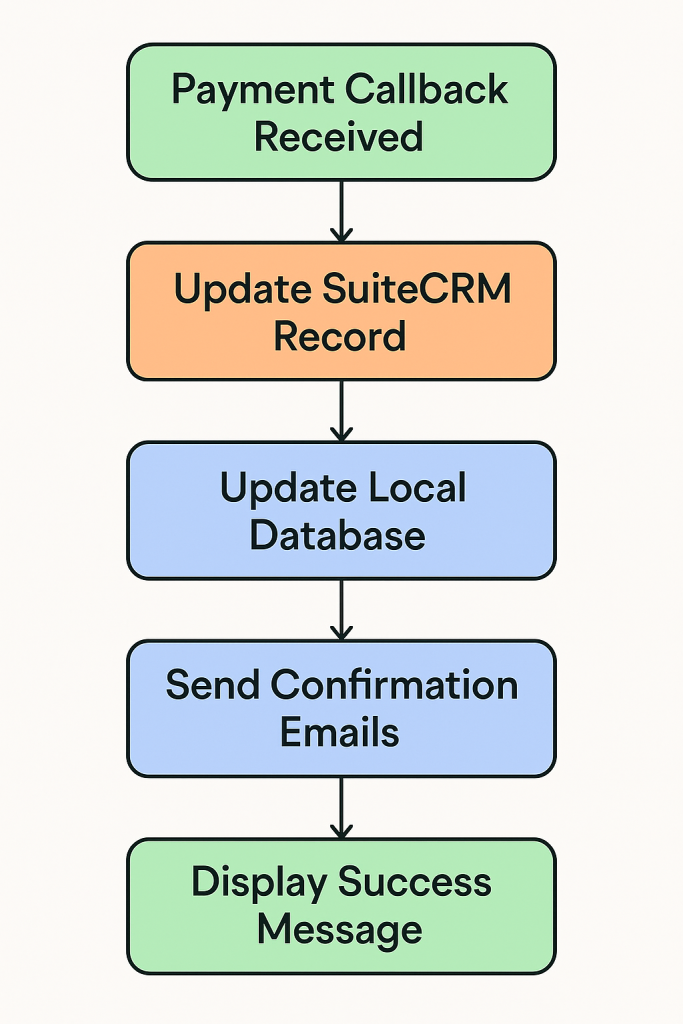

2. PHP File: create_paypal_order.php

This handles:

  • Lead creation
  • Saving to SuiteCRM via WebToPersonCapture.php
  • Creating a PayPal payment order
  • Redirecting to PayPal

Sample Code:

<?php
session_start();
require 'paypal_config.php';

// Collect form data
$first_name = $_POST["first_name"] ?? '';
$last_name = $_POST["last_name"] ?? '';
$email = $_POST["email1"] ?? '';
$phone = $_POST["phone_mobile"] ?? '';
$description = $_POST["description"] ?? '';
$campaign_id = $_POST["campaign_id"] ?? '';
$assigned_user_id = $_POST["assigned_user_id"] ?? '';
$moduleDir = $_POST["moduleDir"] ?? 'Leads';

$order_id = uniqid("ORD_");
$txn_fee = floatval($_POST["amout_paid_c"] ?? 100);
$gst = round($txn_fee * 0.18, 2);
$total = round($txn_fee + $gst, 2);
$create_date = date("Y-m-d");
$payment_status = "Pending";

// Submit lead to SuiteCRM
$crmData = [
    'first_name' => $first_name,
    'last_name' => $last_name,
    'email1' => $email,
    'phone_mobile' => $phone,
    'description' => $description,
    'payment_status_c' => $payment_status,
    'amout_paid_c' => $total,
    'campaign_id' => $campaign_id,
    'assigned_user_id' => $assigned_user_id,
    'order_id_c' => $order_id,
    'moduleDir' => $moduleDir
];

$ch = curl_init("http://your-crm-url.com/index.php?entryPoint=WebToPersonCapture");
curl_setopt($ch, CURLOPT_POST, true);
curl_setopt($ch, CURLOPT_POSTFIELDS, http_build_query($crmData));
curl_setopt($ch, CURLOPT_RETURNTRANSFER, true);
$crmResponse = curl_exec($ch);
curl_close($ch);

// Save to local DB
$conn = new mysqli("localhost", "root", "", "cotocus");
if (!$conn->connect_error) {
    $stmt = $conn->prepare("INSERT INTO payment (create_date, name, email, phone, message, order_id, txn_fee, txn_gst, txn_amount, payment_status) VALUES (?, ?, ?, ?, ?, ?, ?, ?, ?, ?)");
    $name = $first_name . ' ' . $last_name;
    $stmt->bind_param("ssssssddds", $create_date, $name, $email, $phone, $description, $order_id, $txn_fee, $gst, $total, $payment_status);
    $stmt->execute();
    $stmt->close();
    $conn->close();
}

// Create PayPal Order
$return_url = "http://your-site.com/success.php?order_id=$order_id&status=success";
$payload = [
    "intent" => "CAPTURE",
    "purchase_units" => [[
        "reference_id" => $order_id,
        "amount" => ["currency_code" => "USD", "value" => $total],
        "description" => $description
    ]],
    "application_context" => [
        "return_url" => $return_url,
        "cancel_url" => "http://your-site.com/cancel.php"
    ]
];

$ch = curl_init(PAYPAL_BASE_URL . "/v2/checkout/orders");
curl_setopt($ch, CURLOPT_HTTPHEADER, [
    "Content-Type: application/json",
    "Authorization: Bearer $access_token"
]);
curl_setopt($ch, CURLOPT_POST, true);
curl_setopt($ch, CURLOPT_POSTFIELDS, json_encode($payload));
curl_setopt($ch, CURLOPT_RETURNTRANSFER, true);
$response = curl_exec($ch);
$order = json_decode($response);
curl_close($ch);

foreach ($order->links as $link) {
    if ($link->rel === "approve") {
        header("Location: " . $link->href);
        exit;
    }
}
echo "โŒ PayPal creation failed.";
?>

3. PayPal Success Callback: success.php

This script:

  • Confirms order ID
  • Finds lead in SuiteCRM by order_id_c
  • Updates lead to Paid
  • Updates local DB
  • Sends email

Code:

<?php
$orderId = $_GET["order_id"] ?? '';
$status = $_GET["status"] ?? 'Unknown';

$amount = 0;
$crmSubmitted = false;

// Fetch lead via order_id_c
$crmData = [
    'order_id_c' => $orderId,
    'update_existing' => 'true',
    'payment_status_c' => 'Paid'
];

$ch = curl_init("http://your-crm-url.com/index.php?entryPoint=WebToPersonCapture");
curl_setopt($ch, CURLOPT_POST, true);
curl_setopt($ch, CURLOPT_POSTFIELDS, http_build_query($crmData));
curl_setopt($ch, CURLOPT_RETURNTRANSFER, true);
$response = curl_exec($ch);
$crmSubmitted = $response ? true : false;
curl_close($ch);

// Update local DB
$conn = new mysqli("localhost", "root", "", "cotocus");
if (!$conn->connect_error) {
    $stmt = $conn->prepare("UPDATE payment SET payment_status = 'Paid' WHERE order_id = ?");
    $stmt->bind_param("s", $orderId);
    $stmt->execute();
    $stmt->close();
    $conn->close();
}

// Send emails
$subject = "โœ… Payment Received - Order $orderId";
$message = "Thank you! Your payment was received.\nOrder ID: $orderId";
mail("customer@example.com", $subject, $message);
mail("info@yourdomain.com", $subject, $message);

// Show confirmation
echo "<h1>Payment successful!</h1><p>Your order ID: $orderId</p>";
?>

4. CRM Logic Fix: WebToPersonCapture.php

Update SuiteCRM logic to match by order_id_c instead of id_c.

Patch this section:

$order_id_c = $_POST['order_id_c'] ?? null;
$update_existing = $_POST['update_existing'] ?? 'false';

if ($order_id_c && strtolower($update_existing) === 'true') {
    $order_id_safe = $db->quote($order_id_c, false);
    $query = "SELECT id_c FROM leads_cstm WHERE order_id_c = '{$order_id_safe}' LIMIT 1";
    $result = $db->query($query);
    $row = $db->fetchByAssoc($result);
    if ($row && !empty($row['id_c'])) {
        $person = BeanFactory::getBean($moduleDir, $row['id_c']);
    } else {
        $person = BeanFactory::getBean($moduleDir);
    }
} else {
    $person = BeanFactory::getBean($moduleDir);
}

5. Database Table Setup

Ensure your MySQL table payment:

CREATE TABLE `payment` (
  `id` INT AUTO_INCREMENT PRIMARY KEY,
  `create_date` DATE,
  `name` VARCHAR(255),
  `email` VARCHAR(255),
  `phone` VARCHAR(50),
  `message` TEXT,
  `order_id` VARCHAR(100),
  `txn_fee` DECIMAL(10,2),
  `txn_gst` DECIMAL(10,2),
  `txn_amount` DECIMAL(10,2),
  `payment_status` VARCHAR(50)
);

๐Ÿ“ฉ Email Format Example

Subject: Payment Received – Order ORD_xyz123

Dear [User],

Your payment of $118.00 was received successfully.

Order ID: ORD_xyz123
Status: Paid

Thank you,
CMSGalaxy Team

Post Views: 946
  • Payment using PHP
  • PayPal
  • PayPal Payment using PHP
  • php
  • SuiteCRM
  • SuiteCRM Lead Integration
  • SuiteCRM Lead Integration with PayPal
  • SuiteCRM Lead Integration with PayPal Payment using PHP
Subscribe
Login
Notify of
guest
guest
0 Comments
Oldest
Newest Most Voted
Inline Feedbacks
View all comments
  • Strategies to Align DevSecOps With Agile and DevOps Practices
  • How to Fix Laravel Migration Error: Field โ€˜idโ€™ Doesnโ€™t Have a Default Value in the Migrations Table
  • A Practical Guide to Proving DevSecOps Business Value for Engineering Leaders
  • Mastering Secure Software Delivery by Solving DevSecOps Adoption Challenges
  • Operationalizing Security for Faster and Safer Software Deployments
  • DevSecOps Server Security Checklist 2026: 50 Must-Check Points Before Going Live
  • The Complete DevOps Salary Overview for IT Professionals
  • The Modern DevOps Certification Guide: Roadmaps for Every Engineering Role
  • Security Champions in DevSecOps: Responsibilities and Best Practices
  • The DevSecOps Handbook for Shift-Left Security
  • Top DevSecOps Principles for Effective Secure Software Delivery
  • Guide to DevSecOps Maturity Levels for Platform and Security Teams
  • Canada PR CRS Calculator: Express Entry Points System Explained
  • Austria PR Points Calculator: Ultimate Guide to Navigating the Red-White-Red Card System
  • The Essential Guide to Enterprise DevSecOps Implementation
  • How to Set Up Claude Code Agent on a Local Windows Laptop and Use claude Command from Anywhere
  • DevOps and DevSecOps Explained: Bridging the Gap Between Speed and Security
  • Comprehensive Manual on DevOps Methodologies and Cloud Native Engineering
  • The Master Guide to Immigration Points: Calculating Your Path to Canada, Australia, and Beyond
  • How to Skip the Activation Email and Password Reset After Google Login in Keycloak Auto-Link Existing Users in First Broker Login
  • Free SSL Certificate Generation Tutorial for Any Website Using Certbot and Apache
  • The Ultimate Guide to Certified FinOps Professional: Skills, Levels, and Career Impact
  • Certified FinOps Manager: Essential Skills for Modern Cloud Operations
  • How to Use Claude AI for Programming: Complete Guide for Developers to Boost Productivity
  • The Definitive Guide to Certified FinOps Engineer: Master Cloud Value Engineering
  • A Comprehensive Guide to the Certified FinOps Architect Certification and Training
  • Linux Server Diagnostic Commands: Complete Guide for Performance, Network & System Troubleshooting
  • The Ultimate Guide to CDOM โ€“ Certified DataOps Manager Certification
  • The Practical Path to AI Reliability: A Guide to the Certified MLOps Manager
  • Master the Machine Learning Lifecycle:Guide to Becoming a Certified MLOps Architect

Recent Comments

  1. emmy day on SQLSTATE[42S22]: Column not found: 1054 Unknown column ‘provider’ in ‘field list’
  2. digital banking on Complete Tutorial: Setting Up Laravel Telescope Correctly (Windows + XAMPP + Custom Domain)
  3. SAHIL DHINGRA on How to Uninstall Xampp from your machine when it is not visible in Control panel programs & Feature ?
  4. Abhishek on MySQL: List of Comprehensive List of approach to secure MySQL servers.
  5. Kristina on Best practices to followed in .httacess to avoid DDOS attack?

Archives

  • June 2026
  • May 2026
  • April 2026
  • March 2026
  • February 2026
  • January 2026
  • December 2025
  • November 2025
  • October 2025
  • September 2025
  • August 2025
  • July 2025
  • June 2025
  • May 2025
  • April 2025
  • March 2025
  • February 2025
  • January 2025
  • December 2024
  • November 2024
  • October 2024
  • September 2024
  • August 2024
  • July 2024
  • June 2024
  • May 2024
  • April 2024
  • March 2024
  • February 2024
  • January 2024
  • December 2023
  • November 2023
  • October 2023
  • September 2023
  • August 2023
  • July 2023
  • May 2023
  • April 2023
  • March 2023
  • February 2023
  • January 2023
  • December 2022

Categories

  • Ai
  • AI Blogging
  • AiOps
  • ajax
  • Android Studio
  • Antimalware
  • Antivirus
  • Apache
  • Api
  • API Security
  • Api Testing
  • APK
  • Aws
  • Bike Rental Services
  • ChatGPT
  • Code Linting
  • Composer
  • cPanel
  • Cyber Threat Intelligence
  • Cybersecurity
  • Data Loss Prevention
  • Database
  • dataops
  • Deception Technology
  • DeepSeek
  • Devops
  • DevSecOps
  • DevTools
  • Digital Asset Management
  • Digital Certificates
  • Docker
  • Drupal
  • emulator
  • Encryption Tools
  • Endpoint Security Tools
  • Error
  • facebook
  • Firewalls
  • Flutter
  • git
  • GITHUB
  • Google Antigravity
  • Google play console
  • Google reCAPTCHA
  • Gradle
  • Guest posting
  • health and fitness
  • IDE
  • Identity and Access Management
  • Incident Response
  • Instagram
  • Intrusion Detection and Prevention Systems
  • jobs
  • Joomla
  • Keycloak
  • Laravel
  • Law News
  • Lawyer Discussion
  • Legal Advice
  • Linkedin
  • Linkedin Api
  • Linux
  • Livewire
  • Mautic
  • Medical Tourism
  • MlOps
  • MobaXterm
  • Mobile Device Management
  • Multi-Factor Authentication
  • MySql
  • Network Traffic Analysis tools
  • Paytm
  • Penetration Testing
  • php
  • PHPMyAdmin
  • Pinterest Api
  • Quora
  • SAST
  • SecOps
  • Secure File Transfer Protocol
  • Security Analytics Tools
  • Security Auditing Tools
  • Security Information and Event Management
  • Seo
  • Server Management Tools
  • Single Sign-On
  • Site Reliability Engineering
  • soft 404
  • software
  • SSL
  • SuiteCRM
  • SysOps
  • Threat Model
  • Twitter
  • Twitter Api
  • ubuntu
  • Uncategorized
  • Virtual Host
  • Virtual Private Networks
  • VPNs
  • Vulnerability Assessment Tools
  • Web Application Firewalls
  • Windows Processor
  • Wordpress
  • WSL (Windows Subsystem for Linux)
  • X.com
  • Xampp
  • Youtube
©2026 DevSecOps Now!!! | WordPress Theme: EcoCoded
wpDiscuz