Limited Time Offer!
For Less Than the Cost of a Starbucks Coffee, Access All DevOpsSchool Videos on YouTube Unlimitedly.
Master DevOps, SRE, DevSecOps Skills!
The Apache HTTP Server, often simply referred to as Apache, is a cornerstone of web technology and remains one of the most widely deployed web servers across the internet today. Its open-source nature, coupled with its extensive flexibility and scalability, makes it an ideal choice for web hosting, application deployment, and serving dynamic content to users around the globe. Despite its robustness, Apache operates within complex network environments and must handle high traffic loads, varied content requests, and evolving security threats—all of which can introduce challenges in maintaining optimal performance, security, and reliability.

In a production environment, where downtime, performance bottlenecks, or security lapses can have significant repercussions, mastering advanced troubleshooting techniques is essential. Such skills enable administrators to quickly diagnose issues, prevent recurring problems, and optimize configurations to achieve stability under high demand. This guide delves into the advanced aspects of Apache troubleshooting, providing practical solutions and tools to tackle the most pressing and challenging issues. It will cover:
- Performance Bottlenecks: Techniques to analyze and mitigate latency issues, resource limitations, and load distribution to keep response times fast and efficient under stress.
- Configuration Errors: Diagnosing and correcting complex configuration mistakes that may lead to unexpected behaviors or prevent the server from starting altogether.
- Security Vulnerabilities: Methods to identify and secure potential vulnerabilities within the server configuration, including handling mod_security issues, SSL misconfigurations, and mitigating potential denial-of-service attacks.
- Logging and Monitoring: Using Apache’s extensive logging capabilities alongside third-party monitoring tools to gather actionable insights, track real-time performance metrics, and set up alerts for anomalies.
- Modules and Compatibility Issues: Strategies for troubleshooting module conflicts, version incompatibilities, and ensuring optimal module configurations for enhanced functionality and performance.
With this guide, Apache administrators and developers alike will gain a deeper understanding of effective troubleshooting strategies, empowering them to respond swiftly to issues, fortify server security, and ensure consistent uptime.
What are the Apache Troubleshooting Advance Guides?
1. Diagnosing Performance Issues
- High Memory and CPU Usage:
- Check system resources using
top,htop, orps aux --sort=-%mem. Identify which processes consume the most resources. - Analyze Apache processes: The
apachectl statuscommand provides insight into current server operations and resource consumption. - MaxRequestWorkers & ServerLimit tuning: Set optimal limits for
MaxRequestWorkersandServerLimitinhttpd.conf.
- Check system resources using
- Latency and Load Balancing:
- Configure KeepAlive settings to minimize overhead. Set
KeepAlive Onand adjustKeepAliveTimeoutto balance connection speed and resource consumption. - Optimize load balancing with
mod_proxyandmod_proxy_balancerfor improved request handling and distribute loads more evenly.
- Configure KeepAlive settings to minimize overhead. Set
2. Managing Connection Issues
- Slow Response Times:
- Check for network issues using
ping,traceroute, andmtrto identify latency between the server and clients. - Analyze Apache logs: Examine
access.loganderror.logfor error codes like 408, 503, and 504 that may indicate connection timeouts or server overload.
- Check for network issues using
- Connection Refused Errors:
- Firewall and SELinux: Verify that firewalls or SELinux are not blocking incoming connections on Apache’s configured ports.
- Port Listening Issues: Ensure Apache listens on the correct port, typically 80 or 443, with
netstat -tulnporss -tuln.
3. Configuration and Syntax Errors
- Invalid Configuration Syntax:
- Config test: Run
apachectl configtestorhttpd -tto check for syntax errors in the configuration files. - Include Directives: Misconfigured include statements in
httpd.confcan lead to errors. Ensure that all included files have valid syntax and configuration.
- Config test: Run
- Misconfigured Virtual Hosts:
- VirtualHost directives: Confirm that each
VirtualHosthas the correctServerName,DocumentRoot, andErrorLogentries. - Name-based vs. IP-based Virtual Hosts: Make sure to configure name-based virtual hosts when multiple sites share a single IP address.
- VirtualHost directives: Confirm that each
4. Security Troubleshooting
- Unauthorized Access and Directory Permissions:
- Permissions: Use
chmodandchownto ensure the web server has the right permissions without exposing sensitive files to unauthorized users. - Directory Indexing: To disable directory listings, add
Options -Indexesto the relevant<Directory>block.
- Permissions: Use
- SSL/TLS Issues:
- Certificate Errors: SSL misconfigurations can cause HTTPS connection issues. Use
openssl s_client -connect <domain>:443to diagnose certificate issues. - TLS Protocol Support: Ensure compatibility by setting
SSLProtocolin the configuration to support secure versions likeTLSv1.2andTLSv1.3.
- Certificate Errors: SSL misconfigurations can cause HTTPS connection issues. Use
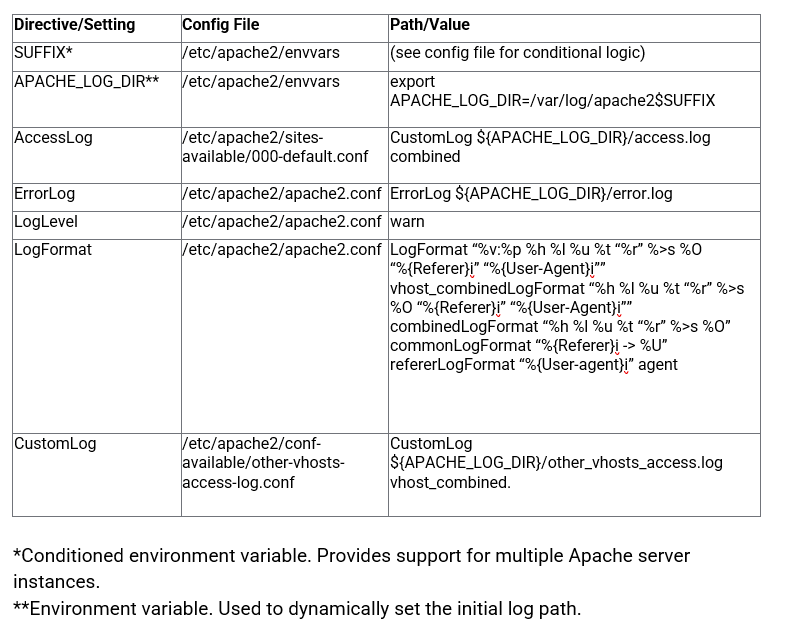
5. Log Analysis for Error Resolution
- Error Logs and Access Logs:
- Custom Log Formatting: Modify
LogFormatto customize log output and capture relevant details. - Log Level Tuning: Set
LogLeveltowarn,error, orinfobased on the severity of issues and requirements for debugging.
- Custom Log Formatting: Modify
6. Advanced Module Configuration
- mod_rewrite Issues:
- RewriteRule Debugging: Use
RewriteLogto view rule processing details and troubleshootmod_rewriteissues. - Redirect Loops: Common in cases where redirections are misconfigured. Check the
RewriteRuleandRewriteConddirectives carefully to avoid infinite loops.
- RewriteRule Debugging: Use
- mod_proxy and Reverse Proxy Troubleshooting:
- Proxy Errors: Enable
ProxyErrorOverrideto handle custom error messages in reverse proxy setups. - Timeout Issues: Use
ProxyTimeoutandProxyPassdirectives to fine-tune request handling times for back-end servers.
- Proxy Errors: Enable
7. Memory Leak and Resource Management
- Memory Leak Identification:
- Process Monitoring: Use tools like
ps,top, orhtopto identify Apache processes with excessive memory usage. - mod_status Monitoring: Enable
mod_statusto analyze server performance and memory consumption in real-time.
- Process Monitoring: Use tools like
8. Handling DoS and DDoS Attacks
- Rate Limiting with mod_evasive:
- Configure
mod_evasiveto prevent DoS attacks by rate-limiting repeated requests from the same IP.
- Configure
- Firewall Rules for Blocking Attacks:
- Use
iptablesorfirewalldto block malicious IPs or rate limit requests, enhancing protection against volumetric attacks.
- Use
9. Optimizing Cache Configuration
- mod_cache and Disk Caching:
- Configure caching: Use
CacheEnableandCacheRootfor disk caching to reduce server load and improve response times. - Header-Based Cache Control: Ensure proper cache headers with
Cache-Control,Expires, andETagto optimize cache policies.
- Configure caching: Use
10. Backup and Disaster Recovery
- Automated Backups:
- Schedule regular backups of configuration files using cron jobs and store them in a secure location.
- Recovery Testing:
- Regularly test backup restoration to ensure configuration integrity and prepare for unexpected failures.
How to Find Apache Http server Issue?
This advanced guide provides a comprehensive toolkit for tackling complex Apache HTTP Server issues, offering insight into configurations, optimizations, and security best practices that go beyond basic troubleshooting. By mastering these techniques, you’ll be well-equipped to handle the myriad challenges that can emerge in high-demand, production environments.
- Reliability Improvements: Advanced troubleshooting ensures that your Apache server runs smoothly and recovers quickly from issues, even under heavy load. Techniques such as load balancing, session handling, and connection rate limiting prevent your server from being overwhelmed. By diagnosing memory leaks, managing resource limits, and optimizing server responses, you reduce downtime and create a more stable server environment that reliably serves user requests.
- Enhanced Security: Apache’s modular nature allows for strong security configurations tailored to the needs of modern web applications. Implementing SSL/TLS, advanced security headers, and strict file permissions helps to mitigate vulnerabilities against threats like XSS, clickjacking, and unauthorized access. By regularly analyzing access patterns, restricting connection requests, and configuring rate-limiting tools like
mod_evasive, you can proactively defend against both external and internal threats, safeguarding sensitive user data and maintaining a secure application infrastructure. - Performance Optimization: High-performance tuning is essential for fast, efficient responses, especially in environments with high traffic or complex applications. From configuring KeepAlive settings to leveraging HTTP/2 for multi-streaming and caching commonly accessed files, advanced optimizations lead to faster page loads and a better user experience. Log analysis, advanced load balancing, and real-time monitoring with
mod_statusprovide valuable performance metrics that help you fine-tune configurations to keep your server operating at peak efficiency. - Resilience in Production: Preparing for unexpected traffic surges, resource shortages, and network issues is crucial for any production setup. By using backup and recovery strategies, effective load distribution, and robust error handling, you create a resilient environment capable of handling operational stresses without affecting service quality. Techniques like health checks for backend servers and garbage collection ensure that your Apache server stays responsive and minimizes interruptions in service.
Mastering these techniques will transform your server administration capabilities, enabling you to anticipate, diagnose, and address issues before they impact end-users. By following this guide, you’re not just troubleshooting; you’re actively refining and future-proofing your Apache server, fostering an environment of high reliability, robust security, and optimal performance that meets the demands of a modern production landscape.