Skip to content
Menu
DevSecOps Now!!!
  • About
  • Certifications
  • Contact
  • Courses
  • DevSecOps Consulting
  • DevSecOps Tools
  • Training
  • Tutorials
DevSecOps Now!!!

Fix Flutter App Not Showing in Emulator + Hot Reload Guide

Posted on May 17, 2025

Limited Time Offer!

For Less Than the Cost of a Starbucks Coffee, Access All DevOpsSchool Videos on YouTube Unlimitedly.
Master DevOps, SRE, DevSecOps Skills!
Enroll Now

This guide covers:

  • What to do when your Flutter app runs but doesnโ€™t show on the emulator
  • How to perform hot reload correctly once the app is running

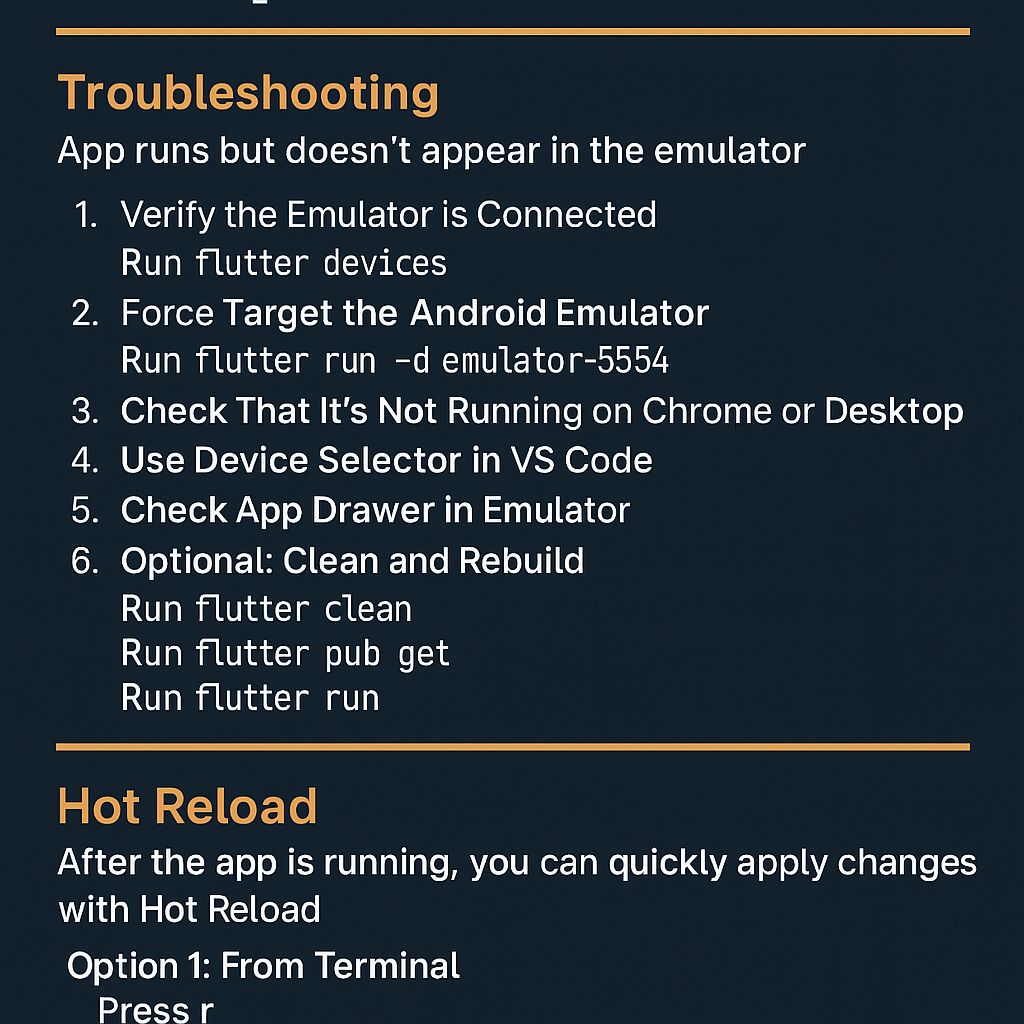
Part 1: Troubleshooting Flutter App Not Displaying on Emulator

Scenario:
You launched your Android emulator from Android Studio, and used Visual Studio Code to run your Flutter app. The command succeeds (flutter run), but the app doesn’t appear on the emulator.

โœ… Step-by-Step Fix:

1. Verify the Emulator is Connected

In VS Code terminal, run:

flutter devices

Make sure your emulator is listed. Youโ€™ll see something like:

emulator-5554 โ€ข Pixel_5_API_33 โ€ข android-x86 โ€ข Android 13

2. Force Target the Android Emulator

Run the app on the specific device using:

flutter run -d emulator-5554

Replace emulator-5554 with your actual emulator ID from step 1.

3. Check That Itโ€™s Not Running on Chrome or Desktop

Sometimes flutter run defaults to a desktop or web target.

Run this to ensure Android is selected:

flutter run -d android

4. Use Device Selector in VS Code

At the bottom-right of VS Code, click the device selector and pick the emulator.

5. Check App Drawer in Emulator

If the app installed but didnโ€™t launch:

  • Open the app drawer in the emulator.
  • Look for your app icon and launch it manually.

6. Optional: Clean and Rebuild

flutter clean
flutter pub get
flutter run

Part 2: Using Hot Reload in Flutter

Once your app is running on the emulator, you can make code changes and quickly apply them using Hot Reload.

๐Ÿ” What is Hot Reload?

Hot Reload injects updated source code into the Dart VM so you donโ€™t lose app state. Great for UI or logic tweaks.

โœ… How to Perform Hot Reload

Option 1: From Terminal

When running flutter run, just press:

r
Option 2: From VS Code
  • Open Command Palette: Ctrl + Shift + P
  • Type: Flutter: Hot Reload โ†’ hit Enter
Option 3: With Toolbar Button

If you’re debugging (F5), use the Hot Reload button (circular arrow) on the top bar.


๐Ÿงช Hot Restart (If Needed)

For a full app restart (not just UI updates), press:

R

in the same terminal window.

Post Views: 2,387
  • Android Studio Emulator
  • flutter app not showing on emulator
  • flutter debugging guide
  • Flutter Debugging Tips
  • Flutter Development Environment
  • flutter emulator black screen
  • Flutter Emulator Fix
  • flutter emulator issues
  • flutter emulator troubleshooting
  • flutter hot reload not working
  • flutter run app but not displaying
  • Flutter Run Command
  • Hot Reload in Flutter
  • Mobile App Development
  • run flutter app on android emulator
  • Visual Studio Code with Flutter
Subscribe
Login
Notify of
guest
guest
0 Comments
Oldest
Newest Most Voted
Inline Feedbacks
View all comments
  • Strategies to Align DevSecOps With Agile and DevOps Practices
  • How to Fix Laravel Migration Error: Field โ€˜idโ€™ Doesnโ€™t Have a Default Value in the Migrations Table
  • A Practical Guide to Proving DevSecOps Business Value for Engineering Leaders
  • Mastering Secure Software Delivery by Solving DevSecOps Adoption Challenges
  • Operationalizing Security for Faster and Safer Software Deployments
  • DevSecOps Server Security Checklist 2026: 50 Must-Check Points Before Going Live
  • The Complete DevOps Salary Overview for IT Professionals
  • The Modern DevOps Certification Guide: Roadmaps for Every Engineering Role
  • Security Champions in DevSecOps: Responsibilities and Best Practices
  • The DevSecOps Handbook for Shift-Left Security
  • Top DevSecOps Principles for Effective Secure Software Delivery
  • Guide to DevSecOps Maturity Levels for Platform and Security Teams
  • Canada PR CRS Calculator: Express Entry Points System Explained
  • Austria PR Points Calculator: Ultimate Guide to Navigating the Red-White-Red Card System
  • The Essential Guide to Enterprise DevSecOps Implementation
  • How to Set Up Claude Code Agent on a Local Windows Laptop and Use claude Command from Anywhere
  • DevOps and DevSecOps Explained: Bridging the Gap Between Speed and Security
  • Comprehensive Manual on DevOps Methodologies and Cloud Native Engineering
  • The Master Guide to Immigration Points: Calculating Your Path to Canada, Australia, and Beyond
  • How to Skip the Activation Email and Password Reset After Google Login in Keycloak Auto-Link Existing Users in First Broker Login
  • Free SSL Certificate Generation Tutorial for Any Website Using Certbot and Apache
  • The Ultimate Guide to Certified FinOps Professional: Skills, Levels, and Career Impact
  • Certified FinOps Manager: Essential Skills for Modern Cloud Operations
  • How to Use Claude AI for Programming: Complete Guide for Developers to Boost Productivity
  • The Definitive Guide to Certified FinOps Engineer: Master Cloud Value Engineering
  • A Comprehensive Guide to the Certified FinOps Architect Certification and Training
  • Linux Server Diagnostic Commands: Complete Guide for Performance, Network & System Troubleshooting
  • The Ultimate Guide to CDOM โ€“ Certified DataOps Manager Certification
  • The Practical Path to AI Reliability: A Guide to the Certified MLOps Manager
  • Master the Machine Learning Lifecycle:Guide to Becoming a Certified MLOps Architect

Recent Comments

  1. emmy day on SQLSTATE[42S22]: Column not found: 1054 Unknown column ‘provider’ in ‘field list’
  2. digital banking on Complete Tutorial: Setting Up Laravel Telescope Correctly (Windows + XAMPP + Custom Domain)
  3. SAHIL DHINGRA on How to Uninstall Xampp from your machine when it is not visible in Control panel programs & Feature ?
  4. Abhishek on MySQL: List of Comprehensive List of approach to secure MySQL servers.
  5. Kristina on Best practices to followed in .httacess to avoid DDOS attack?

Archives

  • June 2026
  • May 2026
  • April 2026
  • March 2026
  • February 2026
  • January 2026
  • December 2025
  • November 2025
  • October 2025
  • September 2025
  • August 2025
  • July 2025
  • June 2025
  • May 2025
  • April 2025
  • March 2025
  • February 2025
  • January 2025
  • December 2024
  • November 2024
  • October 2024
  • September 2024
  • August 2024
  • July 2024
  • June 2024
  • May 2024
  • April 2024
  • March 2024
  • February 2024
  • January 2024
  • December 2023
  • November 2023
  • October 2023
  • September 2023
  • August 2023
  • July 2023
  • May 2023
  • April 2023
  • March 2023
  • February 2023
  • January 2023
  • December 2022

Categories

  • Ai
  • AI Blogging
  • AiOps
  • ajax
  • Android Studio
  • Antimalware
  • Antivirus
  • Apache
  • Api
  • API Security
  • Api Testing
  • APK
  • Aws
  • Bike Rental Services
  • ChatGPT
  • Code Linting
  • Composer
  • cPanel
  • Cyber Threat Intelligence
  • Cybersecurity
  • Data Loss Prevention
  • Database
  • dataops
  • Deception Technology
  • DeepSeek
  • Devops
  • DevSecOps
  • DevTools
  • Digital Asset Management
  • Digital Certificates
  • Docker
  • Drupal
  • emulator
  • Encryption Tools
  • Endpoint Security Tools
  • Error
  • facebook
  • Firewalls
  • Flutter
  • git
  • GITHUB
  • Google Antigravity
  • Google play console
  • Google reCAPTCHA
  • Gradle
  • Guest posting
  • health and fitness
  • IDE
  • Identity and Access Management
  • Incident Response
  • Instagram
  • Intrusion Detection and Prevention Systems
  • jobs
  • Joomla
  • Keycloak
  • Laravel
  • Law News
  • Lawyer Discussion
  • Legal Advice
  • Linkedin
  • Linkedin Api
  • Linux
  • Livewire
  • Mautic
  • Medical Tourism
  • MlOps
  • MobaXterm
  • Mobile Device Management
  • Multi-Factor Authentication
  • MySql
  • Network Traffic Analysis tools
  • Paytm
  • Penetration Testing
  • php
  • PHPMyAdmin
  • Pinterest Api
  • Quora
  • SAST
  • SecOps
  • Secure File Transfer Protocol
  • Security Analytics Tools
  • Security Auditing Tools
  • Security Information and Event Management
  • Seo
  • Server Management Tools
  • Single Sign-On
  • Site Reliability Engineering
  • soft 404
  • software
  • SSL
  • SuiteCRM
  • SysOps
  • Threat Model
  • Twitter
  • Twitter Api
  • ubuntu
  • Uncategorized
  • Virtual Host
  • Virtual Private Networks
  • VPNs
  • Vulnerability Assessment Tools
  • Web Application Firewalls
  • Windows Processor
  • Wordpress
  • WSL (Windows Subsystem for Linux)
  • X.com
  • Xampp
  • Youtube
©2026 DevSecOps Now!!! | WordPress Theme: EcoCoded
wpDiscuz