Limited Time Offer!
For Less Than the Cost of a Starbucks Coffee, Access All DevOpsSchool Videos on YouTube Unlimitedly.
Master DevOps, SRE, DevSecOps Skills!
What is Security Analytics Tools?
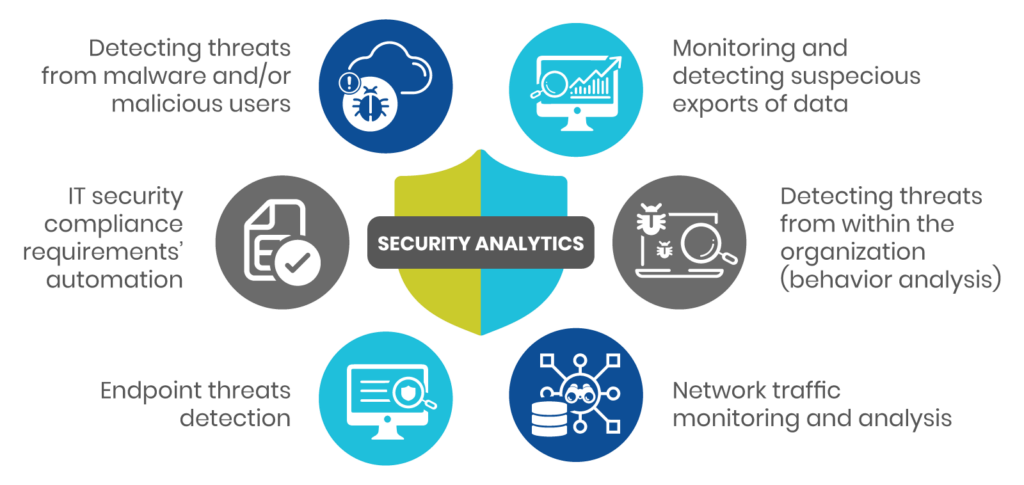
Security Analytics Tools are advanced software solutions designed to monitor, analyze, and interpret security-related data to detect, investigate, and respond to threats and vulnerabilities within an organization’s IT infrastructure. These tools leverage technologies like big data analytics, machine learning, and artificial intelligence to provide actionable insights and help organizations maintain robust security postures. They integrate various data sources such as logs, network traffic, endpoint data, and cloud activity to identify patterns and anomalies that could signify potential security incidents. By processing and analyzing vast amounts of data in real time, these tools enable organizations to act swiftly and effectively against potential threats.
Why Do We Need Security Analytics Tools?
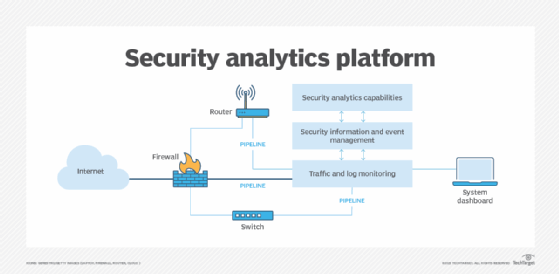
In today’s digital landscape, organizations face an ever-evolving array of cyber threats. Traditional security solutions, like firewalls and antivirus software, often fall short in addressing complex and sophisticated attacks. Here’s why Security Analytics Tools are essential:
- Proactive Threat Detection: These tools can identify threats before they escalate into significant incidents by analyzing historical data and real-time activity to detect unusual patterns.
- Improved Incident Response: They streamline the process of investigating and responding to security breaches, reducing the time needed to mitigate risks.
- Compliance and Auditing: Many industries have stringent regulatory requirements. Security Analytics Tools help organizations meet these by providing detailed logs, reports, and audit trails.
- Operational Efficiency: By reducing false positives and automating routine tasks, they enhance the efficiency of security teams, allowing them to focus on high-priority threats.
- Comprehensive Visibility: These tools provide a holistic view of the organization’s security environment, consolidating data from multiple sources for a unified perspective.
- Adaptive Security Posture: They continuously learn from new data, making it easier to adapt to evolving threats and emerging attack vectors.
What are the Advantages of Security Analytics Tools?
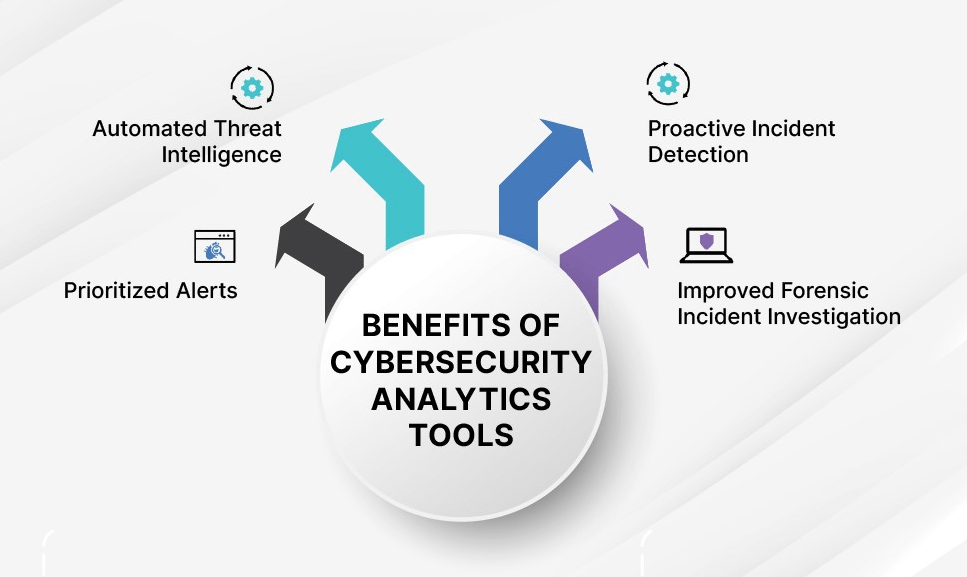
Security Analytics Tools provide numerous benefits, including:
- Enhanced Threat Detection: These tools leverage advanced algorithms and threat intelligence to identify zero-day vulnerabilities, insider threats, and advanced persistent threats (APTs).
- Centralized Monitoring: Security teams can monitor all data sources from a single platform, ensuring no activity goes unnoticed.
- Real-Time Alerts: Instant notifications of suspicious activities or policy violations help in taking timely actions.
- Scalability: These tools are designed to handle large volumes of data from growing infrastructures without performance degradation.
- Integration Capabilities: They work seamlessly with existing security solutions like SIEMs, firewalls, and intrusion detection systems.
- Cost Efficiency: By preventing data breaches and minimizing downtime, these tools reduce the overall cost associated with security incidents.
- Actionable Insights: Security Analytics Tools provide detailed analytics and visualizations, enabling decision-makers to act based on data-driven insights.
- Improved Risk Management: They help organizations prioritize risks based on severity, ensuring critical issues are addressed first.
What are the Features of Security Analytics Tools?
Key features of Security Analytics Tools include:
- Data Aggregation: These tools collect data from diverse sources such as firewalls, servers, endpoints, cloud environments, and IoT devices.
- Threat Intelligence Integration: They use external threat intelligence feeds to stay updated on the latest attack methods and indicators of compromise (IOCs).
- Machine Learning Algorithms: These algorithms help in automatically detecting anomalies and predicting potential threats based on historical data.
- User Behavior Analytics (UBA): They monitor user actions to detect abnormal behavior that could indicate compromised credentials or insider threats.
- Automated Response: Security Analytics Tools can execute predefined actions, such as isolating a device or blocking suspicious IPs, to neutralize threats quickly.
- Compliance Reporting: They generate customizable reports to demonstrate adherence to industry standards and regulations like GDPR, HIPAA, and PCI DSS.
- Dashboards and Visualization: Intuitive interfaces display key security metrics, trends, and incident details in real-time.
- Forensic Analysis: These tools provide detailed data to support post-incident investigations, helping organizations learn from past incidents and improve defenses.
- Behavioral Analytics: Analyze baseline activity to detect deviations indicative of malicious intent.
- Cloud Security Monitoring: Ensure visibility and control over cloud resources and services.
What are the Top 10 Use Cases of Security Analytics Tools?
- Detecting Insider Threats: Identify suspicious activities by employees, contractors, or third-party users that may compromise data security.
- Preventing Data Exfiltration: Monitor data flows to detect unauthorized data transfers or leaks to external locations.
- Ransomware Detection: Recognize unusual file encryption or access patterns associated with ransomware attacks.
- Network Traffic Analysis: Continuously monitor and analyze network traffic to detect malicious activities, such as command-and-control (C2) communications.
- Endpoint Protection: Safeguard endpoints like laptops, desktops, and mobile devices by detecting anomalies and blocking threats.
- Cloud Security Monitoring: Provide visibility into cloud activities to identify potential misconfigurations or malicious usage of cloud resources.
- Fraud Detection: Detect fraudulent activities in financial transactions, customer accounts, or internal operations.
- Compliance Management: Automate compliance checks, generate audit reports, and ensure adherence to industry standards.
- Incident Response: Facilitate quick and effective actions during security breaches, minimizing damage and recovery time.
- Vulnerability Management: Conduct continuous assessments to identify and address weaknesses in IT infrastructure before they can be exploited.
How to Implement Security Analytics Tools?
Implementing Security Analytics Tools involves the following steps:
- Define Objectives: Clearly outline the specific security goals, such as detecting insider threats, improving compliance, or reducing response times.
- Assess Current Infrastructure: Conduct a thorough evaluation of existing IT systems, security solutions, and data sources to identify gaps and areas for improvement.
- Select the Right Tool: Research and choose a Security Analytics Tool that aligns with your organization’s size, industry, and security requirements. Ensure it can integrate with your current infrastructure.
- Data Integration: Configure the tool to collect data from relevant sources such as firewalls, network devices, endpoints, cloud platforms, and application logs.
- Customize Settings: Tailor the tool’s rules, alerts, and dashboards to reflect the specific needs of your organization and its threat landscape.
- Deploy the Tool: Roll out the tool in a phased approach, starting with critical systems or departments. Test its functionality and effectiveness during each phase.
- Train Staff: Ensure IT and security teams are well-versed in using the tool. Provide training on interpreting data, managing alerts, and responding to incidents.
- Monitor and Optimize: Continuously monitor the tool’s performance, adjust configurations as needed, and update it regularly to keep up with emerging threats.
- Conduct Regular Audits: Periodically evaluate the effectiveness of the tool, identify any gaps, and make improvements to enhance security.
- Leverage Automation: Use automation features like threat remediation and reporting to reduce manual workloads and increase efficiency.
