Skip to content
Menu
DevSecOps Now!!!
  • About
  • Certifications
  • Contact
  • Courses
  • DevSecOps Consulting
  • DevSecOps Tools
  • Training
  • Tutorials
DevSecOps Now!!!

Top 20 Commands with explanation of “find” command

Posted on January 30, 2025

Limited Time Offer!

For Less Than the Cost of a Starbucks Coffee, Access All DevOpsSchool Videos on YouTube Unlimitedly.
Master DevOps, SRE, DevSecOps Skills!
Enroll Now

The find command in Linux is a powerful tool used for searching files and directories based on different criteria such as name, size, type, modification date, permissions, and more. It is one of the most frequently used commands by system administrators and DevOps engineers. Hereโ€™s an in-depth look at the top 20 find command examples with detailed explanations.


1. Find Files by Name

Command:

find /home -name "myfile.txt"

Explanation:
This command searches for a file named myfile.txt inside the /home directory and its subdirectories. The -name option is case-sensitive.


2. Find Files by Case-Insensitive Name

Command:

find /home -iname "myfile.txt"

Explanation:
Similar to the previous command but with the -iname option, which makes the search case-insensitive. It will find myfile.txt, MYFILE.TXT, MyFile.txt, etc.


3. Find Directories Instead of Files

Command:

find /var -type d -name "logs"

Explanation:
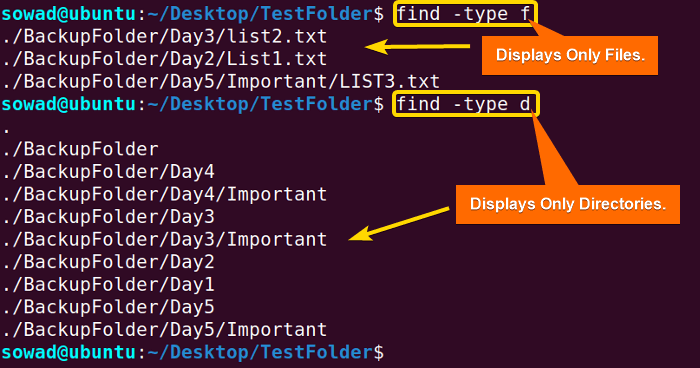
This command searches for directories named logs inside /var and its subdirectories. The -type d option ensures only directories are matched.


4. Find Files by Extension

Command:

find /var/log -type f -name "*.log"

Explanation:
Finds all files inside /var/log that have a .log extension. The -type f ensures that only files are searched.


5. Find Large Files (More than 100MB)

Command:

find / -type f -size +100M

Explanation:
This finds all files larger than 100MB (+100M) in size across the entire system (/). The -size option supports different units:

  • c (bytes)
  • k (kilobytes)
  • M (megabytes)
  • G (gigabytes)

6. Find Small Files (Less than 1KB)

Command:

find /home -type f -size -1k

Explanation:
Searches for files smaller than 1KB inside /home. The -size -1k means “files less than 1KB.”


7. Find Files Modified in the Last 7 Days

Command:

find /var/www -type f -mtime -7

Explanation:
Finds files inside /var/www that have been modified in the last 7 days. The -mtime -7 option ensures it fetches files modified within the past week.


8. Find Files Not Modified in the Last 30 Days

Command:

find /backup -type f -mtime +30

Explanation:
Lists all files in /backup that have not been modified in the last 30 days (+30 means “older than 30 days”).


9. Find Files Accessed in the Last 24 Hours

Command:

find /etc -type f -atime -1

Explanation:
Finds files inside /etc that were accessed within the last 24 hours (-1 means “within 1 day”).


10. Find and Delete Files Older than 30 Days

Command:

find /tmp -type f -mtime +30 -exec rm {} \;

Explanation:
This searches for files older than 30 days (-mtime +30) in /tmp and deletes them using -exec rm {}.

โš ๏ธ Warning: Be very careful when using rm with find as it permanently deletes files.


11. Find Empty Files

Command:

find /home -type f -empty

Explanation:
This finds all empty files (files with 0 bytes) in /home. The -empty flag helps in cleaning up useless files.


12. Find Empty Directories

Command:

find /var -type d -empty

Explanation:
Finds empty directories inside /var.


13. Find Files with Specific Permissions (777 – Full Permissions)

Command:

find / -type f -perm 0777

Explanation:
Lists all files with full permissions (rwxrwxrwx). These files are considered security risks.


14. Find and Change Permissions of Files

Command:

find /var/www -type f -perm 0777 -exec chmod 644 {} \;

Explanation:
Finds files with 777 permissions in /var/www and changes them to 644 (rw-r--r--).


15. Find Files Owned by a Specific User

Command:

find /home -type f -user myuser

Explanation:
Finds all files inside /home that belong to myuser.


16. Find Files Owned by a Specific Group

Command:

find /var -type f -group developers

Explanation:
Finds all files in /var that belong to the developers group.


17. Find Symbolic Links

Command:

find /usr -type l

Explanation:
Lists all symbolic links (-type l) in /usr.


18. Find Files Excluding a Specific Directory

Command:

find / -path "/proc" -prune -o -type f -name "*.conf" -print

Explanation:
Finds all .conf files but excludes the /proc directory using -prune.


19. Find and Copy Files to Another Location

Command:

find /home -type f -name "*.jpg" -exec cp {} /backup/photos/ \;

Explanation:
Finds all .jpg files inside /home and copies them to /backup/photos/.


20. Find and Move Files to Another Directory

Command:

find /downloads -type f -name "*.mp4" -exec mv {} /media/videos/ \;

Explanation:
Finds all .mp4 files inside /downloads and moves them to /media/videos/.


Final Thoughts

The find command is an essential tool in Linux for searching files and directories efficiently. By combining options like -exec, -prune, and -type, you can filter results based on multiple criteria, automate cleanup tasks, and even manage large file systems effectively.

Would you like me to create a downloadable cheatsheet for this? ๐Ÿš€

Post Views: 1,805
  • find
  • find /home
  • find command
  • Linux
  • linux command
  • Linux Commands for Administrator
  • Top 20 Commands
  • Top 20 Commands linux command
Subscribe
Login
Notify of
guest
guest
0 Comments
Oldest
Newest Most Voted
Inline Feedbacks
View all comments
  • Laravel Posts Installation Guide
  • Strategies to Align DevSecOps With Agile and DevOps Practices
  • How to Fix Laravel Migration Error: Field โ€˜idโ€™ Doesnโ€™t Have a Default Value in the Migrations Table
  • A Practical Guide to Proving DevSecOps Business Value for Engineering Leaders
  • Mastering Secure Software Delivery by Solving DevSecOps Adoption Challenges
  • Operationalizing Security for Faster and Safer Software Deployments
  • DevSecOps Server Security Checklist 2026: 50 Must-Check Points Before Going Live
  • The Complete DevOps Salary Overview for IT Professionals
  • The Modern DevOps Certification Guide: Roadmaps for Every Engineering Role
  • Security Champions in DevSecOps: Responsibilities and Best Practices
  • The DevSecOps Handbook for Shift-Left Security
  • Top DevSecOps Principles for Effective Secure Software Delivery
  • Guide to DevSecOps Maturity Levels for Platform and Security Teams
  • Canada PR CRS Calculator: Express Entry Points System Explained
  • Austria PR Points Calculator: Ultimate Guide to Navigating the Red-White-Red Card System
  • The Essential Guide to Enterprise DevSecOps Implementation
  • How to Set Up Claude Code Agent on a Local Windows Laptop and Use claude Command from Anywhere
  • DevOps and DevSecOps Explained: Bridging the Gap Between Speed and Security
  • Comprehensive Manual on DevOps Methodologies and Cloud Native Engineering
  • The Master Guide to Immigration Points: Calculating Your Path to Canada, Australia, and Beyond
  • How to Skip the Activation Email and Password Reset After Google Login in Keycloak Auto-Link Existing Users in First Broker Login
  • Free SSL Certificate Generation Tutorial for Any Website Using Certbot and Apache
  • The Ultimate Guide to Certified FinOps Professional: Skills, Levels, and Career Impact
  • Certified FinOps Manager: Essential Skills for Modern Cloud Operations
  • How to Use Claude AI for Programming: Complete Guide for Developers to Boost Productivity
  • The Definitive Guide to Certified FinOps Engineer: Master Cloud Value Engineering
  • A Comprehensive Guide to the Certified FinOps Architect Certification and Training
  • Linux Server Diagnostic Commands: Complete Guide for Performance, Network & System Troubleshooting
  • The Ultimate Guide to CDOM โ€“ Certified DataOps Manager Certification
  • The Practical Path to AI Reliability: A Guide to the Certified MLOps Manager

Recent Comments

  1. emmy day on SQLSTATE[42S22]: Column not found: 1054 Unknown column ‘provider’ in ‘field list’
  2. digital banking on Complete Tutorial: Setting Up Laravel Telescope Correctly (Windows + XAMPP + Custom Domain)
  3. SAHIL DHINGRA on How to Uninstall Xampp from your machine when it is not visible in Control panel programs & Feature ?
  4. Abhishek on MySQL: List of Comprehensive List of approach to secure MySQL servers.
  5. Kristina on Best practices to followed in .httacess to avoid DDOS attack?

Archives

  • June 2026
  • May 2026
  • April 2026
  • March 2026
  • February 2026
  • January 2026
  • December 2025
  • November 2025
  • October 2025
  • September 2025
  • August 2025
  • July 2025
  • June 2025
  • May 2025
  • April 2025
  • March 2025
  • February 2025
  • January 2025
  • December 2024
  • November 2024
  • October 2024
  • September 2024
  • August 2024
  • July 2024
  • June 2024
  • May 2024
  • April 2024
  • March 2024
  • February 2024
  • January 2024
  • December 2023
  • November 2023
  • October 2023
  • September 2023
  • August 2023
  • July 2023
  • May 2023
  • April 2023
  • March 2023
  • February 2023
  • January 2023
  • December 2022

Categories

  • Ai
  • AI Blogging
  • AiOps
  • ajax
  • Android Studio
  • Antimalware
  • Antivirus
  • Apache
  • Api
  • API Security
  • Api Testing
  • APK
  • Aws
  • Bike Rental Services
  • ChatGPT
  • Code Linting
  • Composer
  • cPanel
  • Cyber Threat Intelligence
  • Cybersecurity
  • Data Loss Prevention
  • Database
  • dataops
  • Deception Technology
  • DeepSeek
  • Devops
  • DevSecOps
  • DevTools
  • Digital Asset Management
  • Digital Certificates
  • Docker
  • Drupal
  • emulator
  • Encryption Tools
  • Endpoint Security Tools
  • Error
  • facebook
  • Firewalls
  • Flutter
  • git
  • GITHUB
  • Google Antigravity
  • Google play console
  • Google reCAPTCHA
  • Gradle
  • Guest posting
  • health and fitness
  • IDE
  • Identity and Access Management
  • Incident Response
  • Instagram
  • Intrusion Detection and Prevention Systems
  • jobs
  • Joomla
  • Keycloak
  • Laravel
  • Law News
  • Lawyer Discussion
  • Legal Advice
  • Linkedin
  • Linkedin Api
  • Linux
  • Livewire
  • Mautic
  • Medical Tourism
  • MlOps
  • MobaXterm
  • Mobile Device Management
  • Multi-Factor Authentication
  • MySql
  • Network Traffic Analysis tools
  • Paytm
  • Penetration Testing
  • php
  • PHPMyAdmin
  • Pinterest Api
  • postify
  • Quora
  • SAST
  • SecOps
  • Secure File Transfer Protocol
  • Security Analytics Tools
  • Security Auditing Tools
  • Security Information and Event Management
  • Seo
  • Server Management Tools
  • Single Sign-On
  • Site Reliability Engineering
  • soft 404
  • software
  • SSL
  • SuiteCRM
  • SysOps
  • Threat Model
  • Twitter
  • Twitter Api
  • ubuntu
  • Uncategorized
  • Virtual Host
  • Virtual Private Networks
  • VPNs
  • Vulnerability Assessment Tools
  • Web Application Firewalls
  • Windows Processor
  • Wordpress
  • WSL (Windows Subsystem for Linux)
  • X.com
  • Xampp
  • Youtube
©2026 DevSecOps Now!!! | WordPress Theme: EcoCoded
wpDiscuz