Limited Time Offer!
For Less Than the Cost of a Starbucks Coffee, Access All DevOpsSchool Videos on YouTube Unlimitedly.
Master DevOps, SRE, DevSecOps Skills!
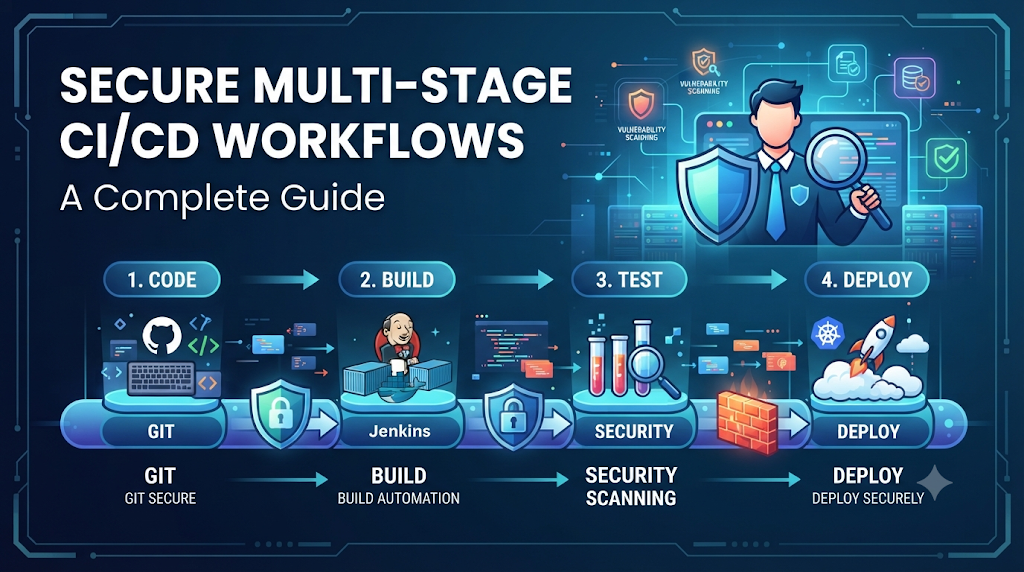
Imagine a fast-growing engineering team releasing a microservice whose automated pipeline builds successfully, passes unit tests, and deploys straight to production—only for an overly privileged credential to allow an insecure dependency from an early development branch to compromise production infrastructure. Adding more pipeline stages does not automatically make software delivery safer; it merely creates additional transition points where credential exposure, excessive permissions, and unverified artifacts can introduce critical vulnerabilities. Consequently, the central challenge of modern DevSecOps is ensuring that every stage transition preserves software integrity while enforcing rigorous access and security controls across development, testing, staging, and production environments. For professionals looking to master these critical practices, DevOpsSchool provides comprehensive learning resources covering advanced DevOps, CI/CD, and security workflows.
1. Understand How Multi-Stage CI/CD Workflows Operate
A multi-stage CI/CD workflow orchestrates the journey of software from raw source code to a running production system. As software moves forward, it encounters distinct operational environments.
- Development and Integration: Engineers write code, fix bugs, and merge changes into shared repositories, triggering initial builds.
- Automated Testing: Unit, integration, and functional tests validate functional correctness.
- Security Validation: Static analysis, secret scanning, and software composition analysis inspect code and dependencies.
- Staging and Pre-Production: Production-like environments validate configuration, performance, and operational readiness.
- Production Deployment: Verified software is released to end users.
- Post-Deployment Verification: Automated health checks and monitoring ensure successful release execution.
Pipelines, Jobs, Environments, and Targets
Understanding pipeline architecture requires distinguishing between several core concepts:
- Pipeline Stage: A logical grouping of related tasks, such as building, testing, or deploying.
- Pipeline Job: An individual execution unit within a stage containing specific script commands or actions.
- Deployment Environment: The logical and physical target infrastructure where code runs, characterized by unique configurations and access policies.
- Deployment Target: The specific cluster, server, or cloud resource receiving the artifact.
Stages depend on one another, passing outputs forward. Yet their security requirements differ drastically. A development environment prioritizes iteration speed and developer flexibility, whereas a production environment demands rigorous isolation, immutable records, and strict authorization.
2. Identify the Security Risks at Every Stage
Security risks evolve as software transitions through pipeline stages. Securing a workflow requires understanding vulnerabilities unique to each environment.
Development Stage
- Untrusted Code Changes: Malicious or unvetted pull requests entering the repository.
- Exposed Development Credentials: Accidental hardcoding of tokens or keys in early commits.
- Insecure Dependencies: Pulling unverified open-source packages containing known vulnerabilities.
- Unrestricted Pipeline Execution: Allowing any fork or external contribution to trigger automated build jobs without approval.
Testing Stage
- Sensitive Test Data Exposure: Hardcoded production-like databases exposed in shared test environments.
- Shared Test Credentials: Reusing credentials across multiple testing jobs.
- Insecure Test Environments: Weakly isolated test clusters that allow lateral movement.
- Untrusted Test Artifacts: Inadequate validation of code output before testing begins.
Staging Stage
- Production-Like Infrastructure with Weak Access Controls: Staging environments that mirror production but lack identical monitoring and hardening.
- Configuration Inconsistencies: Environment variables or flags that unintentionally enable debug modes or administrative backdoors.
- Excessive Service Permissions: Service accounts in staging possessing broad cloud control plane access.
- Unverified Release Candidates: Promoting code to staging without cryptographic verification.
Production Stage
- Unauthorized Deployment: Releasing code without required approvals or audit trails.
- Long-lived Credentials: Storing permanent cloud keys in pipeline configuration settings.
- Unapproved Artifact Promotion: Replacing verified artifacts with ad-hoc hotfixes built outside the pipeline.
- Inadequate Audit Trails: Lacking visibility into who triggered a deployment and why.
- Weak Rollback Controls: Inability to safely revert to a known good state during failures.
An issue introduced or overlooked in an earlier stage—such as an unpatched vulnerability in development—compound in later environments, eventually manifesting as a critical production incident.
3. Design Security Boundaries Between Environments
Development, testing, staging, and production must never automatically share the same permissions, networks, or credentials. Establishing robust environment isolation prevents a compromise in one zone from cascading across the entire infrastructure.
- Environment Isolation: Physically or logically separating cloud accounts, resource groups, or clusters for each environment.
- Network Segmentation: Using firewalls, virtual private clouds (VPCs), and strict ingress/egress rules to limit traffic between pipeline runners and target environments.
- Separate Service Identities: Assigning distinct service principals, IAM roles, or service accounts to each environment.
- Environment-Specific Configuration: Storing configuration values securely outside code repositories, injecting them only when deployment targets match.
- Restricted Communication Paths: Ensuring staging and production environments cannot be reached directly from public or development networks without passing through authorized gateways.
- Controlled Artifact Movement: Forbidding direct code pushes to production; code must travel exclusively through predefined, auditable promotion paths.
- Independent Access Policies: Granting developers broad access to development environments while restricting production access to dedicated deployment pipelines and emergency operators.
Preventing Lateral Movement
To prevent a compromised development job from accessing production resources, network boundaries and identity scopes must be enforced. If a runner executing a pull request build is compromised, it should only possess permissions to write temporary build logs to an isolated artifact store, lacking any network route or credential capable of touching production databases.
4. Apply Least Privilege Across Pipeline Stages
Identity and access management (IAM) forms the backbone of pipeline security. Every job, runner, and deployment script must operate under the principle of least privilege.
- Role-Based Access Control (RBAC): Granting users and machines only the specific permissions necessary to complete their assigned tasks.
- Job-Level Permissions: Restricting workflow permissions so individual steps within a pipeline possess narrow scopes rather than inheriting global repository rights.
- Dedicated Deployment Identities: Utilizing separate identities for building, testing, and deploying.
- Environment-Specific Authorization: Ensuring a deployment identity for staging cannot authenticate against production endpoints.
- Short-Led Credentials: Issuing temporary tokens that expire immediately after a job completes.
- Protected Production Environments: Requiring explicit review gates and explicit branch rules for production-bound jobs.
- Separation of Duties: Ensuring the engineer who writes code cannot unilaterally authorize its promotion to production without independent review or automated checks.
- Human and Machine Identity Management: Auditing both human operator access and automated service tokens regularly.
Example: Job Permission Separation
A testing job requires read access to container registries and test databases, but zero access to production key vaults. Conversely, a production deployment job requires access to production container orchestrators but should not have permission to modify source code repositories. Separating these definitions ensures that a vulnerability in a test script cannot compromise production infrastructure.
5. Manage Secrets Separately for Each Environment
Using one shared credential across all pipeline stages is a major security anti-pattern. If a development job is compromised, a shared production key is exposed instantly.
- Centralized Secrets Management: Storing secrets in dedicated vaults (such as HashiCorp Vault, AWS Secrets Manager, Azure Key Vault, or GitHub Actions Secrets) rather than plain-text configuration files.
- Environment-Specific Secrets: Maintaining separate secret scopes for development, staging, and production.
- Secret Access Restrictions: Configuring policies that dictate which pipeline stages and branches can read specific secrets.
- Credential Rotation: Automatically rotating database passwords, API tokens, and service keys on a regular schedule.
- Secret Masking in Pipeline Logs: Ensuring CI/CD platforms automatically redact sensitive values from execution logs.
- OIDC-Based Workload Identity Federation: Utilizing OpenID Connect (OIDC) to exchange short-lived tokens between cloud providers and CI/CD runners without storing long-lived static keys.
- Avoiding Credentials in Source Code: Enforcing automated scans to block commits containing hardcoded secrets.
When a pipeline deploys to production using OIDC federation, the CI/CD platform authenticates directly with the cloud provider via a signed token assertion. The cloud provider verifies the workflow repository, branch, and environment before issuing a short-lived session token valid only for the duration of that specific deployment job.
6. Secure Code Changes Before They Enter the Pipeline
Pipeline security starts before code is even built. Workflow definitions and application source code must undergo rigorous validation.
- Protected Branches: Enforcing branch protection rules on main branches to prevent direct pushes.
- Pull Request Reviews: Requiring peer code reviews before merging code changes.
- Required Status Checks: Mandating that automated builds and security scans pass successfully before merge authorization is granted.
- Commit Verification: Utilizing cryptographic signatures (GPG or SSH) to verify author identities.
- Secret Scanning: Running automated checks across commits to detect accidentally committed tokens.
- Static Application Security Testing (SAST): Analyzing source code for vulnerabilities before compilation.
- Software Composition Analysis (SCA): Scanning third-party dependencies for known Common Vulnerabilities and Exposures (CVEs).
- Dependency Verification: Checking checksums of downloaded libraries to prevent supply chain tampering.
- Pipeline Configuration Review: Treating CI/CD workflow files (such as YAML definitions) as critical application code, subject to the same review standards.
Workflow files dictate how pipelines execute. If an attacker modifies a CI/CD configuration file via an unverified pull request, they can inject malicious steps into the build process, bypassing standard security gates entirely.
7. Preserve Artifact Integrity Across All Stages
As software moves from development to production, teams must ensure that the artifact being deployed is identical to the one that passed security testing. Rebuilding code at every stage introduces inconsistency risks.
- Versioned Artifacts: Tagging every build with immutable semantic versions or unique hashes.
- Immutable Build Outputs: Ensuring artifacts cannot be overwritten once stored.
- Container Image Digests: Referencing container images by their cryptographic content digest (SHA-256) rather than mutable tags like
latestorstaging. - Trusted Artifact Repositories: Storing builds in secure, access-controlled artifact registries.
- Artifact Signing: Digitally signing binaries and container images using cryptographic keys.
- Signature Verification: Validating signatures before deploying artifacts to staging or production.
- Software Bills of Materials (SBOMs): Generating machine-readable inventories of all components included in an artifact.
- Build Provenance: Recording metadata about how, when, and from what source commit an artifact was built.
- Artifact Retention and Traceability: Maintaining records that link production deployments back to the original source commit and test reports.
Teams should build once and promote the same verified artifact through later environments. Rebuilding code at the staging or production stage introduces the possibility that environment differences or updated external dependencies will alter the binary, invalidating prior test results.
8. Introduce Security Gates at the Right Pipeline Stages
Security checks must be strategically positioned throughout the workflow to catch issues early without creating unnecessary friction.
- Source Validation: Executing branch protection, peer review, and linting during code submission.
- Build and Test: Running unit tests, SAST, and SCA during the build phase.
- Container and IaC Scanning: Inspecting container images and Infrastructure as Code (IaC) templates before deployment to test environments.
- Policy as Code Checks: Validating configurations against organizational compliance rules.
- Artifact Verification: Checking signatures and SBOM validity before promotion to staging.
- Production Authorization: Enforcing manual approvals, change management record validation, and automated health checks prior to production release.
Security gates should be risk-based and automated wherever possible. When checks fail, the pipeline must halt immediately. Failure criteria should be explicit, defining severity thresholds that prevent minor warnings from blocking critical fixes unless policy dictates otherwise.
9. Protect Deployment Infrastructure and Pipeline Runners
CI/CD runners and build agents execute arbitrary code, making them high-value targets for attackers seeking to extract credentials or pivot into target environments.
- Isolated Execution Environments: Running jobs inside ephemeral containers or virtual machines that are destroyed immediately after execution.
- Ephemeral Runners: Provisioning fresh runner instances for every job to prevent state leakage or persistence of malicious artifacts.
- Trusted Runner Images: Using hardened, minimal base images for build agents.
- Runner Patching: Maintaining up-to-date operating systems and runtime environments on runner infrastructure.
- Workspace Cleanup: Purging temporary files, workspace directories, and cache stores post-execution.
- Restricted Network Access: Preventing runners from accessing internal corporate networks unless explicitly required for deployment.
- Untrusted Pull Request Isolation: Ensuring pull requests originating from public forks run in restricted worker pools with zero secret access.
- Secure Pipeline Variables: Encrypting pipeline variables and masking sensitive outputs.
- Separation of Build and Deployment Responsibilities: Using dedicated, highly secured runners for production deployments, separate from general-purpose build agents.
Privileged deployment jobs should never share unrestricted execution environments with untrusted code validation tasks. A compromised build agent used for compiling community contributions must never have access to production deployment credentials.
10. Control Promotion From Staging to Production
Moving software from staging into production represents the final and most critical operational transition. This boundary requires rigorous authorization and verification.
- Protected Deployment Environments: Configuring platform-level locks that require explicit approval gates before jobs can target production.
- Required Approvals: Mandating sign-off from designated release managers or security operators.
- Artifact Verification: Re-verifying container image digests and cryptographic signatures immediately before rollout.
- Release Version Validation: Ensuring the artifact matches the exact version approved during staging tests.
- Change Management Records: Linking deployment executions to verified change tickets or incident management systems.
- Deployment Identity Checks: Confirming that the pipeline executing the release authenticates via dedicated production service principals.
- Deployment Windows: Restricting automated production releases to approved maintenance windows where necessary.
- Emergency Release Procedures: Establishing break-glass protocols with heightened auditing for urgent hotfix deployments.
Balancing automation with human oversight in high-risk production environments ensures operational velocity does not compromise safety. Routine releases can proceed via automated checks and policy validations, while high-risk changes retain mandatory review gates.
11. A Practical Multi-Stage Secure CI/CD Workflow
To illustrate how these principles integrate into a cohesive system, consider an end-to-end secure CI/CD workflow for a containerized web application.
[Source Code] --> (Stage A: Validation) --> (Stage B: Build & Test)
                  --> (Stage C: Security Scans) --> (Stage D: Artifact Creation)
                  --> (Stage E: Staging Deploy) --> (Stage F: Production Promotion)
                  --> (Stage G: Production Deploy) --> (Stage H: Verification)
Stage A – Source Validation
Developers submit pull requests to protected branches. Automated checks verify status rules, perform peer code reviews, and scan workflow files for unauthorized modifications.
Stage B – Build and Test
An ephemeral runner clones the validated repository, compiles the application code, and executes unit tests within an isolated container network.
Stage C – Security Validation
Automated scanners evaluate source code via SAST, analyze third-party libraries using SCA, and scan configuration files for hardcoded secrets.
Stage D – Artifact Creation
Upon passing security checks, the application compiles into a container image. The pipeline generates an SBOM, signs the image digest using cryptographic keys, and pushes the immutable artifact to a private registry.
Stage E – Testing Environment Deployment
The workflow deploys the signed artifact to an isolated testing environment using restricted test credentials to run integration and functional suites.
Stage F – Staging Environment Promotion
The verified artifact is deployed to a staging environment mirroring production. Policy-as-code engines validate infrastructure configurations and environment variables against compliance baselines.
Stage G – Production Authorization
Before production rollout, the pipeline verifies release approval records, checks artifact signatures against trusted public keys, and authenticates via OIDC workload identity federation.
Stage H – Production Deployment
Using a controlled rollout strategy (such as canary deployment or rolling updates), the application releases to production.
Stage I – Post-Deployment Verification
Automated health probes evaluate error rates, response latencies, and service metrics. If anomalies occur, automated rollback procedures revert to the previous known good artifact.
12. Monitor and Audit the Entire Multi-Stage Workflow
Visibility across all pipeline stages is essential for detecting unauthorized activity, compliance auditing, and post-incident investigation.
- Pipeline Execution History: Retaining comprehensive logs of every build, test run, and deployment step.
- Authentication and Authorization Events: Logging identity token exchanges, OIDC assertions, and user login sessions.
- Secrets Access Records: Tracking which jobs accessed specific secret vaults and when.
- Artifact Repository Activity: Monitoring image pushes, pulls, signatures, and registry deletions.
- Security Scan Results: Archiving vulnerability reports generated during build and staging phases.
- Environment Promotion History: Maintaining an immutable ledger of which versions were deployed to which environments.
- Approval Records: Recording who approved production promotions and timestamps of authorization.
- Deployment Changes: Correlating deployment events with infrastructure configuration modifications.
- Failed Policy Checks: Logging instances where security gates blocked pipeline execution.
- Suspicious Workflow Modifications: Alerting security teams immediately if CI/CD configuration files are altered outside standard review channels.
Centralized logging and audit trails allow security teams to reconstruct incidents rapidly, identifying how code modifications, credentials, or artifacts moved through the pipeline.
13. Common Mistakes That Weaken Multi-Stage Pipeline Security
Organizations often struggle with pipeline security due to recurring operational missteps. Recognizing and correcting these mistakes strengthens overall posture.
- Sharing Production Credentials with Development Jobs:
- Mistake: Storing production deployment keys in global repository settings accessible to all branches.
- Correction: Scope credentials strictly to production deployment environments and use OIDC federation.
- Using the Same Permissions in Every Environment:
- Mistake: Granting identical cloud IAM roles across dev, test, and prod.
- Correction: Enforce least privilege by scoping service identities to individual environments.
- Rebuilding Artifacts Separately for Each Stage:
- Mistake: Compiling new binaries in staging or production instead of promoting tested artifacts.
- Correction: Build once, sign the artifact, and promote the exact same immutable binary.
- Allowing Untrusted Pull Requests to Access Secrets:
- Mistake: Allowing external fork PRs to execute jobs containing secret injection.
- Correction: Restrict secret access on pull requests and require manual triggers for untrusted code.
- Skipping Artifact Verification:
- Mistake: Deploying images without checking signatures or SBOM completeness.
- Correction: Implement automated signature validation gates before environment promotion.
- Using Outdated Pipeline Runner Images:
- Mistake: Running builds on long-lived virtual machines with unpatched system packages.
- Correction: Utilize ephemeral, containerized runners rebuilt regularly from hardened base images.
- Treating Staging as a Fully Trusted Environment:
- Mistake: Allowing relaxed access controls in staging because it is not production.
- Correction: Treat staging security parity with production to prevent lateral movement.
- Adding Security Gates Without Clear Failure Criteria:
- Mistake: Implementing warning-only scans that teams ignore indefinitely.
- Correction: Define strict failure thresholds that halt pipelines when critical vulnerabilities appear.
- Ignoring Pipeline Configuration Changes:
- Mistake: Treating CI/CD YAML files as trivial scripts exempt from code review.
- Correction: Apply strict branch protections and PR reviews to all workflow definitions.
- Failing to Test Emergency Deployment Procedures:
- Mistake: Discovering during a live outage that break-glass deployment paths are broken.
- Correction: Regularly test emergency rollback and hotfix pipelines in staging environments.
14. A Practical Roadmap for Improving Pipeline Security
Securing an existing multi-stage CI/CD pipeline does not require overhauling everything overnight. A phased roadmap helps engineering teams implement safeguards systematically.
Phase 1 – Map the Workflow
Identify every pipeline stage, environment, identity, credential, artifact repository, and deployment target. Document how code moves from source to production.
Phase 2 – Establish Environment Boundaries
Separate permissions, credentials, network access, and configuration settings between development, staging, and production environments.
Phase 3 – Secure the Source and Build Process
Introduce branch protections, peer reviews, trusted runner images, dependency vulnerability checks, and automated secret scanning.
Phase 4 – Establish Artifact Trust
Implement immutable build outputs, container image signing, signature verification, and SBOM generation. Stop rebuilding code at later stages.
Phase 5 – Protect Production Promotion
Introduce controlled authorization gates, policy-as-code validation, OIDC workload identity federation, and comprehensive audit logging.
Phase 6 – Continuously Improve
Review security incidents, pipeline failures, access permissions, and control effectiveness regularly. Adapt security gates to address emerging threat vectors.
For professionals seeking to deepen their expertise in modern pipeline engineering, organizations such as DevOpsSchool offer comprehensive learning resources and structured training programs covering advanced DevOps, CI/CD, and DevSecOps practices.
Frequently Asked Questions
1. What is a multi-stage CI/CD workflow?
A multi-stage CI/CD workflow is an automated software delivery pipeline that moves code through successive operational environments—such as development, testing, staging, and production—applying tests, security checks, and promotions at each boundary.
2. Why does each deployment environment need separate security controls?
Separate controls ensure that a compromise in a low-security environment, such as development or testing, cannot propagate laterally into sensitive production infrastructure.
3. How should secrets be managed across pipeline stages?
Secrets should be stored in centralized vaults and injected dynamically using environment-specific scopes, short-lived tokens, or OIDC workload identity federation rather than static configuration files.
4. What is the difference between pipeline security and application security?
Application security focuses on vulnerabilities within the source code and dependencies, whereas pipeline security focuses on protecting the tools, runners, credentials, and workflows used to build and deliver that application.
5. Why should teams promote the same artifact across environments?
Promoting the exact same verified artifact ensures consistency, guarantees that what was tested in staging is identical to what runs in production, and prevents unexpected build variations.
6. How can untrusted pull requests be prevented from accessing deployment secrets?
By configuring CI/CD platforms to withhold secrets from workflows triggered by external forks or unverified pull requests until code changes are reviewed and approved.
7. What is the role of artifact signing in CI/CD security?
Artifact signing uses cryptography to prove that an image or binary was created by a trusted build pipeline and has not been tampered with before deployment.
8. Should production deployment always require manual approval?
Not necessarily for every routine release, but high-risk production promotions benefit from a combination of automated security gates and mandatory human oversight or change management verification.
9. How can CI/CD runners be secured?
By using ephemeral, isolated execution environments, hardened base images, regular patch management, workspace cleanup, and strict network segmentation.
10. What are the first steps to secure an existing multi-stage pipeline?
Map current pipeline stages and identities, remove long-lived static credentials in favor of short-lived secrets, establish branch protections, and isolate production deployment environments.
Conclusion: Secure Every Transition, Not Just the Final Release
Multi-stage CI/CD security depends on protecting the entire journey of software from source code to production. Adding more pipeline stages does not increase safety unless each stage transition enforces rigorous trust boundaries. By establishing environment isolation, enforcing least privilege, protecting secrets, maintaining artifact integrity, automating security gates, controlling promotion paths, and continuously auditing activity, engineering teams can deliver software with speed and confidence. Every stage should establish enough trust for the next stage to proceed safely, ensuring that security remains foundational from the first commit to the final deployment.
