Limited Time Offer!
For Less Than the Cost of a Starbucks Coffee, Access All DevOpsSchool Videos on YouTube Unlimitedly.
Master DevOps, SRE, DevSecOps Skills!
Drupal 10’s custom theme builder gives you complete control over the look and feel of your website, resulting in a distinctive user experience that complements your brand. This article will walk you through the whole process of creating a custom theme from scratch, including how to customize templates and styles as well as set up the directory structure of your theme.
Regardless of your level of experience as a developer, this tutorial will assist you in comprehending the fundamental ideas and procedures of Drupal theming. You’ll have a completely working custom theme at the conclusion of this lesson that you may grow and change to suit your own requirements.
Prerequisites:-
- A setting for local development Install a development environment like Lando or DDEV, or use a local server like XAMPP, WAMP, or MAMP.
- Installing Drupal 10: Drupal 10 is available for download from the official website.
- Basic proficiency with PHP, CSS, and HTML: Although not necessarily required, having some experience with these technologies can make it easier for you to comprehend and modify your theme.
Step-by-Step Guide
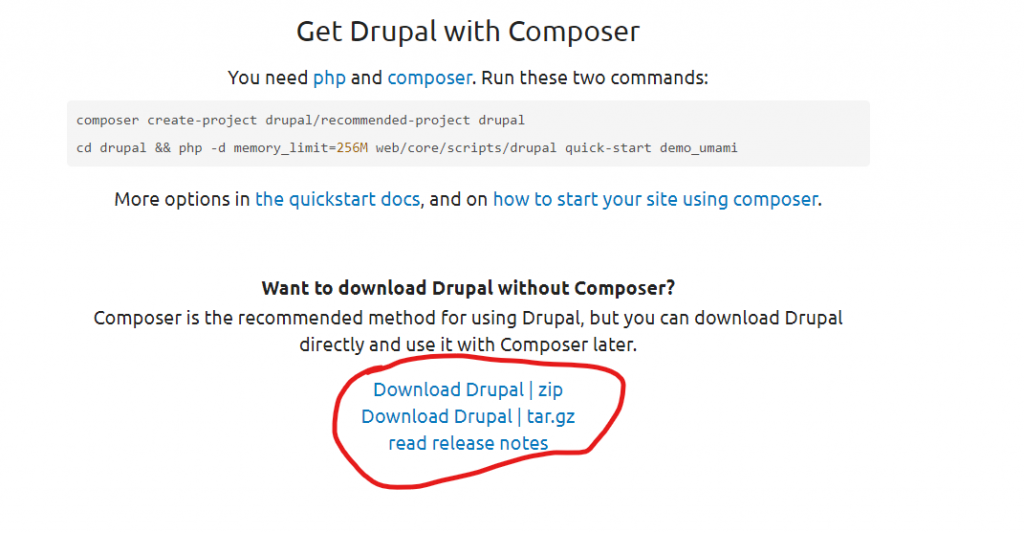
Step 1: Set Up Your Drupal 10 Environment:- Install a Drupal 10 project please click on the given link download the latest version file and unzip. Click Here for windows click on Download Drupal | zip and for the Linux Copy the url od Download Drupal | tar.gz.
Step 2: Create the Custom Theme Directory:- When you will unzip that downloaded file open that in your editor and move to the directory name Theme.
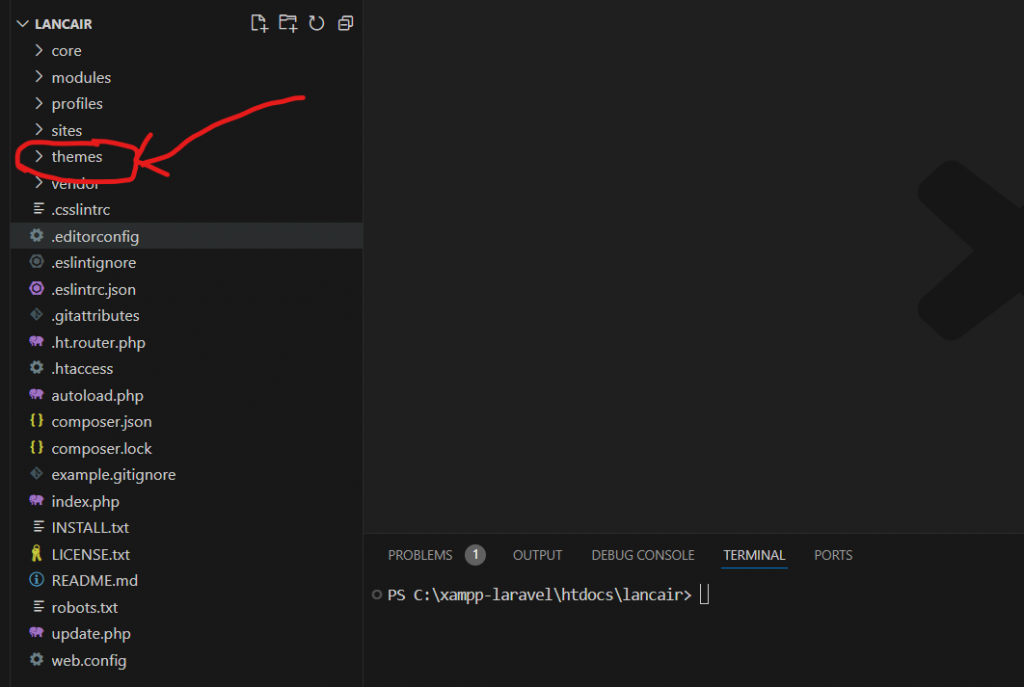
Step 3: Define Theme Region and Metadata in the file VillaAgency.info.yml: – Create a directory of your custom theme and create a yml file name VillaAgency.info.yml. and add the following code according to your requirements.
name: VillaAgency
type: theme
base theme: stark
description: A flexible theme with a responsive, mobile-first layout.
package: yes
core_version_requirement: ^10
libraries:
  - villaagency/global
regions:
  subheader: 'Sub Header'
  header: 'Header'
  main_banner: 'Main Banner'
  featured_section: 'Featured Section'
  video_section: 'video section'
  video_content: 'video content'
  fun_facts: 'Fun Facts'
  best_deal: 'Best Deal'
  ashwani_test: 'Ashwani Test'
  properties_section: 'Properties Section'
  content: 'Content'
  footer: 'Footer'
Step 4: Define Libraries with my_custom_theme.libraries.yml:- Create a my_custom_theme.libraries.yml file to define your theme’s CSS and JavaScript libraries. and create a file of Style.css in Theme/css/style.css.
# Main theme library.
global:
  js:
    jquery/jquery.min.js: {}
    js/bootstrap.min.js: {}
    js/isotope.min.js: {}
    js/owl-carousel.js: {}
    js/counter.js: {}
    js/custon.js: {}
    js/villaagency.js: {}

  css:
    base:
      css/base/elements.css: {}
      css/fontawesome.css: {}
      css/templatemo-villa-agency.css: {}
      css/owl.css: {}
      css/animate.css: {}
    component:
      "fonts.googleapis.com/css2?family=Poppins:wght@100;200;300;400;500;600;700;800;900&display=swap": { type: external}
      css/component/block.css: {}
      css/component/breadcrumb.css: {}
      css/component/field.css: {}
      css/component/form.css: {}
      css/component/header.css: {}
      css/component/menu.css: {}
      css/component/messages.css: {}
      css/component/node.css: {}
      css/component/sidebar.css: {}
      css/component/table.css: {}
      css/component/tabs.css: {}
      css/component/buttons.css: {}
    layout:
      css/layout/layout.css: {}
      css/bootstrap.min.css: {}
    theme:
      css/theme/print.css: { media: print }
Step 5: Create a Theme File (Optional):- Create a villaagency.theme file for custom PHP functions if needed.
function villaagency_preprocess_html(array &$variables): void {

}

/**
 * Implements hook_preprocess_HOOK() for page.html.twig.
 */
function villaagency_preprocess_page(array &$variables): void {

}

/**
 * Implements hook_preprocess_HOOK() for node.html.twig.
 */
function villaagency_preprocess_node(array &$variables): void {

}
Step 6: Create Templates Directory and Files:- Create a templates directory and add template files, starting with page.html.twig. Add basic HTML structure to page.html.twig
<div class="layout-container">

<div class="sub-header">
  <div class="container">
    <div class="row">
      <div class="col-lg-8 col-md-8">
        <ul class="info">
          <li><i class="fa fa-envelope"></i> testing.com</li>
          <li><i class="fa fa-map"></i> test map</li>
        </ul>
      </div>
      <div class="col-lg-4 col-md-4">
        {{ page.subheader }}
      </div>
    </div>
  </div>
</div>


<header class="header-area header-sticky">
  <div class="container">
    <div class="row">
      <div class="col-12">
        <nav class="main-nav">
          <!-- ***** Logo Start ***** -->
          <a href="index.html" class="logo">
            <h1>Villa</h1>
          </a>
          <!-- ***** Logo End ***** -->
          <!-- ***** Menu Start ***** -->
          {{ page.header }}
          <a class="menu-trigger">
            <span>Menu</span>
          </a>
          <!-- ***** Menu End ***** -->
        </nav>
      </div>
    </div>
  </div>
</header>


<div class="featured section">
  {{ page.featured_section }}
</div>

<div class="video-content">
    <div class="container">
      <div class="row">
        <div class="col-lg-10 offset-lg-1">
          {{ page.video_content}}
        </div>
      </div>
    </div>
  </div>

  <div class="fun-facts">
    <div class="container">
      <div class="row">
        {{ page.fun_facts }}
      </div>
    </div>
  </div>


<div class="ashwani test">
  {{ page.ashwani_test }}
</div>

  {# <div class="properties section">
    <div class="container">
      <div class="row">
        <div class="col-lg-4 offset-lg-4">
        </div>
      </div>

     {{ page.properties_section }}

    </div>
  </div> #}


<div>
  {{ page.content }}
</div>
<div class="section best-deal">
    <div class="container">
      <div class="row">
        <div class="col-lg-4">
          <div class="section-heading">
            <h6>| Best Deal</h6>
            <h2>Find Your Best Deal Right Now!</h2>
          </div>
        </div>
        <div class="col-lg-12">
          {{ page.best_deal }}
        </div>
      </div>
    </div>
  </div>

{# <div class="section best-deal">
  <div class="container">
    <div class="row">
      <div class="col-lg-4">
      </div>
      <div class="col-lg-12">
        {{ page.best_deal }}<div class="tabs-content">
            <div class="row">
              <div class="nav-wrapper ">
                <ul class="nav nav-tabs" role="tablist">
                  <li class="nav-item" role="presentation">
                    <button class="nav-link" id="appartment-tab" data-bs-toggle="tab" data-bs-target="#appartment" type="button" role="tab" aria-controls="appartment" aria-selected="false" tabindex="-1">Appartment</button>
                  </li>
                  <li class="nav-item" role="presentation">
                    <button class="nav-link" id="villa-tab" data-bs-toggle="tab" data-bs-target="#villa" type="button" role="tab" aria-controls="villa" aria-selected="false" tabindex="-1">Villa House</button>
                  </li>
                  <li class="nav-item" role="presentation">
                    <button class="nav-link active" id="penthouse-tab" data-bs-toggle="tab" data-bs-target="#penthouse" type="button" role="tab" aria-controls="penthouse" aria-selected="true">Penthouse</button>
                  </li>
                </ul>
              </div>
              <div class="tab-content" id="myTabContent">
                <div class="tab-pane fade" id="appartment" role="tabpanel" aria-labelledby="appartment-tab">
                  <div class="row">
                    <div class="col-lg-3">
                      <div class="info-table">
                        <ul>
                          <li>Total Flat Space <span>185 m2</span></li>
                          <li>Floor number <span>26th</span></li>
                          <li>Number of rooms <span>4</span></li>
                          <li>Parking Available <span>Yes</span></li>
                          <li>Payment Process <span>Bank</span></li>
                        </ul>
                      </div>
                    </div>
                    <div class="col-lg-6">
                      <img src="https://localhost/drupal-new/sites/default/files/2024-06/depositphotos_383827936-stock-photo-airport-runway-apron-passenger-aircraft_0.jpg" alt="">
                    </div>
                    <div class="col-lg-3">
                      <h4>Extra Info About Property</h4>
                      <p>Lorem ipsum dolor sit amet, consectetur adipiscing elit, do eiusmod tempor pack incididunt ut labore et dolore magna aliqua quised ipsum suspendisse.
                      <br><br>When you need free CSS templates, you can simply type TemplateMo in any search engine website. In addition, you can type TemplateMo Portfolio, TemplateMo One Page Layouts, etc.</p>
                      <div class="icon-button">
                        <a href="property-details.html"><i class="fa fa-calendar"></i> Schedule a visit</a>
                      </div>
                    </div>
                  </div>
                </div>
                <div class="tab-pane fade" id="villa" role="tabpanel" aria-labelledby="villa-tab">
                  <div class="row">
                    <div class="col-lg-3">
                      <div class="info-table">
                        <ul>
                          <li>Total Flat Space <span>250 m2</span></li>
                          <li>Floor number <span>26th</span></li>
                          <li>Number of rooms <span>5</span></li>
                          <li>Parking Available <span>Yes</span></li>
                          <li>Payment Process <span>Bank</span></li>
                        </ul>
                      </div>
                    </div>
                    <div class="col-lg-6">
                      <img src="https://localhost/drupal-new/sites/default/files/2024-06/image4-7-770x462_0.png" alt="">
                    </div>
                    <div class="col-lg-3">
                      <h4>Detail Info About Villa</h4>
                      <p>Lorem ipsum dolor sit amet, consectetur adipiscing elit, do eiusmod tempor pack incididunt ut labore et dolore magna aliqua quised ipsum suspendisse. <br><br>Swag fanny pack lyft blog twee. JOMO ethical copper mug, succulents typewriter shaman DIY kitsch twee taiyaki fixie hella venmo after messenger poutine next level humblebrag swag franzen.</p>
                      <div class="icon-button">
                        <a href="property-details.html"><i class="fa fa-calendar"></i> Schedule a visit</a>
                      </div>
                    </div>
                  </div>
                </div>
                <div class="tab-pane fade active show" id="penthouse" role="tabpanel" aria-labelledby="penthouse-tab">
                  <div class="row">
                    <div class="col-lg-3">
                      <div class="info-table">
                        <ul>
                          <li>Total Flat Space <span>320 m2</span></li>
                          <li>Floor number <span>34th</span></li>
                          <li>Number of rooms <span>6</span></li>
                          <li>Parking Available <span>Yes</span></li>
                          <li>Payment Process <span>Bank</span></li>
                        </ul>
                      </div>
                    </div>
                    <div class="col-lg-6">
                      <img src="assets/images/deal-03.jpghttps://localhost/drupal-new/sites/default/files/2024-06/7a2ee4491e1c030b9063b6dc3fb08584_1.png" alt="">
                    </div>
                    <div class="col-lg-3">
                      <h4>Extra Info About Penthouse</h4>
                      <p>Lorem ipsum dolor sit amet, consectetur adipiscing elit, do eiusmod tempor pack incididunt ut labore et dolore magna aliqua quised ipsum suspendisse. <br><br>Swag fanny pack lyft blog twee. JOMO ethical copper mug, succulents typewriter shaman DIY kitsch twee taiyaki fixie hella venmo after messenger poutine next level humblebrag swag franzen.</p>
                      <div class="icon-button">
                        <a href="property-details.html"><i class="fa fa-calendar"></i> Schedule a visit</a>
                      </div>
                    </div>
                  </div>
                </div>
              </div>
            </div>
          </div>
      </div>
    </div>
  </div>
</div> #}

<div class="properties section">
    <div class="container">
      <div class="row">
        <div class="col-lg-4 offset-lg-4">
          <div class="section-heading text-center">
            <h6>| Properties</h6>
            <h2>We Provide The Best Flight Services</h2>
          </div>
        </div>
      </div>
      <div class="row">
        {{ page.properties_section }}
      </div>
    </div>
  </div>


  <footer>
    <div class="container">
      <div class="col-lg-8">
                 {{ page.footer }}
      </div>
    </div>
  </footer>
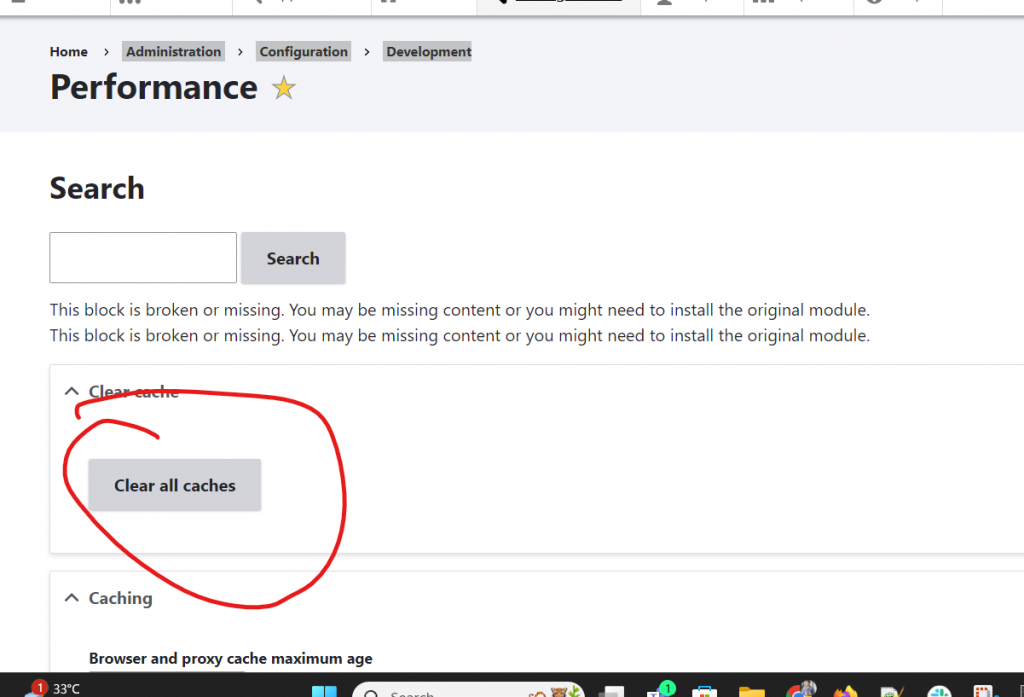
Step 7: Let’s clear the cache:- Go this this url of your project admin/config/development/performance and clear the cache.
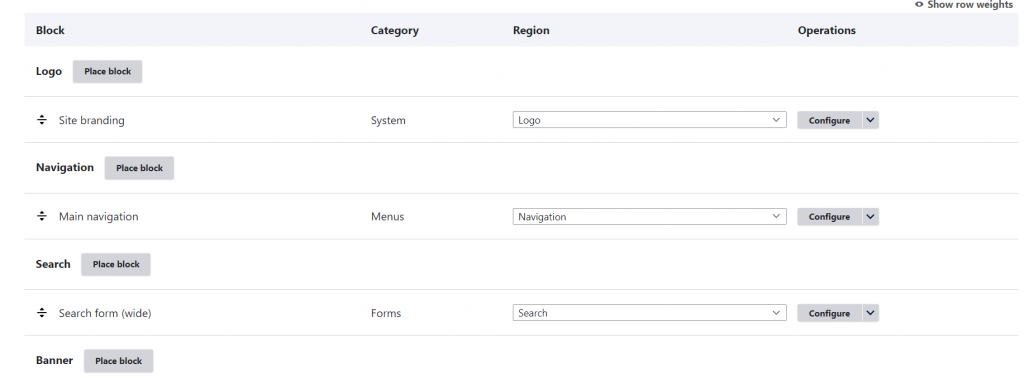
Step 8: Now lets set all the block :- Go to structure>Block Layout and check all the region is present here or not. admin/structure/block
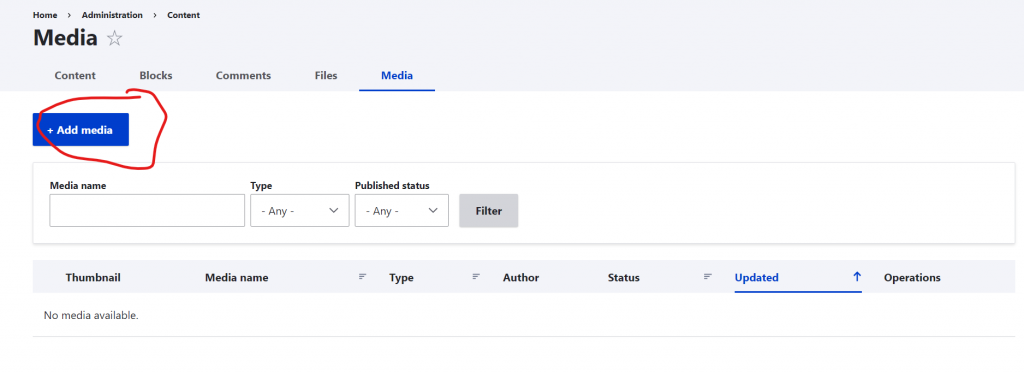
Step 9: Upload the Required image:- What ever the image you want in your project please upload all of them at here . admin/content/media click on add media button and upload the file.
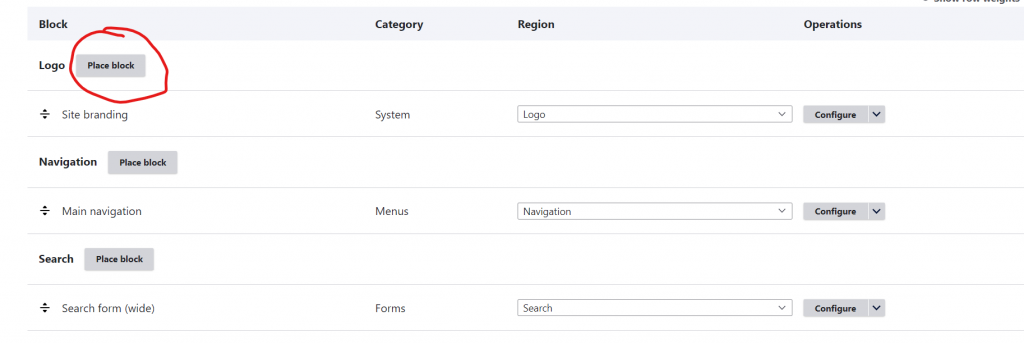
Step 10: lets design the templete:- Go to the Structure> Block Layout> Place Block. Click on Place Block button to add the content
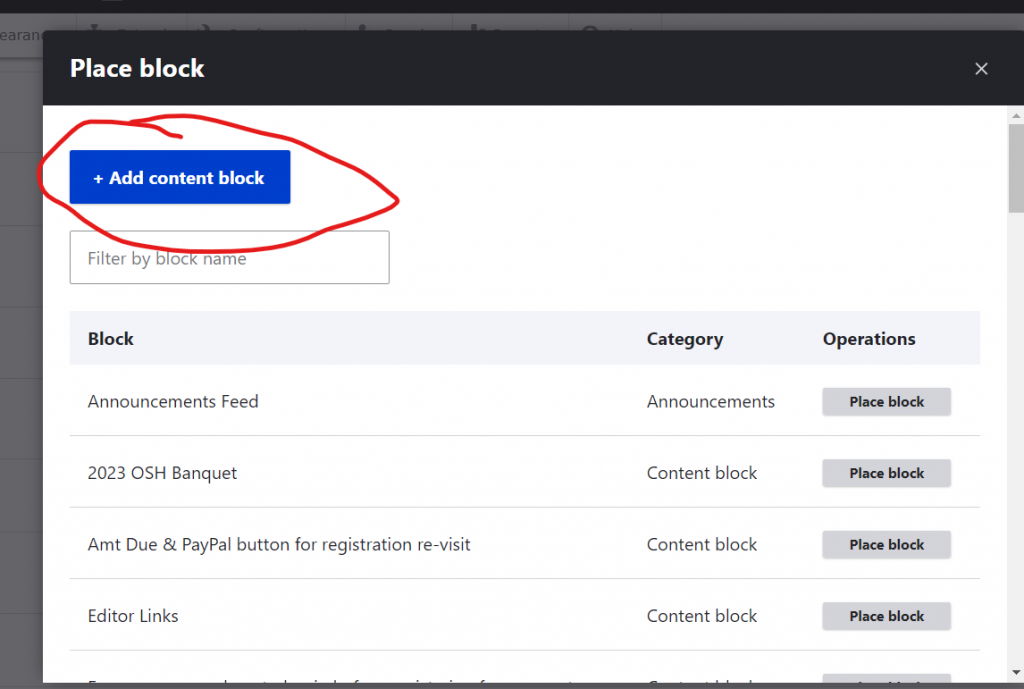
Step 11: Add Content Block:- Add content block here by clikcing on the button and add your html content here.
Step 12: Add all content: Add All of your required Html content there and fill all the Blocks.
Step 13: I m giving you some of the code through which you can add your data.
Feature Section
========================================
<div class="featured section">
    <div class="container">
      <div class="row">
        <div class="col-lg-4">
          <div class="left-image">
            <img src="assets/images/featured.jpg" alt="">
            <a href="property-details.html"><img src="assets/images/featured-icon.png" alt="" style="max-width: 60px; padding: 0px;"></a>
          </div>
        </div>
        <div class="col-lg-5">
          <div class="section-heading">
            <h6>| Featured</h6>
            <h2>Best Appartment & Sea view</h2>
          </div>
          <div class="accordion" id="accordionExample">
            <div class="accordion-item">
              <h2 class="accordion-header" id="headingOne">
                <button class="accordion-button" type="button" data-bs-toggle="collapse" data-bs-target="#collapseOne" aria-expanded="true" aria-controls="collapseOne">
                  Best useful links ?
                </button>
              </h2>
              <div id="collapseOne" class="accordion-collapse collapse show" aria-labelledby="headingOne" data-bs-parent="#accordionExample">
                <div class="accordion-body">
                Get <strong>the best villa</strong> website template in HTML CSS and Bootstrap for your business. TemplateMo provides you the <a href="https://www.google.com/search?q=best+free+css+templates" target="_blank">best free CSS templates</a> in the world. Please tell your friends about it.</div>
              </div>
            </div>
            <div class="accordion-item">
              <h2 class="accordion-header" id="headingTwo">
                <button class="accordion-button collapsed" type="button" data-bs-toggle="collapse" data-bs-target="#collapseTwo" aria-expanded="false" aria-controls="collapseTwo">
                  How does this work ?
                </button>
              </h2>
              <div id="collapseTwo" class="accordion-collapse collapse" aria-labelledby="headingTwo" data-bs-parent="#accordionExample">
                <div class="accordion-body">
                  Dolor <strong>almesit amet</strong>, consectetur adipiscing elit, sed doesn't eiusmod tempor incididunt ut labore consectetur <code>adipiscing</code> elit, sed do eiusmod tempor incididunt ut labore et dolore magna aliqua.
                </div>
              </div>
            </div>
            <div class="accordion-item">
              <h2 class="accordion-header" id="headingThree">
                <button class="accordion-button collapsed" type="button" data-bs-toggle="collapse" data-bs-target="#collapseThree" aria-expanded="false" aria-controls="collapseThree">
                  Why is Villa Agency the best ?
                </button>
              </h2>
              <div id="collapseThree" class="accordion-collapse collapse" aria-labelledby="headingThree" data-bs-parent="#accordionExample">
                <div class="accordion-body">
                  Dolor <strong>almesit amet</strong>, consectetur adipiscing elit, sed doesn't eiusmod tempor incididunt ut labore consectetur <code>adipiscing</code> elit, sed do eiusmod tempor incididunt ut labore et dolore magna aliqua.
                </div>
              </div>
            </div>
          </div>
        </div>
        <div class="col-lg-3">
          <div class="info-table">
            <ul>
              <li>
                <img src="assets/images/info-icon-01.png" alt="" style="max-width: 52px;">
                <h4>250 m2<br><span>Total Flat Space</span></h4>
              </li>
              <li>
                <img src="assets/images/info-icon-02.png" alt="" style="max-width: 52px;">
                <h4>Contract<br><span>Contract Ready</span></h4>
              </li>
              <li>
                <img src="assets/images/info-icon-03.png" alt="" style="max-width: 52px;">
                <h4>Payment<br><span>Payment Process</span></h4>
              </li>
              <li>
                <img src="assets/images/info-icon-04.png" alt="" style="max-width: 52px;">
                <h4>Safety<br><span>24/7 Under Control</span></h4>
              </li>
            </ul>
          </div>
        </div>
      </div>
    </div>
  </div>
For Fun Facts
======================================
<div class="fun-facts">
<div class="container">
<div class="row">
<div class="col-lg-12">
<div class="wrapper">
<div class="row">
<div class="col-lg-4">
<div class="counter">
<h2 class="timer count-title count-number" data-to="34" data-speed="1000">34</h2>
<p class="count-text ">Buildings<br>Finished Now</p>
</div>
</div>
<div class="col-lg-4">
<div class="counter">
<h2 class="timer count-title count-number" data-to="12" data-speed="1000">12</h2>
<p class="count-text ">Years<br>Experience</p>
</div>
</div>
<div class="col-lg-4">
<div class="counter">
<h2 class="timer count-title count-number" data-to="24" data-speed="1000">24</h2>
<p class="count-text ">Awwards<br>Won 2023</p>
</div>
</div>
</div>
</div>
</div>
</div>
</div>
</div><div class="section best-deal">
<div class="container">
<div class="row">
<div class="col-lg-4">
<div class="section-heading">
<h6>| Best Deal</h6>
<h2>Find Your Best Deal Right Now!</h2>
</div>
</div>
<div class="col-lg-12">
<div class="tabs-content">
<div class="row">
<div class="nav-wrapper ">
<ul class="nav nav-tabs" role="tablist">
<li class="nav-item" role="presentation">
<button class="nav-link active" id="appartment-tab" data-bs-toggle="tab" data-bs-target="#appartment" type="button" role="tab" aria-controls="appartment" aria-selected="true">Appartment</button>
</li>
<li class="nav-item" role="presentation">
<button class="nav-link" id="villa-tab" data-bs-toggle="tab" data-bs-target="#villa" type="button" role="tab" aria-controls="villa" aria-selected="false" tabindex="-1">Villa House</button>
</li>
<li class="nav-item" role="presentation">
<button class="nav-link" id="penthouse-tab" data-bs-toggle="tab" data-bs-target="#penthouse" type="button" role="tab" aria-controls="penthouse" aria-selected="false" tabindex="-1">Penthouse</button>
</li>
</ul>
</div>
<div class="tab-content" id="myTabContent">
<div class="tab-pane fade show active" id="appartment" role="tabpanel" aria-labelledby="appartment-tab">
<div class="row">
<div class="col-lg-3">
<div class="info-table">
<ul>
<li>Total Flat Space <span>185 m2</span></li>
<li>Floor number <span>26th</span></li>
<li>Number of rooms <span>4</span></li>
<li>Parking Available <span>Yes</span></li>
<li>Payment Process <span>Bank</span></li>
</ul>
</div>
</div>
<div class="col-lg-6">
<img src="assets/images/deal-01.jpg" alt="">
</div>
<div class="col-lg-3">
<h4>Extra Info About Property</h4>
<p>Lorem ipsum dolor sit amet, consectetur adipiscing elit, do eiusmod tempor pack incididunt ut labore et dolore magna aliqua quised ipsum suspendisse.
<br><br>When you need free CSS templates, you can simply type TemplateMo in any search engine website. In addition, you can type TemplateMo Portfolio, TemplateMo One Page Layouts, etc.</p>
<div class="icon-button">
<a href="property-details.html"><i class="fa fa-calendar"></i> Schedule a visit</a>
</div>
</div>
</div>
</div>
<div class="tab-pane fade" id="villa" role="tabpanel" aria-labelledby="villa-tab">
<div class="row">
<div class="col-lg-3">
<div class="info-table">
<ul>
<li>Total Flat Space <span>250 m2</span></li>
<li>Floor number <span>26th</span></li>
<li>Number of rooms <span>5</span></li>
<li>Parking Available <span>Yes</span></li>
<li>Payment Process <span>Bank</span></li>
</ul>
</div>
</div>
<div class="col-lg-6">
<img src="assets/images/deal-02.jpg" alt="">
</div>
<div class="col-lg-3">
<h4>Detail Info About Villa</h4>
<p>Lorem ipsum dolor sit amet, consectetur adipiscing elit, do eiusmod tempor pack incididunt ut labore et dolore magna aliqua quised ipsum suspendisse. <br><br>Swag fanny pack lyft blog twee. JOMO ethical copper mug, succulents typewriter shaman DIY kitsch twee taiyaki fixie hella venmo after messenger poutine next level humblebrag swag franzen.</p>
<div class="icon-button">
<a href="property-details.html"><i class="fa fa-calendar"></i> Schedule a visit</a>
</div>
</div>
</div>
</div>
<div class="tab-pane fade" id="penthouse" role="tabpanel" aria-labelledby="penthouse-tab">
<div class="row">
<div class="col-lg-3">
<div class="info-table">
<ul>
<li>Total Flat Space <span>320 m2</span></li>
<li>Floor number <span>34th</span></li>
<li>Number of rooms <span>6</span></li>
<li>Parking Available <span>Yes</span></li>
<li>Payment Process <span>Bank</span></li>
</ul>
</div>
</div>
<div class="col-lg-6">
<img src="assets/images/deal-03.jpg" alt="">
</div>
<div class="col-lg-3">
<h4>Extra Info About Penthouse</h4>
<p>Lorem ipsum dolor sit amet, consectetur adipiscing elit, do eiusmod tempor pack incididunt ut labore et dolore magna aliqua quised ipsum suspendisse. <br><br>Swag fanny pack lyft blog twee. JOMO ethical copper mug, succulents typewriter shaman DIY kitsch twee taiyaki fixie hella venmo after messenger poutine next level humblebrag swag franzen.</p>
<div class="icon-button">
<a href="property-details.html"><i class="fa fa-calendar"></i> Schedule a visit</a>
</div>
</div>
</div>
</div>
</div>
</div>
</div>
</div>
</div>
</div>
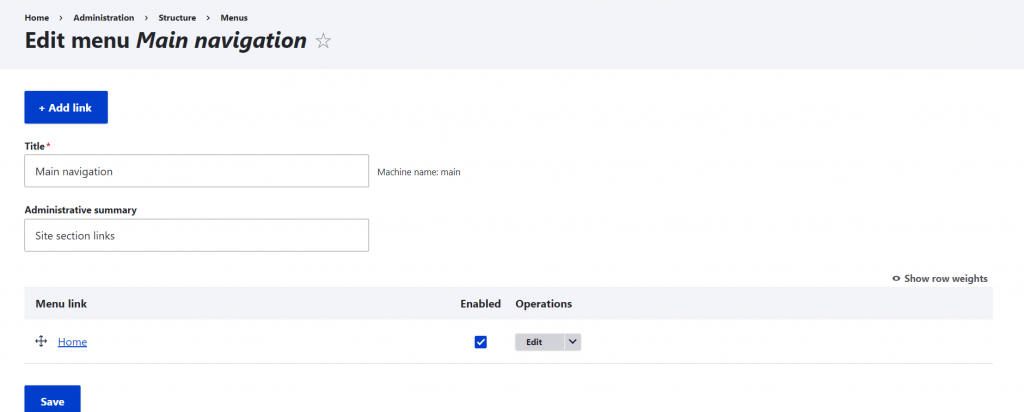
</div>Step 13: Adding Menus:– structure/menu/manage/main go to this url and add the menu you required. Just Click on Add Link and add all your Navigation menu