Limited Time Offer!
For Less Than the Cost of a Starbucks Coffee, Access All DevOpsSchool Videos on YouTube Unlimitedly.
Master DevOps, SRE, DevSecOps Skills!
1. SuiteCRM Setup
Add a Custom Field: order_id_c
Go to Admin > Studio > Leads > Fields:
- Create a new Text Field
- Name:
order_id - System name:
order_id_c - Save and deploy
Now your leads_cstm table has the field order_id_c.
2. PHP File: create_paypal_order.php
This handles:
- Lead creation
- Saving to SuiteCRM via
WebToPersonCapture.php - Creating a PayPal payment order
- Redirecting to PayPal
Sample Code:
<?php
session_start();
require 'paypal_config.php';

// Collect form data
$first_name = $_POST["first_name"] ?? '';
$last_name = $_POST["last_name"] ?? '';
$email = $_POST["email1"] ?? '';
$phone = $_POST["phone_mobile"] ?? '';
$description = $_POST["description"] ?? '';
$campaign_id = $_POST["campaign_id"] ?? '';
$assigned_user_id = $_POST["assigned_user_id"] ?? '';
$moduleDir = $_POST["moduleDir"] ?? 'Leads';

$order_id = uniqid("ORD_");
$txn_fee = floatval($_POST["amout_paid_c"] ?? 100);
$gst = round($txn_fee * 0.18, 2);
$total = round($txn_fee + $gst, 2);
$create_date = date("Y-m-d");
$payment_status = "Pending";

// Submit lead to SuiteCRM
$crmData = [
    'first_name' => $first_name,
    'last_name' => $last_name,
    'email1' => $email,
    'phone_mobile' => $phone,
    'description' => $description,
    'payment_status_c' => $payment_status,
    'amout_paid_c' => $total,
    'campaign_id' => $campaign_id,
    'assigned_user_id' => $assigned_user_id,
    'order_id_c' => $order_id,
    'moduleDir' => $moduleDir
];

$ch = curl_init("http://your-crm-url.com/index.php?entryPoint=WebToPersonCapture");
curl_setopt($ch, CURLOPT_POST, true);
curl_setopt($ch, CURLOPT_POSTFIELDS, http_build_query($crmData));
curl_setopt($ch, CURLOPT_RETURNTRANSFER, true);
$crmResponse = curl_exec($ch);
curl_close($ch);

// Save to local DB
$conn = new mysqli("localhost", "root", "", "cotocus");
if (!$conn->connect_error) {
    $stmt = $conn->prepare("INSERT INTO payment (create_date, name, email, phone, message, order_id, txn_fee, txn_gst, txn_amount, payment_status) VALUES (?, ?, ?, ?, ?, ?, ?, ?, ?, ?)");
    $name = $first_name . ' ' . $last_name;
    $stmt->bind_param("ssssssddds", $create_date, $name, $email, $phone, $description, $order_id, $txn_fee, $gst, $total, $payment_status);
    $stmt->execute();
    $stmt->close();
    $conn->close();
}

// Create PayPal Order
$return_url = "http://your-site.com/success.php?order_id=$order_id&status=success";
$payload = [
    "intent" => "CAPTURE",
    "purchase_units" => [[
        "reference_id" => $order_id,
        "amount" => ["currency_code" => "USD", "value" => $total],
        "description" => $description
    ]],
    "application_context" => [
        "return_url" => $return_url,
        "cancel_url" => "http://your-site.com/cancel.php"
    ]
];

$ch = curl_init(PAYPAL_BASE_URL . "/v2/checkout/orders");
curl_setopt($ch, CURLOPT_HTTPHEADER, [
    "Content-Type: application/json",
    "Authorization: Bearer $access_token"
]);
curl_setopt($ch, CURLOPT_POST, true);
curl_setopt($ch, CURLOPT_POSTFIELDS, json_encode($payload));
curl_setopt($ch, CURLOPT_RETURNTRANSFER, true);
$response = curl_exec($ch);
$order = json_decode($response);
curl_close($ch);

foreach ($order->links as $link) {
    if ($link->rel === "approve") {
        header("Location: " . $link->href);
        exit;
    }
}
echo "❌ PayPal creation failed.";
?>
3. PayPal Success Callback: success.php
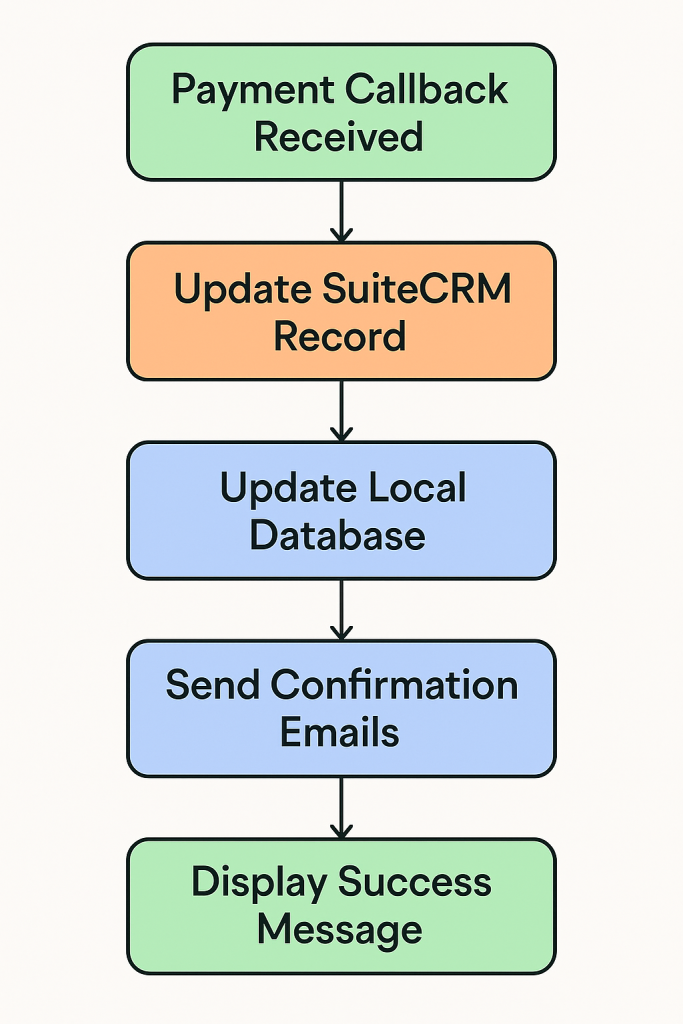
This script:
- Confirms order ID
- Finds lead in SuiteCRM by
order_id_c - Updates lead to
Paid - Updates local DB
- Sends email
Code:
<?php
$orderId = $_GET["order_id"] ?? '';
$status = $_GET["status"] ?? 'Unknown';

$amount = 0;
$crmSubmitted = false;

// Fetch lead via order_id_c
$crmData = [
    'order_id_c' => $orderId,
    'update_existing' => 'true',
    'payment_status_c' => 'Paid'
];

$ch = curl_init("http://your-crm-url.com/index.php?entryPoint=WebToPersonCapture");
curl_setopt($ch, CURLOPT_POST, true);
curl_setopt($ch, CURLOPT_POSTFIELDS, http_build_query($crmData));
curl_setopt($ch, CURLOPT_RETURNTRANSFER, true);
$response = curl_exec($ch);
$crmSubmitted = $response ? true : false;
curl_close($ch);

// Update local DB
$conn = new mysqli("localhost", "root", "", "cotocus");
if (!$conn->connect_error) {
    $stmt = $conn->prepare("UPDATE payment SET payment_status = 'Paid' WHERE order_id = ?");
    $stmt->bind_param("s", $orderId);
    $stmt->execute();
    $stmt->close();
    $conn->close();
}

// Send emails
$subject = "✅ Payment Received - Order $orderId";
$message = "Thank you! Your payment was received.\nOrder ID: $orderId";
mail("customer@example.com", $subject, $message);
mail("info@yourdomain.com", $subject, $message);

// Show confirmation
echo "<h1>Payment successful!</h1><p>Your order ID: $orderId</p>";
?>
4. CRM Logic Fix: WebToPersonCapture.php
Update SuiteCRM logic to match by order_id_c instead of id_c.
Patch this section:
$order_id_c = $_POST['order_id_c'] ?? null;
$update_existing = $_POST['update_existing'] ?? 'false';

if ($order_id_c && strtolower($update_existing) === 'true') {
    $order_id_safe = $db->quote($order_id_c, false);
    $query = "SELECT id_c FROM leads_cstm WHERE order_id_c = '{$order_id_safe}' LIMIT 1";
    $result = $db->query($query);
    $row = $db->fetchByAssoc($result);
    if ($row && !empty($row['id_c'])) {
        $person = BeanFactory::getBean($moduleDir, $row['id_c']);
    } else {
        $person = BeanFactory::getBean($moduleDir);
    }
} else {
    $person = BeanFactory::getBean($moduleDir);
}
5. Database Table Setup
Ensure your MySQL table payment:
CREATE TABLE `payment` (
  `id` INT AUTO_INCREMENT PRIMARY KEY,
  `create_date` DATE,
  `name` VARCHAR(255),
  `email` VARCHAR(255),
  `phone` VARCHAR(50),
  `message` TEXT,
  `order_id` VARCHAR(100),
  `txn_fee` DECIMAL(10,2),
  `txn_gst` DECIMAL(10,2),
  `txn_amount` DECIMAL(10,2),
  `payment_status` VARCHAR(50)
);
📩 Email Format Example
Subject: Payment Received – Order ORD_xyz123
Dear [User],

Your payment of $118.00 was received successfully.

Order ID: ORD_xyz123
Status: Paid

Thank you,
CMSGalaxy Team