Limited Time Offer!
For Less Than the Cost of a Starbucks Coffee, Access All DevOpsSchool Videos on YouTube Unlimitedly.
Master DevOps, SRE, DevSecOps Skills!
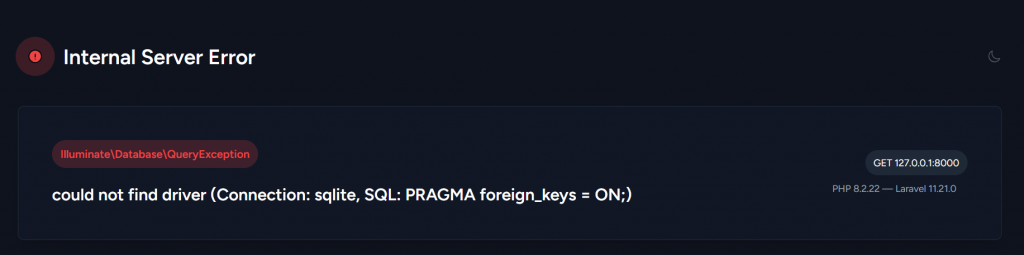
Error:
 local.ERROR: could not find driver (Connection: sqlite, SQL: PRAGMA foreign_keys = ON;) {"exception":"[object] (Illuminate\\Database\\QueryException(code: 0): could not find driver (Connection: sqlite, SQL: PRAGMA foreign_keys = ON;) at C:\\xampp\\htdocs\\tag-input-project\\vendor\\laravel\\framework\\src\\Illuminate\\Database\\Connection.php:825)
[stacktrace]
#0 C:\\xampp\\htdocs\\tag-input-project\\vendor\\laravel\\framework\\src\\Illuminate\\Database\\Connection.php(779): Illuminate\\Database\\Connection->runQueryCallback('PRAGMA foreign_...', Array, Object(Closure))
#1 C:\\xampp\\htdocs\\tag-input-project\\vendor\\laravel\\framework\\src\\Illuminate\\Database\\Connection.php(560): Illuminate\\Database\\Connection->run('PRAGMA foreign_...', Array, Object(Closure))
#2 C:\\xampp\\htdocs\\tag-input-project\\vendor\\laravel\\framework\\src\\Illuminate\\Database\\Schema\\Builder.php(523): Illuminate\\Database\\Connection->statement('PRAGMA foreign_...')
#3 C:\\xampp\\htdocs\\tag-input-project\\vendor\\laravel\\framework\\src\\Illuminate\\Database\\SQLiteConnection.php(59): Illuminate\\Database\\Schema\\Builder->enableForeignKeyConstraints()
#4 C:\\xampp\\htdocs\\tag-input-project\\vendor\\laravel\\framework\\src\\Illuminate\\Database\\SQLiteConnection.php(28): Illuminate\\Database\\SQLiteConnection->configureForeignKeyConstraints()
#5 C:\\xampp\\htdocs\\tag-input-project\\vendor\\laravel\\framework\\src\\Illuminate\\Database\\Connectors\\ConnectionFactory.php(277): Illuminate\\Database\\SQLiteConnection->__construct(Object(Closure), 'C:\\\\xampp\\\\htdocs...', '', Array)
#6 C:\\xampp\\htdocs\\tag-input-project\\vendor\\laravel\\framework\\src\\Illuminate\\Database\\Connectors\\ConnectionFactory.php(76): Illuminate\\Database\\Connectors\\ConnectionFactory->createConnection('sqlite', Object(Closure), 'C:\\\\xampp\\\\htdocs...', '', Array)
#7 C:\\xampp\\htdocs\\tag-input-project\\vendor\\laravel\\framework\\src\\Illuminate\\Database\\Connectors\\ConnectionFactory.php(51): Illuminate\\Database\\Connectors\\ConnectionFactory->createSingleConnection(Array)
#8 C:\\xampp\\htdocs\\tag-input-project\\vendor\\laravel\\framework\\src\\Illuminate\\Database\\DatabaseManager.php(167): Illuminate\\Database\\Connectors\\ConnectionFactory->make(Array, 'sqlite')
#9 C:\\xampp\\htdocs\\tag-input-project\\vendor\\laravel\\framework\\src\\Illuminate\\Database\\DatabaseManager.php(93): Illuminate\\Database\\DatabaseManager->makeConnection('sqlite')
#10 C:\\xampp\\htdocs\\tag-input-project\\vendor\\laravel\\framework\\src\\Illuminate\\Session\\SessionManager.php(108): Illuminate\\Database\\DatabaseManager->connection('sqlite')
#11 C:\\xampp\\htdocs\\tag-input-project\\vendor\\laravel\\framework\\src\\Illuminate\\Session\\SessionManager.php(95): Illuminate\\Session\\SessionManager->getDatabaseConnection()
#12 C:\\xampp\\htdocs\\tag-input-project\\vendor\\laravel\\framework\\src\\Illuminate\\Support\\Manager.php(106):
Solution:
The error message you’re seeing suggests that the reason your Laravel application can’t connect to the SQLite database is because your PHP environment doesn’t have the SQLite driver installed or enabled. You’ll need to activate the SQLite extension in PHP because you’re running XAMPP.
Steps to Fix the SQLite Driver Issue:
Step 1:- Locate the php.ini File:
- Open your XAMPP installation directory (e.g.,
C:\xampp). - Find the
php.inifile, which is usually located in thephpfolder (e.g.,C:\xampp\php\php.ini).
Step 2:- Enable SQLite Extension:
- Open the
php.inifile in a text editor. - Look for the following lines:
;extension=pdo_sqlite
;extension=sqlite3- Remove the semicolon (
;) at the beginning of these lines to uncomment them:
extension=pdo_sqlite
extension=sqlite3
Step 3:- Save and Restart Apache:
- Save the changes to the
php.inifile. - Restart Apache through the XAMPP Control Panel.