Limited Time Offer!
For Less Than the Cost of a Starbucks Coffee, Access All DevOpsSchool Videos on YouTube Unlimitedly.
Master DevOps, SRE, DevSecOps Skills!
Which One Is Best for Production Server?
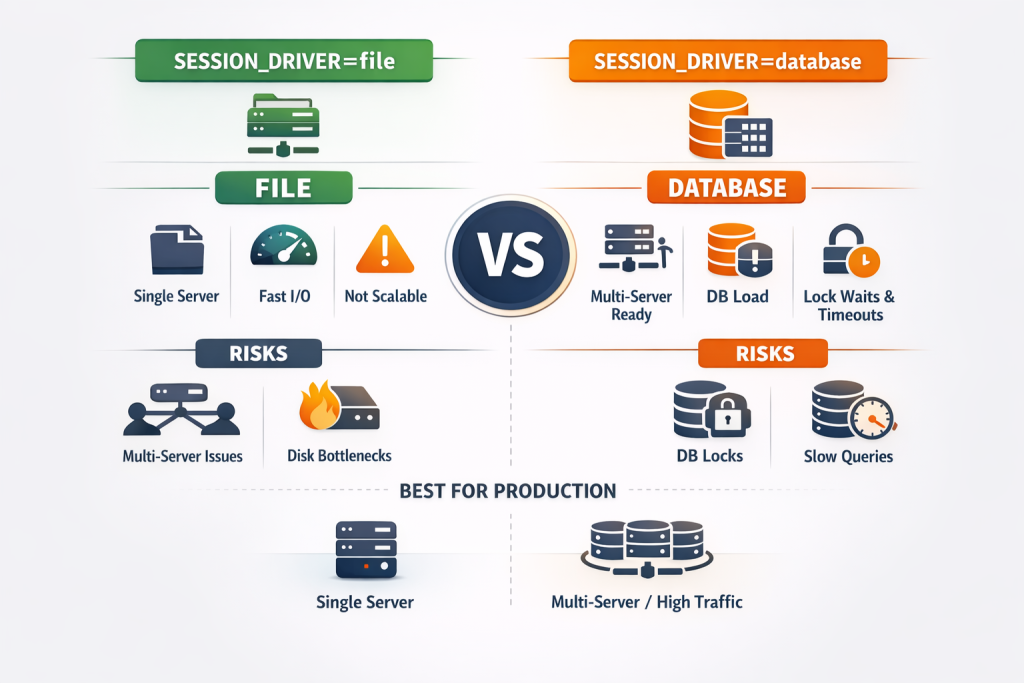
Session management is one of the most critical yet commonly misunderstood parts of any Laravel production setup. Many applications work perfectly in development but start behaving unpredictably in production — users get logged out randomly, sessions disappear, login names don’t appear in the navbar, or the database suddenly throws lock wait timeout errors.
At the center of many of these problems is one small configuration line in the .env file:
SESSION_DRIVER=file
or
SESSION_DRIVER=database
This guide is written to fully explain both options, their real-world production behavior, hidden problems, and when exactly you should use each.
It also covers session locking issues, cleanup behavior, multi-server scenarios, and practical recommendations — not theory.
If you are running Laravel in production and want stability, performance, and scalability, this guide will help you choose correctly.
What Is a Session Driver in Laravel?
A session driver defines where and how user session data is stored.
Session data includes:
- Logged-in user ID
- Authentication state
- CSRF tokens
- Temporary data like flash messages
- SSO tokens (Keycloak, OAuth, etc.)
Laravel supports multiple session drivers, but in real production environments, file and database are the two most commonly used without additional infrastructure.
SESSION_DRIVER=file – Explained in Detail
How file-based sessions work
When you use:
SESSION_DRIVER=file
Laravel stores each user session as a file on the server disk, typically inside:
storage/framework/sessions
Each user gets a separate session file, identified by the session ID stored in their browser cookie.
When file-based sessions work best
File sessions are best when:
- You have one production server
- You do not use load balancers
- You want simplicity and reliability
- Traffic is low to medium
- You want minimal dependency on database performance
Advantages of SESSION_DRIVER=file
- Very stable on single servers
No database dependency for sessions means fewer moving parts. - No database locks
File sessions do not compete for database resources. - Fast for small to medium traffic
Disk reads/writes are efficient when the server is properly configured. - Simpler debugging
Session files can be inspected directly during troubleshooting.
Real production problems with file sessions
Despite its simplicity, file sessions have serious limitations in certain setups.
1. Completely breaks in multi-server environments
If you have:
- Multiple Laravel servers
- Load balancer
- Auto-scaling
Each server has its own local disk.
Result:
- User logs in on Server A
- Next request hits Server B
- Session file does not exist
- User appears logged out
This is one of the most common production session issues.
2. Requires sticky sessions or shared storage
To make file sessions work with multiple servers, you need:
- Load balancer sticky sessions or
- Shared file system (NFS)
Both introduce new risks:
- Sticky sessions reduce load balancing efficiency
- NFS adds latency and failure points
3. Disk I/O pressure at high traffic
High traffic applications generate many session writes.
On slow disks or poorly tuned servers, this can cause performance degradation.
Summary: SESSION_DRIVER=file
Best choice when
- Single production server
- No horizontal scaling
- Want maximum simplicity
Avoid when
- Multiple servers
- Load balancers
- Auto-scaling environments
SESSION_DRIVER=database – Explained in Detail
How database-based sessions work
When you use:
SESSION_DRIVER=database
Laravel stores session data in a database table, usually named:
sessions
Every request:
- Reads session row
- Updates
last_activity - Sometimes updates payload
This means your database becomes part of every user request.
When database sessions are necessary
Database sessions are suitable when:
- You run multiple Laravel servers
- You need sessions shared across servers
- You cannot use Redis
- You want centralized session management
Advantages of SESSION_DRIVER=database
- Works across multiple servers
All servers read from the same database. - No sticky sessions required
Load balancer can freely distribute traffic. - Centralized session invalidation
You can delete sessions for users from one place.
Real production problems with database sessions (very important)
This is where most teams struggle.
1. Database load increases significantly
Every request touches the sessions table.
On high traffic apps, this can become thousands of writes per minute.
2. Lock wait timeout errors
A very common production error looks like this:
SQLSTATE[HY000]: General error: 1205
Lock wait timeout exceeded; try restarting transaction
This typically happens during:
delete from sessions where last_activity <= ?
Why this happens:
- Many concurrent requests update sessions
- Cleanup query tries to delete old rows
- Table or row-level locks block each other
- MySQL waits → times out → throws error
3. Session cleanup causes contention
Laravel automatically cleans expired sessions.
If:
- Session table is large
- Indexes are missing
- Cleanup runs during peak traffic
It can block normal session reads/writes.
4. Poor indexing makes everything worse
If last_activity is not properly indexed:
- Deletes scan many rows
- Locks last longer
- Performance drops sharply
Common symptoms of database session issues
- Random logout
- Navbar user name missing
- Session works in one project but not another
- Intermittent 500 errors
- Lock wait timeout errors in logs
How to reduce database session problems
If you must use database sessions, you should:
- Ensure
last_activityis indexed - Keep session lifetime reasonable
- Avoid very frequent session writes
- Schedule cleanup during low traffic
- Monitor session table size regularly
Even with these steps, database sessions do not scale well under very high traffic.
File vs Database – Direct Comparison
| Aspect | file | database |
|---|---|---|
| Single server | Excellent | Works |
| Multiple servers | Fails | Works |
| Database load | None | High |
| Lock issues | None | Common |
| Setup complexity | Very low | Medium |
| High traffic | Moderate | Risky |
| Cleanup issues | Minimal | Common |
Which SESSION_DRIVER Is Best for Production?
The correct answer depends on your architecture
If you have ONE production server
Best choice:
SESSION_DRIVER=file
Why:
- No DB locks
- Stable
- Faster
- Fewer failures
If you have MULTIPLE servers or load balancer
Minimum acceptable choice:
SESSION_DRIVER=database
Why:
- Sessions must be shared
But be aware:
- Database load
- Locking issues
- Cleanup tuning required
If you have HIGH traffic + multiple servers
Best practice: Redis (outside scope here)
Why many production apps fail with database sessions
Most failures happen because:
- Teams assume database sessions are “safer”
- Indexing is ignored
- Cleanup behavior is not understood
- Traffic grows faster than DB capacity
Database sessions work, but they are not free.
Final Practical Recommendation
- Single server production: use
file - Multi-server production without Redis: use
database, tune carefully - Scaling / heavy traffic: migrate to Redis
If you are currently seeing:
- Lock wait timeout errors
- Session cleanup queries failing
- Navbar authentication inconsistencies
And you are on one server, switching to file sessions is often the fastest and safest fix.
Conclusion
Session configuration is not just a technical detail — it directly affects user experience, login stability, and server performance.
Choosing the wrong session driver for your production architecture leads to:
- Random logouts
- Database overload
- Hard-to-debug authentication issues
Choosing the right one simplifies your system and makes it predictable.
Understand your infrastructure first — then choose the session driver.