Limited Time Offer!
For Less Than the Cost of a Starbucks Coffee, Access All DevOpsSchool Videos on YouTube Unlimitedly.
Master DevOps, SRE, DevSecOps Skills!
Introduction
In the modern software development lifecycle, we are constantly pressured to deliver features faster. The pressure to push code from a developer’s laptop to production in minutes is immense. However, this speed often comes with a significant risk: security is treated as an afterthought. We build, we test for functionality, and then we invite security teams to run a scan or perform a manual review. This approach breaks the rhythm of development and creates a bottleneck that slows down everything.
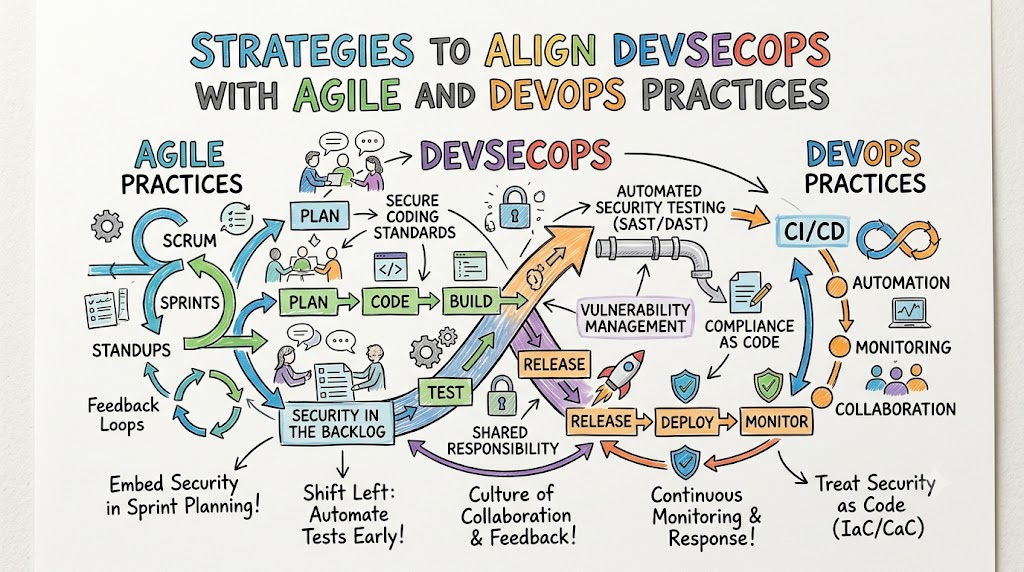
To succeed in today’s environment, we must shift our perspective. Security cannot be a checkpoint at the end of the sprint; it must be a continuous thread woven into every stage of development. This is where the concept of DevSecOps comes into play. It is not just about adding security tools to your pipeline; it is about changing how teams collaborate.
When we talk about aligning DevSecOps with Agile and DevOps, we are talking about creating a culture where security is a shared responsibility. We are moving away from the “us versus them” mentality between developers and security engineers. At DevOpsSchool, we have helped countless engineering teams move from traditional, slow security reviews to automated, secure Agile delivery. In this guide, we will break down exactly how you can align these three pillars—Agile, DevOps, and DevSecOps—to build faster, more secure software.
Understanding Agile, DevOps, and DevSecOps
To align these methodologies, we must first understand what they bring to the table. Think of these as the three layers of your engineering organization.
Agile is your philosophy of speed and iteration. It focuses on breaking down massive projects into smaller, manageable chunks—sprints. It prioritizes the customer and continuous improvement.
DevOps is your engine of collaboration and automation. It breaks down the walls between software development (the builders) and IT operations (the maintainers). It uses CI/CD pipelines to ensure that code can be deployed reliably and frequently.
DevSecOps is the integration of security into the DevOps engine. It acknowledges that security is an essential part of the engineering process, not a separate function. It forces the question: “How can we build security into our automation so that it happens automatically?”
In simple terms: Agile plans the work, DevOps executes the build and deployment, and DevSecOps ensures that what you are building is safe from start to finish.
Why Alignment Matters
If you run Agile and DevOps without DevSecOps, you are essentially driving a high-speed car without brakes. You might reach your destination quickly, but you are not prepared for hazards along the way. When security is not aligned, organizations face:
- Late-Stage Vulnerability Discovery: Finding a critical flaw right before release causes massive delays and morale drops for developers.
- Security Debt: Similar to technical debt, security debt accumulates when we ignore vulnerabilities, making them harder to fix later.
- Fragmented Tooling: Developers use one set of tools, while security teams use another, leading to disconnected data and lack of visibility.
By aligning these practices, you treat security as a quality metric. Just as you wouldn’t deploy code that crashes, you shouldn’t deploy code that has known, exploitable vulnerabilities.
Comparison Table: Agile vs DevOps vs DevSecOps
| Area | Agile | DevOps | DevSecOps |
| Primary Goal | Delivering value to the customer in small iterations. | Continuous delivery and operational efficiency. | Secure software delivery at speed. |
| Focus | Project management, user needs, sprint planning. | Automation, infrastructure as code, CI/CD. | Threat modeling, policy as code, automated compliance. |
| Team Dynamic | Cross-functional teams, Scrum masters, product owners. | Collaboration between Dev and Ops teams. | Collaboration between Dev, Ops, and Security teams. |
| Security Role | Often an external audit or final check. | Implicitly supported but often secondary. | Integrated at every phase; everyone is responsible. |
| Delivery Speed | High (Sprint-based). | Very High (Continuous). | High (Secure by design). |
Core Principles for Aligning DevSecOps
Alignment does not happen by accident. It requires a fundamental shift in how your team approaches the daily sprint.
| Principle | Why It Matters |
| Shift-Left Security | Finding issues during the design or coding phase is 100x cheaper than finding them in production. |
| Continuous Testing | Security checks must run every time code is committed, just like unit tests. |
| Security Automation | Manual security reviews cannot keep up with modern CI/CD speeds. |
| Shared Responsibility | Security is not the police; it is a quality assurance layer that belongs to everyone. |
| Continuous Monitoring | Threats evolve; security must be observed after the code is live. |
| Fast Feedback Loops | Developers need to know about security issues immediately while the code is fresh in their minds. |
Principle #1: Shift-Left Security
Shift-left means moving security tasks earlier in the development lifecycle. Instead of waiting for a security team to run a penetration test at the end of the month, the developer runs a security tool on their local machine before they even push their code.
Sprint Example:
In your sprint planning, don’t just assign “feature stories.” Assign “security stories.” If a developer is building an authentication module, the sprint task should include “Ensure MFA is implemented and SAST scanning confirms no hardcoded credentials.”
Principle #2: Continuous Security Testing
In a traditional setup, security testing happens as a discrete project phase. In an aligned DevSecOps workflow, security testing is part of the build pipeline.
Example Workflow:
- Developer pushes code to the repository.
- The CI/CD pipeline triggers.
- Unit tests run (functionality).
- SAST (Static Application Security Testing) tools run (security).
- If the SAST tool finds a critical vulnerability, the build breaks immediately.
- The developer gets a notification, fixes it, and pushes again.
Principle #3: Security Automation
Automation is the heart of DevSecOps. If a task is repetitive and security-focused, automate it. This includes secret scanning (detecting API keys in code), dependency scanning (detecting vulnerable third-party libraries), and container image scanning.
Realistic Workflow:
Imagine your team uses a container orchestrator. Every time you push a Docker image, an automated scanner checks the OS packages inside that image for known vulnerabilities (CVEs). If the scanner finds a critical vulnerability, the deployment to the staging environment is blocked automatically. No human intervention is needed to enforce this security policy.
Principle #4: Shared Responsibility
This is the hardest principle to implement because it is cultural, not technical. Developers often feel that security is “not their job.” However, in a successful Agile and DevSecOps alignment, the Security team acts as enablers, not gatekeepers. They provide the tools, the guardrails, and the training, while the developers own the implementation.
Team Example:
Instead of the Security team writing the security policies, the Security team holds a “Security Champion” program. One developer in every squad is trained in basic security practices. They act as the liaison. This ensures that security advice is provided by a peer who understands the codebase.
Principle #5: Continuous Monitoring
Security does not end at deployment. Production systems change, and new vulnerabilities (zero-days) are discovered constantly. Continuous monitoring ensures you have observability into your runtime environment.
Example:
Using Application Performance Monitoring (APM) tools, you should look for security anomalies. If a microservice suddenly starts making thousands of requests to an external IP, that is a potential data exfiltration event. Monitoring allows you to catch these patterns in real-time.
Principle #6: Fast Security Feedback
The biggest killer of velocity in Agile teams is waiting for feedback. If a developer submits a PR and has to wait three days for a security review, they have already moved on to the next task, context-switching is destroyed, and the fix will take much longer. Feedback must be instantaneous. Use tools that comment directly on the Pull Request (PR) in real-time.
Real-World Example: Team Without Alignment
Consider “Team A.” They work in two-week sprints. They build features, test them, and merge them into the master branch. The security team performs a manual scan of the application every Friday afternoon.
- Result: The security team finds five critical vulnerabilities on Friday evening. The developers have already started the next sprint.
- The Conflict: Developers are forced to stop their current work to fix the old issues, causing the next sprint to fall behind schedule.
- Outcome: The team is stressed, security is viewed as an obstacle, and releases are delayed.
Real-World Example: Team Successfully Aligning DevSecOps
Consider “Team B.” They integrate security into the pipeline. They use automated dependency scanners in their CI tool.
- Result: When a developer introduces a vulnerable library, the CI build fails within 10 minutes. The developer gets an error message explaining exactly which library is vulnerable and what version to upgrade to.
- The Harmony: The developer fixes it in 15 minutes before the code is even merged. No tickets are created, no meetings are needed, and no releases are delayed.
- Outcome: Security is improved, speed is maintained, and developers feel empowered.
Common Mistakes in Alignment
When organizations try to force alignment, they often make these mistakes:
- Treating Security Separately: Maintaining a security team that works in isolation from the Agile squads.
- Manual Reviews Only: Relying on human auditors to check every line of code. It simply does not scale.
- Ignoring Automation: Trying to “fix” security with more documentation and meetings rather than tools.
- Weak Collaboration: Failure to include security representatives in daily stand-ups or sprint retrospectives.
Alignment Checklist:
- [ ] Is security represented in sprint planning?
- [ ] Are security tools integrated into the CI/CD pipeline?
- [ ] Do developers have access to security scan results?
- [ ] Is there a clear path to update vulnerable dependencies?
- [ ] Are security “champions” identified in each squad?
Common Misunderstandings
There are many myths about DevSecOps that hinder progress.
- “Security slows Agile delivery.” Reality: Bad security (re-work, patches, incidents) is what slows down delivery. Good, automated security speeds it up.
- “DevSecOps replaces Agile.” Reality: It does not. It is an enhancement to Agile, ensuring the rapid cycles are also safe.
- “Only security teams handle risks.” Reality: Developers are the ones writing the code; they are the first line of defense.
- “Automation solves everything.” Reality: Automation is a tool. You still need a culture of security awareness to handle complex threats.
Challenges in Aligning DevSecOps
Implementing this alignment is not a “plug-and-play” solution. You will face resistance.
- Cultural Resistance: Developers may perceive security as slowing them down. The solution is to make security tools frictionless.
- Skill Gaps: Developers are often not trained in secure coding practices. Provide training.
- Tool Complexity: There are too many security tools. Start with the basics (SAST, SCA) rather than trying to buy every tool on the market.
- Balancing Speed and Safety: You cannot secure everything all at once. Prioritize the most critical vulnerabilities first.
Best Practices for Alignment
- Start Small: Do not try to automate everything in one day. Start with SCA (Software Composition Analysis) to secure your third-party libraries.
- Train Engineers: Provide short, hands-on workshops for your developers.
- Include Security in Planning: If you are building a new feature, talk about its security implications during the design phase.
- Improve Communication: Use Slack or Teams integrations to push security alerts directly to the team responsible for the code.
- Standardize Workflows: Create “Golden Images” or secure container templates that teams can use, so they don’t have to build secure infrastructure from scratch.
Role of DevOpsSchool in Learning DevSecOps Alignment
Learning to align these methodologies requires practical, hands-on experience. At DevOpsSchool, we emphasize that DevSecOps is a mindset, not just a software suite. We guide learners through:
- Secure CI/CD Implementation: Understanding how to configure pipelines that automatically scan for threats.
- Agile + DevOps Mindset: Helping teams understand how to collaborate effectively across departments.
- Real-World Practices: Moving beyond theory to solve actual engineering problems found in modern enterprises.
By focusing on the integration of these practices, engineering teams can build robust systems that are both fast and resilient.
Career Importance of Learning DevSecOps Alignment
If you are an engineer or IT professional, understanding how to align these practices is one of the most valuable skills you can acquire.
- DevSecOps Engineer: The bridge between code, infrastructure, and security policy.
- DevOps Engineer: Increasingly, you are expected to understand security as part of your infrastructure setup.
- Scrum Team Engineer: Understanding security helps you estimate stories more accurately and write better code.
- SRE (Site Reliability Engineer): Security is a core component of system reliability.
The job market is shifting. Companies no longer want “developers” and “security guys.” They want engineering teams that can own the full lifecycle of their product, including its safety.
Industries Using DevSecOps + Agile
- SaaS Platforms: They release daily. They cannot afford manual security reviews. They rely entirely on automated DevSecOps pipelines.
- Banking & Finance: They have the strictest compliance requirements. They use “Compliance as Code” to ensure every release meets regulatory standards.
- Healthcare: They must protect patient data while iterating on digital health platforms.
- E-Commerce: They deal with high traffic and payment processing, requiring constant, secure deployment.
- Telecom: Managing massive infrastructure requires high-scale automated security.
Future of DevSecOps Alignment
The future is about intelligence and autonomy.
- AI-Assisted Security: We are seeing the rise of tools that not only find vulnerabilities but also suggest the exact code fix.
- Autonomous Pipelines: Pipelines that self-heal or reconfigure when a threat is detected.
- Platform Engineering: Moving security policies into the internal developer platform so developers consume security as a service, without even thinking about it.
FAQs
- What is DevSecOps alignment?It is the process of integrating security testing and compliance into your existing Agile and DevOps workflows so that it happens continuously without manual blocks.
- Why combine Agile, DevOps, and DevSecOps?To achieve the “speed of Agile,” the “efficiency of DevOps,” and the “safety of DevSecOps” simultaneously. It ensures you don’t compromise safety for speed.
- What is shift-left security?It means moving security practices earlier in the development lifecycle (the “left” side of the pipeline) so you catch issues during design and coding rather than during testing or production.
- Does DevSecOps slow Agile down?No. Done correctly, it prevents “re-work” and “security incidents,” which are the actual causes of delays. Automated security is much faster than manual security.
- Can beginners learn DevSecOps?Yes. Start by understanding the basics of how applications are built and deployed, then learn the fundamental security principles applied at each stage.
- What tools support secure CI/CD?There are many, including SAST tools (like SonarQube), DAST tools (like OWASP ZAP), and SCA tools (like Snyk or Dependabot).
- Why is automation important?Human speed is a bottleneck. Automation allows security checks to run on every commit, ensuring consistent quality and coverage.
- Is DevSecOps only for large enterprises?No. Startups benefit even more because they have fewer resources to recover from a security breach.
- What is the first step to alignment?Start by getting security and development teams into the same room (or virtual meeting) to discuss shared goals. Then, introduce one automated scan tool into your pipeline.
- What is the role of the security team in this model?They shift from being “gatekeepers” to “enablers.” They define the policies and build the platforms that allow developers to be secure.
- How do I measure DevSecOps success?Look at metrics like Mean Time to Remediate (MTTR), deployment frequency, and the number of vulnerabilities found in production versus in the pipeline.
- Are there cultural hurdles to this approach?Yes. Teams often have an “us vs them” mentality. Overcoming this requires transparent communication and shared KPIs.
- Do I need to be a security expert to do DevSecOps?No. You need to be an engineer who understands security basics. Specialized experts will always exist, but the daily workflow should be handled by the team.
- How do I handle legacy code?You cannot apply modern DevSecOps to legacy systems overnight. Start with containerization or adding automated wrappers around legacy components to improve visibility.
- What is the difference between DevSecOps and traditional security?Traditional security is periodic, manual, and reactive. DevSecOps is continuous, automated, and proactive.
Final Thoughts
Aligning DevSecOps with Agile and DevOps is not about adding more work to your plate; it is about changing the nature of that work. Security should not be a roadblock. When done right, it becomes a feature of your development process, just like unit tests or performance monitoring.
As a senior engineer, I have seen the difference between teams that “bolt on” security at the end and teams that “build in” security from the start. The latter group releases faster, breaks less, and feels a greater sense of ownership over their work. Remember, the goal of modern engineering is not just to deliver code; it is to deliver reliable, high-quality, and secure value to your users.
Embrace automation, foster a culture of collaboration, and keep your security practices as agile as your development cycles.
