Skip to content
Menu
DevSecOps Now!!!
  • About
  • Certifications
  • Contact
  • Courses
  • DevSecOps Consulting
  • DevSecOps Tools
  • Training
  • Tutorials
DevSecOps Now!!!

XAMPP: Another MySQL daemon is already running

Posted on September 4, 2024

Limited Time Offer!

For Less Than the Cost of a Starbucks Coffee, Access All DevOpsSchool Videos on YouTube Unlimitedly.
Master DevOps, SRE, DevSecOps Skills!
Enroll Now

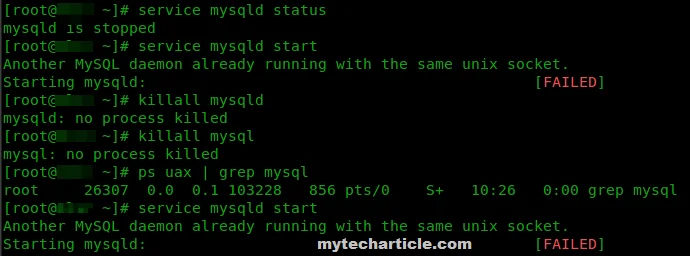
This problem happens when MySQL or MariaDB, which comes with XAMPP, is unable to start because another instance of MySQL is already operating on your system. To resolve this, perform the troubleshooting procedures listed below.

Step 1: Identify the Running MySQL Service

The first step is to confirm if another instance of MySQL or MariaDB is running on your system.

For Windows:

Check running services:

  • Press Windows + R, type services.msc, and hit Enter.
  • Scroll down and look for MySQL or MariaDB. If you find it running, right-click on it and select Stop.

Check Task Manager:

  • Press Ctrl + Shift + Esc to open Task Manager.
  • Look under the Processes tab for any MySQL or MariaDB processes. Select the process and click End Task.

For macOS or Linux:

Check running services:

  • Open a terminal and run the following command:
sudo service mysql status
  • If MySQL is running, stop it using:
sudo service mysql stop

Kill MySQL Process:

  • To check if a MySQL process is running, use:
ps aux | grep mysql
  • If you find any MySQL processes running, kill them with:
sudo kill -9 <PID>

Step 2: Change the MySQL Port in XAMPP

If you are running another MySQL service on port 3306, you can change the default port in XAMPP to avoid conflicts.

  1. Stop the MySQL Service in XAMPP:
    • Open the XAMPP Control Panel and stop MySQL if it is running.
  2. Change the MySQL Port in XAMPP:
    • Go to the folder where XAMPP is installed, typically:
      • Windows: C:\xampp\
      • Linux/macOS: /opt/lampp/
    • Open the file my.ini located in the mysql/bin/ directory.
    • Look for the following line: port=3306
    • Change the port number (e.g., 3307 or 3308).
    • Save and close the file.
  3. Update the XAMPP Control Panel (Windows only):
    • In the XAMPP Control Panel, click on Config next to MySQL, then select my.ini.
    • Ensure the port number matches the one you just set.

Step 3: Reconfigure Other Applications Using MySQL

If you have applications connected to MySQL, like PHPMyAdmin or other services, you’ll need to update their configuration files to point to the new port.

  1. PHPMyAdmin Configuration:
    • Navigate to the phpMyAdmin folder inside the XAMPP installation directory.
    • Open the config.inc.php file.
    • Locate the following line:
$cfg['Servers'][$i]['port'] = '3306';
  • Change 3306 to the new port number you set (e.g., 3307).
  • Save the file.

2. Reconfigure Other Applications:

  • Any other applications connecting to MySQL will need to be updated with the new port.

Step 4: Restart XAMPP

Restart XAMPP:

  • Go back to the XAMPP Control Panel and try starting MySQL again.

Verify the MySQL Status:

  • Open your browser and go to http://localhost/phpmyadmin. Check if MySQL is now running without issues.

Step 5: Check for Port Conflicts Using Command Line (Optional)

If the issue persists, it may be helpful to check for port conflicts.

For Windows:

  1. Open Command Prompt and run:
netstat -aon | findstr 3306
  • This will show you if another service is using port 3306. If it is, take note of the PID.

2. Open Task Manager and go to the Processes tab. Look for the process associated with that PID and terminate it if it’s a conflicting service.

For macOS/Linux:

  1. In the terminal, use:
sudo lsof -i :3306

This will list processes using port 3306. If a conflict exists, you can kill the process with:

sudo kill -9 <PID>

Step 6: Reinstall MySQL (As a Last Resort)

If you’ve followed all the steps and the problem persists, you may need to reinstall MySQL in XAMPP.

  1. Backup your databases:
    • Go to C:\xampp\mysql\data (or the equivalent path on your system) and back up your databases by copying this folder.
  2. Uninstall MySQL in XAMPP:
    • In the XAMPP Control Panel, stop MySQL and click Uninstall.
  3. Reinstall MySQL:
    • Reinstall MySQL from the XAMPP installer or download a fresh copy of XAMPP.
  4. Restore your databases:
    • After reinstalling, copy your backup data folder back to C:\xampp\mysql\data.

Conclusion

The “Another MySQL daemon is already running” problem in XAMPP should be fixed by doing these steps. Although port conflicts are the most frequent reason, the problem may typically be resolved by reinstalling MySQL or changing the port.

Post Views: 1,483
  • Another MySQL daemon is already running
  • Linux
  • macos
  • MySql
  • MySQL daemon
  • Running MySQL Service
  • Solved
  • windows
  • Xampp
  • XAMPP: Another MySQL daemon is already running
Subscribe
Login
Notify of
guest
guest
0 Comments
Oldest
Newest Most Voted
Inline Feedbacks
View all comments
  • Ultimate DevSecOps Learning Roadmap to Move from DevOps to Cloud Security
  • Complete Tutorial: Fixing Keycloak UDP Socket Exhaustion, DNS Failure, GitHub Resolution Error, and Laravel Guzzle ConnectException on a Single Server
  • Comprehensive Guide to DevSecOps in Modern Software Engineering
  • DevSecOps in Modern Software Engineering: A Comprehensive Guide for Professionals
  • Laravel Posts Installation Guide
  • Strategies to Align DevSecOps With Agile and DevOps Practices
  • How to Fix Laravel Migration Error: Field ‘id’ Doesn’t Have a Default Value in the Migrations Table
  • A Practical Guide to Proving DevSecOps Business Value for Engineering Leaders
  • Mastering Secure Software Delivery by Solving DevSecOps Adoption Challenges
  • Operationalizing Security for Faster and Safer Software Deployments
  • DevSecOps Server Security Checklist 2026: 50 Must-Check Points Before Going Live
  • The Complete DevOps Salary Overview for IT Professionals
  • The Modern DevOps Certification Guide: Roadmaps for Every Engineering Role
  • Security Champions in DevSecOps: Responsibilities and Best Practices
  • The DevSecOps Handbook for Shift-Left Security
  • Top DevSecOps Principles for Effective Secure Software Delivery
  • Guide to DevSecOps Maturity Levels for Platform and Security Teams
  • Canada PR CRS Calculator: Express Entry Points System Explained
  • Austria PR Points Calculator: Ultimate Guide to Navigating the Red-White-Red Card System
  • The Essential Guide to Enterprise DevSecOps Implementation
  • How to Set Up Claude Code Agent on a Local Windows Laptop and Use claude Command from Anywhere
  • DevOps and DevSecOps Explained: Bridging the Gap Between Speed and Security
  • Comprehensive Manual on DevOps Methodologies and Cloud Native Engineering
  • The Master Guide to Immigration Points: Calculating Your Path to Canada, Australia, and Beyond
  • How to Skip the Activation Email and Password Reset After Google Login in Keycloak Auto-Link Existing Users in First Broker Login
  • Free SSL Certificate Generation Tutorial for Any Website Using Certbot and Apache
  • The Ultimate Guide to Certified FinOps Professional: Skills, Levels, and Career Impact
  • Certified FinOps Manager: Essential Skills for Modern Cloud Operations
  • How to Use Claude AI for Programming: Complete Guide for Developers to Boost Productivity
  • The Definitive Guide to Certified FinOps Engineer: Master Cloud Value Engineering

Recent Comments

  1. emmy day on SQLSTATE[42S22]: Column not found: 1054 Unknown column ‘provider’ in ‘field list’
  2. digital banking on Complete Tutorial: Setting Up Laravel Telescope Correctly (Windows + XAMPP + Custom Domain)
  3. SAHIL DHINGRA on How to Uninstall Xampp from your machine when it is not visible in Control panel programs & Feature ?
  4. Abhishek on MySQL: List of Comprehensive List of approach to secure MySQL servers.
  5. Kristina on Best practices to followed in .httacess to avoid DDOS attack?

Archives

  • June 2026
  • May 2026
  • April 2026
  • March 2026
  • February 2026
  • January 2026
  • December 2025
  • November 2025
  • October 2025
  • September 2025
  • August 2025
  • July 2025
  • June 2025
  • May 2025
  • April 2025
  • March 2025
  • February 2025
  • January 2025
  • December 2024
  • November 2024
  • October 2024
  • September 2024
  • August 2024
  • July 2024
  • June 2024
  • May 2024
  • April 2024
  • March 2024
  • February 2024
  • January 2024
  • December 2023
  • November 2023
  • October 2023
  • September 2023
  • August 2023
  • July 2023
  • May 2023
  • April 2023
  • March 2023
  • February 2023
  • January 2023
  • December 2022

Categories

  • Ai
  • AI Blogging
  • AiOps
  • ajax
  • Android Studio
  • Antimalware
  • Antivirus
  • Apache
  • Api
  • API Security
  • Api Testing
  • APK
  • Aws
  • Bike Rental Services
  • ChatGPT
  • Code Linting
  • Composer
  • cPanel
  • Cyber Threat Intelligence
  • Cybersecurity
  • Data Loss Prevention
  • Database
  • dataops
  • Deception Technology
  • DeepSeek
  • Devops
  • DevSecOps
  • DevTools
  • Digital Asset Management
  • Digital Certificates
  • Docker
  • Drupal
  • emulator
  • Encryption Tools
  • Endpoint Security Tools
  • Error
  • facebook
  • Firewalls
  • Flutter
  • git
  • GITHUB
  • Google Antigravity
  • Google play console
  • Google reCAPTCHA
  • Gradle
  • Guest posting
  • health and fitness
  • IDE
  • Identity and Access Management
  • Incident Response
  • Instagram
  • Intrusion Detection and Prevention Systems
  • jobs
  • Joomla
  • Keycloak
  • Laravel
  • Law News
  • Lawyer Discussion
  • Legal Advice
  • Linkedin
  • Linkedin Api
  • Linux
  • Livewire
  • Mautic
  • Medical Tourism
  • MlOps
  • MobaXterm
  • Mobile Device Management
  • Multi-Factor Authentication
  • MySql
  • Network Traffic Analysis tools
  • Paytm
  • Penetration Testing
  • php
  • PHPMyAdmin
  • Pinterest Api
  • postify
  • Quora
  • SAST
  • SecOps
  • Secure File Transfer Protocol
  • Security Analytics Tools
  • Security Auditing Tools
  • Security Information and Event Management
  • Seo
  • Server Management Tools
  • Single Sign-On
  • Site Reliability Engineering
  • soft 404
  • software
  • SSL
  • SuiteCRM
  • SysOps
  • Threat Model
  • Twitter
  • Twitter Api
  • ubuntu
  • Uncategorized
  • Virtual Host
  • Virtual Private Networks
  • VPNs
  • Vulnerability Assessment Tools
  • Web Application Firewalls
  • Windows Processor
  • Wordpress
  • WSL (Windows Subsystem for Linux)
  • X.com
  • Xampp
  • Youtube
©2026 DevSecOps Now!!! | WordPress Theme: EcoCoded
wpDiscuz