Limited Time Offer!
For Less Than the Cost of a Starbucks Coffee, Access All DevOpsSchool Videos on YouTube Unlimitedly.
Master DevOps, SRE, DevSecOps Skills!
Modern web applications require far more than simply installing a web server and running code. Performance, scalability, concurrency, and security all depend on how the server stack is designed and tuned.
Many developers start with convenience stacks such as XAMPP because they provide Apache, PHP, and MariaDB bundled together in one installation. However, the default configuration of these stacks is designed for development environments, not high-performance production workloads.
This guide walks through the process of transforming a typical Apache + PHP + MariaDB setup into a properly optimized architecture using:
- Apache Event MPM
- PHP-FPM
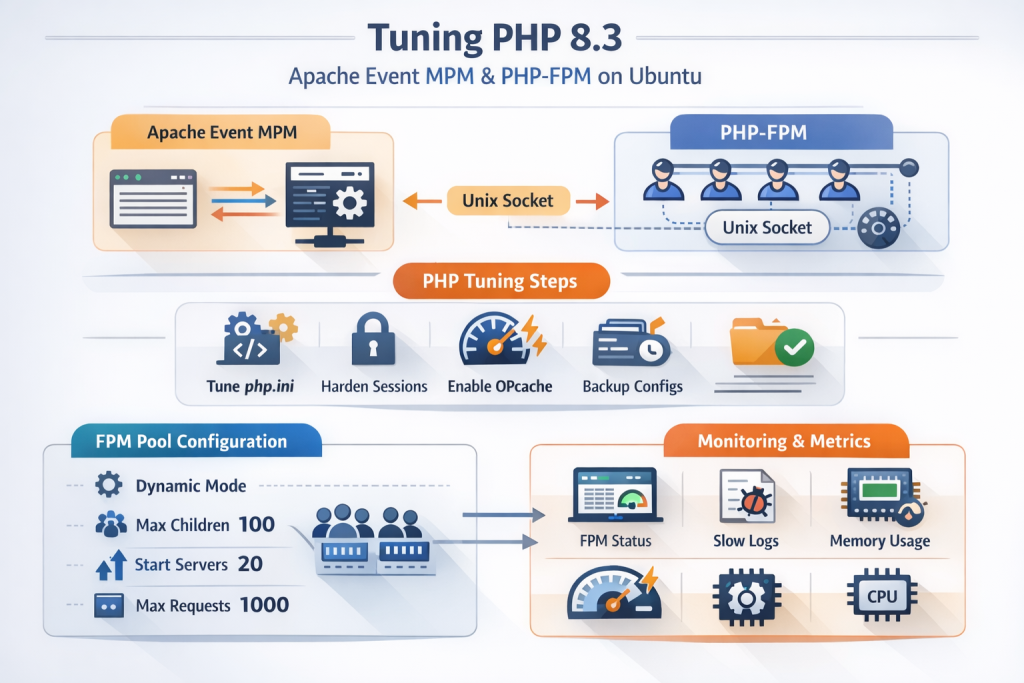
- Tuned PHP configuration
- Optimized MariaDB settings
- Security hardening
- Memory and CPU planning
- Concurrency improvements
The objective is to move away from the traditional Apache Prefork + mod_php model and adopt a modern architecture capable of handling higher concurrency while using fewer resources.
This tutorial assumes a system where XAMPP is installed but the goal is to optimize Apache, PHP, and MariaDB for production-grade workloads.
Understanding the Final Architecture
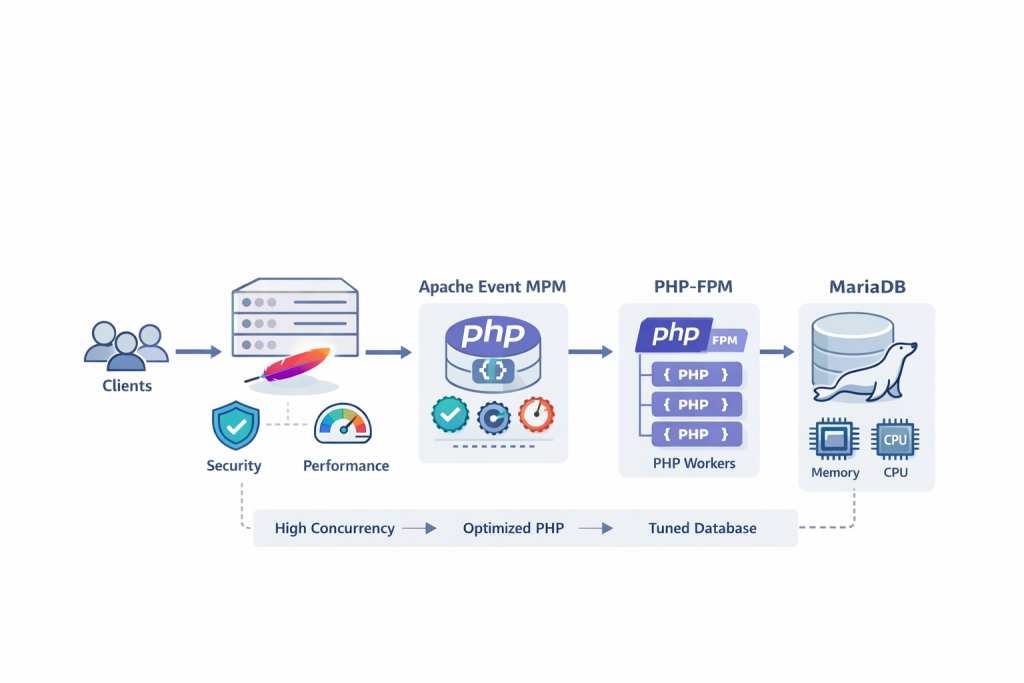
Before tuning anything, it is essential to understand the architecture we want to achieve.
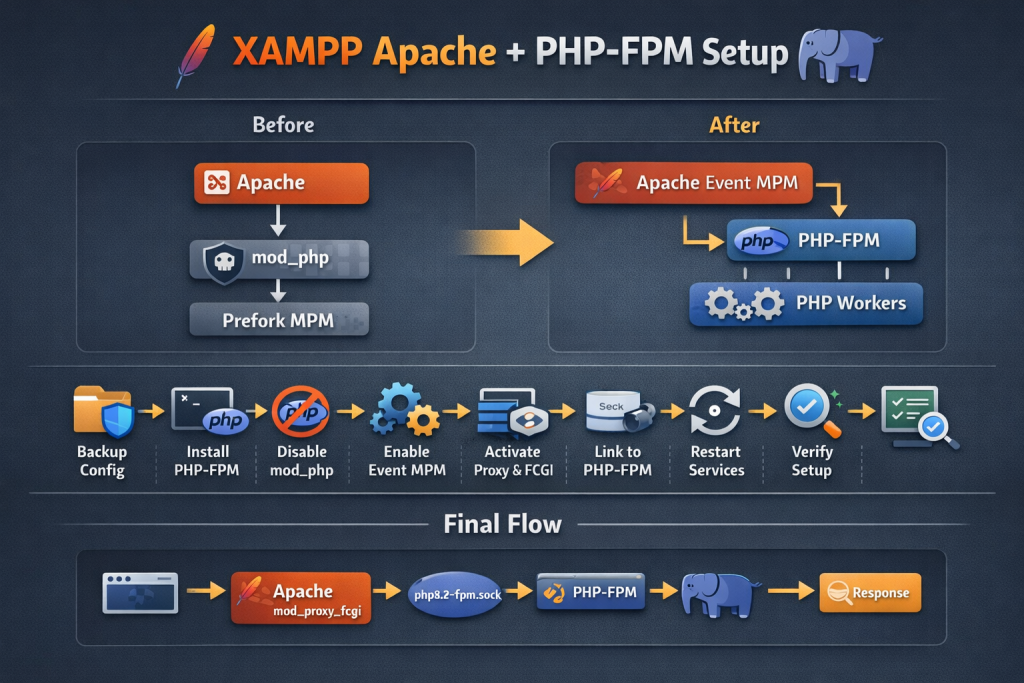
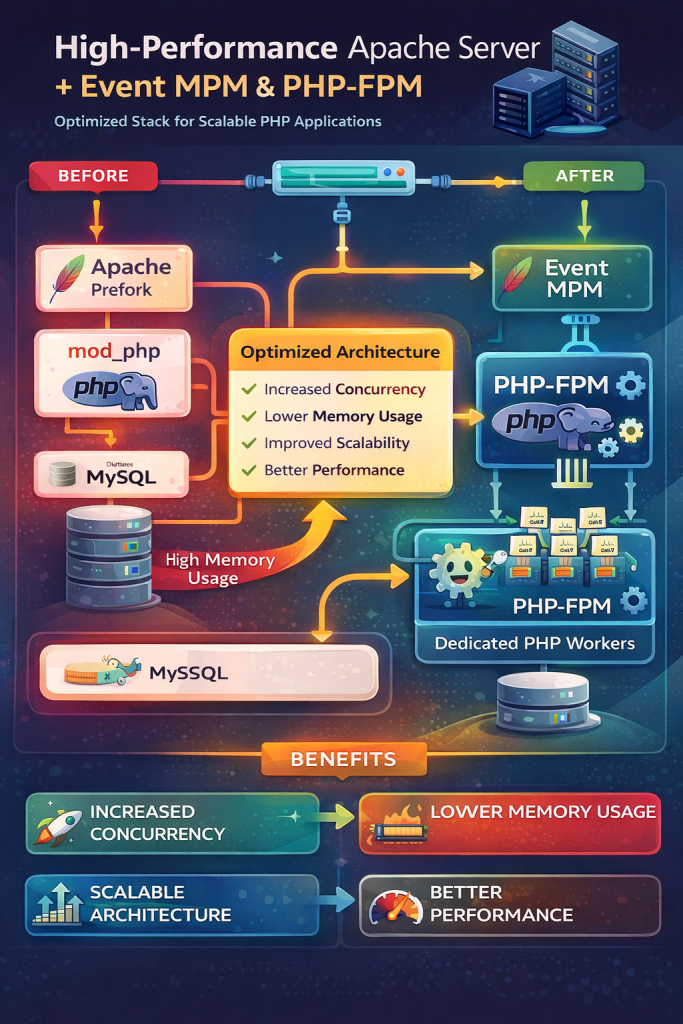
Traditional stacks often run like this:
Client → Apache Prefork → mod_php → MySQL
In this model, every Apache worker process loads the PHP interpreter. This increases memory consumption and limits concurrency.
A modern architecture separates responsibilities.
Client
↓
Apache Event MPM
↓
mod_proxy_fcgi
↓
PHP-FPM
↓
MariaDB
This architecture has several advantages.
Apache handles HTTP connections and static files. PHP-FPM handles PHP execution separately. MariaDB manages data storage efficiently.
Benefits include:
- Higher concurrency
- Lower memory usage
- Better CPU utilization
- Cleaner architecture
- Improved scalability
Why Apache Event MPM Is Better Than Prefork
Apache supports multiple Multi-Processing Modules (MPM). The most common are:
- Prefork
- Worker
- Event
Prefork creates a separate process for every connection. It is stable but inefficient for modern workloads.
Worker introduces threads but still keeps connections tied to threads.
Event MPM improves this further by separating keep-alive connections from active request processing.
Key advantages:
- Handles thousands of idle connections efficiently
- Reduces blocked worker threads
- Improves performance for high-traffic sites
- Works well with PHP-FPM
Event MPM is considered the modern Apache configuration for high concurrency environments.
Step 1 — Preparing the Environment
Even though XAMPP is installed, we will not rely on its default configuration.
Instead we will treat it as a base environment and optimize everything manually.
The major components involved are:
Apache
PHP
PHP-FPM
MariaDB
First confirm Apache is running.
/opt/lampp/lampp status
Check running Apache processes.
ps aux | grep httpd
Check available memory.
free -h
Check CPU cores.
nproc
These numbers will help determine the best configuration.
Step 2 — Enabling Apache Event MPM
Apache must use Event MPM instead of Prefork.
Check the active MPM:
apachectl -V | grep MPM
If Prefork is active, disable it and enable Event.
Typical Apache modules required:
- mpm_event
- proxy
- proxy_fcgi
- headers
- rewrite
- expires
- ssl
- http2
Ensure these modules are loaded.
Example Apache module configuration:
LoadModule mpm_event_module modules/mod_mpm_event.so
LoadModule proxy_module modules/mod_proxy.so
LoadModule proxy_fcgi_module modules/mod_proxy_fcgi.so
LoadModule rewrite_module modules/mod_rewrite.so
LoadModule headers_module modules/mod_headers.so
LoadModule expires_module modules/mod_expires.so
Restart Apache after enabling modules.
sudo apachectl restart
Step 3 — Apache Concurrency Optimization
Apache performance depends heavily on worker configuration.
The Event MPM configuration defines how many concurrent connections Apache can serve.
Example configuration:
<IfModule mpm_event_module>

StartServers             2
ServerLimit              16
ThreadsPerChild          25

MaxRequestWorkers        400

MinSpareThreads          50
MaxSpareThreads          150

MaxConnectionsPerChild   10000

</IfModule>
Explanation of each parameter:
StartServers
Initial Apache processes started at launch.
ServerLimit
Maximum number of Apache processes.
ThreadsPerChild
Number of threads per process.
MaxRequestWorkers
Maximum number of simultaneous requests Apache can process.
MinSpareThreads / MaxSpareThreads
Control idle worker threads.
MaxConnectionsPerChild
Recycles workers after serving many requests to avoid memory leaks.
Example concurrency calculation:
ServerLimit = 16
ThreadsPerChild = 25
Total threads = 16 × 25 = 400
So Apache can serve 400 active connections.
Step 4 — KeepAlive Optimization
Persistent connections improve performance but must be configured correctly.
Recommended configuration:
KeepAlive On
MaxKeepAliveRequests 100
KeepAliveTimeout 2
Timeout 30
Explanation:
KeepAlive On
Allows browsers to reuse connections.
MaxKeepAliveRequests
Maximum requests per connection.
KeepAliveTimeout
How long Apache waits for additional requests.
Timeout
Maximum time Apache waits for slow clients.
Setting KeepAliveTimeout too high wastes worker threads.
A value between 1–2 seconds is usually optimal.
Step 5 — Apache Performance Enhancements
Static assets should be cached aggressively.
Enable browser caching.
<IfModule mod_expires.c>

ExpiresActive On

ExpiresByType text/css "access plus 7 days"
ExpiresByType application/javascript "access plus 7 days"

ExpiresByType image/jpeg "access plus 30 days"
ExpiresByType image/png "access plus 30 days"
ExpiresByType image/webp "access plus 30 days"

ExpiresByType font/woff2 "access plus 30 days"

</IfModule>
Enable compression.
AddOutputFilterByType DEFLATE text/plain
AddOutputFilterByType DEFLATE text/html
AddOutputFilterByType DEFLATE text/css
AddOutputFilterByType DEFLATE application/javascript
This reduces bandwidth usage and speeds up page loading.
Step 6 — Apache Security Hardening
Security must be addressed early.
Hide server version information.
ServerTokens Prod
ServerSignature Off
TraceEnable Off
Disable directory listing.
Options -Indexes
Add security headers.
Header always set X-Frame-Options "SAMEORIGIN"
Header always set X-Content-Type-Options "nosniff"
Header always set Referrer-Policy "strict-origin-when-cross-origin"
Header always set Permissions-Policy "geolocation=(), microphone=(), camera=()"
These headers protect against:
- clickjacking
- MIME sniffing attacks
- cross-site tracking
Step 7 — Connecting Apache to PHP-FPM
Apache must forward PHP requests to PHP-FPM.
Example configuration:
<FilesMatch \.php$>
    SetHandler "proxy:fcgi://127.0.0.1:9000"
</FilesMatch>
Alternatively use a Unix socket.
<FilesMatch \.php$>
SetHandler "proxy:unix:/run/php/php-fpm.sock|fcgi://localhost/"
</FilesMatch>
This allows Apache to execute PHP scripts using the FastCGI process manager.
Step 8 — PHP-FPM Pool Configuration
PHP-FPM manages PHP worker processes.
Configuration file example:
pm = dynamic

pm.max_children = 40
pm.start_servers = 8
pm.min_spare_servers = 4
pm.max_spare_servers = 12

pm.max_requests = 500

request_terminate_timeout = 60
Explanation:
pm.max_children
Maximum PHP processes allowed.
pm.start_servers
Initial workers.
pm.min_spare_servers / pm.max_spare_servers
Idle worker control.
pm.max_requests
Worker recycling to prevent memory leaks.
request_terminate_timeout
Stops stuck scripts.
Calculating PHP Worker Limits
PHP workers consume memory.
Use this formula:
Available RAM for PHP ÷ average PHP memory usage
Example:
Server RAM = 16GB
RAM reserved for OS and database = 8GB
Remaining = 8GB
Average PHP process = 80MB
Calculation:
8192MB ÷ 80MB = ~102 workers
Safe configuration:
pm.max_children = 80
Always leave memory headroom.
Step 9 — Enabling PHP Slow Logs
Slow logs help detect performance problems.
Add to PHP-FPM configuration:
request_slowlog_timeout = 5s
slowlog = /opt/lampp/logs/php-fpm-slow.log
This logs scripts taking longer than 5 seconds.
It helps identify:
- slow database queries
- inefficient loops
- heavy API calls
Step 10 — PHP Core Configuration
Open php.ini and adjust key settings.
expose_php = Off

display_errors = Off
log_errors = On

max_execution_time = 60
max_input_time = 60

memory_limit = 256M

post_max_size = 32M
upload_max_filesize = 32M

max_input_vars = 3000

cgi.fix_pathinfo = 0
Explanation:
display_errors Off
Prevents sensitive error output in production.
memory_limit
Prevents runaway scripts.
cgi.fix_pathinfo = 0
Fixes path traversal vulnerabilities.
Step 11 — Enabling OPcache
OPcache significantly improves PHP performance.
Add to php.ini:
opcache.enable=1
opcache.enable_cli=0

opcache.memory_consumption=256
opcache.interned_strings_buffer=16

opcache.max_accelerated_files=40000

opcache.validate_timestamps=1
opcache.revalidate_freq=2
Benefits:
- Faster script execution
- Reduced CPU usage
- Lower disk I/O
OPcache stores compiled PHP scripts in memory.
Step 12 — PHP Security Settings
Enhance PHP security.
allow_url_fopen = Off
allow_url_include = Off

session.cookie_httponly = 1
session.cookie_secure = 1
session.cookie_samesite = Lax
These settings protect against:
- remote file inclusion
- session hijacking
- cross-site attacks
Step 13 — MariaDB Optimization
MariaDB is the database engine behind many PHP applications.
Performance depends heavily on memory configuration.
The most important parameter is:
innodb_buffer_pool_size
Example configuration:
[mysqld]

bind-address = 127.0.0.1

max_connections = 200

thread_cache_size = 100

table_open_cache = 4000
table_definition_cache = 2000

innodb_buffer_pool_size = 8G
innodb_buffer_pool_instances = 4

innodb_log_file_size = 1G

innodb_flush_method = O_DIRECT

innodb_file_per_table = 1
Explanation:
innodb_buffer_pool_size
Stores database pages in memory.
innodb_log_file_size
Improves write performance.
innodb_flush_method
Reduces double buffering.
innodb_file_per_table
Separates tables into individual files.
Step 14 — Enabling Slow Query Logging
Slow queries often cause performance bottlenecks.
Enable slow query logs.
slow_query_log = 1
slow_query_log_file = /opt/lampp/var/mysql/slow.log
long_query_time = 1
Queries taking longer than 1 second will be logged.
This helps identify missing indexes and inefficient queries.
Step 15 — MariaDB Durability Settings
Data safety is critical.
Recommended configuration:
innodb_flush_log_at_trx_commit = 1
sync_binlog = 1
This ensures transactions are written to disk safely.
Although slightly slower, it prevents data loss during crashes.
Step 16 — Memory Budget Planning
Server performance depends on proper resource allocation.
Example for a 16GB server:
Operating System: 2GB
Apache: 1.5GB
PHP-FPM: 4GB
MariaDB: 7GB
Safety margin: 1.5GB
Always leave spare memory to avoid swapping.
Step 17 — Monitoring System Resources
Regular monitoring is critical.
Check memory usage:
free -h
Check CPU usage:
top
Check disk usage:
df -h
Check Apache connections:
netstat -an | grep :80 | wc -l
Check MariaDB connections:
SHOW STATUS LIKE 'Threads_connected';
These metrics help detect bottlenecks.
Step 18 — Common Mistakes to Avoid
Many developers make these mistakes.
Using Apache Prefork with mod_php
Setting extremely high worker limits
Increasing PHP memory limits unnecessarily
Setting database connections too high
Ignoring slow query logs
Leaving development settings enabled
Performance tuning must always be data driven.
Step 19 — Recommended Optimization Order
Follow this order when optimizing your stack.
- Enable Apache Event MPM
- Connect Apache with PHP-FPM
- Configure Apache concurrency
- Enable OPcache
- Tune PHP-FPM workers
- Optimize MariaDB memory
- Enable slow logs
- Harden security settings
- Monitor performance
This approach ensures stability at every stage.
Final Thoughts
Optimizing a web server stack requires careful planning and testing. Simply installing Apache, PHP, and MariaDB is not enough for modern high-traffic applications.
By adopting a modern architecture using Apache Event MPM, PHP-FPM, and properly tuned MariaDB settings, it is possible to dramatically improve server performance, reduce memory consumption, and handle far more concurrent users.
The key principles are simple.
Separate responsibilities across components.
Control memory usage.
Optimize concurrency.
Monitor real workloads.
Continuously tune based on metrics.
With the techniques described in this guide, developers can transform a basic XAMPP environment into a highly efficient and production-ready server stack capable of powering large-scale web applications.