Limited Time Offer!
For Less Than the Cost of a Starbucks Coffee, Access All DevOpsSchool Videos on YouTube Unlimitedly.
Master DevOps, SRE, DevSecOps Skills!
The last day of support for Drupal 7 will be January 5, 2025. There won’t be any further deadline extensions, according to the Drupal Association! Make sure you’ve read about the dangers of continuing to use Drupal 7 and our suggested course of action, if you haven’t already.
If you’re reading this, it’s likely that you’ve determined Drupal 10 is the best option for your website going forward. That’s fantastic news—after the Drupal 7 to Drupal 10 conversion, you’ll have access to a ton of amazing features!
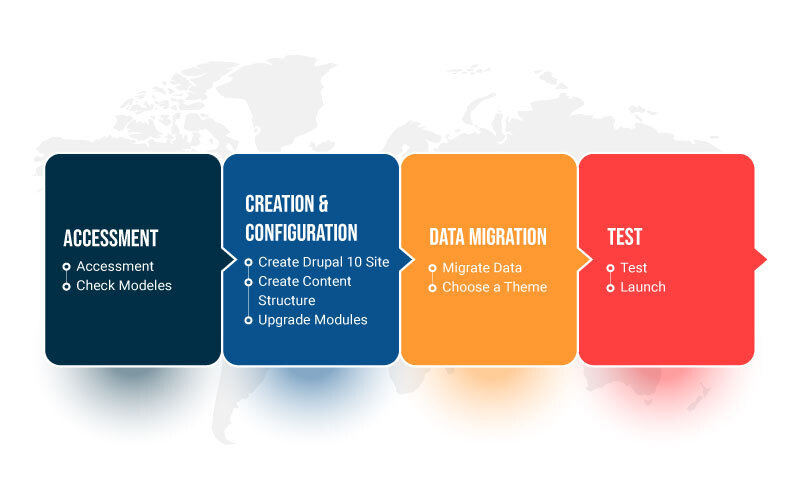
Let’s examine what steps need to be taken to bring you there. Even though every migration project is different, you may typically divide it into the following phases.
1. Examine your Drupal 7 website first
Upgrading from Drupal 7 to 10 is a significant step. Thus, use it as a chance to plan the future of your website and evaluate its design, functionality, content, and structure.
To get you going, consider these queries:
- How would you like Drupal 10 to work? Think about the ways you may use the capabilities in Drupal 10 to improve and expand your online presence. Establish a sandbox environment so you may experiment.
- Does the existing setup function effectively? Consider ways to enhance the information architecture of your new website to facilitate navigation.
- What should be moved? Think about if you really need all of the features and information available now. It might be a good idea to revise or optimize your material. You may map existing and new content structures and lower the risk of data loss by making a data transfer table (DTT).
- Does the design require an update? Look into ways to modernize the appearance and feel of your website to enhance the visibility of your business.
- Does your code require a revision? Now is an excellent moment to review bespoke code and update it to conform to current standards and best practices.
- What is the size of the job? Sites that are complex, multilingual, and content-rich can pose extra difficulties that call for more resources and knowledge.
2. Check Modules Availability
Do you use donated modules to increase your Drupal 7 site’s functionality? If so, before you move, you’ll need to make sure they work with Drupal 10 or find a substitute.
You may accomplish this by utilizing a tool like the Upgrade Status module or by manually reviewing each module’s page on drupal.org.
It’s a good idea to look at alternatives, even if your current modules work with Drupal 10. The Drupal community may have developed better options. Should a better option not be available, you can request that the module be ported to Drupal 10 by a development services provider.
Examine the additional modules that Drupal 10 allows you to employ that Drupal 7 did not allow. For instance, consider these five modules that improve Drupal 10’s built-in WYSIWYG editor, CKEditor 5.
3. Create Your Drupal 10 Website
As of the authoring of this article, Drupal 10.1 is the most recent version that may be used to construct a completely new website.
Install the modules that you choose in the preceding stage. Keep in mind that Drupal 10 installation will differ from Drupal 7 installation.
Create your content structures, using webforms, menus, content categories, and blocks. Think about using Layout Builder, a core module (from Drupal 8.5) that takes the place of Panels. The robust drag-and-drop feature of Layout Builder makes it simple to create aesthetically pleasing, adaptable pages.
4. Update Your Code
To lessen the requirement for new code, try to leverage already-contributed modules. Any customized themes will have to be made from the beginning. See our tutorial on theming with a Single Directory Components approach.
Apply contemporary coding standards and best practices. Recall that Drupal 10 has new database requirements and requires PHP 8.1 or above. See our instructions on converting CKEditor plugins to work with Drupal 10.
Put your Drupal 10 website’s own modules and themes into action.
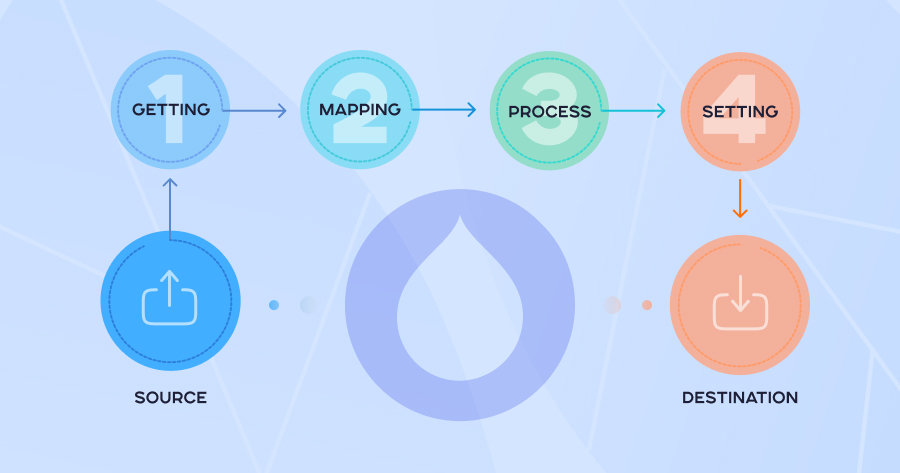
5. Migrate Your Data
You might be able to manually transfer your material from the old site to the new one if you don’t have a lot of stuff. You should definitely automate the procedure if not.
Content and settings can be transferred across using the Migrate API in the event of an automatic migration. Make sure you are aware of its limits and have a strategy in place to deal with them. For instance, you might have to use the views migration module to rebuild views.
Migrate Plus, Migrate Tools, and Migrate Scanner are further useful modules for migrating.
Before beginning work on additional content types, finish the migration for the first one. Because you may use the first successfully completed migration as a template for the next ones, this will save you time.
To facilitate swift rollbacks and reruns, it is preferable to use Drush for large-scale content migrations rather than the UI.
When moving to migrate:
- Organize the data and content on your Drupal 7 website.
- Get the most recent Drupal 7 version for your outdated website.
- In the event that something goes wrong, backup your data.
- Declare a stop to any content updates on the previous site while the move is happening.
- Verify that outdated URLs are redirected to prevent 404 errors.
7. Rebuild your theme or build a new theme
The rebuilding of your theme is the following phase. Note: We frequently work on the theme and backend builds concurrently with our migration stream. But we are going to create a more sequential procedure for the sake of this post.
The following are important points to remember when you revamp or develop your theme:
- Select the best strategy: you may utilize an already-existing Drupal 10 theme like CivicTheme to expedite the process, rebuild your old theme, or develop a custom theme from start using fresh designs.
- Given the significant differences between Drupal 7 and 10, now is the ideal time to do any redesigns or convert to a design system.
- Obtain approval from business stakeholders for all designs before building or setting your Drupal 10 theme if you are redesigning.
- Remember any modifications to the content structure and IA.
- Check to make sure everything is functioning with your theme.
- After the new theme is implemented, non-technical team members will find it simpler to assess the material on the website.
8. Test your site
You should do the majority of your quality assurance (QA) work gradually, testing individual components. Each thing to test should ideally be tracked in tickets, covering the following:
- Frontend tickets: the portion of the website that users view (your theme)
- What content editors and site administrators may view and do with backend tickets
- The content, pictures, files, and data you’re moving from Drupal 7 to Drupal 10 are all listed in the migration tickets.
To ensure that everyone can access your site, testing and quality assurance work should be done on many devices and browsers. Test the accessibility and performance of the website as well.
Obtain business stakeholder approval as necessary once the site has undergone thorough testing by members of the technical and QA teams. Recall the authorized list of features that have been added, deleted, or modified.
It is our opinion that it is preferable to incorporate web accessibility early in the project lifecycle, so that designs are examined for conformity with accessibility standards and the necessary accessibility acceptance criteria are included in each frontend ticket.
9. Launch your new Drupal 10 site
You’re nearly there! The following are some steps you should take to launch your new website:
- Decide on a launch date.
- Inform your users.
- Stop updating content and Admin access on your Drupal 7 website.
- Execute any necessary last-minute incremental data migrations.
- To point to the new website, change your DNS.
- After Drupal 10 launches, explore the site and test it on various devices to make sure everything functions as it should.
- Look through your logs for any warnings or problems, as well as any missing pages (404s).
- Re-add any vanity URLs and redirects you may have used on the previous website.
- Limit who may access the Drupal 7 site.
- Honor your accomplishment: You succeeded!
Don’t forget to maintain your Drupal 10 site
Even if your website has just been published and you want to kick back and relax, Drupal website maintenance is crucial to its success, durability, and security. Maintaining the functionality of your website involves a variety of responsibilities, including as content management, performance monitoring, and frequent upgrades and security patches.
Salsa offers website support and maintenance services that help you keep your Drupal website optimized and up to date so you can concentrate on running your business while we handle the technical aspects.

Upgrading from Drupal 7 to Drupal 10 is like renovating your digital home for the future.