Skip to content
Menu
DevSecOps Now!!!
  • About
  • Certifications
  • Contact
  • Courses
  • DevSecOps Consulting
  • DevSecOps Tools
  • Training
  • Tutorials
DevSecOps Now!!!

How to build Android apk

Posted on January 8, 2025

Limited Time Offer!

For Less Than the Cost of a Starbucks Coffee, Access All DevOpsSchool Videos on YouTube Unlimitedly.
Master DevOps, SRE, DevSecOps Skills!

Enroll Now

How to Build an Android APK: A Comprehensive Guide

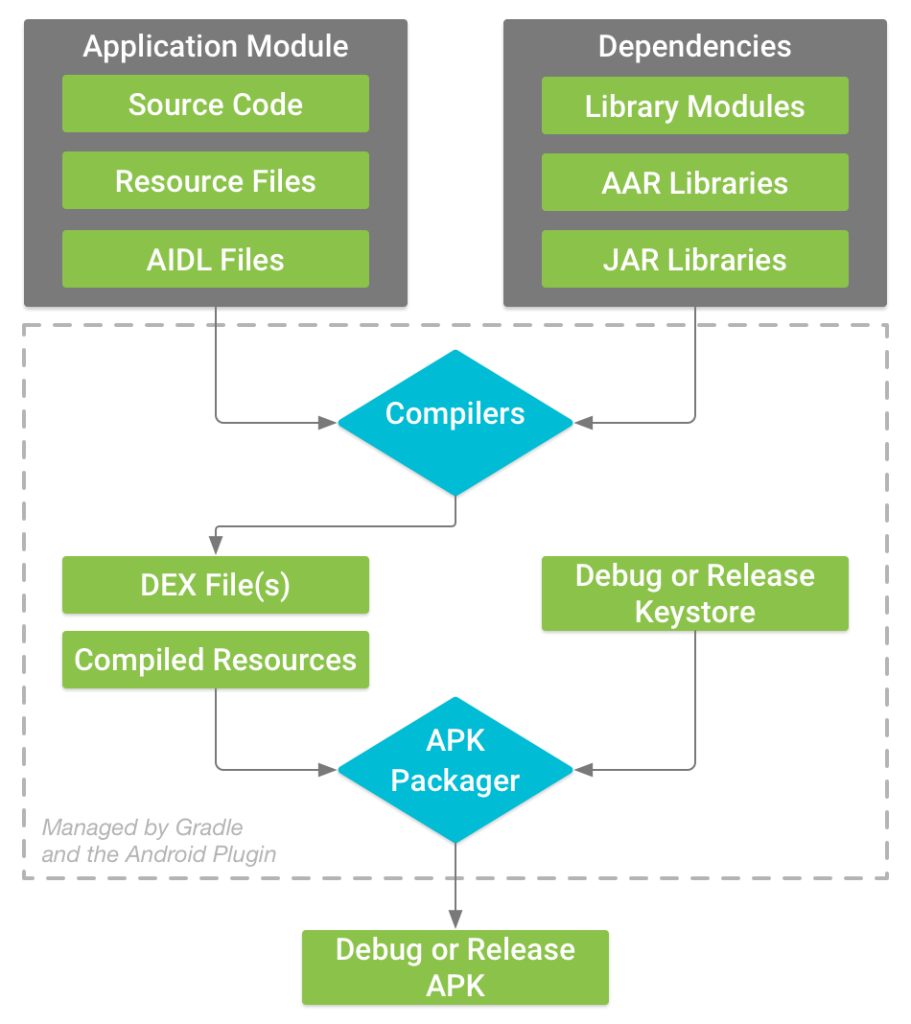
Building an Android APK (Android Package) is an essential step in developing Android applications. An APK file is a packaged file that contains all the necessary elements of your application, such as resources, assets, and code, ready to be installed on Android devices. Here’s a detailed, beginner-friendly guide to help you build your APK:
1. Prerequisites

Before building your APK, make sure you have:

  • Android Studio installed (the official IDE for Android development).
  • The Java Development Kit (JDK) installed on your computer.
  • Your Android project ready for build.

2. Steps to Build the APK
Step 1: Open Your Project

  • Launch Android Studio.
  • Open your Android project by navigating to File > Open and selecting the project folder.

Step 2: Configure Build Settings

  • In the Project Navigator, open the build.gradle files:
    • Module-level build.gradle file: Ensure the application ID, version code, and version name are correct.
    • Project-level build.gradle file: Confirm the Gradle version and dependencies are properly configured.

Step 3: Set the Build Variant

  • In Android Studio, go to Build > Select Build Variant.
  • Choose between:
    • Debug: For internal testing.
    • Release: For distribution on Google Play or external use. (You’ll need to sign your APK for this.)

Step 4: Build the APK

  • Navigate to Build > Build Bundle(s)/APK(s) > Build APK(s).
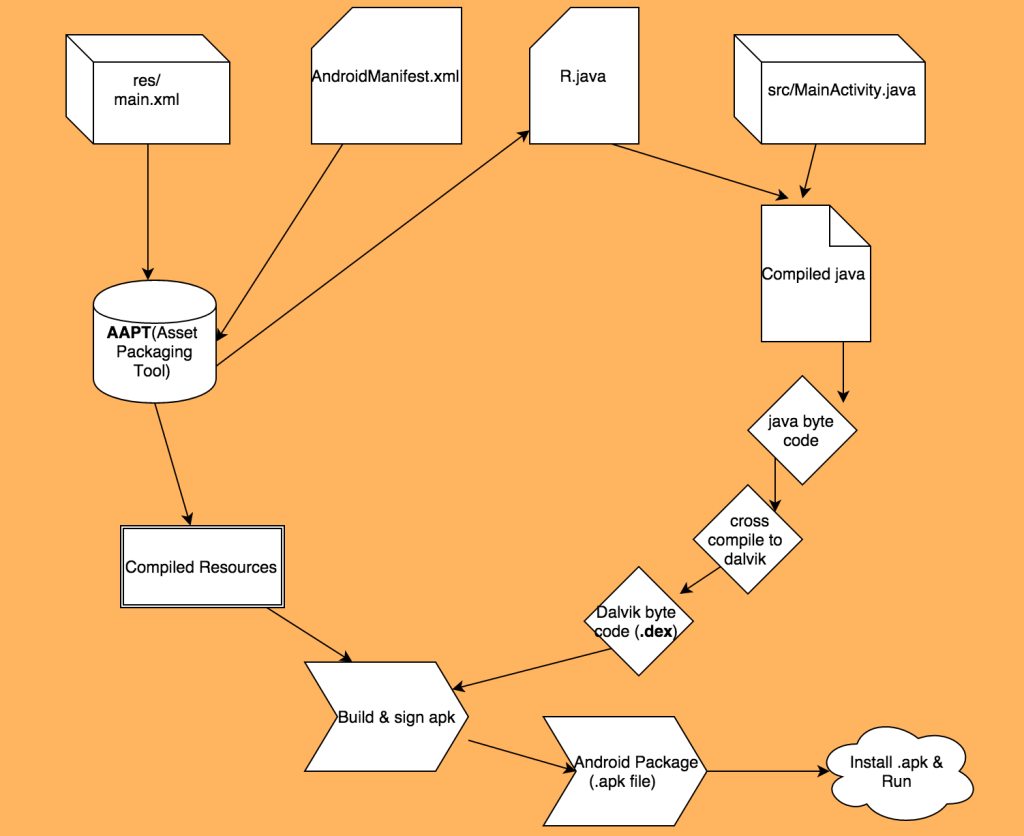
  • Wait for the build process to complete. Android Studio compiles your code, processes your resources, and creates the APK.

Step 5: Locate the APK

  • Once the build is complete, a notification will appear. Click on Locate to open the folder containing the APK.
  • For Debug APK, the file is usually located in: app/build/outputs/apk/debug/app-debug.apk

3. Building a Signed APK for Release
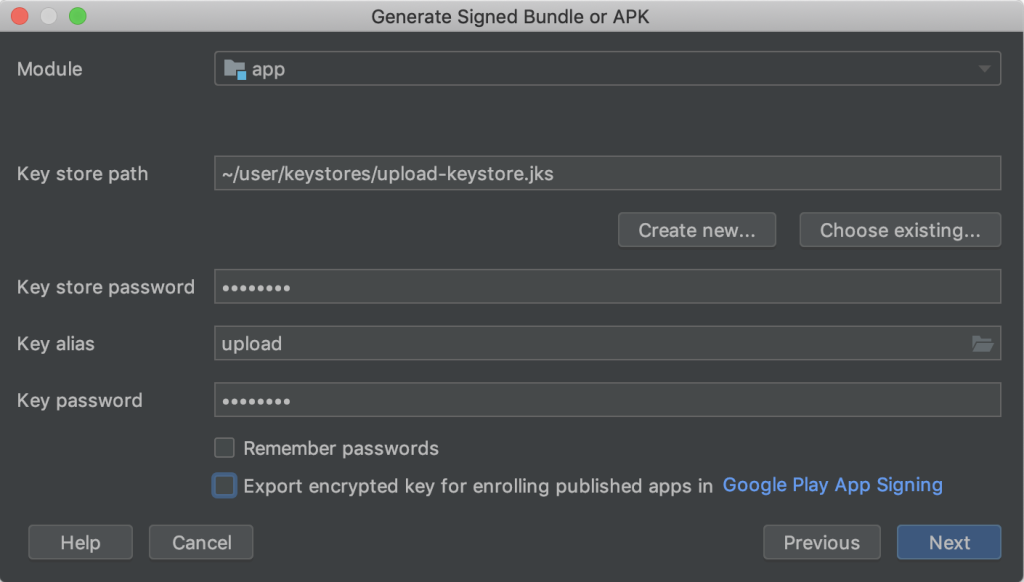
To distribute your app, you’ll need a signed APK:

Step 1: Generate a Keystore

  • Go to Build > Generate Signed Bundle/APK.
  • Select APK and click Next.
  • Click Create New... to generate a keystore.
    • Enter your key details, such as name, password, validity, and organization.
    • Save the keystore file securely.

Step 2: Sign the APK

  • Use the keystore created in the previous step.
  • Select the build type (usually Release) and click Finish.
  • Android Studio will build a signed APK, which is ready for distribution.

Step 3: Locate the Signed APK

  • The signed APK can usually be found in: app/build/outputs/apk/release/app-release.apk

4. Testing Your APK

After building the APK:

  1. Transfer to a Device: Use USB or upload the APK to a cloud service.
  2. Install: Enable “Install from Unknown Sources” in your Android device settings and install the APK.
  3. Test: Run the app on your device to ensure it works as intended.

5. Distributing the APK

  • For Internal Use: Share the APK file directly with testers or users.
  • For Google Play: Upload the APK to the Google Play Console, ensure it meets all requirements, and publish it.

6. Tips and Best Practices

  • Always test your APK thoroughly before distributing it.
  • For production, always build a release APK with proper signing.
  • Keep your keystore file and passwords safe—they’re essential for future updates.

7. Troubleshooting Common Issues

  • Build Errors: Check the Gradle console for detailed error messages.
  • APK Size: Use tools like ProGuard to reduce APK size.
  • Signing Issues: Ensure your keystore file path and passwords are correct.

By following these steps, you’ll have a fully functional Android APK, ready for testing or distribution. Let me know if you need help with specific configurations or issues during the build process!

Post Views: 1,680
  • Build an Android APK
  • build Android
  • build Android apk
  • Build the APK
  • How to build Android apk
  • Run Android APK Files on Windows
  • Signed APK
  • Signed APK for Release
  • Steps to Build the APK
Subscribe
Login
Notify of
guest
guest
0 Comments
Oldest
Newest Most Voted
Inline Feedbacks
View all comments
  • Linux Server Diagnostic Commands: Complete Guide for Performance, Network & System Troubleshooting
  • The Ultimate Guide to CDOM – Certified DataOps Manager Certification
  • The Practical Path to AI Reliability: A Guide to the Certified MLOps Manager
  • Master the Machine Learning Lifecycle:Guide to Becoming a Certified MLOps Architect
  • How to Build a Project-Level AI Memory System That Works Across Codex, Claude, and Other AI Coding Tools
  • Certified MLOps Professional: A Deep Dive into the Certified MLOps Professional Certification
  • Certified MLOps Engineer : The Comprehensive Guide to Mastering Machine Learning Operations
  • Codex vs Claude: A Complete Practical Guide for Modern Developers (2026)
  • Certified AIOps Professional Program A Guide to Career Growth
  • Keycloak Multi-Client Architecture with Project-Based Email Validation (Student, Trainer, Company, Consulting)
  • Incorrect definition of table mysql.column_stats
  • Mautic and PHP 8.3 Compatibility Guide (2026)
  • Certified AIOps Engineer: The Complete Career Path and Certification Guide
  • How to Rename Apache Virtual Host Files Safely (Step-by-Step Guide for Linux)
  • AIOps Foundation Certification: Everything You Need to Know to Get Certified
  • DevOps to Certified Site Reliability Professional: A Senior Mentor’s Guide
  • Certified Site Reliability Manager Training, Preparation, and Career Mapping
  • Certified Site Reliability Architect: The Complete Career Guide
  • What Is a VPN? A Complete Beginner-to-Advanced Tutorial
  • How to Install, Secure, and Tune MySQL 8.4 on Ubuntu 24.04 for Apache Event MPM and PHP-FPM
  • Complete Guide to Certified Site Reliability Engineer Career
  • Certified DevSecOps Professional Step by Step
  • Certified DevSecOps Manager: Complete Career Guide
  • Certified DevSecOps Engineer: Skills, Career Path and Certification Guide
  • Step-by-Step: Become a Certified DevSecOps Architect
  • Tuning PHP 8.3 for Apache Event MPM and PHP-FPM on Ubuntu: A Complete Step-by-Step Production Guide
  • Complete Step-by-Step Guide to Configure Apache Event MPM, Create index.php, Set Up VirtualHost, and Fix Ubuntu Default Page
  • Convert XAMPP Apache to Event MPM + System PHP-FPM
  • The Gateway to System Observability Engineering (MOE)
  • How to Finetune Apache and Prove It Works: A Real-World Guide to Testing Performance, Concurrency, HTTP/2, Memory, CPU, and Security

Recent Comments

  1. emmy day on SQLSTATE[42S22]: Column not found: 1054 Unknown column ‘provider’ in ‘field list’
  2. digital banking on Complete Tutorial: Setting Up Laravel Telescope Correctly (Windows + XAMPP + Custom Domain)
  3. SAHIL DHINGRA on How to Uninstall Xampp from your machine when it is not visible in Control panel programs & Feature ?
  4. Abhishek on MySQL: List of Comprehensive List of approach to secure MySQL servers.
  5. Kristina on Best practices to followed in .httacess to avoid DDOS attack?

Archives

  • April 2026
  • March 2026
  • February 2026
  • January 2026
  • December 2025
  • November 2025
  • October 2025
  • September 2025
  • August 2025
  • July 2025
  • June 2025
  • May 2025
  • April 2025
  • March 2025
  • February 2025
  • January 2025
  • December 2024
  • November 2024
  • October 2024
  • September 2024
  • August 2024
  • July 2024
  • June 2024
  • May 2024
  • April 2024
  • March 2024
  • February 2024
  • January 2024
  • December 2023
  • November 2023
  • October 2023
  • September 2023
  • August 2023
  • July 2023
  • May 2023
  • April 2023
  • March 2023
  • February 2023
  • January 2023
  • December 2022

Categories

  • Ai
  • AI Blogging
  • AiOps
  • ajax
  • Android Studio
  • Antimalware
  • Antivirus
  • Apache
  • Api
  • API Security
  • Api Testing
  • APK
  • Aws
  • Bike Rental Services
  • ChatGPT
  • Code Linting
  • Composer
  • cPanel
  • Cyber Threat Intelligence
  • Cybersecurity
  • Data Loss Prevention
  • Database
  • dataops
  • Deception Technology
  • DeepSeek
  • Devops
  • DevSecOps
  • DevTools
  • Digital Asset Management
  • Digital Certificates
  • Docker
  • Drupal
  • emulator
  • Encryption Tools
  • Endpoint Security Tools
  • Error
  • facebook
  • Firewalls
  • Flutter
  • git
  • GITHUB
  • Google Antigravity
  • Google play console
  • Google reCAPTCHA
  • Gradle
  • Guest posting
  • health and fitness
  • IDE
  • Identity and Access Management
  • Incident Response
  • Instagram
  • Intrusion Detection and Prevention Systems
  • jobs
  • Joomla
  • Keycloak
  • Laravel
  • Law News
  • Lawyer Discussion
  • Legal Advice
  • Linkedin
  • Linkedin Api
  • Linux
  • Livewire
  • Mautic
  • Medical Tourism
  • MlOps
  • MobaXterm
  • Mobile Device Management
  • Multi-Factor Authentication
  • MySql
  • Network Traffic Analysis tools
  • Paytm
  • Penetration Testing
  • php
  • PHPMyAdmin
  • Pinterest Api
  • Quora
  • SAST
  • SecOps
  • Secure File Transfer Protocol
  • Security Analytics Tools
  • Security Auditing Tools
  • Security Information and Event Management
  • Seo
  • Server Management Tools
  • Single Sign-On
  • Site Reliability Engineering
  • soft 404
  • software
  • SuiteCRM
  • SysOps
  • Threat Model
  • Twitter
  • Twitter Api
  • ubuntu
  • Uncategorized
  • Virtual Host
  • Virtual Private Networks
  • VPNs
  • Vulnerability Assessment Tools
  • Web Application Firewalls
  • Windows Processor
  • Wordpress
  • WSL (Windows Subsystem for Linux)
  • X.com
  • Xampp
  • Youtube
©2026 DevSecOps Now!!! | WordPress Theme: EcoCoded
wpDiscuz