Limited Time Offer!
For Less Than the Cost of a Starbucks Coffee, Access All DevOpsSchool Videos on YouTube Unlimitedly.
Master DevOps, SRE, DevSecOps Skills!
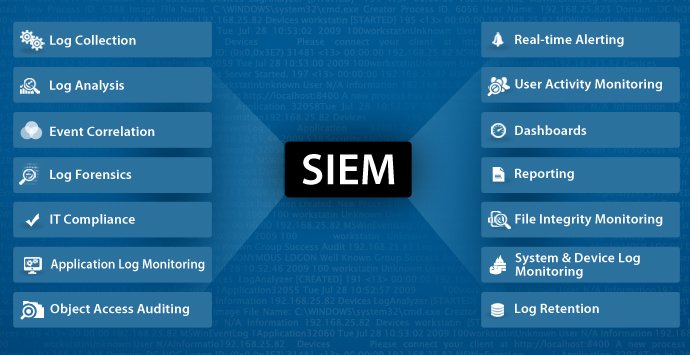
Combining security information management (SIM) and security event management (SEM) activities into a single security management system is known as security information and event management, or SIEM. The word “sim” in the acronym SIEM is pronounced without an e.
Every SIEM system operates on the fundamental tenets of gathering pertinent data from various sources, seeing abnormalities, and taking suitable action. For instance, a SIEM system may record more data, raise an alert, and direct other security measures to halt an activity’s progression upon detecting a possible problem.
How does SIEM (Security Information and Event Management) work?
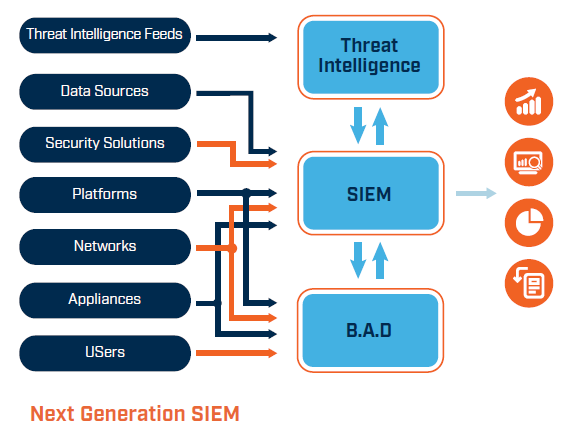
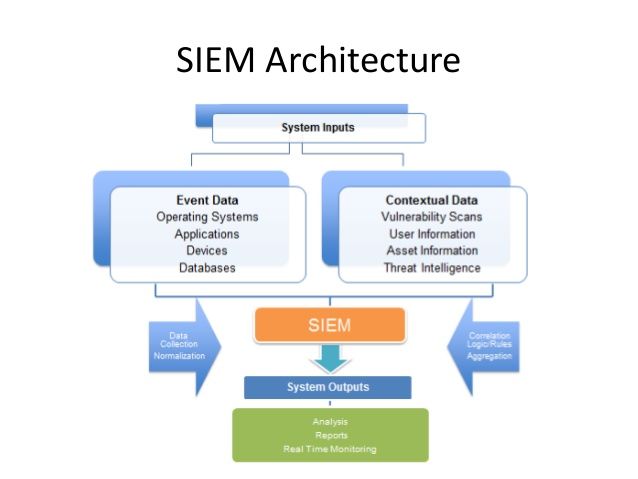
All SIEM systems, at their most basic, carry out some degree of data consolidation, aggregation, and sorting operations in order to detect risks and fulfill data compliance obligations. While the capabilities of certain systems differ, the majority provide the same essential features:
Log Management
Event data is ingested by SIEM from a variety of sources throughout the whole IT architecture of a company, including cloud and on-premises settings. Real-time event log data is gathered, correlated, and analyzed from users, endpoints, apps, data sources, cloud workloads, networks, and security hardware and software like firewalls and antivirus programs.
In order to correlate their internal security data to previously identified threat signatures and profiles, several SIEM solutions further interface with external threat intelligence feeds. Teams can prevent or identify novel attack signature types by integrating with real-time threat sources.
Event Correlation and Analytics
Any SIEM system must provide event correlation. By applying sophisticated analytics to recognize and comprehend complex data patterns, event correlation offers valuable information that can be used to promptly detect and address possible security risks to a company. By offloading the laborious manual procedures connected to the in-depth analysis of security events, SIEM systems greatly increase the mean time to detect (MTTD) and mean time to response (MTTR) for IT security teams.
Incident Monitoring and Security Alerts
Security teams use SIEM to compile their information into a single, central dashboard from which they can monitor activity, prioritize warnings, spot dangers, and start responding or fixing issues. In order to assist security analysts in identifying patterns or spikes in suspicious behavior, the majority of SIEM dashboards also provide real-time data visualizations. Administrators may be promptly warned and take necessary action to reduce vulnerabilities before they develop into more serious security concerns by using preset, customized correlation criteria.
Compliance Management and Reporting
SIEM solutions are a well-liked option for businesses that must comply with various regulations. The automatic data collecting and analysis that SIEM offers makes it a useful tool for obtaining and confirming compliance information throughout the whole corporate infrastructure. By generating real-time compliance reports for PCI-DSS, GDPR, HIPPA, SOX, and other compliance requirements, SIEM systems may lessen the workload associated with security management and identify any infractions early on, allowing for prompt resolution. Numerous SIEM solutions have pre-configured, out-of-the-box add-ons that may produce automatic reports that are made to comply with regulatory standards.
Why is SIEM important?
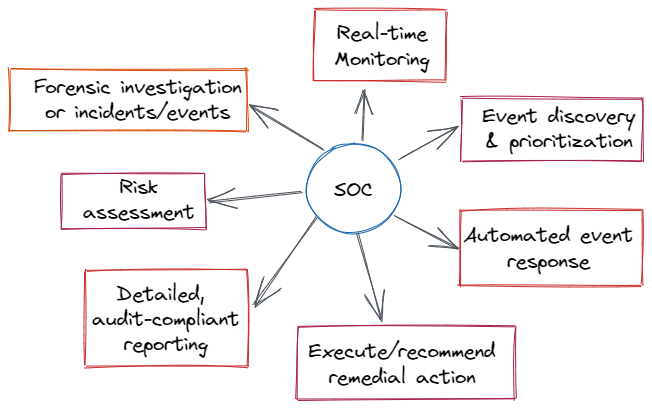
By prioritizing the security warnings that the software creates and sifting vast volumes of security data, SIEM helps organizations manage security more easily.
Organizations may identify incidents with SIEM software that could otherwise go unnoticed. The log entries are examined by the program to look for indications of malicious activity. Furthermore, because the system collects data from many sources throughout the network, it can reconstruct the assault’s history and help an organization identify the type of attack and how it affected the business.
Additionally, by automatically producing reports that contain all of the security events that have been logged across various sources, a SIEM system may assist a company in meeting compliance obligations. The organization would have to manually collect log data and create reports if SIEM software weren’t present.
By assisting the organization’s security team in determining the path an attack takes throughout the network, locating compromised sources, and offering automated capabilities to stop assaults in progress, a SIEM system further improves incident management.
What are the benefits of SIEM?
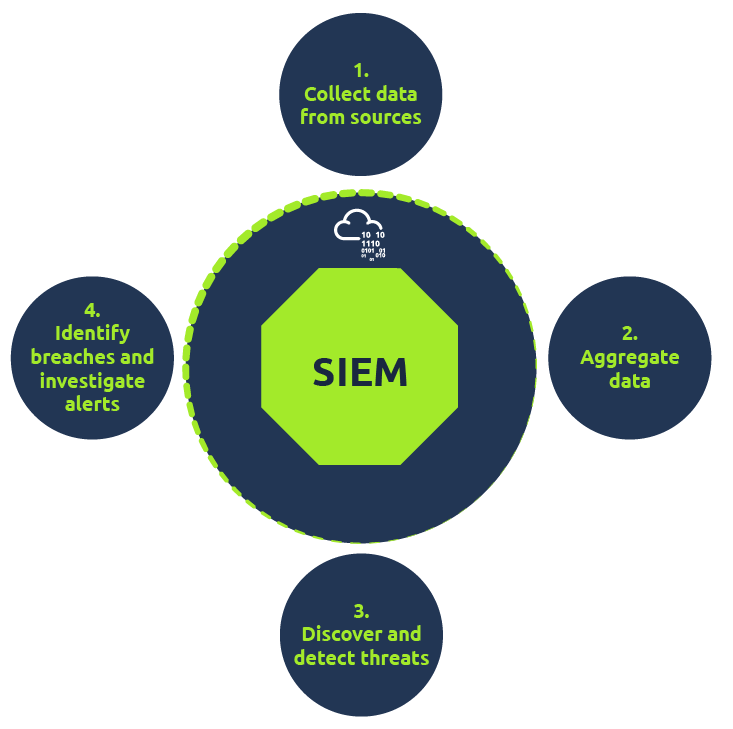
When it comes to managing IT security threats, enterprises of all sizes may benefit greatly from the use of SIEM, or Security Information and Event Management. By using automation and artificial intelligence (AI) to speed up compliance audits and reporting, these systems offer real-time danger detection. By providing a single picture of system data and encouraging efficient communication and teamwork during incident response, SIEM improves organizational productivity.
The technology’s integrated threat intelligence feeds and AI capabilities enable it to detect a wide range of threats, including as ransomware, phishing, insider threats, DDoS assaults, and data exfiltration. SIEM is essential for forensic investigations because it makes it possible to analyze log data from digital assets effectively, which helps with incident reconstruction and security procedure enhancement.
With SIEM, compliance auditing becomes easier to handle and offers on-demand reporting and real-time audits to cut down on personnel costs. By keeping an eye on users, apps, and network behavior across a range of devices, the solution also adjusts to the trends of the modern workplace and guarantees transparency and danger detection even outside of conventional network perimeters.
To sum up, SIEM delivers threat detection and alarms, scales well, supports a variety of data-related use cases, offers a comprehensive picture of information security, dramatically reduces the time it takes to identify threats, and makes thorough forensic investigation easier in the event of a security breach.
What are the Limitations of SIEM?
Security Information and Event Management, or SIEM, has benefits for cybersecurity but also drawbacks. Due to the requirement for seamless integration with current security measures and a diversified architecture, implementation can be time-consuming, frequently requiring 90 days or more.
One major disadvantage of SIEM is its cost, since early expenditures can amount to hundreds of thousands of dollars. Employees for administration and oversight, yearly maintenance, and agents or software for data gathering are examples of ongoing costs. Experts with the necessary skills are needed to integrate, configure, and analyze reports, which are frequently handled by security operations centers.
The problem of managing hundreds of warnings per day arises from SIEM technologies’ heavy reliance on rules to evaluate enormous volumes of recorded data. This can make it more difficult to spot any cyberthreats within the clutter of unnecessary records. Furthermore, the possibility of misconfiguration might lead to the omission of important security events, which reduces the efficacy of information risk management.
How to Implement SIEM?
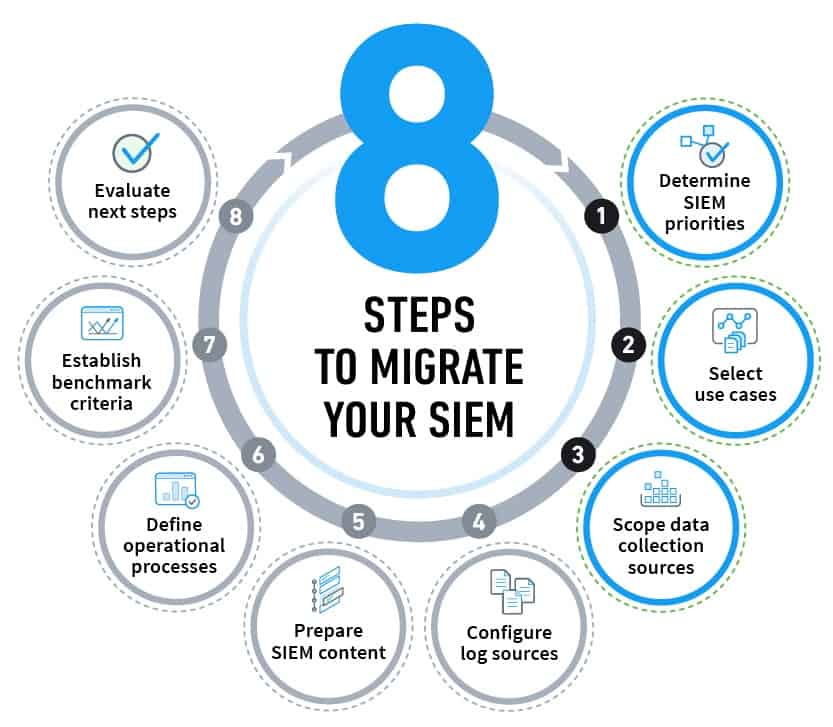
Here are some best practices for SIEM deployment that you should adhere to, either before or after you’ve invested in your new solution:
- Step 1 : Start with becoming completely aware of the implementation’s scope. Establish the proper security use cases and decide which aspects of deployment will help your company the most.
- Step 2 : Create and implement your pre-established data correlation rules across all networks and systems, including cloud installations.
- Step 3 : To gain a better understanding of your risk posture, list all of your company compliance requirements and make sure your SIEM system is set up to audit and report on these standards in real-time.
- Step 4 : Organize and categorize every digital asset in the IT infrastructure of your company. This will be crucial for handling the gathering of log data, identifying unauthorized access, and keeping an eye on network activities.
- Step 5 : When connecting your SIEM system, set up BYOD policies, IT setups, and limits that are watchable.
- Step 6 : Make sure you’re minimizing false positives in your security alerts by regularly fine-tuning your SIEM parameters.
- Step 7 : To guarantee that teams are capable of reacting promptly to any security occurrence that calls for involvement, all incident response plans and procedures should be documented and practiced.
- Step 8 : Automate wherever feasible by utilizing security technologies like SOAR and artificial intelligence (AI).
- Step 9 : Consider whether you should manage your SIEM deployments by hiring an MSSP (Managed Security Service Provider). MSSPs may be more qualified to manage and maintain the ongoing operation of your SIEM as well as handle the intricacies of its setup, depending on the particular requirements of your company.
