Skip to content
Menu
DevSecOps Now!!!
  • About
  • Certifications
  • Contact
  • Courses
  • DevSecOps Consulting
  • DevSecOps Tools
  • Training
  • Tutorials
DevSecOps Now!!!

What is Multi-Factor Authentication (MFA) Tools?

Posted on January 26, 2025

Limited Time Offer!

For Less Than the Cost of a Starbucks Coffee, Access All DevOpsSchool Videos on YouTube Unlimitedly.
Master DevOps, SRE, DevSecOps Skills!

Enroll Now

What is Multi-Factor Authentication (MFA)?
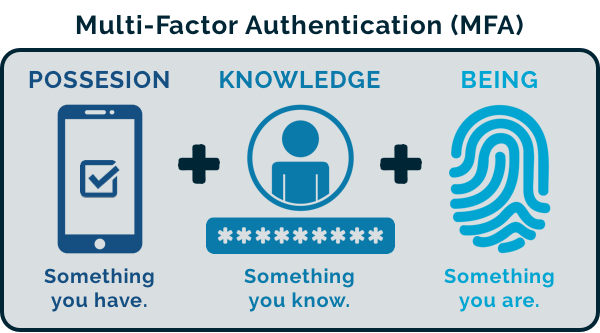
Multi-Factor Authentication (MFA) is a security measure that requires users to provide two or more verification factors to gain access to an application, system, or online account. Unlike traditional single-factor authentication (e.g., passwords), MFA adds additional layers of security by combining:

  1. Something you know (password or PIN).
  2. Something you have (a physical token, smartphone app, or smart card).
  3. Something you are (biometrics such as fingerprint, retina scan, or voice recognition).

MFA ensures that even if one factor is compromised, unauthorized access is less likely, significantly enhancing security.


Why Do We Need Multi-Factor Authentication?
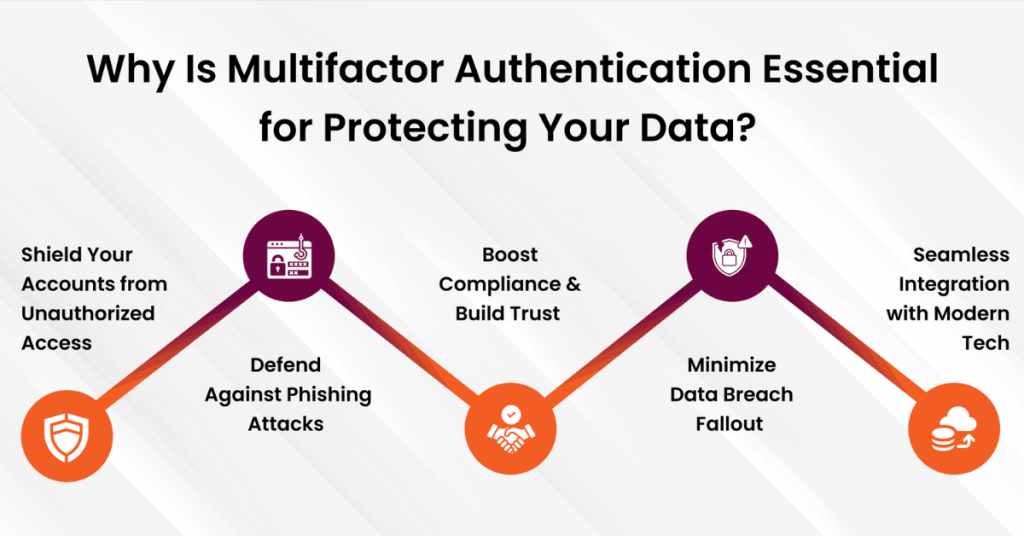
The need for MFA stems from the increasing sophistication of cyber threats and the critical importance of safeguarding sensitive data. Here are the primary reasons:

  1. Mitigating Password Vulnerabilities: Passwords are often weak, reused, or compromised, making single-factor authentication insufficient.
  2. Protecting Sensitive Information: Whether personal data or enterprise-level confidential files, MFA prevents unauthorized access.
  3. Reducing Risks of Phishing Attacks: Even if credentials are stolen through phishing, MFAโ€™s secondary verification blocks unauthorized logins.
  4. Ensuring Compliance: Many industries (e.g., healthcare, finance) mandate MFA for compliance with regulations like GDPR, HIPAA, and PCI-DSS.
  5. Securing Remote Workforces: With the rise of remote work, MFA ensures secure access to organizational systems from external networks.

What are the Advantages of Multi-Factor Authentication?
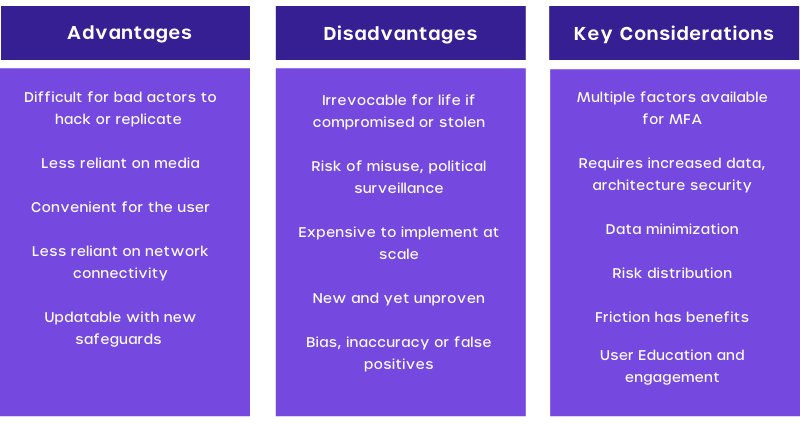
  1. Enhanced Security: By requiring multiple factors, MFA reduces the risk of unauthorized access even if one factor is compromised.
  2. Fraud Prevention: Protects against identity theft, phishing, and brute-force attacks.
  3. Improved Compliance: Helps organizations meet regulatory requirements and avoid penalties.
  4. User Trust: Builds customer and employee confidence in the system’s security.
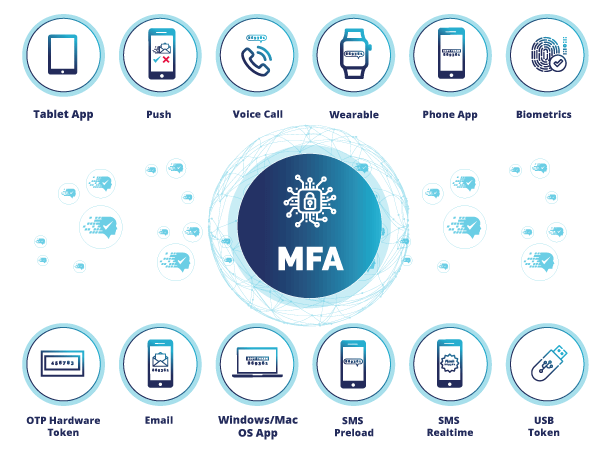
  5. Flexibility in Methods: Provides multiple options for authentication (e.g., SMS, email, biometrics) tailored to user needs.
  6. Reduced Costs from Breaches: Minimizes the financial and reputational impact of data breaches.

What are the Features of Multi-Factor Authentication Tools?
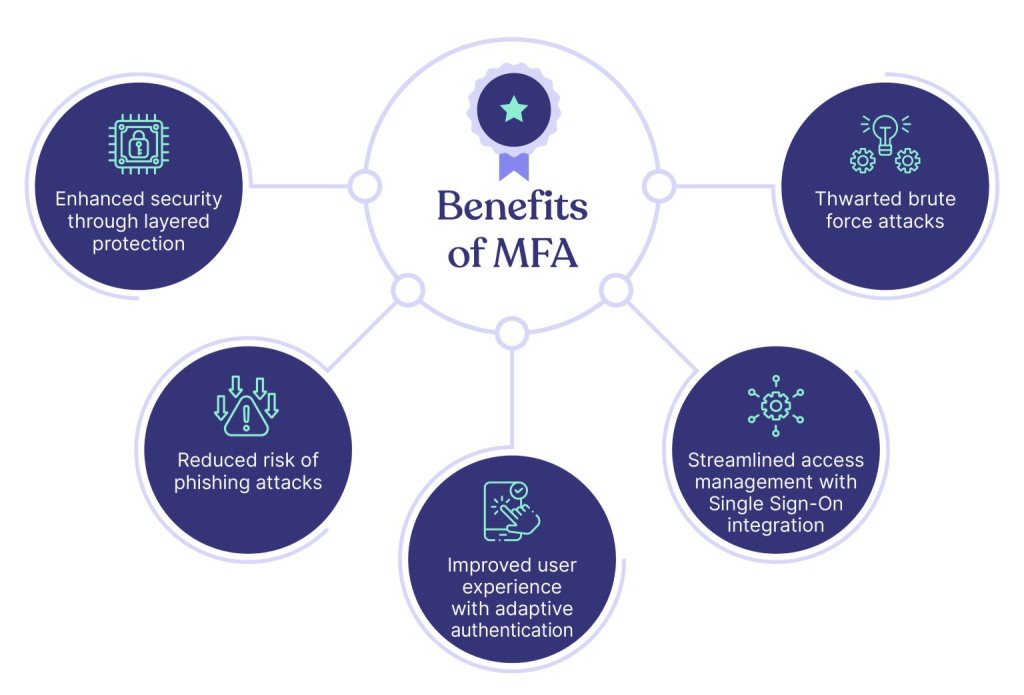
  1. Variety of Authentication Factors: Support for passwords, OTPs, biometrics, and physical devices.
  2. Device Compatibility: Integration with desktops, mobile apps, and hardware tokens.
  3. Adaptive Authentication: Dynamically adjusts security based on user behavior, location, and risk level.
  4. Seamless Integration: Works with enterprise applications, cloud services, and VPNs.
  5. User-Friendly Interfaces: Offers intuitive onboarding and authentication processes for end users.
  6. Reporting and Monitoring: Provides real-time analytics and alerts for suspicious login attempts.
  7. Offline Authentication: Options to authenticate users in environments without internet access.
  8. Customizable Policies: Ability to configure security policies based on organizational requirements.
  9. Failover Mechanisms: Backup methods (e.g., security questions) in case primary methods fail.
  10. Encryption and Secure Data Storage: Ensures authentication data is protected.

Top 10 Use Cases of Multi-Factor Authentication Tools
  1. Securing Remote Work Access: Ensures only verified employees can access company networks from remote locations.
  2. Protecting Cloud-Based Services: Adds extra security for platforms like AWS, Azure, and Google Workspace.
  3. Safeguarding Financial Transactions: MFA is crucial for online banking, mobile wallets, and payment systems.
  4. Preventing Unauthorized Device Access: Secures physical devices such as laptops or smartphones.
  5. Compliance in Regulated Industries: Enforces compliance in industries like healthcare (HIPAA), finance (PCI DSS), and government (FISMA).
  6. Securing Online Accounts: Protects personal accounts like email, social media, and e-commerce profiles.
  7. Access Control for Enterprise Applications: Ensures only authorized personnel access CRM, ERP, and HR systems.
  8. Privileged Access Management: Adds a security layer for administrators and high-privilege accounts.
  9. Customer Identity Verification: Used by businesses to verify customer identities during onboarding or transactions.
  10. IoT Device Security: Adds an authentication layer for accessing IoT platforms and devices.

How to Implement Multi-Factor Authentication?
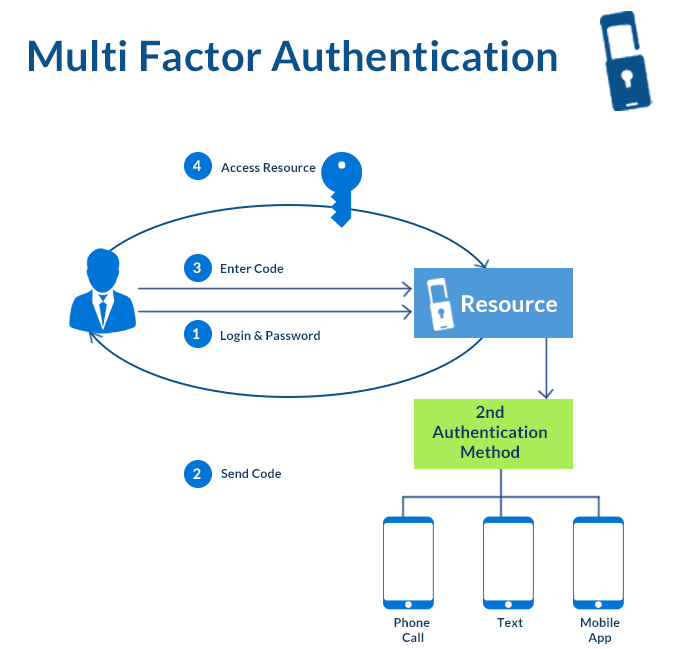
Step 1: Assess Requirements

  • Identify critical systems and applications needing MFA.
  • Define user groups and authentication factors based on their roles.

Step 2: Choose the Right MFA Tool

  • Evaluate tools based on features like compatibility, ease of use, and scalability. Examples include Microsoft Authenticator, Google Authenticator, and Okta.

Step 3: Integrate with Existing Systems

  • Connect MFA with identity providers (IdPs) like Active Directory, SAML, or OAuth.
  • Ensure compatibility with all critical applications.

Step 4: Configure Authentication Methods

  • Set up authentication factors such as biometrics, OTPs, or hardware tokens.
  • Enable fallback options (e.g., recovery codes) for accessibility.

Step 5: Enforce Security Policies

  • Define policies for high-risk scenarios (e.g., logins from unknown devices or locations).
  • Implement adaptive authentication for dynamic responses.

Step 6: Educate Users

  • Provide training on using MFA tools effectively.
  • Communicate the importance of MFA to minimize resistance.

Step 7: Monitor and Optimize

  • Track login attempts and monitor for suspicious activity.
  • Regularly update MFA tools to address vulnerabilities and improve features.
Post Views: 1,257
  • Advantages of Multi-Factor Authentication
  • Authentication
  • Features of MFA Tools
  • Features of Multi-Factor Authentication Tools
  • MFA
  • Multi-Factor
  • Multi-Factor Authentication
  • Multi-Factor Authentication (MFA) Tools
  • Multi-Factor Authentication Tools
  • Use Cases of Multi-Factor Authentication Tools
  • What is MFA
  • What is Multi-Factor Authentication
  • Why Do We Need Multi-Factor Authentication
Subscribe
Login
Notify of
guest
guest
0 Comments
Oldest
Newest Most Voted
Inline Feedbacks
View all comments
  • Certified AIOps Engineer: The Complete Career Path and Certification Guide
  • How to Rename Apache Virtual Host Files Safely (Step-by-Step Guide for Linux)
  • AIOps Foundation Certification: Everything You Need to Know to Get Certified
  • DevOps to Certified Site Reliability Professional: A Senior Mentorโ€™s Guide
  • Certified Site Reliability Manager Training, Preparation, and Career Mapping
  • Certified Site Reliability Architect: The Complete Career Guide
  • What Is a VPN? A Complete Beginner-to-Advanced Tutorial
  • How to Install, Secure, and Tune MySQL 8.4 on Ubuntu 24.04 for Apache Event MPM and PHP-FPM
  • Complete Guide to Certified Site Reliability Engineer Career
  • Certified DevSecOps Professional Step by Step
  • Certified DevSecOps Manager: Complete Career Guide
  • Certified DevSecOps Engineer: Skills, Career Path and Certification Guide
  • Step-by-Step: Become a Certified DevSecOps Architect
  • Tuning PHP 8.3 for Apache Event MPM and PHP-FPM on Ubuntu: A Complete Step-by-Step Production Guide
  • Complete Step-by-Step Guide to Configure Apache Event MPM, Create index.php, Set Up VirtualHost, and Fix Ubuntu Default Page
  • Convert XAMPP Apache to Event MPM + System PHP-FPM
  • The Gateway to System Observability Engineering (MOE)
  • How to Finetune Apache and Prove It Works: A Real-World Guide to Testing Performance, Concurrency, HTTP/2, Memory, CPU, and Security
  • Building a High-Performance Apache Event MPM + PHP-FPM + MariaDB Stack (Advanced Server Optimization Guide)
  • Master Infrastructure as Code: The Complete Hashicorp Terraform Associate Guide
  • Building a High-Performance Apache Server with Event MPM + PHP-FPM (Step-by-Step Guide)
  • Is XAMPP Safer for Production Than Using Apache and PHP as Root? 2026 Practical Guide
  • Unlock Cloud Security Expertise with Certified Kubernetes Security Specialist (CKS)
  • How to Fix wpDiscuz Not Replacing Default WordPress Comments in Block Themes
  • Complete Guide to Certified Kubernetes Application Developer Certification
  • Overview of Certified Kubernetes Administrator (CKA) Certification
  • How to Install and Configure XAMPP on Ubuntu 24 Server (Latest Version โ€“ 2026 Complete Guide)
  • Mastering the Google Cloud Professional DevOps Engineer
  • Mastering Azure Cloud Security: The AZ-500 Path
  • Why AZ-400 is Essential for Global Cloud Engineering Roles

Recent Comments

  1. digital banking on Complete Tutorial: Setting Up Laravel Telescope Correctly (Windows + XAMPP + Custom Domain)
  2. SAHIL DHINGRA on How to Uninstall Xampp from your machine when it is not visible in Control panel programs & Feature ?
  3. Abhishek on MySQL: List of Comprehensive List of approach to secure MySQL servers.
  4. Kristina on Best practices to followed in .httacess to avoid DDOS attack?
  5. Roshan Jha on Git all Commands

Archives

  • March 2026
  • February 2026
  • January 2026
  • December 2025
  • November 2025
  • October 2025
  • September 2025
  • August 2025
  • July 2025
  • June 2025
  • May 2025
  • April 2025
  • March 2025
  • February 2025
  • January 2025
  • December 2024
  • November 2024
  • October 2024
  • September 2024
  • August 2024
  • July 2024
  • June 2024
  • May 2024
  • April 2024
  • March 2024
  • February 2024
  • January 2024
  • December 2023
  • November 2023
  • October 2023
  • September 2023
  • August 2023
  • July 2023
  • May 2023
  • April 2023
  • March 2023
  • February 2023
  • January 2023
  • December 2022

Categories

  • Ai
  • AI Blogging
  • AiOps
  • ajax
  • Android Studio
  • Antimalware
  • Antivirus
  • Apache
  • Api
  • API Security
  • Api Testing
  • APK
  • Aws
  • Bike Rental Services
  • ChatGPT
  • Code Linting
  • Composer
  • cPanel
  • Cyber Threat Intelligence
  • Cybersecurity
  • Data Loss Prevention
  • Database
  • dataops
  • Deception Technology
  • DeepSeek
  • Devops
  • DevSecOps
  • DevTools
  • Digital Asset Management
  • Digital Certificates
  • Docker
  • Drupal
  • emulator
  • Encryption Tools
  • Endpoint Security Tools
  • Error
  • facebook
  • Firewalls
  • Flutter
  • git
  • GITHUB
  • Google Antigravity
  • Google play console
  • Google reCAPTCHA
  • Gradle
  • Guest posting
  • health and fitness
  • IDE
  • Identity and Access Management
  • Incident Response
  • Instagram
  • Intrusion Detection and Prevention Systems
  • jobs
  • Joomla
  • Keycloak
  • Laravel
  • Law News
  • Lawyer Discussion
  • Legal Advice
  • Linkedin
  • Linkedin Api
  • Linux
  • Livewire
  • Medical Tourism
  • MlOps
  • MobaXterm
  • Mobile Device Management
  • Multi-Factor Authentication
  • MySql
  • Network Traffic Analysis tools
  • Paytm
  • Penetration Testing
  • php
  • PHPMyAdmin
  • Pinterest Api
  • Quora
  • SAST
  • SecOps
  • Secure File Transfer Protocol
  • Security Analytics Tools
  • Security Auditing Tools
  • Security Information and Event Management
  • Seo
  • Server Management Tools
  • Single Sign-On
  • Site Reliability Engineering
  • soft 404
  • software
  • SuiteCRM
  • SysOps
  • Threat Model
  • Twitter
  • Twitter Api
  • ubuntu
  • Uncategorized
  • Virtual Host
  • Virtual Private Networks
  • VPNs
  • Vulnerability Assessment Tools
  • Web Application Firewalls
  • Windows Processor
  • Wordpress
  • WSL (Windows Subsystem for Linux)
  • X.com
  • Xampp
  • Youtube
©2026 DevSecOps Now!!! | WordPress Theme: EcoCoded
wpDiscuz