Limited Time Offer!
For Less Than the Cost of a Starbucks Coffee, Access All DevOpsSchool Videos on YouTube Unlimitedly.
Master DevOps, SRE, DevSecOps Skills!
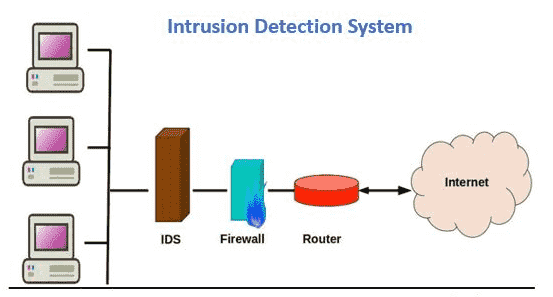
Security tools or software known as intrusion detection and prevention systems (IDPS) keep an eye on network traffic and systems for any suspicious behavior. They are capable of identifying a variety of dangers, such as malware, denial-of-service assaults, and illegal access attempts. By blocking harmful communication, IDPS systems may also be used to stop assaults from occurring in the first place.
In order for IDPS systems to function, network traffic is watched over for any patterns that could point to malicious behavior. These patterns may be derived from existing attack signatures or via heuristic analysis, a method of spotting questionable behavior by combining known attack patterns with additional information.
How Intrusion Detection and Prevention Systems (IDPS) works?
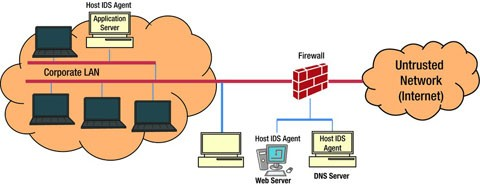
Intrusion Detection and Prevention Systems (IDPS) are used to keep an eye out for harmful behavior in network traffic and to stop it before it starts. They are capable of identifying a variety of dangers, such as malware, denial-of-service assaults, and illegal access attempts. In order for IDPS systems to function, network traffic is watched over for any patterns that could point to malicious behavior. These patterns may be derived from existing attack signatures or via heuristic analysis, a method of spotting questionable behavior by combining known attack patterns with additional information.
- Traffic Monitoring:
- IDPS keeps an eye on every incoming and outgoing data packets while continually monitoring network traffic.
- They look for a number of traffic characteristics, including protocols, ports, source and destination IP addresses, and payload contents.
- Signature-based Detection:
- By using this technique, IDPS compares actions that are seen to a pre-established database of attack patterns or signatures.
- The system sends out an alert as soon as a match is discovered.
- Anomaly-based Detection:
- An initial baseline of typical network or system activity is established via anomaly-based IDPS.
- They monitor departures from this standard, sending out notifications when actions seem out of the ordinary or questionable.
- Heuristic or Behavioral Analysis:
- This method entails keeping an eye out for actions that may point to an assault, even in the absence of a recognized signature.
- It searches for patterns of behavior that might be threatening or suspicious.
- Data Correlation:
- Advanced IDPS evaluate data from several sources using correlation methods to spot trends or abnormalities.
- This enhances alert accuracy and lowers false positives.
- Response and Mitigation:
- Certain IDPS are capable of reacting to threats automatically. This may entail taking steps like readjusting firewall settings, isolating impacted computers, or restricting network traffic.
- Logging and Reporting:
- Logs of incidents that are found are kept by IDPS. Forensics analysis, compliance reporting, and incident investigation all depend on these records.
- Continuous Monitoring and Updating:
- The most recent threat intelligence, including new attack signatures, trends, and behavior profiles, must be continuously added to IDPS.
- This guarantees that the system will continue to identify and stop emerging threats.
- Integration with Other Security Tools:
- To offer a more complete security posture, IDPS can frequently interface with other security tools and systems, including firewalls, antivirus programs, and Security Information and Event Management (SIEM) systems.
- User-defined Policies and Rules:
- Administrators have the ability to set up IDPS with particular rules and regulations that correspond with the security needs and compliance standards of the company.
What are the different types of Intrusion Detection and Prevention Systems (IDPS)?
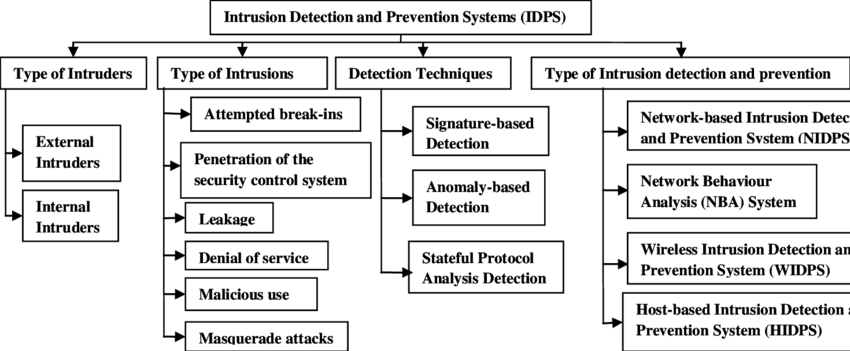
Depending on the kind of deployment they want, organizations might think about putting in place any one of four types of intrusion detection and prevention systems.
- Network-based intrusion prevention system (NIPS): A sort of IDPS called network-based IDPS (NIPS) is placed at particular locations inside a network to keep an eye on all network traffic and look for security issues. Typically, the NIPS accomplishes this by examining behavior and comparing it to a manually maintained database of known threats by a security professional. The action cannot continue over the network if it is identified in the database as a known danger. Often installed behind firewalls, in routers or modems, and at network remote access points, an NIPS is used at the edge of a network.
- Wireless intrusion prevention systems (WIPS): By examining protocols unique to wireless networking, wireless intrusion prevention systems keep an eye on wireless networks. Although WIPS are useful inside a company’s wireless network, they are unable to evaluate higher-level network protocols like transmission control protocol (TCP). Systems for preventing wireless intrusions are installed both inside wireless networks and in locations where unapproved wireless networking is possible.
- Network behavior analysis (NBA) systems: While network behavior analysis systems (NBA) look for anomalous traffic patterns to identify threats, NIPS analyzes irregularities in protocol activity. These patterns are typically the consequence of distributed denial of service (DDoS) attacks, malware-generated attacks, or policy breaches. NBA systems are installed in the internal networks of businesses and at the intersections of their internal and external networks.
- Host-based intrusion prevention system (HIPS): Unlike other intrusion prevention systems, host-based intrusion prevention solutions are implemented on a single host. These hosts are vital servers that hold crucial information or are open to the public and may act as entry points to internal networks. Through the monitoring of active processes, network activity, system logs, application activity, and configuration changes, the HIPS keeps an eye on all traffic coming into and leaving that specific host.
| IDPS Type | Deployed In | Types of Activity Detected |
| Network-based IDPS | Across network borders, around routers and firewalls, and via remote access servers | Network, transport, and application TCP/IP layer activity |
| Wireless intrusion prevention systems (WIPS) | inside the network of wireless | Unauthorized usage of WLANs and wireless protocol activities |
| Network behavior analysis (NBA) systems | both within networks and at the locations where data is transferred between them and external networks | Protocol-level abnormalities in network, transport, and application TCP/IP layer activities |
| Host-based intrusion prevention system (HIPS) | Individual hosts: vital servers or servers that are open to the public | Network, transport, and application TCP/IP layer activity; host application and operating system (OS) activity |
What are the Benefits of Intrusion Detection and Prevention Systems (IDPS)?
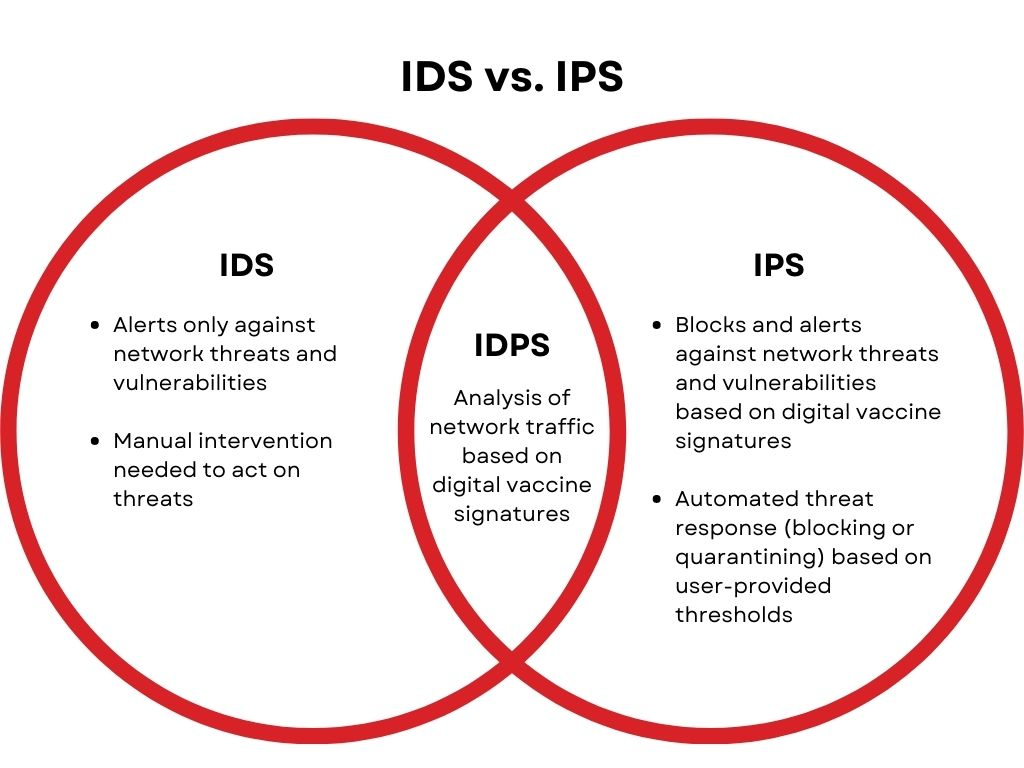
The entire company as well as your corporate security personnel may find an IDPS to be a helpful tool. How an IDPS may assist you:
Without human interaction, scan activity and respond to dangers: Although complex dangers frequently need human action, an IDPS allows for systematic and speedy response to lesser risks while also flagging complex concerns for human intervention more quickly. As a consequence, security teams may respond to attacks before they do harm and can handle a rising number of threats.
Find threats that might slip through: An IDPS, particularly if it employs anomaly-based detection, can discover dangers that human security professionals may overlook.
Enforce user and security policies continuously: Due to the rule-based architecture of an IDPS, threat detection is implemented consistently.
Meet compliance requirements: Because of the usage of an IDPS, fewer people must interface with private data, which is a regulatory necessity in many businesses.
Detection methods VS Prevention actions
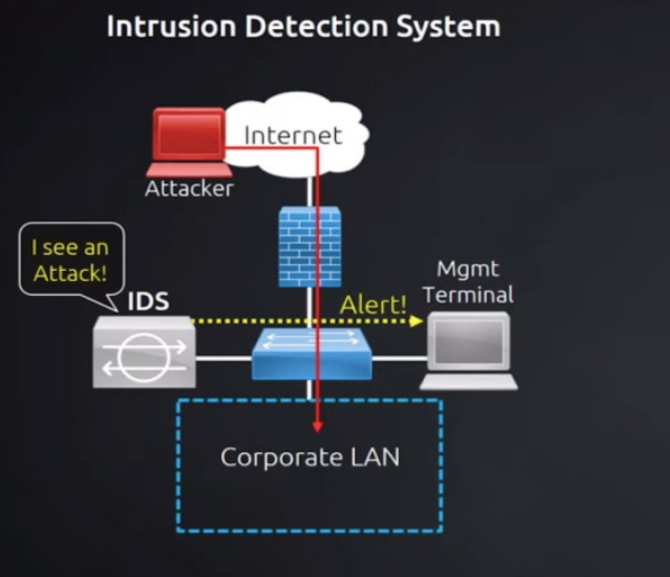
Detection methods:
Once in place, an IDPS employs a number of ways to detect threats. These approaches are roughly classified into three types:
Signature-based: Signature-based threat detection compares monitored behavior to a database of previously detected threats’ signatures (a distinctive pattern or identity). While this approach detects well-known dangers well, unexpected threats will go undiscovered.
Anomaly-based: Threat detection based on anomalies compares a random sample of network behavior to a baseline standard of network activity. If the random selection differs significantly from the baseline, the threat prompts action. While this technique detects novel threats, it also generates more false positives than signature-based threat detection. The part of IDPS that has been most improved by advances in artificial intelligence and machine learning algorithms is anomaly-based threat identification.
Protocol-based: Protocol-based (or policy-based) threat detection is similar to signature-based threat detection in that it employs a database of particular protocols set by the organization and detects and stops any activity that violates those guidelines. A security specialist must manually setup the protocols.
Prevention actions:
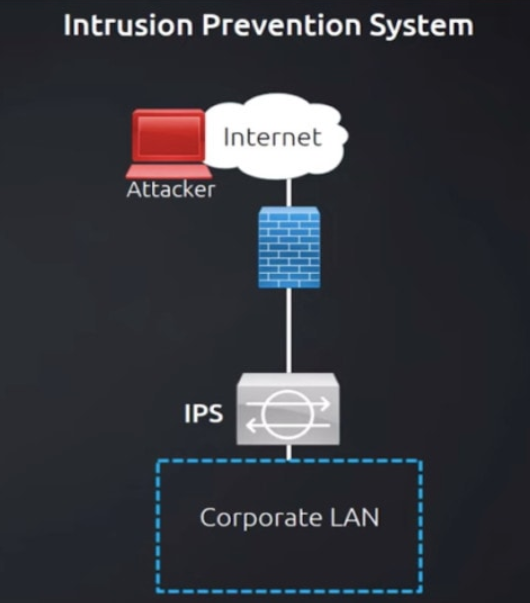
When the IDPS identifies a perceived danger, it can take one of many actions, depending on how it is configured and the type of threat identified. Common anti-attack preventive measures include:
Alert administrators: The IDPS informs human security administrators in this most basic sort of reaction, just like an intrusion detection system might. This type of alert is sent when an automatic action may be inappropriate or when the system is unclear if there is a false positive.
Employ banishment vigilance: When the IDPS takes this step, it prevents incidents from occurring by banning traffic or flagging users from a potentially dangerous IP address. A classic example is banning an IP address that has repeatedly failed a password check.
Change the security environment: This strategy, similar to banishment vigilance, has the IDPS adjust the network’s security configuration to prevent the danger from getting access. A firewall reconfiguration is an example of this reaction.
Modify the attack content: This strategy includes automatically changing the attack’s content. For example, if a suspicious email is reported, the IDPS will delete any component of the email that may include harmful network material, such as email attachments.
Which Intrusion Detection and Prevention Systems (IDPS) is best?
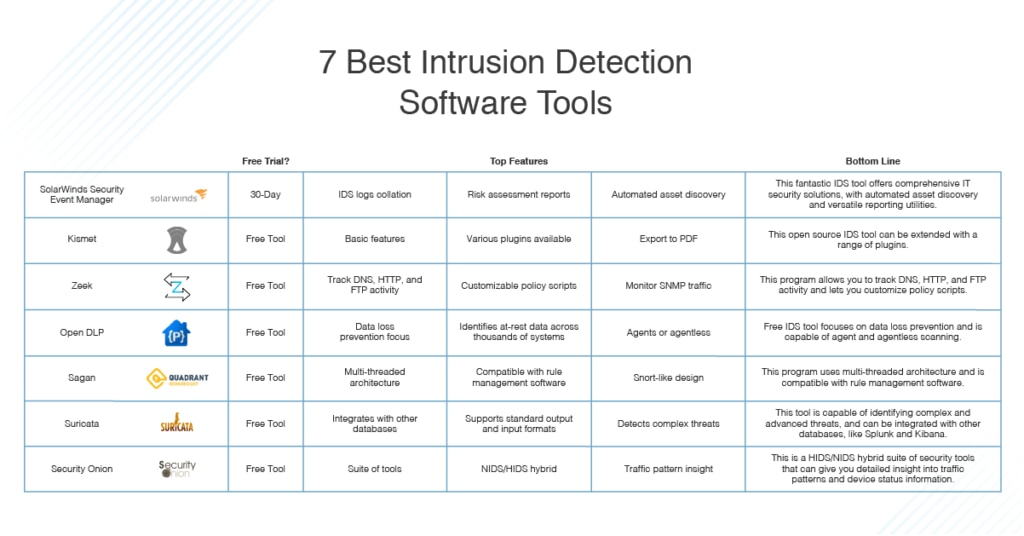
The “best” Intrusion Detection and Prevention System (IDPS) for a certain business is determined by a number of criteria, such as the organization’s specific demands, budget, infrastructure, and compliance requirements. There is no such thing as a one-size-fits-all approach, and what is best for one company may not be best for another.
Having said that, there are a number of trustworthy IDPS suppliers and solutions on the market. Among the well-known IDPS suppliers are:
- Cisco
- Palo Alto Networks
- Check Point
- IBM (QRadar)
- Fortinet
- McAfee (now part of Tenable)
- Symantec (now part of Broadcom)
- Trend Micro
- FireEye (now part of Mandiant, a subsidiary of Google Cloud)
