Limited Time Offer!
For Less Than the Cost of a Starbucks Coffee, Access All DevOpsSchool Videos on YouTube Unlimitedly.
Master DevOps, SRE, DevSecOps Skills!
What are Incident Response (IR) Tools?
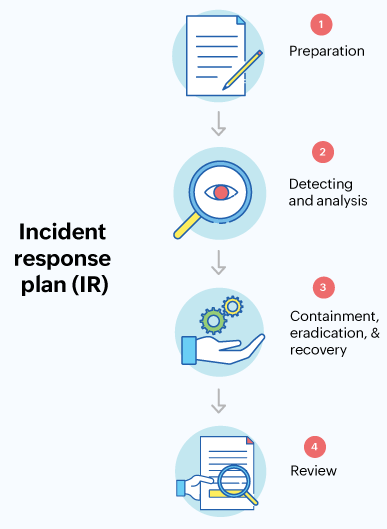
Let’s start with the basics. Imagine your organization is a fortress, and cyber threats are like intruders trying to break in. Incident Response (IR) tools are your defense systems — think of them as a team of highly skilled security guards equipped with alarms, surveillance, and protocols to handle emergencies.
These tools are designed to help detect, investigate, and neutralize cyber threats before they cause chaos. They work behind the scenes to make sure your organization’s data, systems, and reputation stay intact. Whether it’s a phishing email, a ransomware attack, or suspicious activity within your network, IR tools act as your frontline defense to manage and mitigate the incident efficiently.
Why Do We Need Incident Response (IR) Tools?
Now you might wonder, “Can’t we just deal with threats manually?” Sure, you could, but the cyber world is a fast-moving battlefield. Here’s why IR tools are a necessity:
- Speed is Everything: Cyberattacks can escalate in minutes. Without the right tools, it’s like trying to put out a fire with a bucket of water instead of a fire extinguisher.
- Stay Ahead of Hackers: Cybercriminals are evolving daily. IR tools help you stay proactive instead of playing catch-up.
- Save Time and Money: Recovering from a data breach is expensive — we’re talking millions of dollars and weeks of downtime. IR tools reduce the risk of major financial loss.
- Peace of Mind: Knowing there’s a system in place to detect and handle threats lets you focus on growing your business, not worrying about the “what ifs.”
- Regulatory Compliance: Many industries have rules (like GDPR or HIPAA) that require you to have an incident response plan. Without one, you could face hefty fines or legal issues.
In short, IR tools are like having insurance for your cybersecurity — you hope you never need it, but it’s a lifesaver when you do.
What are the Advantages of Incident Response (IR) Tools?
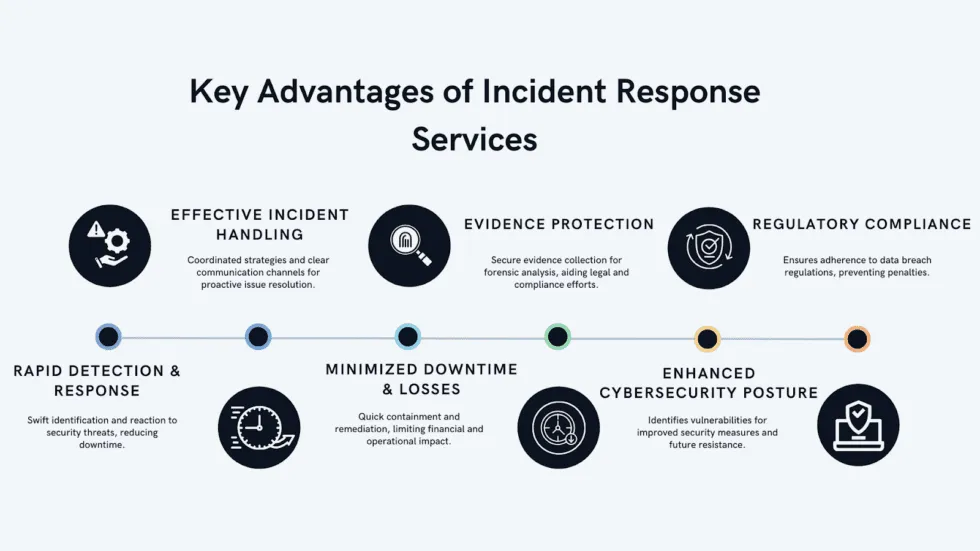
Using IR tools is like upgrading from a basic home security alarm to a state-of-the-art surveillance system. Here’s what makes them stand out:
- Real-Time Protection: These tools constantly scan for unusual activity, so you’re always a step ahead of threats.
- Automated Actions: No need to manually sift through hundreds of alerts — IR tools use automation to handle repetitive tasks, letting your team focus on critical issues.
- Accurate Threat Detection: Tired of false alarms? Advanced tools use AI and machine learning to spot real threats and ignore the noise.
- Team Efficiency: With clear workflows and automation, your security team can handle incidents faster and more effectively.
- Regulatory Confidence: IR tools make compliance easier by keeping detailed logs and generating reports when needed.
- Comprehensive Visibility: They give you a bird’s-eye view of your entire network, so no threat goes unnoticed.
What Features Do Incident Response (IR) Tools Offer?
IR tools are packed with powerful features. Let’s break down some of the highlights:
- Threat Detection: They monitor your network, devices, and applications, raising flags for anything suspicious.
- Automated Playbooks: When a threat is detected, these tools follow pre-defined steps to neutralize it quickly — think of it as having a robot assistant.
- Forensic Capabilities: After an incident, they provide a detailed trail of what happened, which is crucial for understanding and preventing future attacks.
- Collaboration Tools: Security teams need to work together, especially during a crisis. IR tools make that easy by providing shared dashboards and real-time communication features.
- Compliance Support: They ensure your organization stays on the right side of regulatory requirements.
- Integration: Most tools connect seamlessly with your existing security systems, like firewalls or endpoint protection.
Top 10 Use Cases of Incident Response (IR) Tools
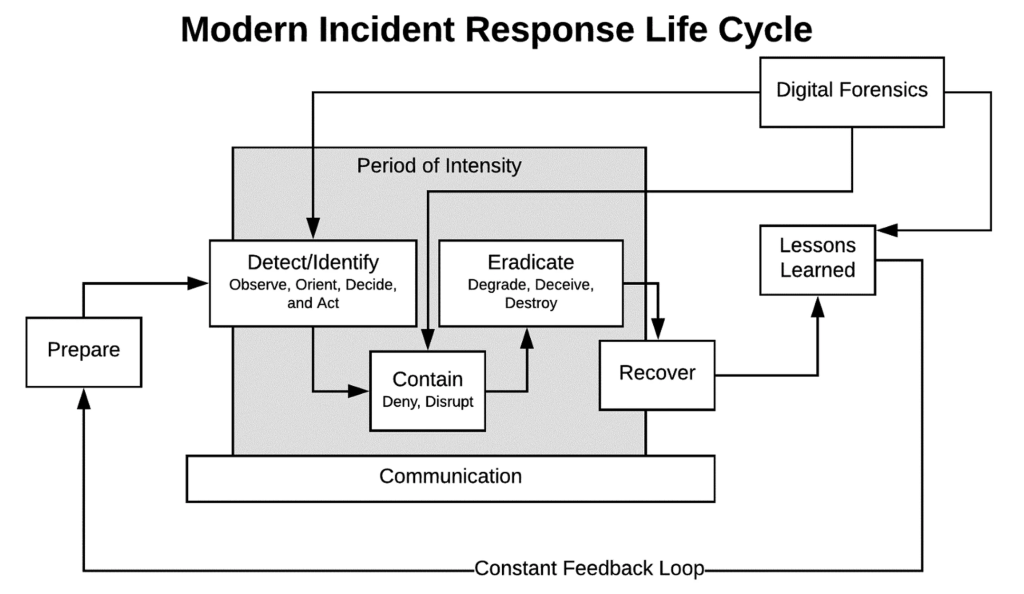
Think of these tools as multi-purpose powerhouses. Here are ten scenarios where they shine:
- Phishing Defense: Spotting and stopping fake emails before someone clicks a malicious link.
- Ransomware Protection: Isolating infected devices and preventing ransomware from spreading across your network.
- Data Breach Investigations: Finding out exactly what data was accessed and how to prevent it from happening again.
- Malware Removal: Quickly identifying and eradicating harmful software.
- Insider Threat Detection: Keeping an eye on employees who might be acting against the company’s interest (knowingly or unknowingly).
- Advanced Persistent Threats (APTs): Detecting stealthy, long-term cyberattacks targeting sensitive data.
- Zero-Day Vulnerabilities: Addressing new, unpatched vulnerabilities exploited by attackers.
- DDoS Attack Mitigation: Blocking excessive traffic to ensure your services stay online.
- Network Intrusions: Identifying unauthorized access attempts and shutting them down immediately.
- Regulatory Reporting: Generating audit-ready reports for compliance requirements.
How Do You Implement Incident Response (IR) Tools?
Implementing IR tools doesn’t have to feel overwhelming. Think of it as setting up a security system for your digital assets:
- Understand Your Needs: Start by identifying your organization’s vulnerabilities. What assets need protection? What kind of threats do you face most often?
- Choose the Right Tool: Look for tools that fit your size, budget, and existing infrastructure. Do you need something that integrates with your SIEM or offers AI-driven threat detection?
- Set It Up: Once you’ve chosen a tool, configure it to align with your incident response plan. Customize alerts and workflows so the system knows how to handle different types of incidents.
- Train Your Team: Your IR tool is only as good as the people using it. Run training sessions to ensure everyone knows how to respond to alerts and manage incidents.
- Test Regularly: Simulate attacks to see how your system and team respond. This helps identify any gaps before a real incident occurs.
- Review and Improve: Cybersecurity is not a “set it and forget it” deal. Regularly review your tool’s performance and tweak its settings as needed.
- Integrate Threat Intelligence: Use external threat feeds to stay updated on emerging risks and vulnerabilities.
- Monitor and Maintain: Keep your tools up-to-date, monitor for new threats, and adapt to changes in your organization or industry.
