Skip to content
Menu
DevSecOps Now!!!
  • About
  • Certifications
  • Contact
  • Courses
  • DevSecOps Consulting
  • DevSecOps Tools
  • Training
  • Tutorials
DevSecOps Now!!!

Laravel Spark + Paytm Subscription Integration Tutorial

Posted on April 18, 2025

Limited Time Offer!

For Less Than the Cost of a Starbucks Coffee, Access All DevOpsSchool Videos on YouTube Unlimitedly.
Master DevOps, SRE, DevSecOps Skills!
Enroll Now

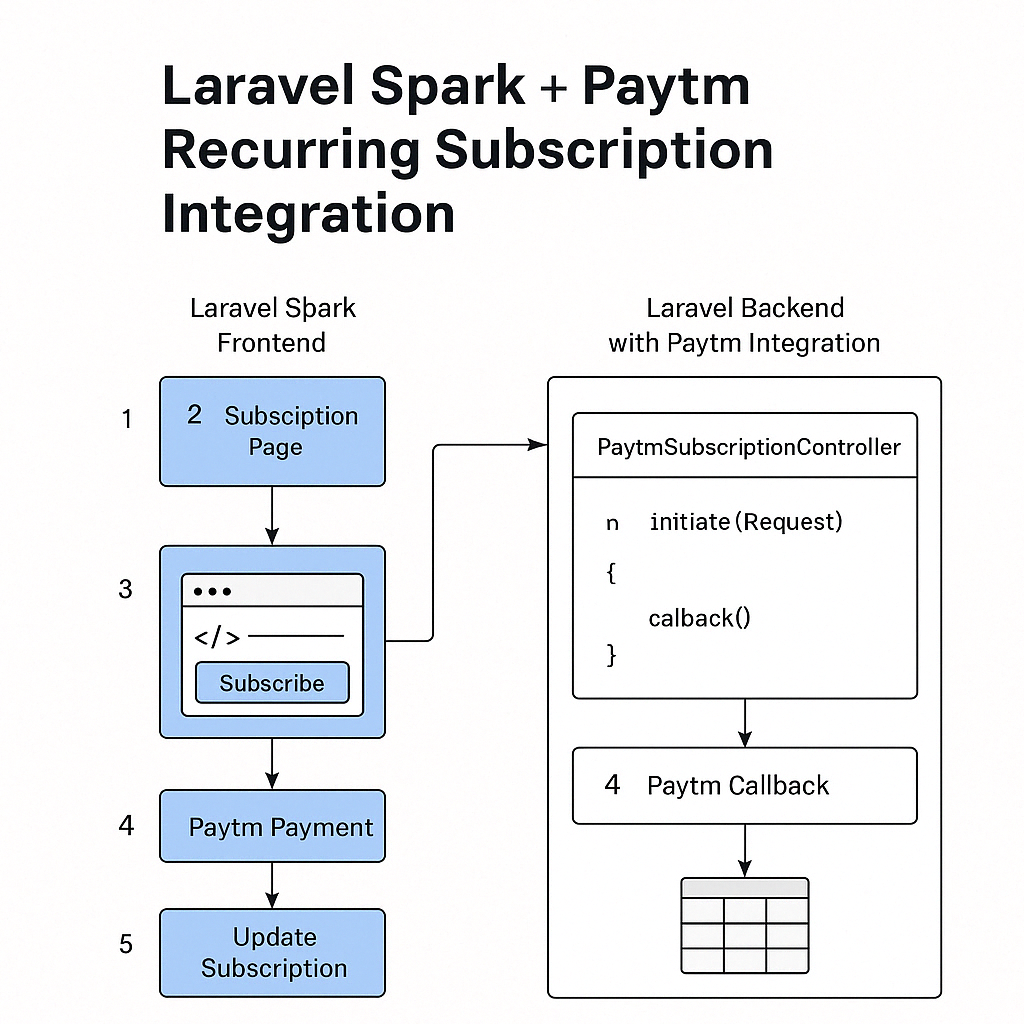
Laravel Spark natively supports Stripe and Paddle. Paytm is not supported out-of-the-box, so to support Indian payment preferences such as UPI and net banking, we must manually integrate Paytm’s recurring subscription feature.

Paytm supports:

  • UPI Autopay (₹5000 limit per mandate)
  • e-NACH Mandates (bank auto-debit, higher limits)

This guide uses the anandsiddharth/laravel-paytm-wallet package for Paytm integration.


Prerequisites

  • Laravel Spark app set up and working
  • Laravel 8+ installed
  • Verified Paytm Business Account with subscription billing enabled
  • Access to Paytm Merchant Dashboard and Developer Portal
  • Paytm credentials: Merchant ID, Merchant Key, Website

Install Paytm Wallet Package

Run the following command in your Laravel project:

composer require anandsiddharth/laravel-paytm-wallet

Configure Paytm in Laravel

.env

PAYTM_ENVIRONMENT=local
PAYTM_MERCHANT_ID=YOUR_MERCHANT_ID
PAYTM_MERCHANT_KEY=YOUR_MERCHANT_KEY
PAYTM_MERCHANT_WEBSITE=DEFAULT
PAYTM_CHANNEL=WEB
PAYTM_INDUSTRY_TYPE=Retail

config/services.php

'paytm-wallet' => [
    'env' => env('PAYTM_ENVIRONMENT'),
    'merchant_id' => env('PAYTM_MERCHANT_ID'),
    'merchant_key' => env('PAYTM_MERCHANT_KEY'),
    'merchant_website' => env('PAYTM_MERCHANT_WEBSITE'),
    'channel' => env('PAYTM_CHANNEL'),
    'industry_type' => env('PAYTM_INDUSTRY_TYPE'),
],

If using Laravel < 5.5, manually add the provider and alias in config/app.php.


Create Subscription Payment Flow

Create Controller

php artisan make:controller PaytmSubscriptionController

app/Http/Controllers/PaytmSubscriptionController.php

namespace App\Http\Controllers;

use Illuminate\Http\Request;
use PaytmWallet;

class PaytmSubscriptionController extends Controller
{
    public function initiate(Request $request)
    {
        $order_id = 'ORDER_' . time();

        $payment = PaytmWallet::with('receive');
        $payment->prepare([
            'order' => $order_id,
            'user' => auth()->id(),
            'mobile_number' => auth()->user()->phone,
            'email' => auth()->user()->email,
            'amount' => $request->amount,
            'callback_url' => route('paytm.callback')
        ]);

        return $payment->receive();
    }

    public function callback()
    {
        $transaction = PaytmWallet::with('receive');
        $response = $transaction->response();

        if ($transaction->isSuccessful()) {
            auth()->user()->update([
                'subscription_status' => 'active',
                'paytm_order_id' => $response['ORDERID'],
                'subscription_renewal_date' => now()->addMonth(), // for monthly plan
            ]);

            return redirect('/dashboard')->with('success', 'Subscription activated successfully.');
        }

        return redirect('/subscribe')->with('error', 'Payment failed or cancelled.');
    }
}

Routes

Add the following routes in routes/web.php:

Route::middleware(['auth'])->group(function () {
    Route::post('/paytm/initiate', [PaytmSubscriptionController::class, 'initiate'])->name('paytm.initiate');
    Route::post('/paytm/callback', [PaytmSubscriptionController::class, 'callback'])->name('paytm.callback');
});

Create Blade View for Subscription

Create or update a blade file where users can initiate payment:

<form action="{{ route('paytm.initiate') }}" method="POST">
    @csrf
    <input type="hidden" name="amount" value="999"> <!-- Set dynamically -->
    <button type="submit" class="btn btn-primary">Subscribe with Paytm</button>
</form>

Enable Recurring Payment with Paytm

Paytm offers two ways to handle recurring billing:

A. UPI Autopay

  • Maximum ₹5000
  • User approves mandate via UPI app
  • Use createSubscription API from Paytm to initiate UPI mandate

B. e-NACH

  • Works via net banking or debit card
  • Suitable for high-value yearly subscriptions

You must call Paytm’s Subscription APIs to:

  • Initiate a subscription plan
  • Track mandate approval
  • Handle renewals via webhook or periodic API check

Refer: Paytm Subscriptions


Subscription Management

Since Spark is tightly integrated with Stripe, you need to manually:

  • Track Paytm mandates
  • Update your own subscription table or user model
  • Handle failures or renewal issues via a scheduled command or webhook from Paytm

Create a custom table like paytm_subscriptions to store:

  • user_id
  • subscription_id
  • status
  • next_renewal_date
  • mandate_type (upi/nach)

Laravel Command to Check Renewals (Optional)

You can create a Laravel console command to query Paytm API for recurring status and renewals and update your database accordingly.


Key Differences and Summary

FeatureLaravel Spark (Default)Paytm Integration (Manual)
Built-in supportStripe, PaddleNot available
UPI SupportNoYes
Net Banking SupportNoYes
Mandate SupportNoYes (UPI/e-NACH)
Automated BillingYesManual/Webhook
Integration ComplexityLowMedium
Recurring Subscription UXSeamlessRequires Custom Work

Final Notes

  • Paytm integration with Spark requires manual subscription handling.
  • You can still use Spark’s UI and subscription management by syncing states.
  • For users preferring Indian payments, this gives you full flexibility.
  • Ensure you test in Paytm’s staging environment before production.
  • UPI Autopay and e-NACH require proper configuration and approval from Paytm.

Post Views: 1,329
  • Configure Paytm in Laravel
  • laravel
  • Laravel Spark
  • Paytm
  • Paytm in Laravel
  • Paytm Subscription
  • Paytm Wallet Package
  • Subscription
Subscribe
Login
Notify of
guest
guest
0 Comments
Oldest
Newest Most Voted
Inline Feedbacks
View all comments
  • Linux Server Diagnostic Commands: Complete Guide for Performance, Network & System Troubleshooting
  • The Ultimate Guide to CDOM – Certified DataOps Manager Certification
  • The Practical Path to AI Reliability: A Guide to the Certified MLOps Manager
  • Master the Machine Learning Lifecycle:Guide to Becoming a Certified MLOps Architect
  • How to Build a Project-Level AI Memory System That Works Across Codex, Claude, and Other AI Coding Tools
  • Certified MLOps Professional: A Deep Dive into the Certified MLOps Professional Certification
  • Certified MLOps Engineer : The Comprehensive Guide to Mastering Machine Learning Operations
  • Codex vs Claude: A Complete Practical Guide for Modern Developers (2026)
  • Certified AIOps Professional Program A Guide to Career Growth
  • Keycloak Multi-Client Architecture with Project-Based Email Validation (Student, Trainer, Company, Consulting)
  • Incorrect definition of table mysql.column_stats
  • Mautic and PHP 8.3 Compatibility Guide (2026)
  • Certified AIOps Engineer: The Complete Career Path and Certification Guide
  • How to Rename Apache Virtual Host Files Safely (Step-by-Step Guide for Linux)
  • AIOps Foundation Certification: Everything You Need to Know to Get Certified
  • DevOps to Certified Site Reliability Professional: A Senior Mentor’s Guide
  • Certified Site Reliability Manager Training, Preparation, and Career Mapping
  • Certified Site Reliability Architect: The Complete Career Guide
  • What Is a VPN? A Complete Beginner-to-Advanced Tutorial
  • How to Install, Secure, and Tune MySQL 8.4 on Ubuntu 24.04 for Apache Event MPM and PHP-FPM
  • Complete Guide to Certified Site Reliability Engineer Career
  • Certified DevSecOps Professional Step by Step
  • Certified DevSecOps Manager: Complete Career Guide
  • Certified DevSecOps Engineer: Skills, Career Path and Certification Guide
  • Step-by-Step: Become a Certified DevSecOps Architect
  • Tuning PHP 8.3 for Apache Event MPM and PHP-FPM on Ubuntu: A Complete Step-by-Step Production Guide
  • Complete Step-by-Step Guide to Configure Apache Event MPM, Create index.php, Set Up VirtualHost, and Fix Ubuntu Default Page
  • Convert XAMPP Apache to Event MPM + System PHP-FPM
  • The Gateway to System Observability Engineering (MOE)
  • How to Finetune Apache and Prove It Works: A Real-World Guide to Testing Performance, Concurrency, HTTP/2, Memory, CPU, and Security

Recent Comments

  1. emmy day on SQLSTATE[42S22]: Column not found: 1054 Unknown column ‘provider’ in ‘field list’
  2. digital banking on Complete Tutorial: Setting Up Laravel Telescope Correctly (Windows + XAMPP + Custom Domain)
  3. SAHIL DHINGRA on How to Uninstall Xampp from your machine when it is not visible in Control panel programs & Feature ?
  4. Abhishek on MySQL: List of Comprehensive List of approach to secure MySQL servers.
  5. Kristina on Best practices to followed in .httacess to avoid DDOS attack?

Archives

  • April 2026
  • March 2026
  • February 2026
  • January 2026
  • December 2025
  • November 2025
  • October 2025
  • September 2025
  • August 2025
  • July 2025
  • June 2025
  • May 2025
  • April 2025
  • March 2025
  • February 2025
  • January 2025
  • December 2024
  • November 2024
  • October 2024
  • September 2024
  • August 2024
  • July 2024
  • June 2024
  • May 2024
  • April 2024
  • March 2024
  • February 2024
  • January 2024
  • December 2023
  • November 2023
  • October 2023
  • September 2023
  • August 2023
  • July 2023
  • May 2023
  • April 2023
  • March 2023
  • February 2023
  • January 2023
  • December 2022

Categories

  • Ai
  • AI Blogging
  • AiOps
  • ajax
  • Android Studio
  • Antimalware
  • Antivirus
  • Apache
  • Api
  • API Security
  • Api Testing
  • APK
  • Aws
  • Bike Rental Services
  • ChatGPT
  • Code Linting
  • Composer
  • cPanel
  • Cyber Threat Intelligence
  • Cybersecurity
  • Data Loss Prevention
  • Database
  • dataops
  • Deception Technology
  • DeepSeek
  • Devops
  • DevSecOps
  • DevTools
  • Digital Asset Management
  • Digital Certificates
  • Docker
  • Drupal
  • emulator
  • Encryption Tools
  • Endpoint Security Tools
  • Error
  • facebook
  • Firewalls
  • Flutter
  • git
  • GITHUB
  • Google Antigravity
  • Google play console
  • Google reCAPTCHA
  • Gradle
  • Guest posting
  • health and fitness
  • IDE
  • Identity and Access Management
  • Incident Response
  • Instagram
  • Intrusion Detection and Prevention Systems
  • jobs
  • Joomla
  • Keycloak
  • Laravel
  • Law News
  • Lawyer Discussion
  • Legal Advice
  • Linkedin
  • Linkedin Api
  • Linux
  • Livewire
  • Mautic
  • Medical Tourism
  • MlOps
  • MobaXterm
  • Mobile Device Management
  • Multi-Factor Authentication
  • MySql
  • Network Traffic Analysis tools
  • Paytm
  • Penetration Testing
  • php
  • PHPMyAdmin
  • Pinterest Api
  • Quora
  • SAST
  • SecOps
  • Secure File Transfer Protocol
  • Security Analytics Tools
  • Security Auditing Tools
  • Security Information and Event Management
  • Seo
  • Server Management Tools
  • Single Sign-On
  • Site Reliability Engineering
  • soft 404
  • software
  • SuiteCRM
  • SysOps
  • Threat Model
  • Twitter
  • Twitter Api
  • ubuntu
  • Uncategorized
  • Virtual Host
  • Virtual Private Networks
  • VPNs
  • Vulnerability Assessment Tools
  • Web Application Firewalls
  • Windows Processor
  • Wordpress
  • WSL (Windows Subsystem for Linux)
  • X.com
  • Xampp
  • Youtube
©2026 DevSecOps Now!!! | WordPress Theme: EcoCoded
wpDiscuz