Skip to content
Menu
DevSecOps Now!!!
  • About
  • Certifications
  • Contact
  • Courses
  • DevSecOps Consulting
  • DevSecOps Tools
  • Training
  • Tutorials
DevSecOps Now!!!

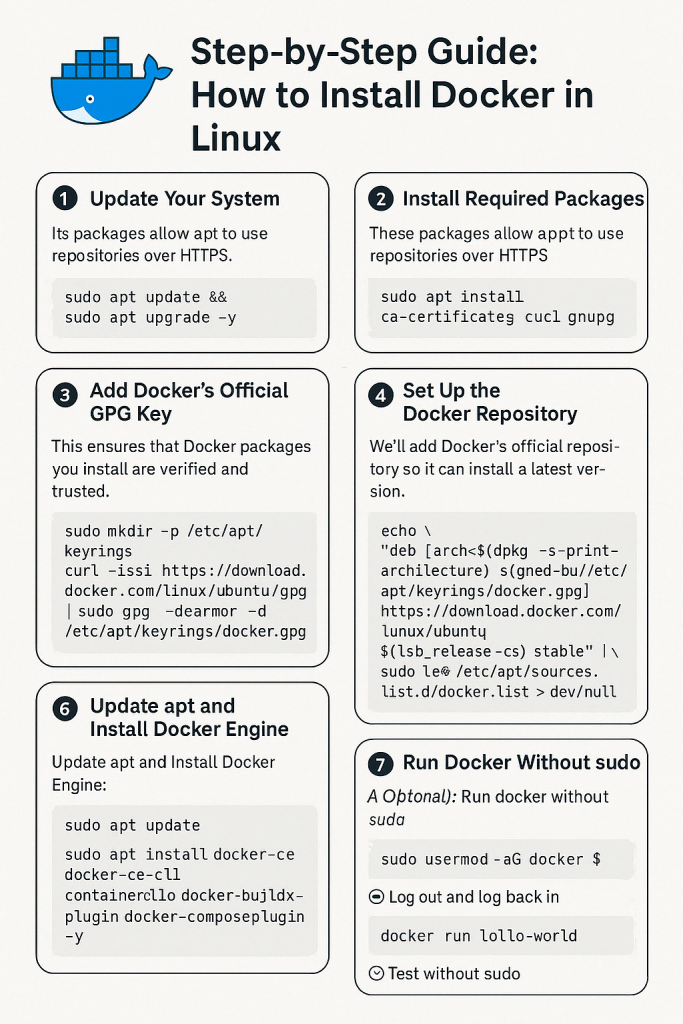
Step-by-Step Guide: How to Install Docker in Linux

Posted on April 15, 2025

Limited Time Offer!

For Less Than the Cost of a Starbucks Coffee, Access All DevOpsSchool Videos on YouTube Unlimitedly.
Master DevOps, SRE, DevSecOps Skills!

Enroll Now

What is Docker?

Docker is a platform used to develop, ship, and run applications inside containers. Containers are lightweight, portable, and self-sufficient environments that ensure your app runs smoothly on any system, regardless of differences in configuration.

If you’re a developer, sysadmin, or just curious, learning Docker is a huge step forward in modern DevOps and deployment workflows.


๐Ÿ“Œ Prerequisites

Before diving in, ensure the following:

  • You are using a 64-bit Linux system.
  • You have a terminal with sudo access.
  • Your system is connected to the internet.
  • Recommended: Ubuntu 20.04 LTS or later, or Debian 10+.

โœ… Step 1: Update Your System

Why?
Itโ€™s important to update your local package list to ensure youโ€™re working with the latest repositories and security patches.

sudo apt update && sudo apt upgrade -y
  • apt update: Updates the list of available packages.
  • apt upgrade: Installs the newest versions of packages on your system.

โœ… Step 2: Install Required Dependencies

Docker requires some dependencies to handle repositories and HTTPS.

sudo apt install ca-certificates curl gnupg lsb-release -y
  • ca-certificates: Ensures HTTPS connections are trusted.
  • curl: Used to download files from the internet.
  • gnupg: Required to add GPG keys for verifying packages.
  • lsb-release: Provides info about your distribution, used in repo setup.

โœ… Step 3: Add Dockerโ€™s Official GPG Key

Why?
This key is used to verify Docker packages and make sure they haven’t been tampered with.

sudo mkdir -p /etc/apt/keyrings
curl -fsSL https://download.docker.com/linux/ubuntu/gpg | \
  sudo gpg --dearmor -o /etc/apt/keyrings/docker.gpg
  • mkdir -p: Creates a directory if it doesnโ€™t already exist.
  • curl ... | gpg --dearmor: Downloads and converts the Docker GPG key.

โœ… Step 4: Add the Docker Repository

We now add the Docker repository to our APT sources list so we can install Docker directly from Docker’s official servers.

echo \
  "deb [arch=$(dpkg --print-architecture) signed-by=/etc/apt/keyrings/docker.gpg] \
  https://download.docker.com/linux/ubuntu \
  $(lsb_release -cs) stable" | \
  sudo tee /etc/apt/sources.list.d/docker.list > /dev/null
  • dpkg --print-architecture: Returns your CPU architecture (e.g., amd64).
  • lsb_release -cs: Returns your codename (e.g., focal, jammy).
  • This command sets up the Docker repository specific to your system version.

โœ… Step 5: Update APT and Install Docker Engine

Now that Dockerโ€™s repo is set up, you can install Docker using the following commands:

sudo apt update
sudo apt install docker-ce docker-ce-cli containerd.io docker-buildx-plugin docker-compose-plugin -y
  • docker-ce: The core Docker engine.
  • docker-ce-cli: Command-line tools to interact with Docker.
  • containerd.io: A core container runtime.
  • docker-compose-plugin: Allows you to use docker compose commands (note the space, new syntax).
  • docker-buildx-plugin: Used for building multi-platform images.

โœ… Step 6: Verify That Docker Is Installed and Running

Check the Docker version:

sudo docker --version

Expected output:

Docker version 24.x.x, build xxxx

Run a test container:

sudo docker run hello-world

This command pulls a test image and runs a container from it. It verifies:

  • Docker is installed correctly
  • The Docker daemon is active
  • The Docker engine can pull images from the internet

โœ… Step 7: Use Docker Without sudo (Optional but Recommended)

By default, Docker needs sudo for security. You can allow your user to run Docker directly by adding them to the Docker group:

sudo usermod -aG docker $USER
  • usermod -aG: Adds your user to a group (here, docker).
  • $USER: Refers to your current username.

Important: Log out and log back in after this step. Otherwise, changes wonโ€™t take effect.

Then test without sudo:

docker run hello-world

โœ… Step 8: Enable Docker to Start on System Boot

If you want Docker to always start after a reboot (which is useful for servers), run:

sudo systemctl enable docker
  • This ensures Docker starts every time your machine does.

๐ŸŽฏ Additional: Useful Docker Commands

CommandDescription
docker psLists running containers
docker ps -aLists all containers (including stopped)
docker imagesLists downloaded Docker images
docker stop <container_id>Stops a running container
docker rm <container_id>Deletes a container
docker rmi <image_id>Deletes a Docker image
docker exec -it <container_id> bashAccess container terminal

๐Ÿ“Œ Troubleshooting Tips

  • If docker run hello-world fails, check:
    • Is the Docker daemon running? sudo systemctl status docker
    • Any firewall blocking Docker?
    • Try restarting: sudo systemctl restart docker.
Post Views: 2,870
Subscribe
Login
Notify of
guest
guest
0 Comments
Oldest
Newest Most Voted
Inline Feedbacks
View all comments
  • Linux Server Diagnostic Commands: Complete Guide for Performance, Network & System Troubleshooting
  • The Ultimate Guide to CDOM โ€“ Certified DataOps Manager Certification
  • The Practical Path to AI Reliability: A Guide to the Certified MLOps Manager
  • Master the Machine Learning Lifecycle:Guide to Becoming a Certified MLOps Architect
  • How to Build a Project-Level AI Memory System That Works Across Codex, Claude, and Other AI Coding Tools
  • Certified MLOps Professional: A Deep Dive into the Certified MLOps Professional Certification
  • Certified MLOps Engineer : The Comprehensive Guide to Mastering Machine Learning Operations
  • Codex vs Claude: A Complete Practical Guide for Modern Developers (2026)
  • Certified AIOps Professional Program A Guide to Career Growth
  • Keycloak Multi-Client Architecture with Project-Based Email Validation (Student, Trainer, Company, Consulting)
  • Incorrect definition of table mysql.column_stats
  • Mautic and PHP 8.3 Compatibility Guide (2026)
  • Certified AIOps Engineer: The Complete Career Path and Certification Guide
  • How to Rename Apache Virtual Host Files Safely (Step-by-Step Guide for Linux)
  • AIOps Foundation Certification: Everything You Need to Know to Get Certified
  • DevOps to Certified Site Reliability Professional: A Senior Mentorโ€™s Guide
  • Certified Site Reliability Manager Training, Preparation, and Career Mapping
  • Certified Site Reliability Architect: The Complete Career Guide
  • What Is a VPN? A Complete Beginner-to-Advanced Tutorial
  • How to Install, Secure, and Tune MySQL 8.4 on Ubuntu 24.04 for Apache Event MPM and PHP-FPM
  • Complete Guide to Certified Site Reliability Engineer Career
  • Certified DevSecOps Professional Step by Step
  • Certified DevSecOps Manager: Complete Career Guide
  • Certified DevSecOps Engineer: Skills, Career Path and Certification Guide
  • Step-by-Step: Become a Certified DevSecOps Architect
  • Tuning PHP 8.3 for Apache Event MPM and PHP-FPM on Ubuntu: A Complete Step-by-Step Production Guide
  • Complete Step-by-Step Guide to Configure Apache Event MPM, Create index.php, Set Up VirtualHost, and Fix Ubuntu Default Page
  • Convert XAMPP Apache to Event MPM + System PHP-FPM
  • The Gateway to System Observability Engineering (MOE)
  • How to Finetune Apache and Prove It Works: A Real-World Guide to Testing Performance, Concurrency, HTTP/2, Memory, CPU, and Security

Recent Comments

  1. emmy day on SQLSTATE[42S22]: Column not found: 1054 Unknown column ‘provider’ in ‘field list’
  2. digital banking on Complete Tutorial: Setting Up Laravel Telescope Correctly (Windows + XAMPP + Custom Domain)
  3. SAHIL DHINGRA on How to Uninstall Xampp from your machine when it is not visible in Control panel programs & Feature ?
  4. Abhishek on MySQL: List of Comprehensive List of approach to secure MySQL servers.
  5. Kristina on Best practices to followed in .httacess to avoid DDOS attack?

Archives

  • April 2026
  • March 2026
  • February 2026
  • January 2026
  • December 2025
  • November 2025
  • October 2025
  • September 2025
  • August 2025
  • July 2025
  • June 2025
  • May 2025
  • April 2025
  • March 2025
  • February 2025
  • January 2025
  • December 2024
  • November 2024
  • October 2024
  • September 2024
  • August 2024
  • July 2024
  • June 2024
  • May 2024
  • April 2024
  • March 2024
  • February 2024
  • January 2024
  • December 2023
  • November 2023
  • October 2023
  • September 2023
  • August 2023
  • July 2023
  • May 2023
  • April 2023
  • March 2023
  • February 2023
  • January 2023
  • December 2022

Categories

  • Ai
  • AI Blogging
  • AiOps
  • ajax
  • Android Studio
  • Antimalware
  • Antivirus
  • Apache
  • Api
  • API Security
  • Api Testing
  • APK
  • Aws
  • Bike Rental Services
  • ChatGPT
  • Code Linting
  • Composer
  • cPanel
  • Cyber Threat Intelligence
  • Cybersecurity
  • Data Loss Prevention
  • Database
  • dataops
  • Deception Technology
  • DeepSeek
  • Devops
  • DevSecOps
  • DevTools
  • Digital Asset Management
  • Digital Certificates
  • Docker
  • Drupal
  • emulator
  • Encryption Tools
  • Endpoint Security Tools
  • Error
  • facebook
  • Firewalls
  • Flutter
  • git
  • GITHUB
  • Google Antigravity
  • Google play console
  • Google reCAPTCHA
  • Gradle
  • Guest posting
  • health and fitness
  • IDE
  • Identity and Access Management
  • Incident Response
  • Instagram
  • Intrusion Detection and Prevention Systems
  • jobs
  • Joomla
  • Keycloak
  • Laravel
  • Law News
  • Lawyer Discussion
  • Legal Advice
  • Linkedin
  • Linkedin Api
  • Linux
  • Livewire
  • Mautic
  • Medical Tourism
  • MlOps
  • MobaXterm
  • Mobile Device Management
  • Multi-Factor Authentication
  • MySql
  • Network Traffic Analysis tools
  • Paytm
  • Penetration Testing
  • php
  • PHPMyAdmin
  • Pinterest Api
  • Quora
  • SAST
  • SecOps
  • Secure File Transfer Protocol
  • Security Analytics Tools
  • Security Auditing Tools
  • Security Information and Event Management
  • Seo
  • Server Management Tools
  • Single Sign-On
  • Site Reliability Engineering
  • soft 404
  • software
  • SuiteCRM
  • SysOps
  • Threat Model
  • Twitter
  • Twitter Api
  • ubuntu
  • Uncategorized
  • Virtual Host
  • Virtual Private Networks
  • VPNs
  • Vulnerability Assessment Tools
  • Web Application Firewalls
  • Windows Processor
  • Wordpress
  • WSL (Windows Subsystem for Linux)
  • X.com
  • Xampp
  • Youtube
©2026 DevSecOps Now!!! | WordPress Theme: EcoCoded
wpDiscuz