Skip to content
Menu
DevSecOps Now!!!
  • About
  • Certifications
  • Contact
  • Courses
  • DevSecOps Consulting
  • DevSecOps Tools
  • Training
  • Tutorials
DevSecOps Now!!!

How to Configure X Profile for Business. Step by Step Guide

Posted on February 7, 2025

Limited Time Offer!

For Less Than the Cost of a Starbucks Coffee, Access All DevOpsSchool Videos on YouTube Unlimitedly.
Master DevOps, SRE, DevSecOps Skills!

Enroll Now

X, formerly known as Twitter, is one of the best platforms for businesses to connect with customers, grow their brand, and engage in meaningful conversations. Whether you’re a startup, small business, or an established brand, X can help you build credibility, drive traffic to your website, and create a loyal audience.

If you’re looking to set up an X Business Profile, youโ€™re in the right place. Follow this step-by-step guide to create, optimize, and grow your business presence on X.


Step 1: Create a Business Account on X

Before you start tweeting, you need an account. You can either create a new business account or use an existing personal account and convert it into a business profile.

Creating a New Business Account

  1. Go to X.com or download the X app on your phone.
  2. Click on Sign Up and enter your business name or brand name.
  3. Use a business email or phone number (avoid using personal emails).
  4. Set a strong password and click Next.
  5. Customize your experience by selecting topics and accounts related to your industry.
  6. Confirm your email or phone number to activate your account.

Once you complete these steps, your business is officially on X! But thereโ€™s still work to do to make it look professional.


Step 2: Optimize Your X Business Profile
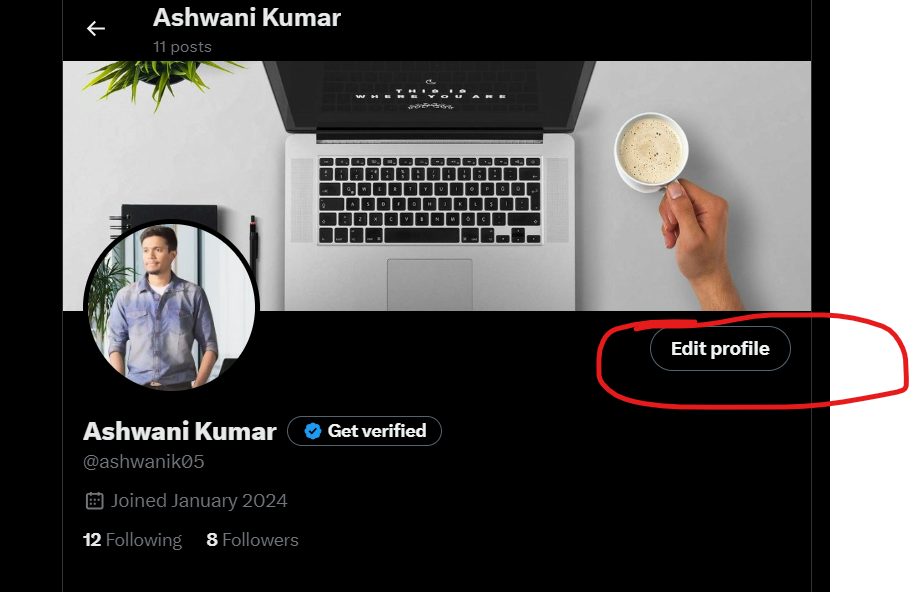
Now that your account is set up, itโ€™s time to make it look polished, professional, and recognizable.

Choose a Profile Picture

Your profile picture is one of the first things people notice. Choose an image that best represents your business:

  • If you have a brand logo, use that for consistency.
  • If you’re a personal brand, a high-quality headshot works best.
  • Keep it clear and high resolution so it looks great on all devices.
  • The recommended size is 400 x 400 pixels.

Set an Eye-Catching Header Image

Your header is like your business billboard. Itโ€™s a great place to showcase your brandโ€™s message, tagline, or latest campaign.

  • Use a 1500 x 500 pixels image thatโ€™s visually appealing.
  • Highlight your brand mission, a promotion, or a new product launch.

Update Your Display Name and Handle

  • Your display name should be your business name.
  • Your @username (handle) should be short, memorable, and as close to your business name as possible.
  • If your preferred handle is taken, try slight variations like @YourBrandHQ or @YourBrandOfficial.

Write a Compelling Bio

Your bio is your elevator pitch. In just a few words, it should tell visitors:

  • What your business does
  • Why they should follow you
  • A clear call-to-action (CTA)

Example for a marketing agency:
“Helping businesses grow with expert social media strategies. DM us for a free consultation!”

Add Your Website and Location

Make it easy for customers to find you:

  • Add your website link to drive traffic.
  • If you have a physical store or office, include your location.

Step 3: Switch to a Professional Account
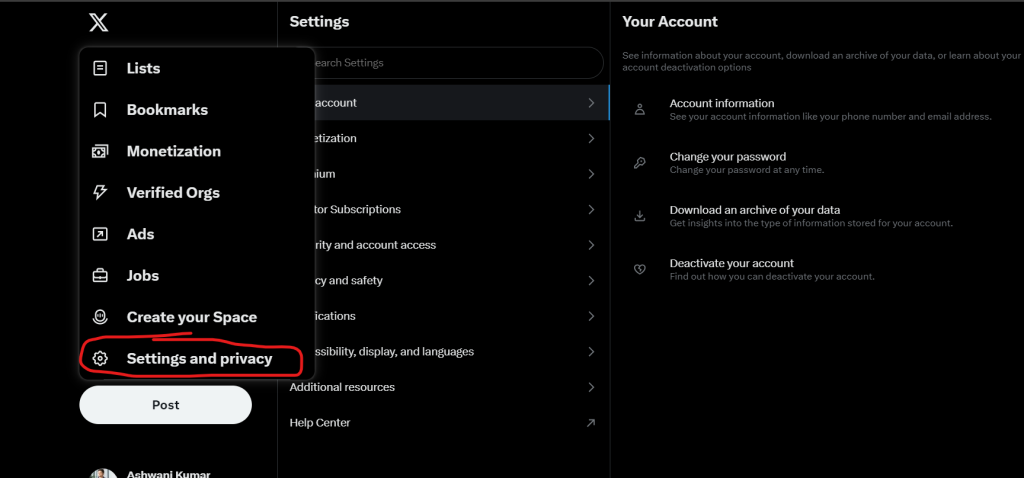
To unlock business features like analytics and ad tools, switch to a Professional Account. Hereโ€™s how:

  1. Go to Your Profile and click on “More” from the left menu.
  2. Select “Settings and Privacy”, then “Account Settings.”
  3. Scroll down and tap “Switch to Professional.”
  4. Choose “Business” as your category and follow the setup prompts.

This will unlock features like X Analytics, advertising options, and more customization tools.


Step 4: Enable X Ads (If You Plan to Advertise)

If you want to promote your business and reach a larger audience, X Ads is a great tool. Hereโ€™s how to set it up:

  1. Go to ads.twitter.com and log in.
  2. Enter your business billing details.
  3. Set up your first advertising campaign based on your goals (followers, website clicks, engagement, etc.).

Running ads is completely optional, but it can help you grow your business faster by reaching new audiences.


Step 5: Adjust Privacy & Security Settings

A secure account ensures smooth operations and keeps your brandโ€™s reputation intact.

  • Keep your account public so anyone can follow and engage with your content.
  • Enable two-factor authentication to prevent unauthorized access.
  • Control who can reply to your tweets to manage spam and trolls.
  • Turn on keyword filters to block unwanted comments or mentions.

Step 6: Start Posting and Engaging
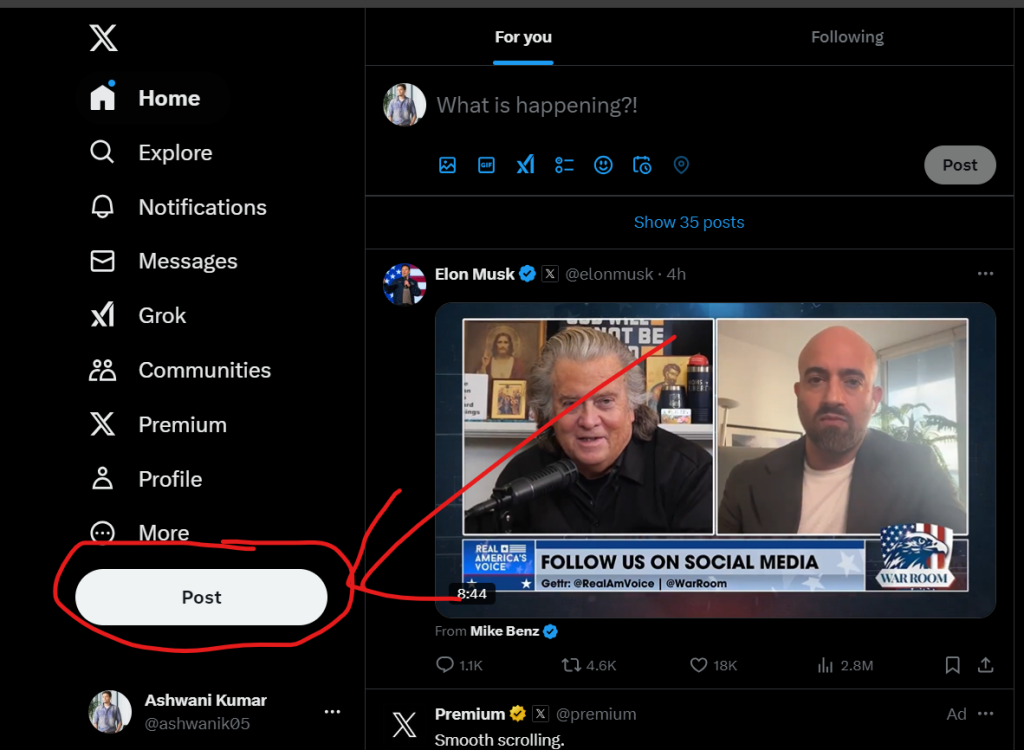
Now that your profile is set up, it’s time to start creating content that engages your audience.

What Kind of Content Works on X?

  • Industry Trends โ€“ Share updates, insights, and news in your niche.
  • Business Updates โ€“ Announce new products, services, or events.
  • Behind the Scenes โ€“ Show the human side of your business.
  • Customer Testimonials โ€“ Highlight positive reviews and user experiences.
  • Educational Threads โ€“ Post informative content that adds value.
  • Engagement Polls & Questions โ€“ Start conversations and interact with followers.

How Often Should You Post?

Consistency is key on X. Hereโ€™s a good posting schedule:

  • 3-5 tweets per day for steady engagement.
  • Use scheduling tools like Buffer or Hootsuite to plan ahead.
  • Reply to comments and retweet to keep your profile active.

Step 7: Leverage X Business Features for Growth

Pin a Tweet to Your Profile

Pinning a tweet lets you showcase an important message at the top of your profile. This could be:

  • A welcome message
  • A promotional offer
  • A new product launch

Use Twitter Lists

Lists help organize your feed. You can create lists for:

  • Industry leaders for inspiration
  • Competitors to track their strategies
  • Loyal customers to engage more personally

Hashtags Matter

Hashtags increase your visibility. Use one to three relevant hashtags per tweet.

Example for a fitness brand:
“Struggling to stay motivated? Hereโ€™s how to make workouts fun and effective! #FitnessTips #WorkoutMotivation”


Step 8: Track Performance with X Analytics

Once you start posting, keep an eye on your analytics to see whatโ€™s working.

  1. Click More > Analytics from your dashboard.
  2. Track impressions, engagement, and follower growth.
  3. Identify which tweets perform best and adjust your content strategy.

If a certain type of content gets more engagement, post more of it. If some tweets flop, experiment with different styles, formats, or timing.

Post Views: 1,672
  • Configure X Profile for Business
  • How to Configure Twitter Profile
  • How to Configure X Profile
  • How to Configure X Profile for Business. Step by Step Guide
  • twitter
  • Twitter Profile
  • X Profile
  • x.com
Subscribe
Login
Notify of
guest
guest
0 Comments
Oldest
Newest Most Voted
Inline Feedbacks
View all comments
  • Linux Server Diagnostic Commands: Complete Guide for Performance, Network & System Troubleshooting
  • The Ultimate Guide to CDOM โ€“ Certified DataOps Manager Certification
  • The Practical Path to AI Reliability: A Guide to the Certified MLOps Manager
  • Master the Machine Learning Lifecycle:Guide to Becoming a Certified MLOps Architect
  • How to Build a Project-Level AI Memory System That Works Across Codex, Claude, and Other AI Coding Tools
  • Certified MLOps Professional: A Deep Dive into the Certified MLOps Professional Certification
  • Certified MLOps Engineer : The Comprehensive Guide to Mastering Machine Learning Operations
  • Codex vs Claude: A Complete Practical Guide for Modern Developers (2026)
  • Certified AIOps Professional Program A Guide to Career Growth
  • Keycloak Multi-Client Architecture with Project-Based Email Validation (Student, Trainer, Company, Consulting)
  • Incorrect definition of table mysql.column_stats
  • Mautic and PHP 8.3 Compatibility Guide (2026)
  • Certified AIOps Engineer: The Complete Career Path and Certification Guide
  • How to Rename Apache Virtual Host Files Safely (Step-by-Step Guide for Linux)
  • AIOps Foundation Certification: Everything You Need to Know to Get Certified
  • DevOps to Certified Site Reliability Professional: A Senior Mentorโ€™s Guide
  • Certified Site Reliability Manager Training, Preparation, and Career Mapping
  • Certified Site Reliability Architect: The Complete Career Guide
  • What Is a VPN? A Complete Beginner-to-Advanced Tutorial
  • How to Install, Secure, and Tune MySQL 8.4 on Ubuntu 24.04 for Apache Event MPM and PHP-FPM
  • Complete Guide to Certified Site Reliability Engineer Career
  • Certified DevSecOps Professional Step by Step
  • Certified DevSecOps Manager: Complete Career Guide
  • Certified DevSecOps Engineer: Skills, Career Path and Certification Guide
  • Step-by-Step: Become a Certified DevSecOps Architect
  • Tuning PHP 8.3 for Apache Event MPM and PHP-FPM on Ubuntu: A Complete Step-by-Step Production Guide
  • Complete Step-by-Step Guide to Configure Apache Event MPM, Create index.php, Set Up VirtualHost, and Fix Ubuntu Default Page
  • Convert XAMPP Apache to Event MPM + System PHP-FPM
  • The Gateway to System Observability Engineering (MOE)
  • How to Finetune Apache and Prove It Works: A Real-World Guide to Testing Performance, Concurrency, HTTP/2, Memory, CPU, and Security

Recent Comments

  1. emmy day on SQLSTATE[42S22]: Column not found: 1054 Unknown column ‘provider’ in ‘field list’
  2. digital banking on Complete Tutorial: Setting Up Laravel Telescope Correctly (Windows + XAMPP + Custom Domain)
  3. SAHIL DHINGRA on How to Uninstall Xampp from your machine when it is not visible in Control panel programs & Feature ?
  4. Abhishek on MySQL: List of Comprehensive List of approach to secure MySQL servers.
  5. Kristina on Best practices to followed in .httacess to avoid DDOS attack?

Archives

  • April 2026
  • March 2026
  • February 2026
  • January 2026
  • December 2025
  • November 2025
  • October 2025
  • September 2025
  • August 2025
  • July 2025
  • June 2025
  • May 2025
  • April 2025
  • March 2025
  • February 2025
  • January 2025
  • December 2024
  • November 2024
  • October 2024
  • September 2024
  • August 2024
  • July 2024
  • June 2024
  • May 2024
  • April 2024
  • March 2024
  • February 2024
  • January 2024
  • December 2023
  • November 2023
  • October 2023
  • September 2023
  • August 2023
  • July 2023
  • May 2023
  • April 2023
  • March 2023
  • February 2023
  • January 2023
  • December 2022

Categories

  • Ai
  • AI Blogging
  • AiOps
  • ajax
  • Android Studio
  • Antimalware
  • Antivirus
  • Apache
  • Api
  • API Security
  • Api Testing
  • APK
  • Aws
  • Bike Rental Services
  • ChatGPT
  • Code Linting
  • Composer
  • cPanel
  • Cyber Threat Intelligence
  • Cybersecurity
  • Data Loss Prevention
  • Database
  • dataops
  • Deception Technology
  • DeepSeek
  • Devops
  • DevSecOps
  • DevTools
  • Digital Asset Management
  • Digital Certificates
  • Docker
  • Drupal
  • emulator
  • Encryption Tools
  • Endpoint Security Tools
  • Error
  • facebook
  • Firewalls
  • Flutter
  • git
  • GITHUB
  • Google Antigravity
  • Google play console
  • Google reCAPTCHA
  • Gradle
  • Guest posting
  • health and fitness
  • IDE
  • Identity and Access Management
  • Incident Response
  • Instagram
  • Intrusion Detection and Prevention Systems
  • jobs
  • Joomla
  • Keycloak
  • Laravel
  • Law News
  • Lawyer Discussion
  • Legal Advice
  • Linkedin
  • Linkedin Api
  • Linux
  • Livewire
  • Mautic
  • Medical Tourism
  • MlOps
  • MobaXterm
  • Mobile Device Management
  • Multi-Factor Authentication
  • MySql
  • Network Traffic Analysis tools
  • Paytm
  • Penetration Testing
  • php
  • PHPMyAdmin
  • Pinterest Api
  • Quora
  • SAST
  • SecOps
  • Secure File Transfer Protocol
  • Security Analytics Tools
  • Security Auditing Tools
  • Security Information and Event Management
  • Seo
  • Server Management Tools
  • Single Sign-On
  • Site Reliability Engineering
  • soft 404
  • software
  • SuiteCRM
  • SysOps
  • Threat Model
  • Twitter
  • Twitter Api
  • ubuntu
  • Uncategorized
  • Virtual Host
  • Virtual Private Networks
  • VPNs
  • Vulnerability Assessment Tools
  • Web Application Firewalls
  • Windows Processor
  • Wordpress
  • WSL (Windows Subsystem for Linux)
  • X.com
  • Xampp
  • Youtube
©2026 DevSecOps Now!!! | WordPress Theme: EcoCoded
wpDiscuz