Limited Time Offer!
For Less Than the Cost of a Starbucks Coffee, Access All DevOpsSchool Videos on YouTube Unlimitedly.
Master DevOps, SRE, DevSecOps Skills!
What is MDM?
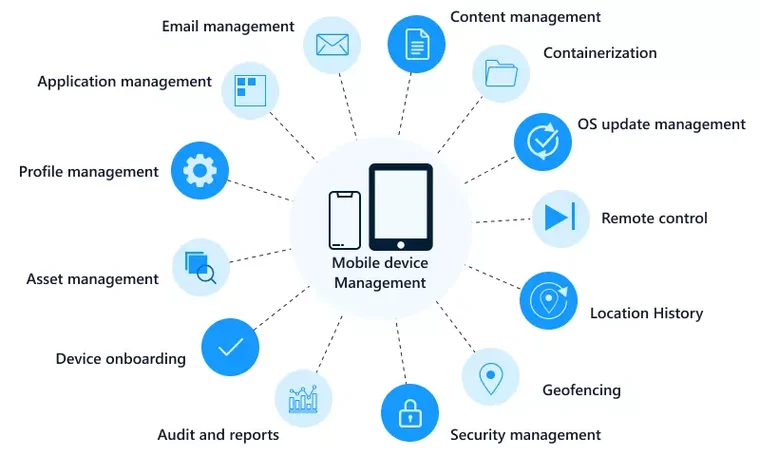
Mobile Device Management (MDM) refers to the suite of technologies, tools, and processes designed to help organizations effectively manage, monitor, and secure mobile devices like smartphones, tablets, laptops, and other endpoints that employees use for work purposes. These tools allow IT administrators to control and secure the usage of mobile devices, ensuring they align with corporate policies while enhancing productivity and minimizing risks. MDM is a crucial aspect of modern IT infrastructure, especially for businesses implementing Bring Your Own Device (BYOD) policies or managing a distributed workforce.
Why Do We Need MDM?
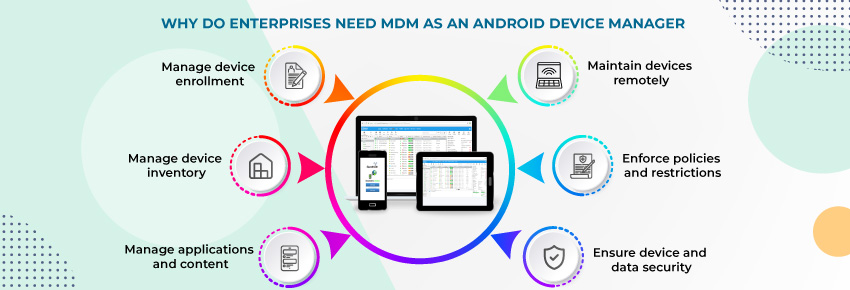
The need for MDM arises from the increasing reliance on mobile devices for business operations. Here are the key reasons why MDM is essential:
- Protect Sensitive Data: Mobile devices often store confidential company data. MDM ensures this data is encrypted, secure, and accessible only to authorized users.
- Enable Remote Work: As more employees work remotely, MDM provides the tools to manage devices regardless of their location.
- Prevent Data Breaches: Lost or stolen devices can lead to data breaches. MDM allows administrators to remotely wipe such devices to prevent unauthorized access.
- Support Compliance: MDM ensures that devices meet industry-specific regulations like GDPR, HIPAA, and PCI DSS, reducing legal and financial risks.
- Manage Device Diversity: With employees using various devices and operating systems, MDM offers a centralized solution to manage all devices uniformly.
- Increase Productivity: By pre-installing business apps and limiting non-work-related usage, MDM helps employees stay focused and productive.
- Cost Optimization: It reduces costs related to unauthorized usage, data leaks, and manual device management efforts.
What Are the Advantages of MDM?
MDM offers several benefits to organizations of all sizes. Here are the primary advantages:
- Centralized Management: MDM enables IT teams to manage all devices from a single dashboard, simplifying administration.
- Enhanced Security: MDM enforces security protocols like password policies, data encryption, and remote wiping to protect devices and data.
- Seamless Updates: IT can remotely push updates and patches to devices, ensuring they stay secure and functional.
- Application Control: MDM allows for controlled installation, updating, and removal of apps to align with organizational requirements.
- Geofencing Capabilities: Restricts device access based on location to enhance security and compliance.
- Device Tracking: MDM provides real-time tracking and inventory management for all registered devices.
- Reduced Downtime: MDM minimizes downtime by providing quick troubleshooting and remote support to users.
- Policy Customization: Organizations can create role-specific or department-specific policies to meet their unique needs.
What Are the Features of MDM?
Modern MDM tools are equipped with a variety of features to meet diverse organizational needs. Some key features include:
- Device Enrollment: Streamlined onboarding processes for registering devices with minimal user intervention.
- Policy Enforcement: Enforces security and usage policies such as screen locks, strong passwords, and VPN usage.
- Remote Device Control: IT administrators can remotely lock, unlock, or wipe devices in case of theft or misuse.
- Application Management: Ensures employees have access to approved apps and restricts the use of unauthorized ones.
- Data Encryption: Protects data on devices using robust encryption technologies.
- Compliance Monitoring: Tracks and ensures devices adhere to regulatory and organizational policies.
- Real-Time Alerts: Notifies administrators of security breaches, compliance violations, or unauthorized activities.
- Content Management: Allows for the distribution and management of corporate files and documents on mobile devices.
- Role-Based Access: Assigns access and permissions based on user roles within the organization.
- Integration Capabilities: Seamlessly integrates with existing IT tools, such as directory services and email systems.
Top 10 Use Cases of MDM
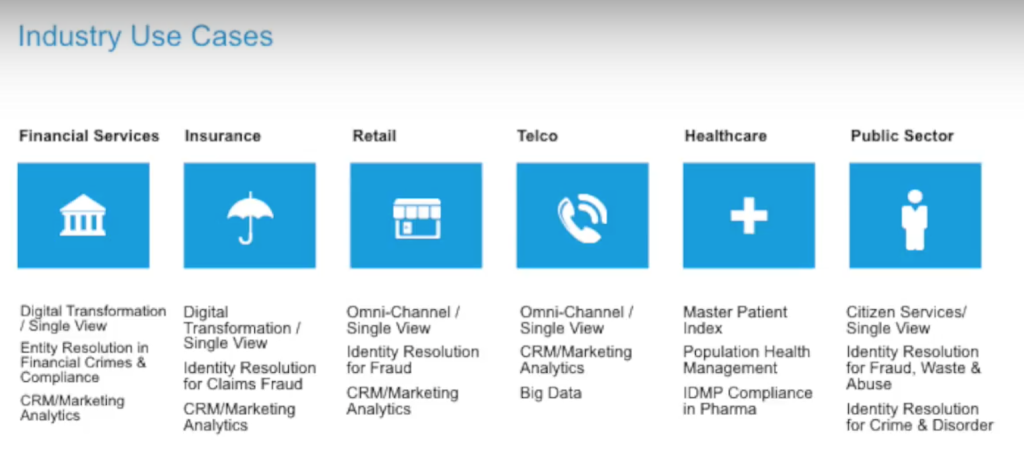
MDM solutions can be applied in various scenarios to optimize security, productivity, and compliance. Here are the top use cases:
- BYOD Management: Supports personal devices in the workplace by separating personal and corporate data securely.
- Data Protection: Secures sensitive data through encryption, remote wiping, and controlled access.
- Device Tracking: Enables location tracking and inventory management for better resource allocation.
- Remote Work Enablement: Facilitates secure remote access to corporate networks and resources.
- Application Deployment: Simplifies the distribution and management of business-critical applications.
- Kiosk Management: Locks devices into specific applications for single-purpose use in industries like retail and education.
- Regulatory Compliance: Helps organizations meet standards like HIPAA, GDPR, and PCI DSS through automated enforcement of policies.
- Patch Management: Deploys security patches and updates efficiently across all devices.
- Secure Email Access: Ensures email communication remains protected and compliant on mobile devices.
- Incident Response: Enables swift actions like device lockdown or data wiping in response to security incidents.
How to Implement MDM?
Implementing MDM involves several steps to ensure effective management and security of mobile devices. Here’s a detailed process:
- Define Objectives: Start by identifying your organization’s goals for MDM, such as improving security, enabling BYOD, or managing remote workers.
- Evaluate Solutions: Research and select an MDM solution that aligns with your needs. Consider factors like features, cost, scalability, and vendor reputation. Popular tools include Microsoft Intune, VMware Workspace ONE, and MobileIron.
- Develop Policies: Create comprehensive policies for device usage, security, and compliance. These policies should address aspects like password requirements, permitted apps, and data access.
- Enroll Devices: Onboard devices into the MDM system. This can be done through manual registration, email invitations, or automated provisioning.
- Configure Settings: Set up security features such as encryption, VPN, and remote wipe capabilities to ensure device security.
- Deploy Applications: Push required business apps to devices and restrict access to non-approved applications.
- Provide Training: Educate employees about MDM policies, their responsibilities, and how to use their devices securely.
- Monitor Devices: Use MDM dashboards to monitor device performance, compliance, and security in real time.
- Conduct Audits: Regularly review device compliance, security policies, and system effectiveness to identify areas for improvement.
- Adapt and Update: Continuously refine your MDM strategy based on feedback, new threats, and organizational changes.
