Limited Time Offer!
For Less Than the Cost of a Starbucks Coffee, Access All DevOpsSchool Videos on YouTube Unlimitedly.
Master DevOps, SRE, DevSecOps Skills!

In the digital age, network connectivity plays a crucial role in every facet of technology, from individual computing to large-scale enterprise solutions. When network issues arise, they can lead to service interruptions, reduced productivity, and even financial loss. Troubleshooting these network issues effectively and promptly is essential for maintaining seamless connectivity and efficient workflows.
Linux is known for its robust suite of built-in tools designed to diagnose, monitor, and resolve network-related issues. Whether you’re a system administrator, a network engineer, or a developer working in a Linux environment, understanding these troubleshooting commands is invaluable. From checking connectivity and monitoring real-time network traffic to diagnosing DNS and routing issues, Linux provides a wide array of commands that empower users to swiftly detect and resolve issues.
This article provides an in-depth guide to essential Linux commands for network troubleshooting. Each command is explained to ensure you can effectively diagnose issues such as packet loss, DNS resolution failures, connectivity delays, and other common network problems. By mastering these commands, you’ll be well-equipped to handle complex network issues, ensuring the systems you manage stay online and perform at optimal levels.
What are the Linux Commands to Troubleshoot Network Issues?
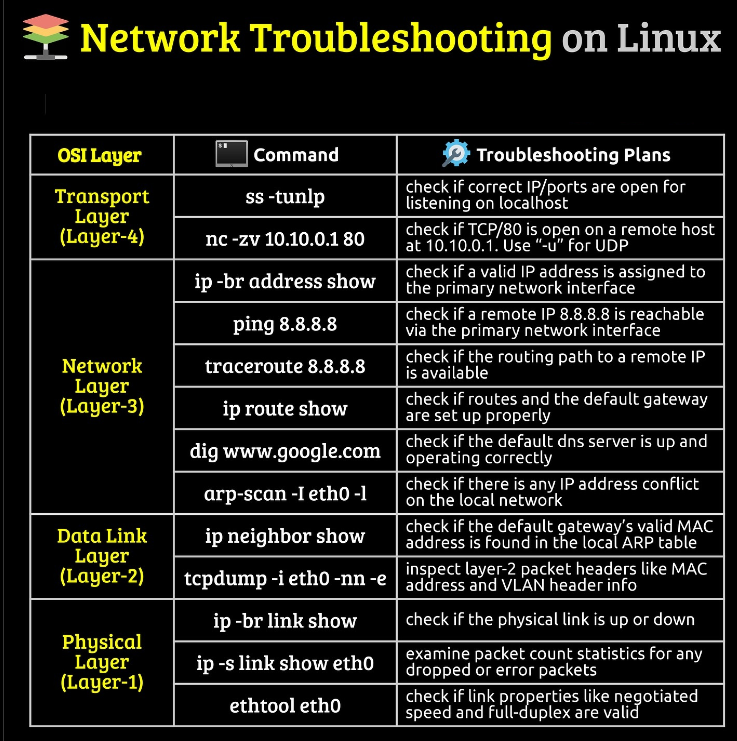
Network issues can disrupt connectivity, cause downtime, and affect productivity. Below are essential Linux commands to help troubleshoot network issues efficiently.
1. Check Network Interface Details
Use this command to display all network interfaces and their status.
ip a2. Check IP Address and Network Information
To view IP address, subnet mask, and more details:
ifconfig3. Ping to Test Connectivity
Ping a destination IP or hostname to check if it’s reachable:
ping <destination_ip_or_hostname>4. Traceroute to Trace Network Path
Trace the route taken to reach a remote server, identifying any delays.
traceroute <destination_ip_or_hostname>5. nslookup to Check DNS Resolution
Use nslookup to resolve domain names to IP addresses.
nslookup <domain_name>6. Dig for Detailed DNS Information
Use dig for a more detailed DNS lookup:
dig <domain_name>7. Check Open Ports with Netstat
List open ports and listening services:
netstat -tuln8. Check Active Connections with SS
View detailed information on active connections and listening ports.
ss -tuln9. Monitor Real-Time Traffic with Tcpdump
Capture and analyze network packets in real-time:
sudo tcpdump -i <interface> -nn10. Test Network Bandwidth with Iperf
Run a bandwidth test (iperf must be installed on both client and server).
iperf -c <server_ip>11. Verify Routes with ip route
View routing table information:
ip route12. Resolve Routing Issues with Route Command
Display and manage routes:
route -n13. Test DNS Server Performance
Run dig on different DNS servers to test their performance:
dig <domain_name> @<dns_server_ip>14. Check Firewall Rules with UFW (Ubuntu)
Verify if the firewall is blocking network traffic.
sudo ufw status verbose15. Nmap for Network Scanning
Scan network for open ports and services (nmap must be installed).
nmap <target_ip>16. Netcat for Port Connectivity Testing
Test connectivity to a port on a remote machine:
nc -zv <host> <port>17. Use MTR for Comprehensive Network Path Analysis
Combines ping and traceroute for better analysis.
mtr <destination_ip_or_hostname>18. Log Network Events with dmesg
View kernel messages for network-related logs:
dmesg | grep -i network19. Monitor Real-Time Network Traffic with Iftop
Track incoming and outgoing traffic for each connection.
sudo iftop -i <interface>20. Check Connectivity via CURL or WGET
Verify connectivity by fetching data from a URL:
curl -I <url>
wget --spider <url>
What are the Important things in troubleshooting network issues on Linux?
1. Network Interface Configuration
- Importance: Properly configured network interfaces are essential for device connectivity.
- Key Commands:
ip a,ifconfig - Why It Matters: Misconfigured or disconnected interfaces often cause connectivity issues. Verify IP addresses, subnet masks, and interface statuses to ensure correct setup.
2. IP Address and Subnet Verification
- Importance: IP addresses and subnetting ensure devices communicate on the same network.
- Key Commands:
ifconfig,ip addr show - Why It Matters: A wrong IP address or subnet can lead to unreachable devices and broken connections, especially in subnet-dependent systems.
3. Network Connectivity Testing
- Importance: Determines whether devices can reach one another.
- Key Commands:
ping,traceroute - Why It Matters: Pinging can reveal packet loss, latency, and connectivity, while traceroute helps pinpoint network hops with delays or failures.
4. DNS Resolution
- Importance: DNS resolves domain names to IP addresses, a necessity for internet connectivity.
- Key Commands:
nslookup,dig - Why It Matters: DNS issues prevent accessing websites or external resources, causing broken connectivity to URLs or services dependent on domain resolution.
5. Routing and Network Paths
- Importance: Routing controls how packets travel from source to destination.
- Key Commands:
ip route,route,traceroute - Why It Matters: Misconfigured routes or routing issues can block or reroute traffic inefficiently. This is especially crucial in complex networks with multiple pathways.
6. Open Ports and Services
- Importance: Determines which services are accessible from the network.
- Key Commands:
netstat,ss - Why It Matters: Checking open ports ensures that services are listening on the correct ports and aren’t blocked by firewalls or configuration errors.
7. Firewall Rules and Security
- Importance: Firewalls protect the network but can also inadvertently block legitimate traffic.
- Key Commands:
ufw,iptables - Why It Matters: Misconfigured firewalls may block necessary traffic, so reviewing rules can identify any obstacles.
8. Network Traffic and Packet Analysis
- Importance: Allows monitoring of live network data for analysis.
- Key Commands:
tcpdump,iftop - Why It Matters: Traffic analysis helps identify high bandwidth usage, network congestion, and potential security threats by examining packets directly.
9. DNS Server and Latency Analysis
- Importance: Measures DNS performance and verifies it against backup or alternative DNS servers.
- Key Commands:
dig <domain> @<dns_server_ip> - Why It Matters: Slow or unreliable DNS servers can cause delays, and testing alternatives can help determine if a DNS server switch is needed.
10. Connection Performance and Bandwidth
- Importance: Evaluates network speed and data transfer rates.
- Key Commands:
iperf,speedtest-cli - Why It Matters: Bottlenecks in bandwidth affect application performance. Testing speed and bandwidth ensures networks are operating at required levels.
11. Detailed Network Mapping and Path Analysis
- Importance: MTR (My Traceroute) combines ping and traceroute for more comprehensive network diagnostics.
- Key Commands:
mtr <destination> - Why It Matters: MTR is excellent for ongoing diagnostics to observe how network paths behave over time, revealing intermittent issues in real-time.
12. Log Analysis for Network-Related Events
- Importance: Logs contain historical data on network events and errors.
- Key Commands:
dmesg | grep network - Why It Matters: Reviewing logs helps pinpoint past network issues and ongoing errors that may affect current connectivity.
13. Protocol and Port Scanning
- Importance: Scans reveal open services and potential vulnerabilities.
- Key Commands:
nmap - Why It Matters: Scanning lets you discover open ports and potential security gaps, ensuring all exposed services are intentional and secured.
14. Remote Connectivity Testing
- Importance: Determines if the network can reach remote servers or services.
- Key Commands:
curl,wget - Why It Matters:
curlandwgettest connectivity to remote servers, helping confirm if issues are within the internal network or on remote servers.