
Limited Time Offer!
For Less Than the Cost of a Starbucks Coffee, Access All DevOpsSchool Videos on YouTube Unlimitedly.
Master DevOps, SRE, DevSecOps Skills!
In the digital-first world where content is a currency, businesses are producing, consuming, and distributing media assets at a staggering scale. Images, videos, presentations, brand documents, campaign creatives, logos, and thousands of marketing materials — all form the backbone of a company’s digital presence. As this volume grows, the chaos grows with it. Without a structured and intelligent system to manage these assets, organizations face duplication, lost files, compliance issues, inconsistent branding, and inefficient collaboration.
That’s where Digital Asset Management (DAM) software plays a transformational role.
But choosing the right DAM software is not a one-size-fits-all decision. It involves strategic alignment with business goals, usability for teams, scalability for growth, and compliance with brand integrity. In this comprehensive tutorial, we’ll break down everything you need to know to confidently choose the right digital asset management solution — and why WizBrand is emerging as a powerful contender in the DAM space.
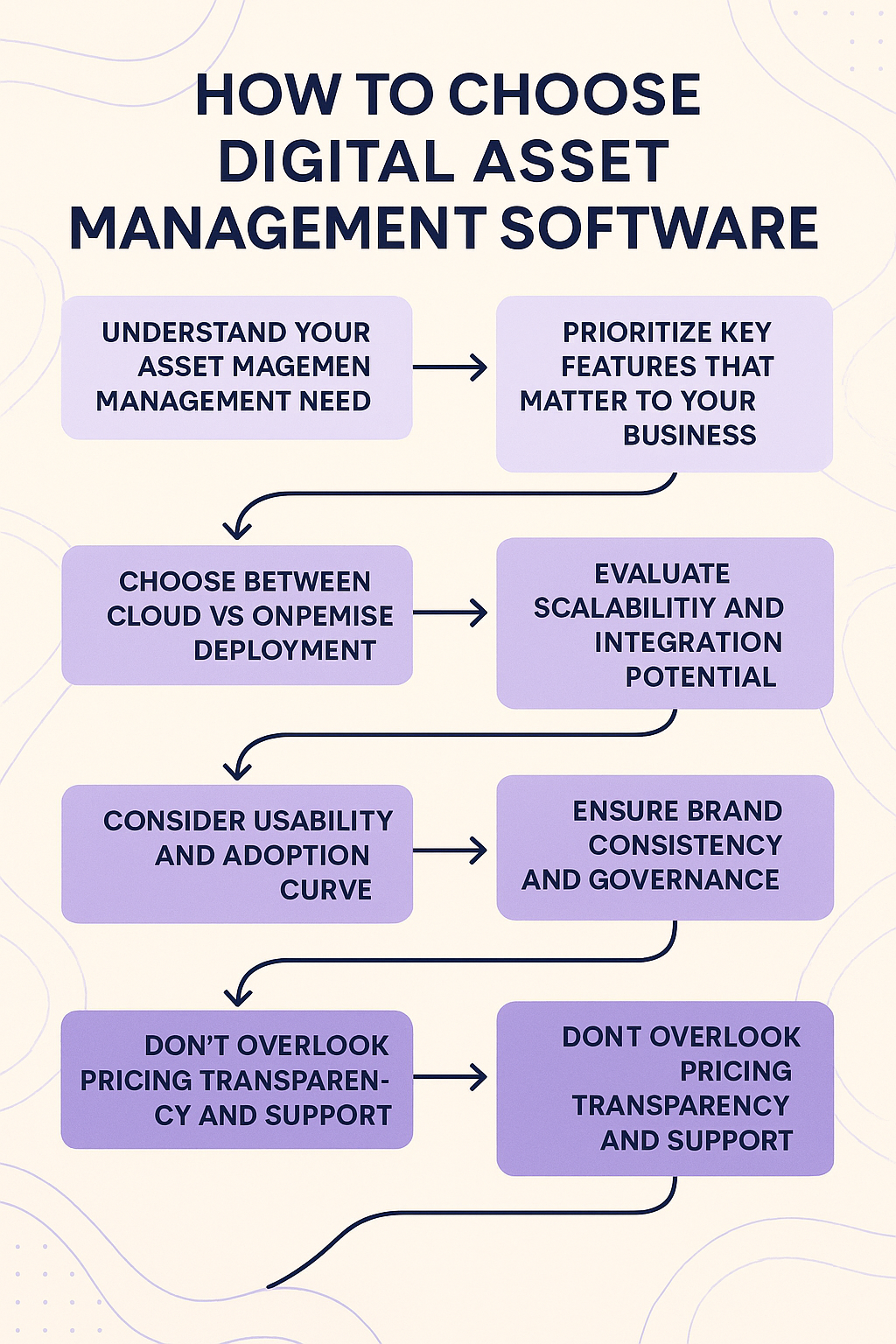
1. Understand Your Asset Management Needs
Before jumping into platforms and features, you must conduct an internal audit of your digital asset workflow.
- What types of digital assets does your organization use? (Images, videos, documents, logos, templates, etc.)
- Where are these assets stored today?
- How do different teams access, share, and repurpose these assets?
- Are there current pain points with searchability, duplication, or brand misuse?
- Do you need user access control, version history, or expiration policies?
- Is collaboration between internal and external teams crucial?
This clarity helps align your needs with the features offered by a DAM system.
WizBrand’s DAM solution begins by addressing exactly this. Its dashboard is structured to offer centralized access, controlled sharing, and organized grouping of every asset by tag, folder, and project—giving you a clean slate to manage your content ecosystem.
2. Prioritize Key Features That Matter to Your Business
Every DAM software offers some variation of asset storage and retrieval. What differentiates a top-tier DAM from an average tool is how intelligently it helps you manage, search, and secure your assets.
Here are essential features to evaluate:
- Smart Tagging & Metadata Management
Enables quick asset categorization, contextual search, and brand governance. - Granular Access Controls
Define user roles, permissions, and workflows to protect sensitive content. - Version Control & History
Track edits, retain older versions, and avoid overwriting critical files. - Secure Cloud Storage with Backups
Assets should be safely stored and retrievable across global teams. - Collaboration Tools & Commenting
Enable feedback, approvals, and team interactions around digital files. - Link-based Sharing & Embed Options
Share externally while maintaining control over access. - Audit Logs & Compliance Tools
Track every action on every file for legal or branding audits.
WizBrand checks all these boxes. It goes a step further with:
- Real-time file monitoring
- Dynamic folder and asset grouping
- Auto-generated thumbnails
- One-click preview and publish workflows
This ensures marketers, designers, developers, and stakeholders stay aligned and productive.
3. Choose Between Cloud vs On-Premise Deployment
Your deployment choice influences not just costs but also control, scalability, and integration.
- Cloud-Based DAM (like WizBrand):
- Faster setup
- Lower upfront investment
- Automatic updates
- Global accessibility
- Ideal for remote teams
- On-Premise DAM:
- Full control over data
- Often chosen by government, healthcare, or banking sectors
- Higher maintenance effort
Unless you have strict data residency rules, a cloud-first DAM like WizBrand offers maximum agility and cost-efficiency.
4. Evaluate Scalability and Integration Potential
Your DAM system shouldn’t exist in isolation. It must integrate well with your broader marketing and business stack, such as:
- Content Management Systems (CMS)
- CRM tools like Salesforce or HubSpot
- Project Management platforms like Asana or Trello
- Marketing automation tools
- Design tools like Adobe Creative Suite or Canva
WizBrand supports API integrations, making it highly extensible. You can plug it into your organization’s workflows and automate digital asset syncs, approvals, and publishing across systems.
Additionally, as your content footprint grows, the platform scales without performance degradation — handling thousands of assets and users without friction.
5. Consider Usability and Adoption Curve
Your DAM software might be powerful, but it’s useless if your teams avoid using it due to complexity or clunky UI. Look for:
- Clean, intuitive interfaces
- Easy upload and tagging
- Simple drag-and-drop folders
- Smart search with filters
- Mobile and tablet access
WizBrand is designed with non-tech users in mind. It ensures that marketers, interns, designers, and senior executives can navigate the interface with minimal learning curve. The dashboard is minimal, fast, and responsive — optimized for productivity from day one.
6. Don’t Overlook Pricing Transparency and Support
Look closely at:
- Pricing tiers and hidden fees
- Cost per seat vs. unlimited users
- File storage limits
- Support responsiveness and SLAs
- Training and onboarding assistance
WizBrand offers flexible pricing that suits small startups, growing agencies, and enterprise clients alike. Its transparent pricing, along with active support and onboarding assistance, makes adoption smoother and cost-effective. Unlike legacy DAM providers who charge per user or restrict API access, WizBrand is designed for growth and scale.
7. Ensure Brand Consistency and Governance
At its core, a DAM system should enforce brand compliance.
Look for:
- Branded portals for internal/external sharing
- Expiry dates for outdated assets
- Approval workflows before files are distributed
- Rights management for licensed assets
WizBrand enables role-based governance, expiry policies, and permission flags so only approved content is accessed and distributed — protecting your brand integrity across markets and platforms.
Conclusion
Choosing the right digital asset management software is not just about features. It’s about aligning the tool with your team workflows, growth strategy, compliance needs, and content vision.
Whether you’re a marketing team scaling campaigns, a startup building a content library, or an enterprise enforcing global brand consistency — a platform like WizBrand Digital Asset Management stands out with its simplicity, power, affordability, and user-first design.
With WizBrand, you don’t just manage files. You build a strategic content engine that empowers your people, protects your brand, and drives digital growth.