
Limited Time Offer!
For Less Than the Cost of a Starbucks Coffee, Access All DevOpsSchool Videos on YouTube Unlimitedly.
Master DevOps, SRE, DevSecOps Skills!
Introduction to Digital Asset Management (DAM) Software
In the fast-paced world of e-commerce, the ability to manage, store, and distribute digital assets efficiently is essential. High-quality images, engaging videos, product documentation, and marketing materials are central to attracting and retaining customers. Digital Asset Management (DAM) software is a powerful solution designed to help e-commerce businesses streamline these processes, ensuring assets are easily accessible, organized, and secure at all times1.
DAM software provides a central repository where all digital files can be stored. This not only improves the efficiency of daily operations but also enhances collaboration among teams and departments. For e-commerce, where product visuals and branding assets must be updated regularly, a strong DAM system can lead to improved sales and customer satisfaction.
Why DAM Software is Crucial for E-commerce
E-commerce businesses handle a high volume of digital assets, including product images, banners, videos, spec sheets, brochures, and more. Managing these manually can lead to misplaced files, version control issues, and slowdowns in campaign launches.
DAM software addresses these common pain points by:
- Centralizing asset storage so all files are in one secure, easily accessible location.
- Enabling fast search and retrieval of digital assets using metadata, tags, previews, or keywords.
- Reducing duplication of effort and ensuring everyone works with the most current version of an asset.
- Supporting seamless collaboration between marketing, design, and e-commerce teams.
- Improving security by setting user roles and permission levels, ensuring only authorized personnel can access sensitive files.
- Giving insightful analytics to understand asset usage and effectiveness, allowing businesses to optimize their marketing strategies.
How DAM Software Works for E-commerce
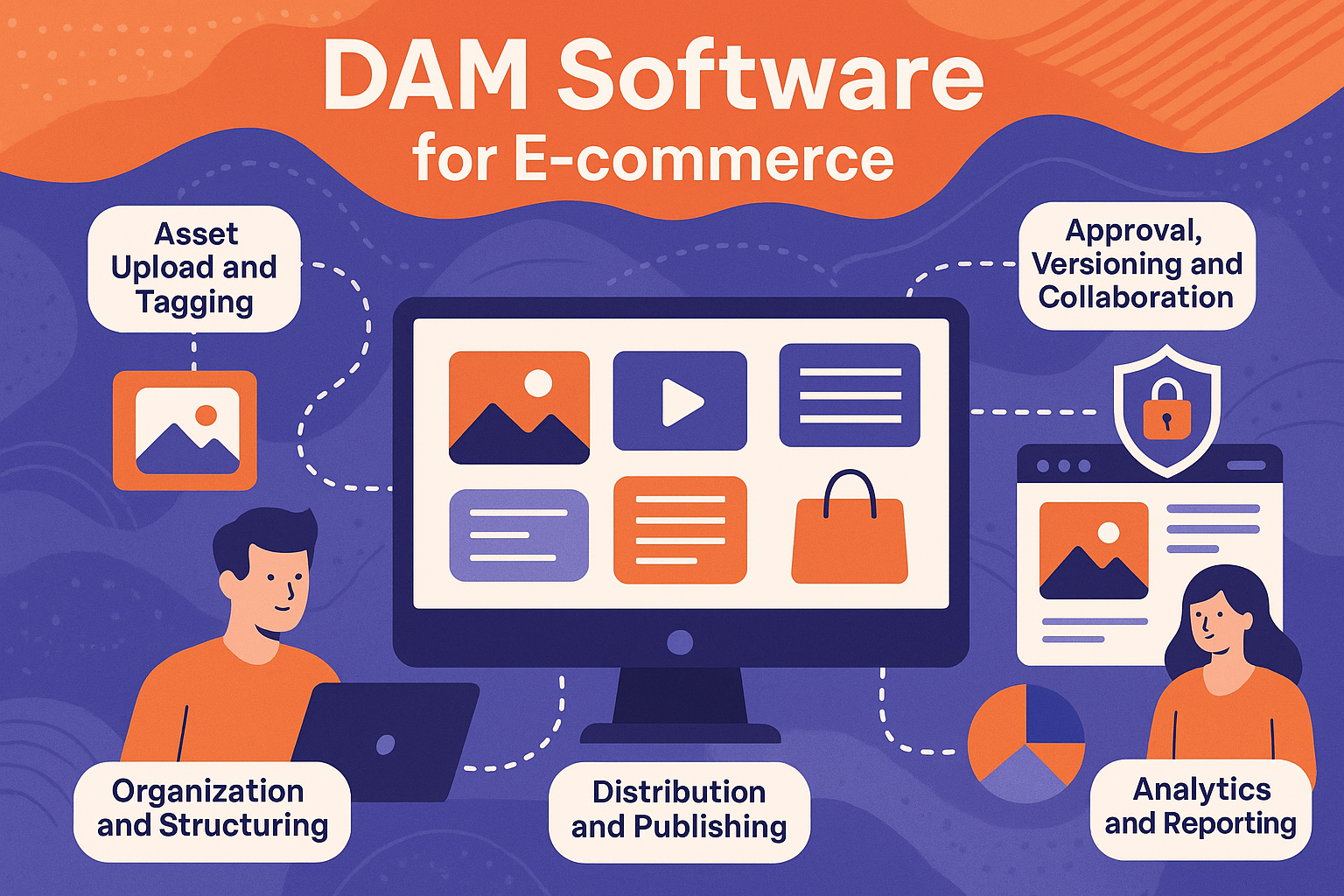
DAM software, like the solution provided by Wizbrand, offers the following workflow for e-commerce businesses:
Asset Upload and Tagging
Digital assets are uploaded to a centralized repository. Upon upload, files are assigned metadata—such as tags, descriptions, product codes, or campaign names—so they can be quickly found when needed.
Organization and Structuring
Assets are organized into folders or collections based on product categories, seasons, campaigns, or any custom criteria that make sense for your business. This ensures assets are easy to browse and retrieve.
Approval, Versioning, and Collaboration
Teams can review, comment, and approve assets within the platform. DAM software keeps a version history, allowing users to roll back to previous versions or track changes for compliance and consistency.
Distribution and Publishing
DAM solutions integrate with popular e-commerce platforms, social media channels, and marketing tools. Approved assets can be published directly to product listings, ad campaigns, or external partners—all from within the DAM interface.
Security and Access Controls
Admin users can configure who can view, edit, download, or share specific assets. This protects sensitive content while giving team members the resources they need.
Analytics and Reporting
With built-in analytics, DAM solutions show which assets are downloaded, shared, or used most often, enabling data-driven improvements to your asset strategy.
Key Features of DAM Software for E-commerce
When evaluating DAM software for your e-commerce business, look for the following essential features:
- Centralized asset repository
- Advanced search and filtering options (by tags, keywords, metadata)
- Bulk upload and management capabilities
- File preview and quick download links
- Automated file format conversions (e.g., resizing images for web/mobile use)
- Collaboration tools (comments, approval workflows, version control)
- Permission-based access settings
- Integration with major e-commerce and marketing platforms
- Detailed usage reports and analytics
The DAM software offered by Wizbrand includes all of these features, designed specifically to meet the needs of modern e-commerce operations1.
Benefits of Using DAM Software for E-commerce Businesses
Operational Efficiency
Teams save time previously spent searching for files or recreating assets. New products or campaigns can be launched faster, giving companies a competitive edge.
Brand Consistency
With all approved assets centralized and controlled, everyone in the organization uses the correct, up-to-date visuals and logos, reinforcing your brand’s identity.
Scalability
A quality DAM solution grows with your business. As your product catalog and marketing needs expand, the system can handle larger volumes of assets and more users without slowing down.
Enhanced Collaboration
Designers, marketers, product managers, and external partners can easily share feedback on assets, speeding up project turnaround times.
Better Security and Compliance
Access controls and audit trails give you peace of mind, ensuring sensitive files don’t fall into the wrong hands and that you are compliant with digital rights policies.
Actionable Insights
DAM analytics reveal which assets drive customer engagement, enabling smarter content investment and improved return on marketing spend.
Common Use Cases in E-commerce
- Managing thousands of product images for multiple categories or brands
- Launching seasonal campaigns or flash sales, requiring quick asset turnaround
- Distributing updated banners and promotional content to partners and marketplaces
- Ensuring all sales channels use the same, approved imagery and product info
- Keeping a record of historic content for compliance and re-use
Getting Started with Wizbrand’s DAM for E-commerce
Wizbrand provides a DAM platform tailored for e-commerce use cases. The solution is designed to be intuitive, helping users easily upload, categorize, and retrieve large volumes of assets.
Begin by centralizing your product images, videos, and marketing collateral within the platform. Make use of tag-based search and advanced filtering to quickly locate files. Collaborate with your team by implementing approval workflows and version controls, ensuring only the latest, approved assets are used in your online store and promotional channels.
Leverage Wizbrand’s integration options to connect your DAM system to e-commerce storefronts and digital marketing platforms, automatically publishing rich media where it’s needed most. With robust analytics, continuously improve your digital content strategy based on what assets drive traffic and sales.
Tips for E-commerce Businesses Implementing DAM
- Map your current digital asset management workflow and identify pain points before adopting a DAM solution.
- Involve all stakeholders—marketing, product, IT, design—in the evaluation and deployment process for smoother adoption.
- Use standardized naming conventions and tags for easier searching and future-proof scalability.
- Schedule periodic reviews to archive outdated content and ensure your asset library remains clean and relevant.
- Train teams on best practices for using the DAM platform to maximize ROI.
Conclusion
DAM software is a critical investment for any e-commerce company aiming to streamline their digital content operations. With powerful storage, organization, security, and collaboration features, platforms like Wizbrand help businesses operate more efficiently, maintain brand consistency, and drive better performance from their digital assets. By adopting a user-friendly and scalable DAM solution, e-commerce brands position themselves for long-term success in an increasingly competitive marketplace.