Limited Time Offer!
For Less Than the Cost of a Starbucks Coffee, Access All DevOpsSchool Videos on YouTube Unlimitedly.
Master DevOps, SRE, DevSecOps Skills!
Introduction
Modern software delivery moves at an incredible speed. Features are pushed to production multiple times a day, which is fantastic for business growth and user satisfaction. However, this rapid pace introduces a massive challenge for security. When code changes hundreds of times a week, relying on manual security reviews becomes impossible. Reviewing every single line of code, dependency, secret, container image, infrastructure configuration, and deployment manually will grind your delivery pipeline to a halt.
This is where security automation changes everything. By embedding automated security checks directly into your software delivery lifecycle, engineering teams can catch vulnerabilities early, receive instant feedback, and maintain consistent security baselines without slowing down development. Automation handles repetitive, high-volume security tasks, allowing security teams to step away from routine checks and focus on complex risk decisions, architecture reviews, and threat modeling. To explore comprehensive training programs and expert guidance on modern engineering practices, visit DevOpsSchool for structured professional development.
What Is Security Automation in DevSecOps?
Security automation refers to the practice of using software tools, scripts, and policies to execute security checks, validations, and enforcement mechanisms without manual intervention. In a traditional software development lifecycle, security was treated as a final gatekeeper phase right before release. DevSecOps changes this model by integrating security into every single stage of development through shift-left practices.
The relationship between DevOps and security is built on shared responsibility. Automation acts as the bridge that connects high-speed delivery with rigorous protection. Through continuous integration and continuous deployment pipelines, automated security tools evaluate source code, dependencies, and infrastructure configurations the moment a developer commits changes. This approach is known as Security as Code, where security policies are defined, tested, and managed just like application source code. Automated security checks differ from manual reviews because they execute identically every time, providing rapid, objective results that scale effortlessly.
Why Security Needs to Be Automated in a DevSecOps Pipeline
Automating security inside a delivery pipeline provides numerous operational and technical benefits that protect organizations from modern cyber threats. Manual reviews are prone to human fatigue, inconsistent application of standards, and unacceptable delays. Automation solves these bottlenecks by delivering rapid feedback loops directly to the developers who wrote the code.
When vulnerabilities are detected early in the coding phase, they are exponentially cheaper and faster to fix than when discovered in production. Automated checks ensure that security baselines are applied consistently across every repository and project team, eliminating human oversight errors. Furthermore, automation improves auditability by generating comprehensive compliance reports and artifact logs automatically.
Consider a practical example: A developer accidentally commits a database password into a public source code repository. If left to manual review, that secret might remain undiscovered for weeks. An automated secret scanning tool detects the credential within seconds of the push, revokes the token automatically, and alerts the developer before the code even reaches a staging environment.
Security Activities That Should Be Automated
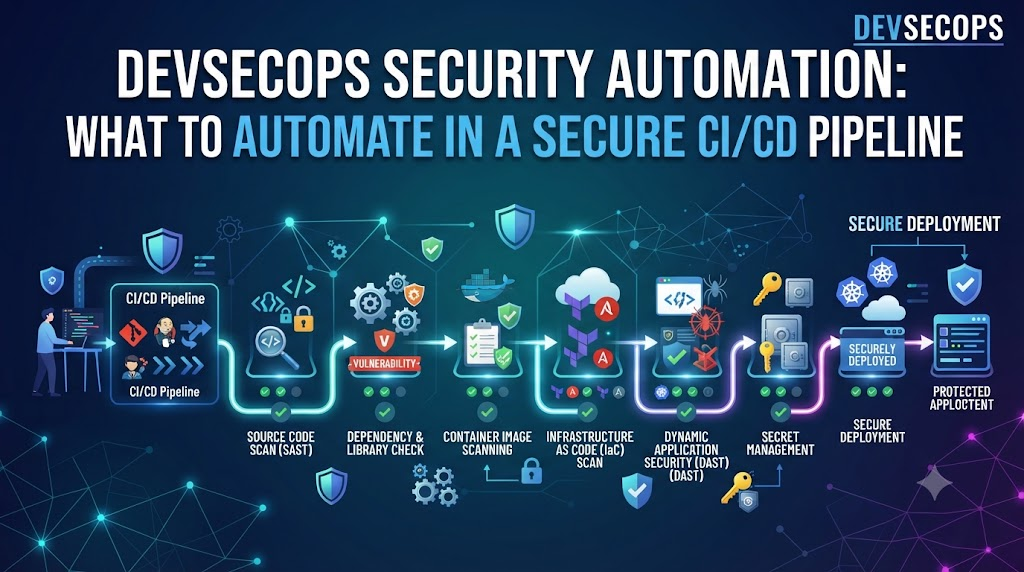
An effective DevSecOps pipeline automates various security activities across different stages of the software delivery lifecycle. The following table provides an overview of these activities:
| Security Activity | Automation Stage | Primary Purpose |
| SAST | Code | Identify insecure coding patterns in source code |
| SCA | Build | Detect vulnerable open-source packages and dependencies |
| Secrets Scanning | Code | Prevent hardcoded API keys, passwords, and tokens |
| Container Scanning | Build | Check base images and OS packages for vulnerabilities |
| IaC Scanning | Infrastructure | Detect cloud misconfigurations before deployment |
| DAST | Test | Identify runtime vulnerabilities in running web applications |
| Image Signing | Release | Ensure integrity and authenticity of build artifacts |
| Security Gates | CI/CD | Block pipelines when critical risk thresholds are breached |
| Runtime Monitoring | Production | Detect active threats and anomalies in live environments |
Automated Source Code Security
Source code security automation focuses on analyzing raw code before it is compiled or deployed. Static Application Security Testing tools inspect source code for flaws such as SQL injection, cross-site scripting, and buffer overflows without executing the program. These tools should run automatically on every pull request or merge request.
In addition to SAST, automated code quality and secure coding rules enforce organizational standards. If a pull request introduces unsafe functions or violates secure coding guidelines, the automated validation fails and comments directly on the code review interface. Handling false positives effectively is crucial here. Teams must configure suppression rules and tune scanning profiles to reduce noise, ensuring that developers remain focused on genuine security risks rather than endless false alarms.
Automated Dependency and Software Supply Chain Security
Modern applications are built using a vast ecosystem of third-party libraries and open-source packages. Software Composition Analysis tools automate the inspection of these dependencies to identify known vulnerabilities, outdated packages, and risky licenses.
Automated dependency checks run during the build phase to ensure that vulnerable components do not move further down the pipeline. Additionally, generating a Software Bill of Materials automatically during every build provides a comprehensive inventory of all software components used in the application. This visibility allows security teams to respond rapidly when a zero-day vulnerability is announced in an open-source library.
Automated Secrets Detection and Management
Hardcoding credentials, API keys, passwords, and certificates into source code or container images is a leading cause of security breaches. Secrets detection tools scan repositories, commit histories, and build files for patterns resembling sensitive information.
Automation must be paired with secure secret management systems such as HashiCorp Vault or cloud native secret stores. Instead of embedding credentials, applications fetch secrets dynamically at runtime from secure vaults. Automated rotation policies further protect systems by expiring and replacing credentials regularly without manual intervention.
Automated Container Security
Containers form the foundation of modern cloud-native architectures. Securing them requires automated scanning of base images, operating system packages, and application binaries during the build phase.
Container Security Workflow
Build Image
↓
Scan Image
↓
Evaluate Findings
↓
Sign Image
↓
Push to Registry
↓
Deploy Approved Image
Container security should begin during image creation rather than waiting until the container runs in production. Automated image signing ensures that only verified images from trusted builders are allowed into production registries, preventing tampering throughout the supply chain.
Automated Kubernetes Security
Kubernetes orchestration layers introduce complex configuration challenges. Automating security checks for Kubernetes manifests, Role-Based Access Control configurations, network policies, and pod security standards prevents fragile environments.
Policy engines evaluate Kubernetes deployment YAML files against best practices and regulatory requirements before they reach the cluster. Catching overly permissive RBAC roles or missing resource limits at the configuration stage prevents attackers from escalating privileges if a pod is compromised.
Automated Infrastructure as Code Security
Infrastructure as Code allows teams to define cloud environments using code files written in Terraform, CloudFormation, or Ansible. Automated IaC scanning tools analyze these configuration files for cloud misconfigurations, such as publicly accessible S3 storage buckets or overly permissive security group rules.
By evaluating IaC files before infrastructure is provisioned, organizations prevent insecure cloud resources from ever existing in their live environments. This proactive approach saves time and eliminates the friction of retrofitting security onto running infrastructure.
Automated CI/CD Pipeline Security
The pipeline itself is a high-value target for attackers. If a malicious actor compromises your CI/CD pipeline, they can inject malicious code directly into production releases. Securing the pipeline requires strict automation controls.
Teams must automate branch protection rules, require multi-person approvals for sensitive pipeline modifications, and secure build runners using isolated execution environments. Pipeline configuration files should also be scanned for security flaws just like application source code.
Automated Security Gates
Security gates are automated check-points within a pipeline that evaluate scan results against predefined risk thresholds. When a scan detects vulnerabilities that exceed acceptable limits, the security gate fails and stops the pipeline.
| Gate | Trigger | Possible Pipeline Action |
| Critical Vulnerability Gate | SAST / SCA Scan Completion | Fail pipeline and notify security team |
| Secrets Detection Gate | Commit / PR Creation | Block merge and alert developer |
| IaC Policy Gate | Terraform Plan Execution | Prevent infrastructure provisioning |
| Container Vulnerability Gate | Image Scan Completion | Block push to production registry |
Security gates must be risk-based rather than blocking every low-risk finding. Overly aggressive gates cause alert fatigue and tempt developers to bypass security controls entirely.
Automated Dynamic Application Security Testing
Dynamic Application Security Testing evaluates running applications from an external perspective, simulating real-world attacks such as SQL injection, authentication bypass, and input validation failures. DAST runs automatically in staging environments after a successful deployment.
Automating DAST ensures that newly deployed features are tested for runtime vulnerabilities before reaching production users. API endpoints require dedicated security testing as well, given their critical role in modern distributed architectures. Automated API security tests validate authentication tokens, authorization rules, and input payload limits.
Automated Cloud Security and Compliance
Cloud security posture management tools automate the continuous monitoring of cloud environments to detect configuration drifts, IAM misconfigurations, and unauthorized resource changes.
Policy as Code frameworks automate compliance validation by checking cloud resources against industry standards such as CIS benchmarks, PCI-DSS, or HIPAA. While automation collects evidence and validates configurations continuously, it is important to remember that automation alone does not guarantee compliance; human legal and governance oversight remains necessary.
Automated Runtime Security and Monitoring
Security automation does not stop at deployment. Runtime security monitoring tools observe live containers, host systems, and network traffic to detect anomalous behavior, unauthorized process executions, and active intrusion attempts.
When a suspicious event occurs, automated incident triggers can isolate compromised containers, capture forensic logs, and alert on-call security engineers immediately, minimizing dwell time for attackers.
Complete DevSecOps Security Automation Workflow
Developer Commit
↓
SAST
↓
Secrets Scan
↓
Dependency Scan
↓
Build
↓
Container Scan
↓
IaC Scan
↓
Security Gate
↓
Artifact Signing
↓
Deployment
↓
DAST
↓
Runtime Monitoring
↓
Security Alert
↓
Incident Response
Each stage in this workflow operates seamlessly to validate code quality, verify infrastructure integrity, and protect production environments continuously.
What Should Not Be Fully Automated?
While automation is powerful, certain decisions require human context and judgment. Automation cannot evaluate business impact, determine risk acceptance, or resolve conflicting priorities between speed and security.
Areas requiring human expertise include:
- Risk acceptance decisions for business-critical exceptions
- Critical vulnerability prioritization based on threat intelligence
- Complex security architecture and threat modeling reviews
- Incident response coordination and forensic analysis
- Regulatory policy interpretation and governance decisions
Human judgment and automated tools must work in tandem to create a balanced security posture.
Handling False Positives and Security Findings
Every automated security tool occasionally generates false positives. Blindly blocking pipelines on every alert destroys developer trust and slows delivery.
Teams must establish a clear vulnerability triage process. Security findings should be evaluated based on severity, exploitability, and actual business context. Establishing an exception management workflow allows teams to document temporary acceptances while developers work on proper remediation.
Common Mistakes in DevSecOps Security Automation
Implementing security automation requires careful planning to avoid common pitfalls.
- Adding too many security tools: Overloading pipelines with redundant scanners creates excessive noise.
- Blocking every finding: Failing to tune severity thresholds leads to constant pipeline blockages.
- Running scans only at the end: Delaying security checks until late in the pipeline violates shift-left principles.
- Hardcoding credentials: Storing secrets insecurely in configuration files undermines pipeline integrity.
- Ignoring CI/CD security: Securing application code while leaving the deployment pipeline vulnerable invites compromise.
Real-World DevSecOps Example
An enterprise financial technology company faced significant delays because security reviews occurred manually during a two-week window before every release. The development team struggled with critical vulnerabilities escaping into production and frequent friction between developers and security engineers.
The organization implemented a comprehensive DevSecOps automation strategy. They integrated SAST and secrets scanning into pull requests, added automated SCA and container image scanning to their build pipeline, and deployed Terraform scanning for infrastructure changes.
They configured risk-based security gates that only blocked builds on critical severity findings. Staging deployments triggered automated DAST scans, while runtime monitoring protected live applications. This automation reduced security review times from two weeks to under ten minutes, empowering developers to fix vulnerabilities while code was fresh in their minds.
DevSecOps Security Automation Checklist
- Source code scanning configured
- Secret detection active in repositories
- Dependency scanning integrated into builds
- SBOM generation automated
- Container scanning enabled in registry
- IaC scanning implemented for cloud resources
- Kubernetes policy checks enforced
- CI/CD pipeline security hardened
- Risk-based security gates established
- Artifact signing enforced before release
- DAST executed on staging environments
- Cloud security posture monitoring active
- Runtime security monitoring configured
- Audit logging enabled across all environments
- Incident response automation integrated
How to Build a Security Automation Strategy
Building an effective security automation strategy requires a methodical, step-by-step approach. Start by identifying your primary risks and mapping existing security controls to your pipeline stages.
Begin with high-value, low-friction automation such as secrets scanning and dependency checks. Define clear severity thresholds and assign explicit ownership for security tooling maintenance. Measure your results, gather feedback from developers, and review your automation strategy continuously to adapt to evolving threats.
DevSecOps Learning Roadmap
DevOps Fundamentals
↓
Linux & Networking
↓
Git & CI/CD
↓
Cloud Fundamentals
↓
Application Security
↓
SAST / SCA / DAST
↓
Container Security
↓
Kubernetes Security
↓
Infrastructure Security
↓
Security Automation
↓
Continuous DevSecOps
Each stage of this roadmap builds the foundational skills required to design, implement, and maintain robust security automation pipelines.
Career Value of DevSecOps Security Automation Skills
Proficiency in security automation is among the most sought-after skill sets in modern technology. Organizations across every industry are urgently seeking engineers who can bridge the gap between rapid software delivery and enterprise-grade security.
| Role | Important Automation Skills |
| DevSecOps Engineer | CI/CD security integration, automated vulnerability scanning, pipeline hardening |
| Cloud Security Engineer | IAM automation, cloud posture management, Policy as Code |
| Security Automation Engineer | Scripting security workflows, API integrations, threat detection automation |
| Platform Engineer | Secure self-service developer portals, automated guardrails, infrastructure security |
| SRE | Runtime monitoring, incident response automation, resilience engineering |
Frequently Asked Questions
What security should be automated in a DevSecOps pipeline?
Security activities that involve repetitive, high-volume checks should be automated. This includes source code analysis, dependency scanning, secrets detection, container image validation, infrastructure configuration checks, and pipeline security gates.
Why is security automation important?
Automation provides rapid feedback to developers, ensures consistent application of security policies, reduces manual effort, catches vulnerabilities early when they are inexpensive to fix, and allows security teams to focus on high-risk strategic decisions.
What is SAST?
Static Application Security Testing is an automated method of analyzing source code for security vulnerabilities without executing the program, helping developers catch insecure coding patterns during development.
What is SCA?
Software Composition Analysis is an automated technique used to identify open-source libraries, third-party dependencies, known vulnerabilities, and license compliance issues within an application build.
What is DAST?
Dynamic Application Security Testing evaluates running applications from an external perspective by simulating real-world attacks to identify runtime vulnerabilities and configuration flaws.
Should secrets scanning be automated?
Yes. Secrets scanning should run automatically on every code commit and pull request to prevent API keys, passwords, and sensitive tokens from entering source code repositories.
How can container security be automated?
Container security can be automated by scanning base images and OS packages during the build phase, evaluating configurations, signing approved images, and enforcing registry controls before deployment.
What is an automated security gate?
An automated security gate is a validation checkpoint within a CI/CD pipeline that evaluates scan findings against predefined risk thresholds and blocks deployment if critical criteria are breached.
Should every vulnerability block a deployment?
No. Blocking every low-risk finding creates alert fatigue and slows delivery. Security gates should be risk-based, focusing primarily on high and critical severity vulnerabilities.
Can compliance checks be automated?
Many compliance validation tasks and evidence collection processes can be automated using Policy as Code frameworks, though human governance and legal interpretation remain essential.
What security activities still require humans?
Human judgment is necessary for risk acceptance decisions, business impact assessments, complex architectural reviews, threat modeling, exception approvals, and incident response coordination.
How can beginners learn DevSecOps security automation?
Beginners should start by learning Linux, networking, and Git, followed by CI/CD pipeline fundamentals, cloud basics, and hands-on practice with open-source security tools like SAST and SCA scanners.
Final Thoughts
Effective DevSecOps security automation is not about deploying the maximum number of security tools or striving for a completely hands-off process. True security success comes from selecting the right controls, placing them at the appropriate stages of your delivery pipeline, enforcing sensible risk-based gates, monitoring production environments, and keeping human expertise at the center of decisions that require business and security judgment.
