Skip to content
Menu
DevSecOps Now!!!
  • About
  • Certifications
  • Contact
  • Courses
  • DevSecOps Consulting
  • DevSecOps Tools
  • Training
  • Tutorials
DevSecOps Now!!!

How We Fixed a Stubborn Laravel MeiliSearch Bulk Indexing Failure (16,000+ Records)

Posted on February 14, 2026

Limited Time Offer!

For Less Than the Cost of a Starbucks Coffee, Access All DevOpsSchool Videos on YouTube Unlimitedly.
Master DevOps, SRE, DevSecOps Skills!
Enroll Now

If you’ve ever run a Laravel Artisan command and watched it hang forever…

You know that feeling.

No errors.
No crash message.
Just a blinking cursor.

Recently, we faced this exact issue while syncing 16,000+ doctor records into MeiliSearch for our search system. The command:

php artisan search:sync-providers

would print:

Fetching doctors...

And then… nothing.

Here’s the complete story of:

  • What went wrong
  • Why it failed silently
  • How we diagnosed it
  • And how we fixed it properly

This tutorial walks you through everything step-by-step.


The Real Problem: Why the Command Was Hanging

We needed to:

  1. Fetch 16,000+ doctors from an external API
  2. Store them in our search_providers table
  3. Index them into MeiliSearch

But instead of syncing, the process would:

  • Hang indefinitely
  • Not log errors
  • Not insert data
  • Leave the frontend search broken (404 index not found)

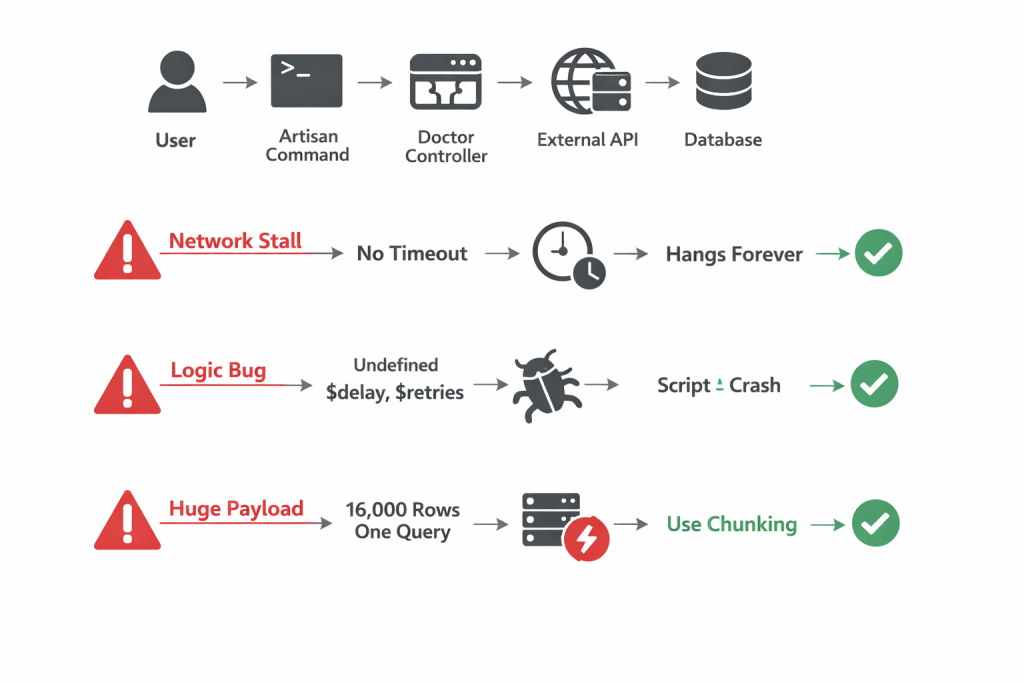
This was not one bug.

It was three separate failures happening at different layers.


Understanding the Execution Flow
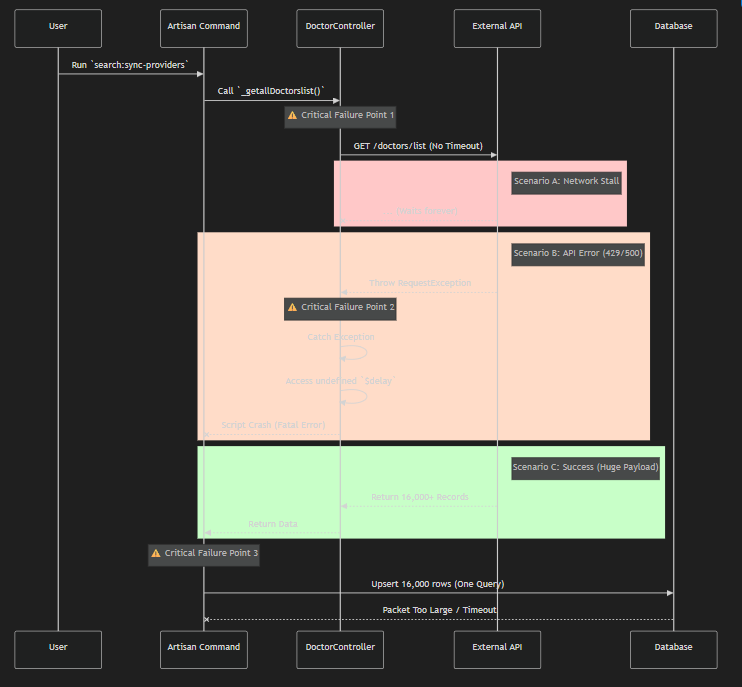
When you run:

php artisan search:sync-providers

Here’s what actually happens:

  1. Artisan command runs
  2. It calls _getallDoctorslist()
  3. Guzzle sends a request to external API
  4. API returns 16,000 records
  5. We run SearchProvider::upsert(...)
  6. Data is stored
  7. MeiliSearch reindexes

Now let’s see where it broke.


Failure 1: The Infinite Hang (Network Layer)

The Bug

$http = new Client(); // No timeout!

Guzzle has no default timeout.

If the external API:

  • Accepts connection
  • But never sends data

Then PHP waits… forever.

And in CLI mode, max_execution_time is often unlimited.

What This Means

If the API server hangs or drops packets, your script:

  • Never finishes
  • Never throws an error
  • Just waits

That’s why your terminal showed:

Fetching doctors...

And then nothing.


Fix #1: Add Timeout (Fail Fast Strategy)

$http = new Client([
    'timeout' => 60,
    'connect_timeout' => 10
]);

Now:

  • If server doesn’t respond → script fails in 60 seconds
  • If connection can’t be established → fails in 10 seconds
  • Error is logged properly

This single line fixed the infinite waiting problem.


Failure 2: The Silent Crash (Logic Layer)

Even worse…

When the API actually failed, our error handler was broken.

The Problem Code

catch (RequestException $e) {
    if ($e->getCode() == 429) {
        Log::warning("Retrying in $delay seconds"); // $delay undefined
        $retries--; // $retries undefined
    }
}

Why This Is Dangerous

When API returned 429 or 500:

  • Execution entered the catch block
  • PHP tried to use undefined variables
  • Fatal error occurred inside error handler
  • Script exited silently

So the real API error was swallowed.

That’s why logs looked clean — but the script was dying.


Fix #2: Proper Retry Logic

$retries = 3;
$delay   = 2;

while ($retries > 0) {
    try {
        $response = $http->get($url);
        return json_decode($response->getBody(), true);

    } catch (RequestException $e) {
        Log::warning("API failed. Retrying in {$delay} seconds...");
        sleep($delay);
        $retries--;
        $delay *= 2; // exponential backoff
    }
}

Now:

  • Retry works properly
  • Delay is defined
  • Logs show real errors
  • Script never crashes silently

Failure 3: The Database Choke (Data Layer)

After fixing networking and logic…

We hit a new wall.

We were doing this:

SearchProvider::upsert($all_16136_records, ...);

One single massive query.

Why This Fails

16,000 records in one query means:

  • Massive SQL statement
  • Several MB packet size
  • High RAM usage
  • Risk of:
MySQL server has gone away
General error: 2006
max_allowed_packet exceeded

Even if MySQL doesn’t throw an error, PHP memory usage spikes heavily.


Fix #3: Chunking (The Real Performance Upgrade)

We refactored to process records in batches.

$chunks = array_chunk($items, 500);

foreach ($chunks as $index => $chunk) {

    SearchProvider::upsert(
        $chunk,
        ['external_id'],
        ['name', 'email', 'updated_at']
    );

    $this->info("Synced batch " . ($index + 1));
}

Why 500?

  • Safe for MySQL
  • Low memory usage
  • Fast execution
  • Easier debugging

Instead of 1 massive query:

  • We run 33 small queries
  • Each query handles 500 rows

Before vs After Comparison

LayerBeforeAfter
NetworkNo timeout60s timeout
Error HandlingUndefined variablesProper retry loop
Database16k rows single query500 rows per batch
LoggingNo progressBatch progress logging
ReliabilityHangs indefinitelyAlways completes or fails clearly
PerformanceUnstableSyncs in under 1 minute

Final Result

After all fixes:

  • 16,136 doctors synced successfully
  • No hanging
  • No silent crashes
  • No MySQL packet errors
  • MeiliSearch indexed properly
  • Frontend search works perfectly

And the terminal now shows:

[1/33] Synced batch of 500 providers
[2/33] Synced batch of 500 providers
...

That visibility alone is a huge developer experience upgrade.


The Bigger Lesson (What This Teaches Us)

This bug wasn’t one mistake.

It was:

  1. A networking configuration issue
  2. A logic bug inside error handling
  3. A data architecture problem

Most production failures are layered like this.

Fixing only one layer wouldn’t have solved everything.


Best Practices for Large Laravel Bulk Sync Jobs

If you are building large indexing or sync systems:

Always:

  • Set Guzzle timeouts
  • Implement retry logic
  • Use chunking for inserts
  • Log batch progress
  • Handle CLI max_execution_time carefully
  • Monitor memory usage

Conclusion

If your Laravel Artisan command is hanging:

Don’t assume it’s one issue.

Check:

  • Network layer
  • Exception handling
  • Database query size
  • Memory usage

In our case, fixing all three transformed a broken indexing system into a robust, production-ready bulk sync pipeline.

And now it runs fast, reliably, and predictably.

Post Views: 197
  • guzzle client timeout configuration
  • laravel api integration best practices
  • laravel api retry logic
  • laravel artisan command hanging
  • laravel background job optimization
  • laravel batch processing example
  • laravel bulk insert performance
  • laravel chunking example
  • laravel database optimization techniques
  • laravel exponential backoff example
  • laravel large dataset processing
  • laravel meilisearch tutorial
  • laravel memory limit issue
  • laravel performance optimization tips
  • laravel production debugging guide
  • laravel queue performance optimization
  • laravel scalable architecture guide
  • laravel search indexing tutorial
  • laravel search performance improvement
  • laravel upsert large data
  • max_allowed_packet error mysql
  • meilisearch laravel integration
  • mysql server has gone away fix
  • php cli script hanging fix
  • php guzzle timeout example
Subscribe
Login
Notify of
guest
guest
0 Comments
Oldest
Newest Most Voted
Inline Feedbacks
View all comments
  • Incorrect definition of table mysql.column_stats
  • Mautic and PHP 8.3 Compatibility Guide (2026)
  • Certified AIOps Engineer: The Complete Career Path and Certification Guide
  • How to Rename Apache Virtual Host Files Safely (Step-by-Step Guide for Linux)
  • AIOps Foundation Certification: Everything You Need to Know to Get Certified
  • DevOps to Certified Site Reliability Professional: A Senior Mentor’s Guide
  • Certified Site Reliability Manager Training, Preparation, and Career Mapping
  • Certified Site Reliability Architect: The Complete Career Guide
  • What Is a VPN? A Complete Beginner-to-Advanced Tutorial
  • How to Install, Secure, and Tune MySQL 8.4 on Ubuntu 24.04 for Apache Event MPM and PHP-FPM
  • Complete Guide to Certified Site Reliability Engineer Career
  • Certified DevSecOps Professional Step by Step
  • Certified DevSecOps Manager: Complete Career Guide
  • Certified DevSecOps Engineer: Skills, Career Path and Certification Guide
  • Step-by-Step: Become a Certified DevSecOps Architect
  • Tuning PHP 8.3 for Apache Event MPM and PHP-FPM on Ubuntu: A Complete Step-by-Step Production Guide
  • Complete Step-by-Step Guide to Configure Apache Event MPM, Create index.php, Set Up VirtualHost, and Fix Ubuntu Default Page
  • Convert XAMPP Apache to Event MPM + System PHP-FPM
  • The Gateway to System Observability Engineering (MOE)
  • How to Finetune Apache and Prove It Works: A Real-World Guide to Testing Performance, Concurrency, HTTP/2, Memory, CPU, and Security
  • Building a High-Performance Apache Event MPM + PHP-FPM + MariaDB Stack (Advanced Server Optimization Guide)
  • Master Infrastructure as Code: The Complete Hashicorp Terraform Associate Guide
  • Building a High-Performance Apache Server with Event MPM + PHP-FPM (Step-by-Step Guide)
  • Is XAMPP Safer for Production Than Using Apache and PHP as Root? 2026 Practical Guide
  • Unlock Cloud Security Expertise with Certified Kubernetes Security Specialist (CKS)
  • How to Fix wpDiscuz Not Replacing Default WordPress Comments in Block Themes
  • Complete Guide to Certified Kubernetes Application Developer Certification
  • Overview of Certified Kubernetes Administrator (CKA) Certification
  • How to Install and Configure XAMPP on Ubuntu 24 Server (Latest Version – 2026 Complete Guide)
  • Mastering the Google Cloud Professional DevOps Engineer

Recent Comments

  1. digital banking on Complete Tutorial: Setting Up Laravel Telescope Correctly (Windows + XAMPP + Custom Domain)
  2. SAHIL DHINGRA on How to Uninstall Xampp from your machine when it is not visible in Control panel programs & Feature ?
  3. Abhishek on MySQL: List of Comprehensive List of approach to secure MySQL servers.
  4. Kristina on Best practices to followed in .httacess to avoid DDOS attack?
  5. Roshan Jha on Git all Commands

Archives

  • April 2026
  • March 2026
  • February 2026
  • January 2026
  • December 2025
  • November 2025
  • October 2025
  • September 2025
  • August 2025
  • July 2025
  • June 2025
  • May 2025
  • April 2025
  • March 2025
  • February 2025
  • January 2025
  • December 2024
  • November 2024
  • October 2024
  • September 2024
  • August 2024
  • July 2024
  • June 2024
  • May 2024
  • April 2024
  • March 2024
  • February 2024
  • January 2024
  • December 2023
  • November 2023
  • October 2023
  • September 2023
  • August 2023
  • July 2023
  • May 2023
  • April 2023
  • March 2023
  • February 2023
  • January 2023
  • December 2022

Categories

  • Ai
  • AI Blogging
  • AiOps
  • ajax
  • Android Studio
  • Antimalware
  • Antivirus
  • Apache
  • Api
  • API Security
  • Api Testing
  • APK
  • Aws
  • Bike Rental Services
  • ChatGPT
  • Code Linting
  • Composer
  • cPanel
  • Cyber Threat Intelligence
  • Cybersecurity
  • Data Loss Prevention
  • Database
  • dataops
  • Deception Technology
  • DeepSeek
  • Devops
  • DevSecOps
  • DevTools
  • Digital Asset Management
  • Digital Certificates
  • Docker
  • Drupal
  • emulator
  • Encryption Tools
  • Endpoint Security Tools
  • Error
  • facebook
  • Firewalls
  • Flutter
  • git
  • GITHUB
  • Google Antigravity
  • Google play console
  • Google reCAPTCHA
  • Gradle
  • Guest posting
  • health and fitness
  • IDE
  • Identity and Access Management
  • Incident Response
  • Instagram
  • Intrusion Detection and Prevention Systems
  • jobs
  • Joomla
  • Keycloak
  • Laravel
  • Law News
  • Lawyer Discussion
  • Legal Advice
  • Linkedin
  • Linkedin Api
  • Linux
  • Livewire
  • Mautic
  • Medical Tourism
  • MlOps
  • MobaXterm
  • Mobile Device Management
  • Multi-Factor Authentication
  • MySql
  • Network Traffic Analysis tools
  • Paytm
  • Penetration Testing
  • php
  • PHPMyAdmin
  • Pinterest Api
  • Quora
  • SAST
  • SecOps
  • Secure File Transfer Protocol
  • Security Analytics Tools
  • Security Auditing Tools
  • Security Information and Event Management
  • Seo
  • Server Management Tools
  • Single Sign-On
  • Site Reliability Engineering
  • soft 404
  • software
  • SuiteCRM
  • SysOps
  • Threat Model
  • Twitter
  • Twitter Api
  • ubuntu
  • Uncategorized
  • Virtual Host
  • Virtual Private Networks
  • VPNs
  • Vulnerability Assessment Tools
  • Web Application Firewalls
  • Windows Processor
  • Wordpress
  • WSL (Windows Subsystem for Linux)
  • X.com
  • Xampp
  • Youtube
©2026 DevSecOps Now!!! | WordPress Theme: EcoCoded
wpDiscuz