Limited Time Offer!
For Less Than the Cost of a Starbucks Coffee, Access All DevOpsSchool Videos on YouTube Unlimitedly.
Master DevOps, SRE, DevSecOps Skills!
What is a Password Manager?
A password manager is a specialized software application designed to securely store, organize, and manage digital credentials, such as usernames and passwords. These tools are essential in the modern digital landscape where users must juggle multiple accounts across websites, applications, and services. Password managers alleviate the burden of remembering numerous passwords by securely encrypting and storing them, enabling users to generate and retrieve strong, unique passwords with ease. By doing so, they play a crucial role in enhancing both personal and organizational cybersecurity.
Why Do We Need Password Managers?
In the digital age, managing secure access to accounts has become increasingly complex. Here’s why password managers are a necessity:
- Increased Security: Reusing passwords across multiple platforms is a major security risk. Password managers help create unique passwords for each account, significantly reducing the risk of unauthorized access.
- Convenience: Memorizing numerous complex passwords is impractical. Password managers simplify this by storing and autofilling credentials.
- Time Efficiency: Logging into accounts becomes faster as password managers automatically fill in login details.
- Protection Against Phishing: By autofilling credentials only on legitimate websites, password managers reduce the risk of falling victim to phishing attacks.
- Multi-Device Accessibility: Synchronization features allow users to access their passwords across multiple devices, ensuring convenience and flexibility.
- Reduced Cognitive Load: Frees users from the mental strain of remembering passwords, enabling them to focus on more important tasks.
What Are the Advantages of Password Managers?
Password managers provide a range of benefits that enhance user security and convenience:
- Improved Security: Securely encrypts sensitive data using advanced encryption standards like AES-256.
- Random Password Generation: Creates strong, unique passwords that are difficult to crack.
- Ease of Access: Synchronizes passwords across devices, enabling seamless access from anywhere.
- Two-Factor Authentication (2FA) Support: Adds an additional layer of security to login processes.
- Secure Credential Sharing: Facilitates safe sharing of login details with trusted individuals or teams.
- Data Breach Notifications: Alerts users when their credentials have been compromised in a breach.
- Password Auditing: Identifies weak, reused, or outdated passwords and recommends improvements.
- Time-Saving: Simplifies the process of accessing accounts with autofill functionality.
- Emergency Access: Grants trusted contacts access to the account in case of emergencies.
- User-Friendly Interface: Intuitive design ensures ease of use for both tech-savvy users and beginners.
What Are the Features of a Good Password Manager?
A high-quality password manager should offer the following features:
- Strong Encryption: Protects user data with industry-standard encryption, such as AES-256.
- Password Generator: Provides tools to create strong and random passwords for enhanced security.
- Cross-Platform Compatibility: Functions seamlessly on desktops, mobile devices, and web browsers.
- Autofill Functionality: Automatically fills in login credentials on websites and apps.
- Secure Notes: Stores additional sensitive information, such as PINs, recovery keys, or personal details.
- Multi-Factor Authentication Integration: Ensures a higher level of security by requiring an additional verification step.
- Backup and Recovery Options: Allows users to back up their credentials and restore them in case of device loss or failure.
- Password Health Analysis: Evaluates stored passwords for strength and uniqueness, providing recommendations for improvement.
- Emergency Access Provision: Enables trusted individuals to access accounts in critical situations.
- Breach Monitoring: Continuously monitors the web for compromised credentials and alerts users promptly.
Top 10 Use Cases of Password Managers
Password managers have versatile applications that cater to both individual and organizational needs. Here are the top 10 use cases:
- Personal Account Management: Simplifies the process of managing passwords for personal accounts, including social media, email, and online banking.
- Business Credential Management: Provides a centralized platform for employees to access and manage corporate accounts securely.
- Secure Sharing of Credentials: Allows teams and families to share login details without compromising security.
- Regular Password Audits: Identifies weak or reused passwords and helps users strengthen their security posture.
- Enhanced Security with 2FA: Integrates with two-factor authentication tools for added protection.
- Data Breach Alerts: Notifies users if their credentials have been exposed in a security breach.
- Travel-Friendly Accessibility: Ensures users can securely access their accounts while traveling.
- Device Synchronization: Synchronizes credentials across devices to ensure seamless access.
- Browser and App Integration: Works with popular browsers and applications for quick and convenient login.
- Disaster Recovery: Ensures users can recover access to accounts in case of a forgotten master password or lost device.
How to Implement a Password Manager?
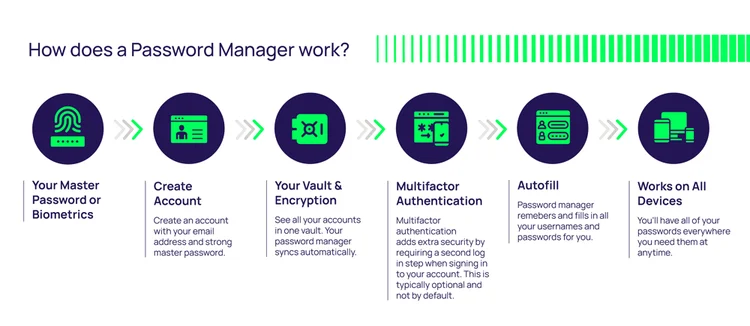
Implementing a password manager effectively involves several steps. Here is a detailed guide:
- Research and Select a Password Manager:
- Evaluate password managers based on your specific needs. Popular options include LastPass, Dashlane, 1Password, and Bitwarden. Consider factors such as security features, ease of use, and pricing.
- Install and Configure the Application:
- Download and install the chosen password manager on all relevant devices, including desktops, smartphones, and browsers.
- Set Up a Master Password:
- Create a strong and unique master password to secure your password vault. This password should be memorable to you but difficult for others to guess.
- Import Existing Passwords:
- Import credentials from browsers, spreadsheets, or other storage methods into the password manager. Many tools offer automated import features.
- Enable Two-Factor Authentication (2FA):
- Enhance the security of your password manager account by enabling 2FA. This requires an additional verification step during login.
- Organize Your Credentials:
- Categorize saved passwords into folders or tags for better organization (e.g., work, personal, banking).
- Use the Password Generator:
- Replace weak or reused passwords with strong, randomly generated ones using the password manager’s built-in generator.
- Sync Across Devices:
- Ensure the password manager is synchronized across all devices for consistent access.
- Train Users (For Businesses):
- Educate employees on how to use the password manager securely and effectively. Emphasize the importance of creating strong master passwords and avoiding unsafe practices.
- Regularly Monitor and Update:
- Periodically review saved credentials for strength and uniqueness. Update any weak or compromised passwords as necessary.
