Skip to content
Menu
DevSecOps Now!!!
  • About
  • Certifications
  • Contact
  • Courses
  • DevSecOps Consulting
  • DevSecOps Tools
  • Training
  • Tutorials
DevSecOps Now!!!

How to Configure Facebook group. Step by Step Guide

Posted on February 5, 2025

Limited Time Offer!

For Less Than the Cost of a Starbucks Coffee, Access All DevOpsSchool Videos on YouTube Unlimitedly.
Master DevOps, SRE, DevSecOps Skills!

Enroll Now

Creating a Facebook Group is a great way to build a community, whether for your business, interests, or social causes. The best part? It’s completely free and allows you to engage with people who share similar interests.


Step 1: Creating Your Facebook Group
1.1 Log Into Facebook

First, go to Facebook and log in to your account. If you’re using a mobile device, open the Facebook app.

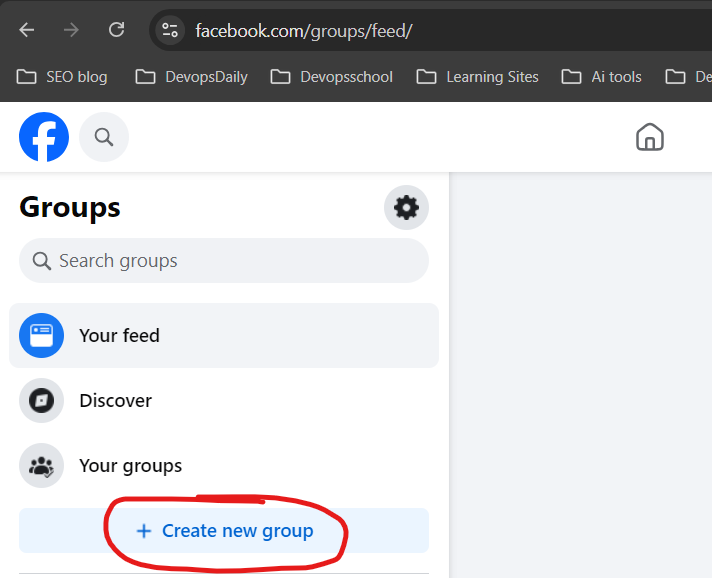
1.2 Navigate to the “Groups” Section

  • On a computer: Click on the “Groups” section in the left-hand menu.
  • On a mobile phone: Tap the menu (☰) at the bottom right and select “Groups.”

1.3 Click “Create New Group”

Once you’re inside the Groups section, you’ll see a “Create New Group” button. Click on it!

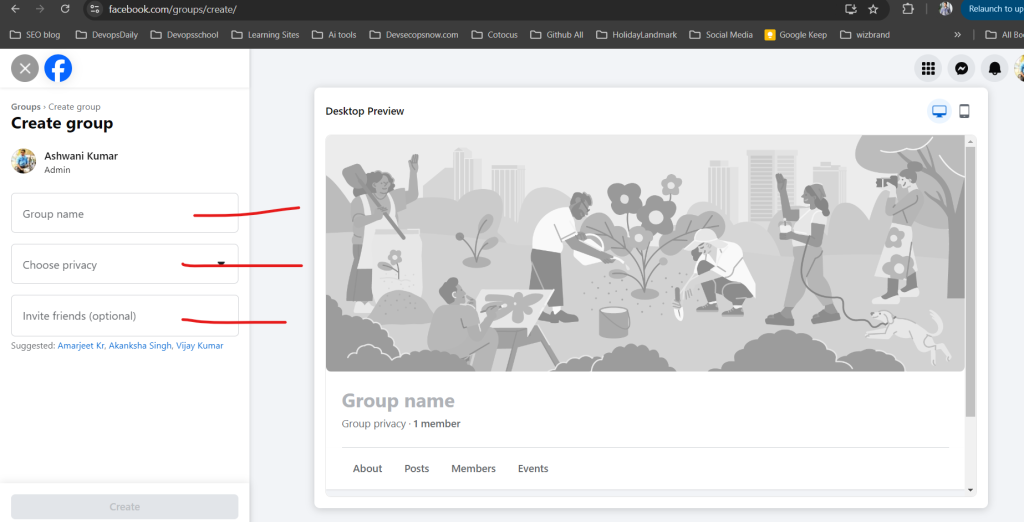
1.4 Choose a Group Name

Pick a clear and meaningful name for your group.

  • If it’s for a business: “Marketing Tips for Small Businesses”
  • If it’s for fun: “Dog Lovers Club”
  • If it’s a support group: “Mental Health Awareness Community”

Make sure it reflects the purpose of the group so people know what to expect.

1.5 Set Privacy Settings

Facebook offers two privacy options:

  1. Public – Anyone can see the posts and join without approval.
  2. Private – Only members can see and interact with posts.

➡️ Pro Tip: If you want a close-knit or exclusive community, go for Private. If it’s for general discussion, Public is fine.

1.6 Decide on Group Visibility

  • Visible – Anyone can find your group and request to join.
  • Hidden – Only invited members can see it. (Best for secret projects or exclusive clubs.)
Step 2: Customizing Your Group
Now that you’ve created your group, let’s make it visually appealing and functional.

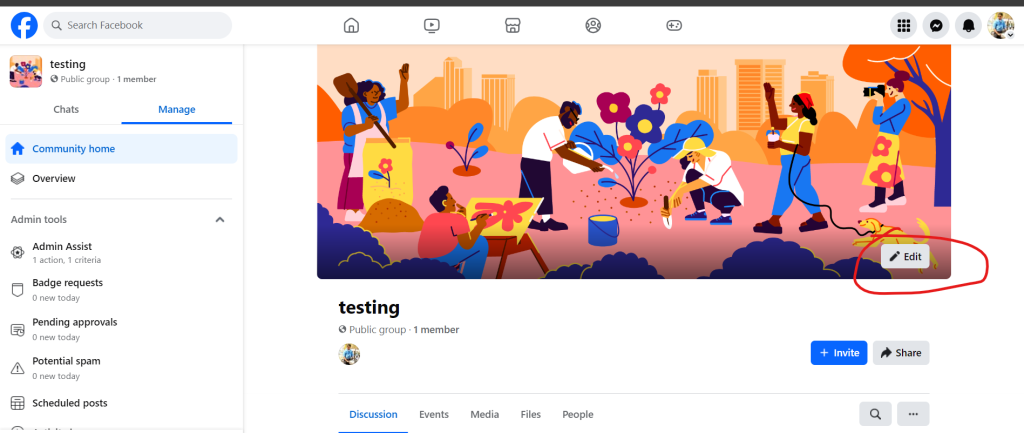
2.1 Add a Cover Photo

Think of this as your group’s first impression!

  • Ideal size: 1200 x 628 pixels
  • Use a relevant and attractive image
  • You can create a custom banner using Canva (a free design tool)

2.2 Write a Group Description

Your description should tell newcomers what your group is about in a few sentences.
Example:
“Welcome to the ‘Healthy Living Community’! This is a space to share tips, recipes, and motivation for a healthier lifestyle. Be kind, be respectful, and let’s support each other!”

2.3 Set Up Group Rules

Click “Group Rules” in the settings and add a few basic rules, such as:
✅ Respect everyone
🚫 No spam or self-promotion
💡 Stay on topic

➡️ Pro Tip: Having rules helps avoid conflicts and keeps discussions meaningful.


Step 3: Managing Group Members & Roles
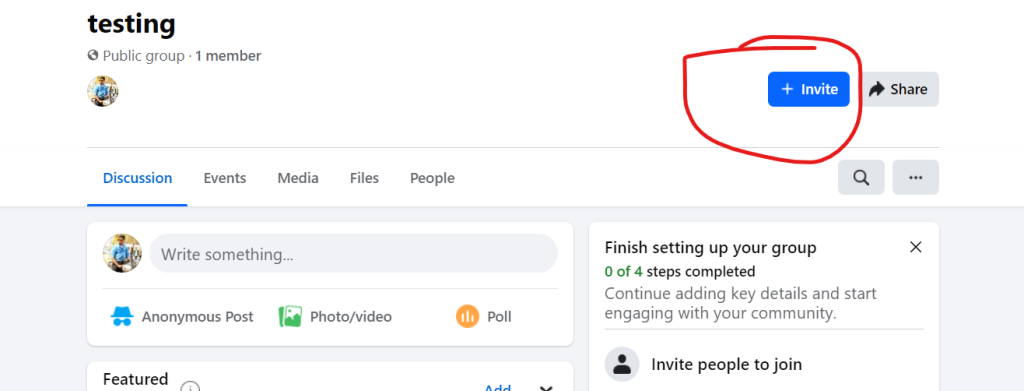
3.1 Invite People to Join

You can manually invite friends or share your group link on social media, emails, or your website.

3.2 Approve or Decline Membership Requests (For Private Groups)

If you set the group to Private, you’ll need to approve new members. You can:

  • Ask membership questions (e.g., “Why do you want to join?”)
  • Filter requests based on mutual friends or interests

3.3 Assign Admins and Moderators

Running a group alone can be tough! Here’s how to assign help:

  • Go to “Members”, find a trusted person, click “… More”, then “Make Admin” or “Make Moderator”.
  • Admins have full control, while Moderators can help manage posts and member activity.

Step 4: Posting & Engaging with Members
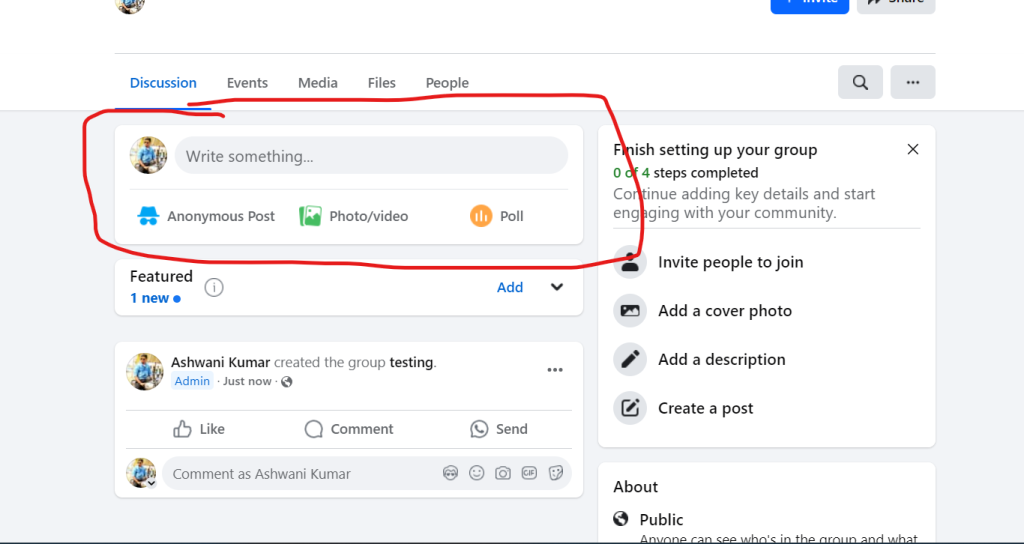
4.1 Pin Important Announcements

If you have rules, upcoming events, or key info, create a post and pin it to the top so everyone sees it.

4.2 Schedule Posts

Consistency is key! You can schedule posts to appear at specific times to keep engagement active.

4.3 Use Polls, Questions, and Events

To keep things fun and interactive, try:

  • Polls – Ask what members think about a topic.
  • Q&A – Post discussion starters.
  • Events – Host live Q&A sessions or webinars.

➡️ Pro Tip: People love engaging content. Mix it up with memes, gifs, or quick challenges!


Step 5: Moderation & Security Features

5.1 Approve or Decline Posts

If you want quality content, enable Post Approval so only relevant posts go live.

5.2 Monitor Discussions

Use Facebook’s Keyword Alerts to flag inappropriate words.

5.3 Mute, Remove, or Ban Members

If someone is causing trouble, you can:
🚫 Mute them (temporarily block posting)
🚫 Remove them (kick them out)
🚫 Ban them (they can’t rejoin)

➡️ Pro Tip: A well-moderated group stays positive and engaging!


Step 6: Growing Your Group 🚀

Your group is set up! Now, let’s bring in more members and keep it thriving.

6.1 Share the Group Link Everywhere

  • On your Facebook profile
  • In other related groups (if allowed)
  • On your website, blog, or emails

6.2 Run Fun Challenges or Giveaways

  • Example: “Share a photo of your pet – the cutest one gets a feature on our page!”

6.3 Encourage Members to Invite Others

Word of mouth is powerful! Ask members to invite like-minded friends.

Post Views: 818
Subscribe
Login
Notify of
guest
guest
0 Comments
Oldest
Newest Most Voted
Inline Feedbacks
View all comments
  • Certified Site Reliability Architect: The Complete Career Guide
  • What Is a VPN? A Complete Beginner-to-Advanced Tutorial
  • How to Install, Secure, and Tune MySQL 8.4 on Ubuntu 24.04 for Apache Event MPM and PHP-FPM
  • Complete Guide to Certified Site Reliability Engineer Career
  • Certified DevSecOps Professional Step by Step
  • Certified DevSecOps Manager: Complete Career Guide
  • Certified DevSecOps Engineer: Skills, Career Path and Certification Guide
  • Step-by-Step: Become a Certified DevSecOps Architect
  • Tuning PHP 8.3 for Apache Event MPM and PHP-FPM on Ubuntu: A Complete Step-by-Step Production Guide
  • Complete Step-by-Step Guide to Configure Apache Event MPM, Create index.php, Set Up VirtualHost, and Fix Ubuntu Default Page
  • Convert XAMPP Apache to Event MPM + System PHP-FPM
  • The Gateway to System Observability Engineering (MOE)
  • How to Finetune Apache and Prove It Works: A Real-World Guide to Testing Performance, Concurrency, HTTP/2, Memory, CPU, and Security
  • Building a High-Performance Apache Event MPM + PHP-FPM + MariaDB Stack (Advanced Server Optimization Guide)
  • Master Infrastructure as Code: The Complete Hashicorp Terraform Associate Guide
  • Building a High-Performance Apache Server with Event MPM + PHP-FPM (Step-by-Step Guide)
  • Is XAMPP Safer for Production Than Using Apache and PHP as Root? 2026 Practical Guide
  • Unlock Cloud Security Expertise with Certified Kubernetes Security Specialist (CKS)
  • How to Fix wpDiscuz Not Replacing Default WordPress Comments in Block Themes
  • Complete Guide to Certified Kubernetes Application Developer Certification
  • Overview of Certified Kubernetes Administrator (CKA) Certification
  • How to Install and Configure XAMPP on Ubuntu 24 Server (Latest Version – 2026 Complete Guide)
  • Mastering the Google Cloud Professional DevOps Engineer
  • Mastering Azure Cloud Security: The AZ-500 Path
  • Why AZ-400 is Essential for Global Cloud Engineering Roles
  • Webp format is not supported by PHP installation.
  • Reconfigure PHP 8.2.12 for XAMPP WITH WebP
  • How to Fix “WebP Format is Not Supported by PHP Installation” in XAMPP/LAMPP (Complete 2026 Guide)
  • Fixing WebP Format Is Not Supported by PHP Installation in XAMPP (Ubuntu 24) – Complete Step-by-Step Guide
  • Azure Solutions Architect Advice for Senior Leads

Recent Comments

  1. digital banking on Complete Tutorial: Setting Up Laravel Telescope Correctly (Windows + XAMPP + Custom Domain)
  2. SAHIL DHINGRA on How to Uninstall Xampp from your machine when it is not visible in Control panel programs & Feature ?
  3. Abhishek on MySQL: List of Comprehensive List of approach to secure MySQL servers.
  4. Kristina on Best practices to followed in .httacess to avoid DDOS attack?
  5. Roshan Jha on Git all Commands

Archives

  • March 2026
  • February 2026
  • January 2026
  • December 2025
  • November 2025
  • October 2025
  • September 2025
  • August 2025
  • July 2025
  • June 2025
  • May 2025
  • April 2025
  • March 2025
  • February 2025
  • January 2025
  • December 2024
  • November 2024
  • October 2024
  • September 2024
  • August 2024
  • July 2024
  • June 2024
  • May 2024
  • April 2024
  • March 2024
  • February 2024
  • January 2024
  • December 2023
  • November 2023
  • October 2023
  • September 2023
  • August 2023
  • July 2023
  • May 2023
  • April 2023
  • March 2023
  • February 2023
  • January 2023
  • December 2022

Categories

  • Ai
  • AI Blogging
  • AiOps
  • ajax
  • Android Studio
  • Antimalware
  • Antivirus
  • Apache
  • Api
  • API Security
  • Api Testing
  • APK
  • Aws
  • Bike Rental Services
  • ChatGPT
  • Code Linting
  • Composer
  • cPanel
  • Cyber Threat Intelligence
  • Cybersecurity
  • Data Loss Prevention
  • Database
  • dataops
  • Deception Technology
  • DeepSeek
  • Devops
  • DevSecOps
  • DevTools
  • Digital Asset Management
  • Digital Certificates
  • Docker
  • Drupal
  • emulator
  • Encryption Tools
  • Endpoint Security Tools
  • Error
  • facebook
  • Firewalls
  • Flutter
  • git
  • GITHUB
  • Google Antigravity
  • Google play console
  • Google reCAPTCHA
  • Gradle
  • Guest posting
  • health and fitness
  • IDE
  • Identity and Access Management
  • Incident Response
  • Instagram
  • Intrusion Detection and Prevention Systems
  • jobs
  • Joomla
  • Keycloak
  • Laravel
  • Law News
  • Lawyer Discussion
  • Legal Advice
  • Linkedin
  • Linkedin Api
  • Linux
  • Livewire
  • Medical Tourism
  • MlOps
  • MobaXterm
  • Mobile Device Management
  • Multi-Factor Authentication
  • MySql
  • Network Traffic Analysis tools
  • Paytm
  • Penetration Testing
  • php
  • PHPMyAdmin
  • Pinterest Api
  • Quora
  • SAST
  • SecOps
  • Secure File Transfer Protocol
  • Security Analytics Tools
  • Security Auditing Tools
  • Security Information and Event Management
  • Seo
  • Server Management Tools
  • Single Sign-On
  • Site Reliability Engineering
  • soft 404
  • software
  • SuiteCRM
  • SysOps
  • Threat Model
  • Twitter
  • Twitter Api
  • ubuntu
  • Uncategorized
  • Virtual Host
  • Virtual Private Networks
  • VPNs
  • Vulnerability Assessment Tools
  • Web Application Firewalls
  • Windows Processor
  • Wordpress
  • WSL (Windows Subsystem for Linux)
  • X.com
  • Xampp
  • Youtube
©2026 DevSecOps Now!!! | WordPress Theme: EcoCoded
wpDiscuz