Limited Time Offer!
For Less Than the Cost of a Starbucks Coffee, Access All DevOpsSchool Videos on YouTube Unlimitedly.
Master DevOps, SRE, DevSecOps Skills!
What is vulnerability assessment?
Network infrastructure, computer systems, and application vulnerabilities may be found, categorized, and prioritized with the use of a vulnerability assessment. A vulnerability is a security flaw that might leave the company open to dangers or attacks via the internet. A vulnerability assessment report displays the findings of vulnerability assessments, which frequently include automated testing tools like network security scanners.
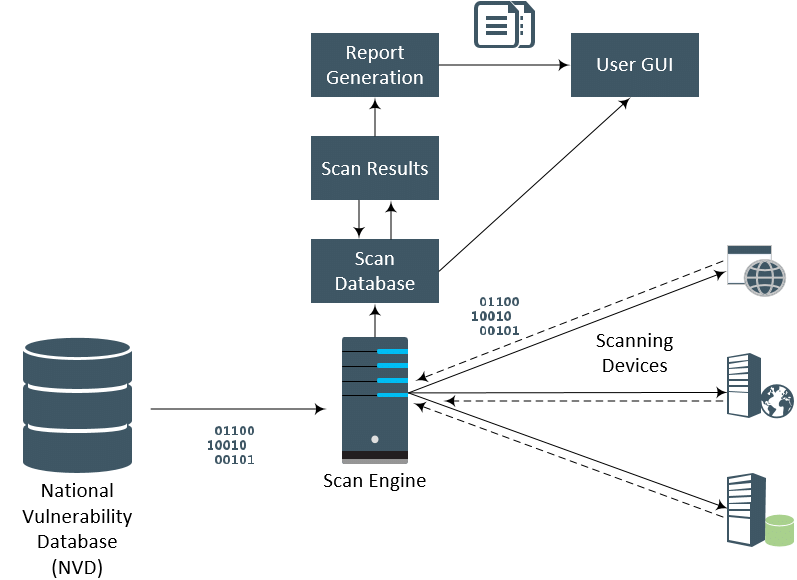
Regular vulnerability assessments may be quite beneficial for organizations that are constantly dealing with cyberattacks. Threat actors are always searching for weaknesses in systems and apps that they may use to compromise whole networks. Organizations often add new components, and vulnerabilities in hardware and software are constantly being found in already-existing components. Enhancing security posture and identifying and addressing security flaws may be accomplished with the aid of a vulnerability assessment and vulnerability management program.
Why Vulnerability Assessment is Important?
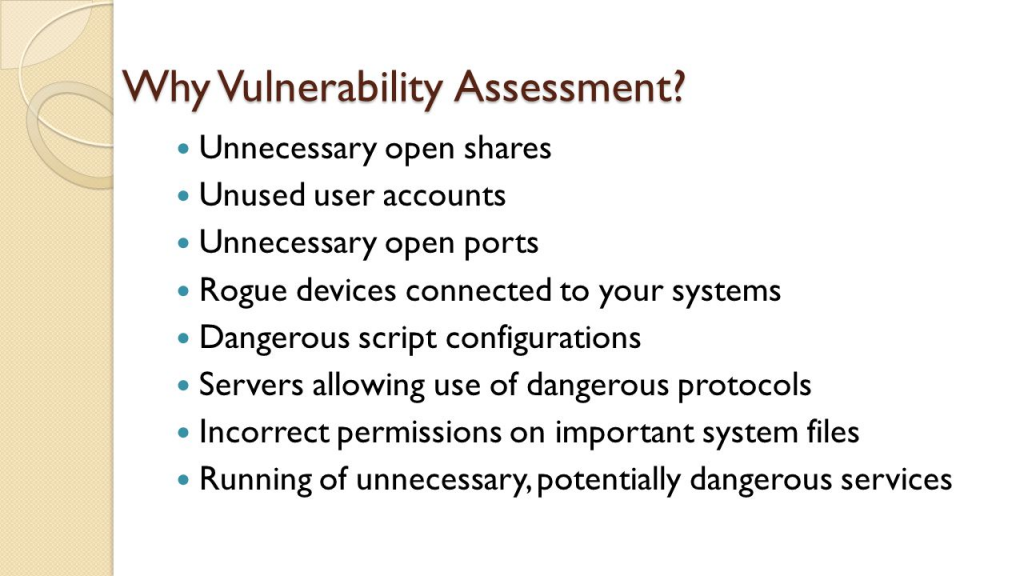
The most prevalent security flaws are caused by either problems with technology or user behavior:
- Information breaches may be from insiders who purposefully leak information or from insiders who unintentionally provide information to an outside source (malicious insiders).
- Unencrypted data on lost or stolen devices is another common way for hackers to get into a company’s network.
- Malware can be installed on target computers by cybercriminals in order to steal data or take over computer systems.
Companies may avoid data breaches and leaks by using vulnerability management, although it does need ongoing attention to detail. The procedure is continuous and calls for doing vulnerability assessments on a regular basis; one assessment must end before another can start.
Security teams may find, evaluate, classify, report, and fix security flaws in browsers, operating systems, business apps, and endpoint devices by using vulnerability assessments.
Every year, thousands of new vulnerabilities are found by organizations, necessitating frequent patching and reconfiguration to safeguard their operating systems, apps, and networks. Unfortunately, a lot of businesses don’t have a good patch management plan and don’t deploy the required updates on time to stop a breach.
Patching every vulnerability at once is not feasible. The security team may prioritize vulnerabilities and make sure high-risk vulnerabilities are addressed first with the use of a vulnerability management system.
What are the types of Vulnerability Assessment Tools?
Automated scanning technologies are essential to modern vulnerability assessments. The primary tool categories for checking for vulnerabilities in an environment are as follows:
- Network-based scanning is a technique for spotting possible security breaches on networks. Both wired and wireless networks with susceptible systems can be found using this kind of search.
- Host-based scanning: this method finds security holes in workstations, servers, and other network hosts. This kind of scan looks for open ports and services that are susceptible, giving information on the configuration settings and patch history of the systems it scans.
- Wireless network scans: these tools look for security flaws in an organization’s Wi-Fi network. These checks can guarantee that wireless networks are established securely and can detect fraudulent access points.
- Application scans: they are used to check for known software vulnerabilities and misconfigurations on websites and mobile applications.
- Database scans are used to find generic server vulnerabilities and misconfigurations, as well as vulnerabilities that might allow database-specific attacks like SQL and NoSQL injection.
How Vulnerability assessment: Security scanning process works?
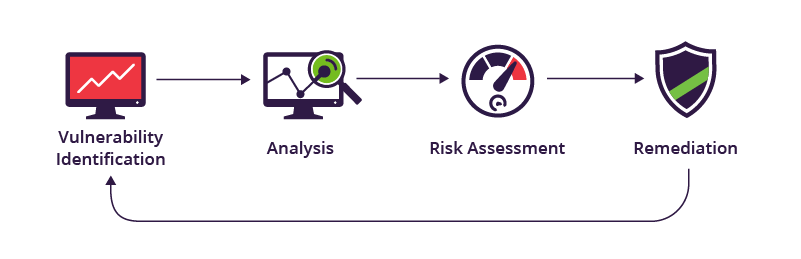
There are four phases in the security scanning process: testing, analysis, evaluation, and repair.
1. Vulnerability identification (testing): Making a thorough inventory of all the vulnerabilities in an application is the goal of this stage. Security analysts use automated technologies to scan apps, servers, or other systems, or they might manually test and evaluate them to determine their level of security. In order to find security flaws, analysts also depend on threat intelligence feeds, asset management systems, vulnerability databases, and vendor vulnerability notifications.
2. Vulnerability analysis: Finding the origin and primary cause of the vulnerabilities found in step one is the aim of this stage. It entails determining which system components are at fault for every vulnerability as well as the vulnerability’s underlying cause. For instance, an outdated version of an open-source library may be the core cause of a vulnerability. This offers an obvious course for correction—modernizing the library.
3. Risk assessment: Setting vulnerability priorities is the aim of this stage. Each vulnerability is given a rating or severity score by security experts based on many criteria, including:
- which systems are impacted.
- What information is in jeopardy.
- certain operational tasks are in jeopardy.
- simplicity of compromise or attack.
- intensity of the assault.
- possible harm brought on by the weakness.
4. Remediation: Sealing off security holes is the aim of this stage. The development, operations, and security teams usually work together to identify the best course of action for each vulnerability’s remedy or mitigation.
Particular corrective actions could consist of:
- introduction of fresh security protocols, instruments, or methods.
- the upgrading of configuration or operational modifications.
- creation and application of a fix for a vulnerability.
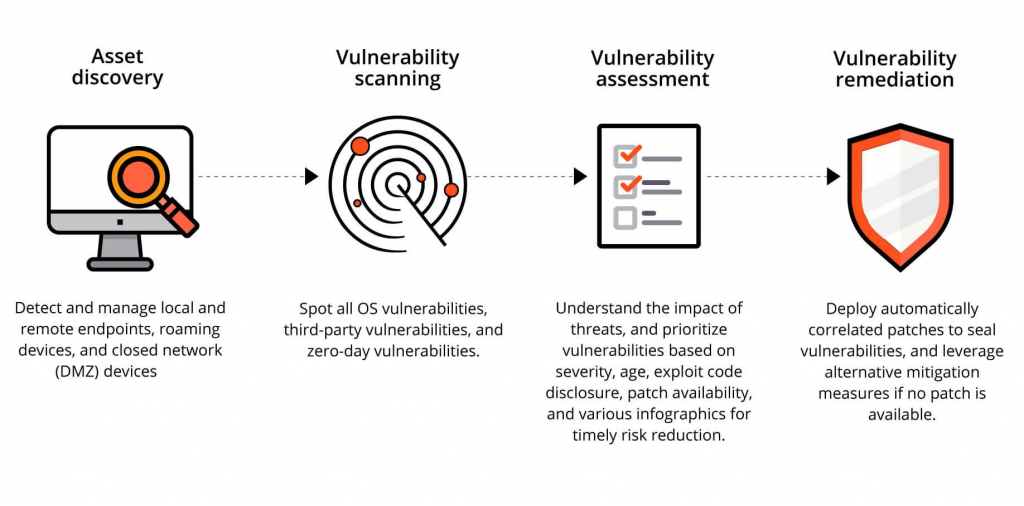
An isolated vulnerability evaluation is not possible. Organizations must operationalize this process and carry it out frequently for it to be effective. Fostering collaboration across security, operation, and development teams is also essential; this is known as DevSecOps.
What are the process of Vulnerability Assessment?
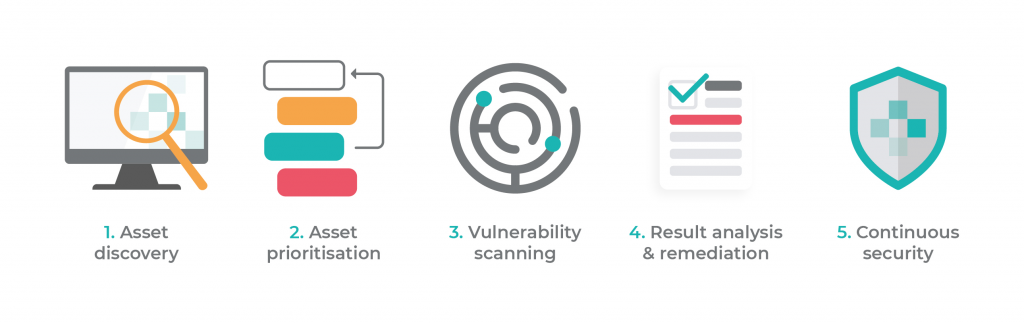
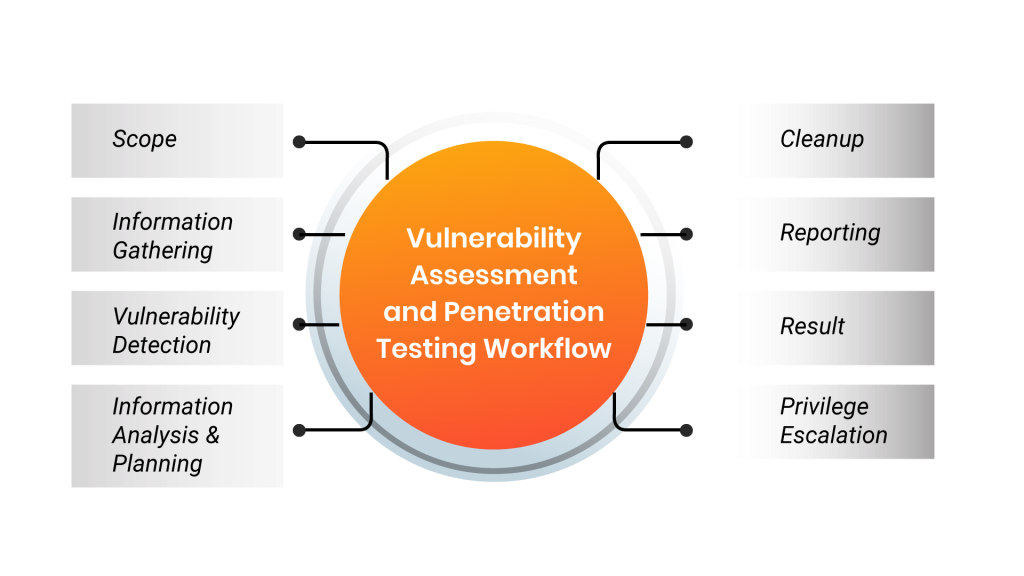
1. Initial Preparation:-
The group determines the objectives and scope of vulnerability testing at this point. This includes:
- The group determines the objectives and scope of vulnerability testing at this point. This includes:
- mapping out all endpoints and identifying equipment and valuables that are safeguarded.
- figuring out each asset’s commercial worth and the consequences of an assault.
- determining each system’s access restrictions and other security needs.
- figuring out whether sensitive data is stored in systems and how it is moved across them.
- keeping track of open ports, processes, and services on protected assets.
- identifying the software and operating systems installed on the assets.
Security teams may create a remediation approach and comprehend attack surfaces and the most serious threat scenarios with the aid of this knowledge.
2. Vulnerability Assessment Testing:-
During this phase, the group examines target devices and surroundings for vulnerabilities automatically. When required, they look into a system’s security posture using manual tools.
Teams usually rely on one or more vulnerability databases, vendor security advisories, and threat intelligence feeds to automate and streamline this step.
Depending on the size of the target system and the sort of scan, a single test may take a minute or many hours.
3. Prioritize Vulnerabilities:-
At this point, the group ranks vulnerabilities based on many criteria and eliminates false positives from vulnerability scanning data. These may consist of:
- Viability database-provided severity score
- The effect on company if a vulnerability is taken advantage of
- Private information that might be in danger
- The vulnerability’s simplicity of exploiting
- How long has the vulnerability existed
- The capacity to travel laterally from one system to other delicate systems
- The difficulty of applying a patch and its availability
4. Create a Vulnerability Assessment Report:-
At this point, the group produces a single report that lists all vulnerabilities discovered in protected assets along with a remediation strategy.
When a medium-to high-risk vulnerability is found, the report should include details on the vulnerability, when it was found, the systems it affects, the potential harm that may occur if an attacker were to take advantage of it, and the strategy and work needed to fix it.
The group should, if at all feasible, also offer a proof of concept (PoC) that shows how each key vulnerability may be used against it.
5. Continuous Vulnerability Assessment:-
An organization’s digital infrastructure’s vulnerabilities are shown in a point-in-time snapshot via vulnerability scans. New vulnerabilities, however, can be brought about by fresh deployments, configuration modifications, recently found vulnerabilities, and other circumstances. Vulnerability management should be an ongoing effort as vulnerabilities are not static.
Automated vulnerability assessment should be part of software development teams’ continuous integration and deployment (CI/CD) workflow. This makes it easy to find vulnerabilities and address them as early as possible in the software development lifecycle (SDLC), obviating the necessity for patching insecure code with releases.
Nevertheless, continual vulnerability scans of production systems are necessary to supplement this procedure since it is unable to detect all vulnerabilities, many of which exist in legacy or third-party systems.
Conclusion:-
We addressed the fundamentals of vulnerability assessment, the primary techniques for finding vulnerabilities (network scanning, host scanning, and application scanning), and a 5-step procedure for handling vulnerability assessments inside your company in this article:
Initial preparation – laying out the objectives and scope of vulnerability testing.
Vulnerability testing – conducting automated tests to find weaknesses in the systems covered by the scope.
Prioritize vulnerabilities – Determine which vulnerabilities are critical and need to be addressed, as well as any potential effects on company.
Create vulnerability assessment report – create a strategy outlining the high- and medium-level vulnerabilities that were discovered, along with suggested fixes.
Continuous vulnerability assessment – continuously looking for vulnerabilities to find new ones and determine if previously discovered ones have been fixed.
