Limited Time Offer!
For Less Than the Cost of a Starbucks Coffee, Access All DevOpsSchool Videos on YouTube Unlimitedly.
Master DevOps, SRE, DevSecOps Skills!
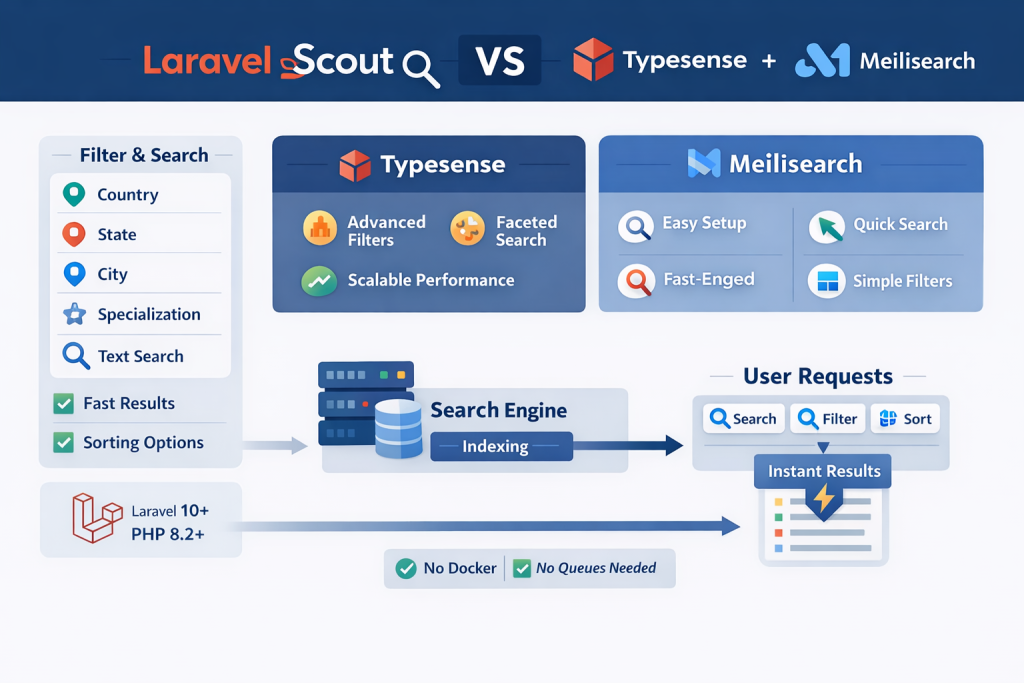
Modern web applications are no longer judged only by features. They are judged by speed, search accuracy, and user experience.
If your Laravel application has:
- Multiple filters (country, state, city, specialization)
- Text search (single or multiple keywords)
- Sorting (latest, rating, relevance, etc.)
- Growing data
- Many concurrent users
Then traditional MySQL-only search is not enough.
This tutorial explains, in simple and practical terms:
- Why MySQL struggles at scale
- Why Laravel Scout exists
- What Typesense and Meilisearch are
- Which one to choose
- Whether they are free
- Whether they work with PHP 8.2 and Laravel 10+
- How to use them on a basic server (no Docker, no Horizon, no queues)
- The best backend + frontend search strategy
- A future-proof architecture that will not break under load
This is written for real projects, not demos.
Why MySQL-Only Search Becomes a Problem
At the beginning, MySQL feels fine:
LIKE %keyword%WHERE country_id = ?ORDER BY created_at DESC
But as data grows, problems start appearing:
- LIKE queries are slow
- Multiple filters + joins are expensive
- Sorting + filtering together kills indexes
- Search UX becomes laggy
- Concurrency causes DB load spikes
MySQL is excellent for transactions and consistency,
but it is not a search engine.
This is where search indexing comes in.
What Laravel Scout Actually Is (Important to Understand)
Laravel Scout is not a search engine.
Laravel Scout is:
- A bridge between Laravel models and search engines
- A standard API for indexing and searching data
- A way to keep your Laravel code clean and future-proof
Scout lets you:
- Map a model → search index
- Swap search engines later
- Keep your app logic independent from the engine
Scout supports:
- Database (basic)
- Meilisearch
- Typesense
- Other engines
Scout itself is free and stable.
What Typesense and Meilisearch Really Are
Typesense
Typesense is:
- A fast, open-source search engine
- Built specifically for filtering, faceting, and sorting
- Optimized for low-latency, high-concurrency search
- Designed to power search-driven UIs
Key strengths:
- Excellent multi-filter performance
- Strong sorting support
- Predictable relevance
- Very fast response times
Meilisearch
Meilisearch is:
- A developer-friendly open-source search engine
- Focused on ease of use
- Very fast to set up
- Great default search behavior
Key strengths:
- Simple setup
- Good relevance out of the box
- Friendly for small teams and MVPs
Are They Free?
Yes — both are free if self-hosted.
What “free” really means
- No license cost
- No per-request cost
- No user limit
You only pay for:
- Your server (VPS / VM)
Paid only if:
- You choose a managed cloud service
For a basic server:
- You can run them yourself
- Completely free software-wise
PHP 8.2 and Laravel 10+ Compatibility
This setup is fully compatible with:
- PHP 8.2
- Laravel 10
- Laravel 11 and newer
Why?
- Laravel Scout supports PHP 8+
- Typesense and Meilisearch communicate over HTTP
- No PHP extension dependency
- No version lock-in
You are safe long-term.
“Is This Production Ready?”
Yes. This stack is production-proven.
What production-ready means here:
- Stable APIs
- Predictable behavior
- Can handle thousands of concurrent users
- Actively maintained
- Used in real businesses
The only difference between a beginner and a mature setup is how you deploy it, not the technology itself.
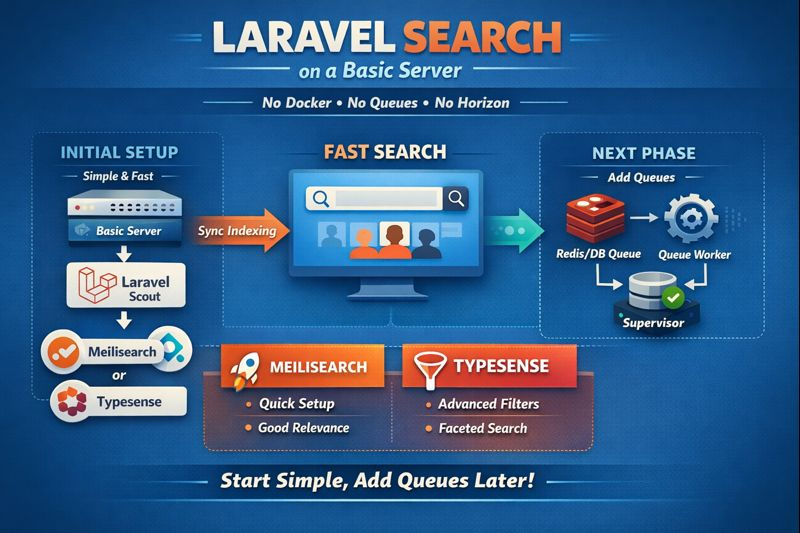
Using This on a Basic Server (No Docker, No Queues, No Horizon)
This is a very important point, and the answer is practical.
Without Docker
No problem.
- Both engines run as a single binary/service
- Can be started via system service
- Laravel connects via HTTP
Without Queues
Still works.
- Indexing happens synchronously
- Create/update actions take slightly longer
- Search queries remain fast
This is acceptable for early-stage and medium traffic.
Without Horizon
Not required.
- Horizon is monitoring, not a requirement
- Later you can use Supervisor + queue worker
Conclusion:
You can start today on a basic server.
Typesense vs Meilisearch — Honest Comparison
Choose Typesense if:
- Filters are core to your UX
- You have many combinations (country + city + specialization)
- Sorting matters a lot
- You want predictable performance as data grows
Choose Meilisearch if:
- You want the easiest setup
- Your filters are simpler
- You want quick results with minimal tuning
- You are early-stage
My recommendation for your use case
Because you emphasized:
- Filtering
- Sorting
- Performance
- Long-term stability
Typesense is the better fit.
Meilisearch is excellent, but Typesense aligns more closely with your requirements.
Backend Search Strategy (Very Important)
You asked:
Should I load all data once or call backend every time?
Correct answer:
Always search on the backend.
Why loading everything is bad:
- Slow initial page load
- High memory usage in browser
- Impossible at scale
- Bad mobile experience
Correct modern approach:
- Backend handles search
- Frontend sends parameters
- Results are paginated
- Requests are debounced
This is how all scalable systems work.
How to Make Backend Search Feel Instant
Even with backend calls, UX can feel instant if you:
- Debounce input
- Wait 300–500ms after typing
- Cancel old requests
- Only latest query matters
- Keep old results visible
- Replace when new results arrive
- Paginate
- Never fetch everything
- Cache popular queries
- Short TTL (30–60 seconds)
This works beautifully with both Typesense and Meilisearch.
Recommended Architecture (Microservices Friendly)
Step 1: Create a Search Read Model
Instead of joining multiple tables at runtime:
- Flatten your data
- One document = one searchable entity
Example fields:
- id
- name
- country_id
- state_id
- city_id
- specialization_ids
- rating
- created_at
- searchable_text
Step 2: Index This Model
- Laravel Scout maps model → index
- No joins during search
- Search engine does the heavy lifting
Step 3: Search API
One clean endpoint:
- q (text)
- filters
- sort
- page
- per_page
Frontend does not care how it’s implemented.
Why This Will Not Break with 1000s of Users
Because:
- Search traffic does not hit MySQL
- Filters are pre-indexed
- Sorting is pre-computed
- MySQL is reserved for writes
- Search engine is optimized for reads
This separation is the key to scalability.
Final Recommendation (Clear and Honest)
For your situation:
- PHP 8.2
- Laravel 10+
- Microservices
- Heavy filtering
- Basic server today
- Long-term growth planned
Best choice:
Laravel Scout + Typesense
Safe alternative:
Laravel Scout + Meilisearch
Both are:
- Free (self-hosted)
- Production-ready
- Scalable
- Compatible with your stack
Typesense simply aligns better with your filter-driven UX and future scale.