
Limited Time Offer!
For Less Than the Cost of a Starbucks Coffee, Access All DevOpsSchool Videos on YouTube Unlimitedly.
Master DevOps, SRE, DevSecOps Skills!
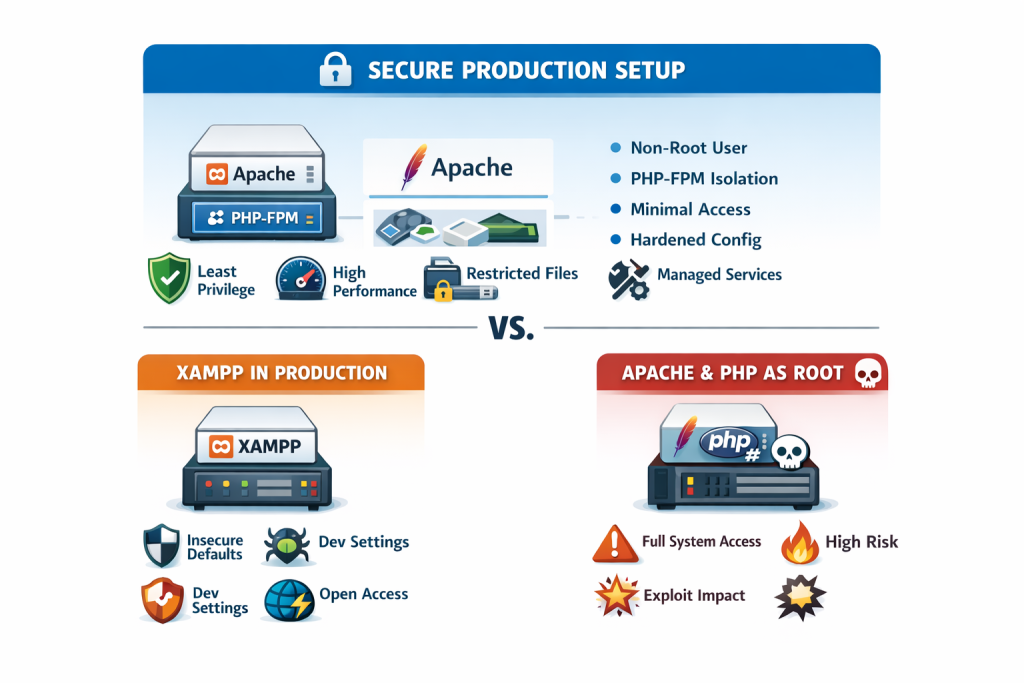
If you are asking whether XAMPP is safer for production or using Apache and PHP in root, the honest answer is that neither is the right production choice. XAMPP is explicitly documented by Apache Friends as a development stack, not a production platform, and Apache’s own documentation warns against setting the runtime User or Group to root unless you fully understand the danger. The safer production pattern is a standard web stack that follows least privilege: Apache running with limited privileges, and PHP isolated through FastCGI-style execution such as PHP-FPM on Unix-like systems. (Apache Friends)
This article is for advanced Windows, macOS, and Linux users who want a practical answer, not a vague rule of thumb. By the end, you will know what is actually unsafe, why people get confused about “running Apache as root,” and what a production-grade setup should look like on each platform. (Apache HTTP Server)
Why This Topic Matters
This question matters because many developers move from local development to production without changing the security model. That is exactly where trouble starts. A dev stack is optimized for convenience and speed of setup; a production stack is optimized for reliability, exposure control, privilege separation, patching, and recovery. Apache Friends says XAMPP is configured to be as open as possible for developers, and that this can be fatal in production. (Apache Friends)
In real environments, the damage from a poor runtime model is rarely limited to just one PHP file. If the web server or PHP process has broader system access than it needs, a vulnerable plugin, upload bug, RCE, or deserialization flaw can turn into file disclosure, lateral movement, credential theft, or full host compromise. That is exactly why both OWASP and Microsoft emphasize the principle of least privilege: give a process only the permissions it truly needs, and nothing more. (OWASP)
There is also a performance and operational angle. Modern Apache guidance favors MPM choices based on workload, and the event MPM is specifically designed to serve more simultaneous requests by freeing worker threads from some connection-handling work. PHP’s own documentation also points users toward FastCGI-style separation when using a threaded MPM so PHP runs in its own memory space. In other words, the safer design is often the more scalable one too. (Apache HTTP Server)
Core Explanation of the Topic
The simple answer first
Here is the simple version:
- XAMPP is not the safe production choice.
- Running Apache or PHP request-handling as root is also not the safe production choice.
- The safer production model is a standard Apache setup with least-privileged runtime users and isolated PHP execution. On Linux and most Unix-like systems, that usually means Apache + PHP-FPM. On Windows, that means using the official PHP build with Apache or IIS and running the service under a restricted service identity, not an admin-level one. (Apache Friends)
Why XAMPP is not safer for production
Apache Friends could not be more direct: XAMPP is “not meant for production use.” Their FAQs for Windows, Linux, and macOS all repeat the same point and list insecure defaults such as a MySQL root account without a password, network-accessible MySQL, and known default credentials in bundled services. That does not mean XAMPP is “bad” software. It means it is a developer convenience bundle, and its default posture is the wrong baseline for an internet-facing production system. (Apache Friends)
Could you harden XAMPP enough to make it less risky? In some cases, yes. Apache Friends even provides security tooling or instructions for tightening parts of the installation. But that still does not change the central problem: you are starting from a stack that the vendor itself says is not intended for production. In practice, serious teams usually avoid that debate entirely and deploy a standard OS-managed Apache/PHP stack instead. (Apache Friends)
Why “Apache and PHP in root” is the wrong model
This part confuses many developers, because there is an important nuance.
Apache documentation explains that if you want Apache to use the User directive to switch to a less-privileged account, the server must initially start as root. That is normal on Unix-like systems because binding to low ports and setting up the runtime may require elevated privileges. But Apache also explicitly warns: do not set User or Group to root unless you know exactly what you are doing and what the dangers are. It recommends creating a dedicated user and group for the server. (Apache HTTP Server)
So the problem is not that the parent process may briefly start with elevated privileges. The problem is allowing the request-handling path to keep those privileges. Once your PHP code, uploads, shells, image processors, or third-party libraries are effectively running with root-level access, a normal app vulnerability can become a host-level breach. That is precisely the kind of risk least privilege is meant to reduce. (Apache HTTP Server)
Where PHP-FPM fits in
PHP’s FastCGI Process Manager is designed for heavier-loaded sites and supports separate pools with different user IDs, group IDs, environments, and listening endpoints. Its configuration also lets you tune how workers are created with static, dynamic, or ondemand modes, and pm.max_children directly controls the number of simultaneous requests the pool can serve. (PHP)
That matters because it gives you two benefits at once: better isolation and better operational control. Instead of embedding PHP deeply into the Apache worker model, you can run PHP as a dedicated service with a constrained identity and predictable worker behavior. PHP’s own FAQ says that if you want a threaded MPM, you should look at a FastCGI configuration where PHP runs in its own memory space. (PHP)
Detailed Breakdown: What You Should Do Instead
Is XAMPP safer for production than using Apache and PHP as root?
No. If those are the only two options on the table, a properly configured Apache setup with limited privileges is safer than XAMPP, and both are safer than keeping request execution at root level. But the best answer is to reject the choice itself and use a production architecture built around least privilege, minimal components, and clear patch ownership. (Apache Friends)
Linux production workflow
On Linux, the production-friendly pattern is:
- Install Apache from your OS packages or controlled repository.
- Use a dedicated runtime user and group such as
www-dataor a custom service account. - Use Apache
eventMPM where appropriate for concurrency. - Run PHP through PHP-FPM pools.
- Restrict PHP-FPM sockets or ports to only what Apache needs.
- Keep the document root and writable directories separate.
- Give write access only to the few directories that must be writable. (Apache HTTP Server)
This model is strong because Apache can focus on connection handling while PHP-FPM handles PHP execution in its own process manager. Apache says event MPM is designed to allow more simultaneous requests, and PHP says FPM is useful for heavy-loaded sites and can run pools under different uid/gid values. (Apache HTTP Server)
macOS reality check
For local development on macOS, XAMPP may still be convenient. For production, the same rule applies: XAMPP is not production-ready according to Apache Friends. Also, recent macOS versions no longer ship bundled PHP, so production-like setups usually rely on maintained third-party packages or compiled builds rather than all-in-one dev bundles. If you are using macOS for build validation or staging, mirror a real Apache + PHP setup as closely as possible instead of depending on XAMPP behavior. (Apache Friends)
Windows production workflow
Windows is where this question often gets distorted, because “root” is a Unix term. On Windows, the dangerous equivalent is running your web stack under an overly privileged identity such as a broad administrative account when it does not need that power. Microsoft’s guidance on least privilege says accounts should have the minimum permissions required, and Microsoft documents service accounts specifically as a way to control a service’s access to local and network resources more safely. PHP’s Windows manual also states that the official Windows releases are recommended for production use. (Microsoft Learn)
A practical Windows production pattern looks like this:
- Use official PHP on Windows rather than a dev bundle. (PHP)
- Run Apache or IIS as a managed service, not from a developer control panel. (Apache HTTP Server)
- Avoid admin-level service identities unless they are truly required. (Microsoft Learn)
- Prefer service-account discipline and isolated writable paths. (Microsoft Learn)
- If using Apache with a threaded model, keep PHP separated through CGI/FastCGI-style execution rather than assuming the easiest local dev method is the best production method. (PHP)
A practical decision rule
Use this rule in real projects:
- Local development: XAMPP is acceptable for speed and convenience.
- Staging: start moving toward the production layout.
- Production: use a standard Apache/PHP deployment, limited privileges, audited file permissions, managed updates, and service-level monitoring. (Apache Friends)
Common Mistakes, Myths, and Misconceptions
Mistake 1: “If I secure XAMPP manually, it becomes a production stack”
You can improve it, but that is not the same as choosing the right baseline. A stack intentionally designed for developer convenience still carries packaging, service exposure, and operational assumptions that do not align with hardened production practice. When the vendor says “not meant for production,” take that seriously. (Apache Friends)
Mistake 2: “Apache always runs as root, so root is normal”
This is only half true. Apache may start with elevated privileges on Unix-like systems, but Apache’s own documentation says the server should answer requests under the configured less-privileged user, and it explicitly warns against setting that runtime user to root. The distinction between a startup privilege and a request-execution privilege is critical. (Apache HTTP Server)
Mistake 3: “Performance and security are separate decisions”
Not here. PHP’s documentation points users of threaded MPMs toward FastCGI-style separation, and Apache’s event MPM is built to improve concurrent request handling. A better architecture often improves both safety and capacity. (Apache HTTP Server)
Mistake 4: “On Windows, this root question does not apply”
The exact word does not apply, but the security principle absolutely does. Replace “root” with “Administrator-equivalent privileges” or “over-privileged service account” and the same risk model appears. Microsoft’s least-privilege guidance exists for exactly this reason. (Microsoft Learn)
Mistake 5: “One runtime identity for everything is simpler, so it is better”
It is simpler until the day you need containment. The moment an app needs write access only to uploads, cache, or sessions, and your process can also read secrets or modify system files, your blast radius is already too large. Separate identities and minimal write permissions are not overengineering; they are standard defensive design. (Apache HTTP Server)
Best Practices and Expert Recommendations
If you want the expert recommendation in one sentence, it is this: never choose between XAMPP and root-level request execution for production; choose least-privileged, service-managed deployment instead. (Apache Friends)
Here is the practical best-practice list:
1. Use the right tool for the environment
Use XAMPP for quick local development only, not for public production systems. Apache Friends documents this clearly across platforms. (Apache Friends)
2. Separate privilege from request handling
On Unix-like systems, allow Apache to start in the way the platform requires, but make sure the actual request-serving identity is a dedicated low-privilege user and group. Apache explicitly recommends that approach. (Apache HTTP Server)
3. Isolate PHP execution
Use PHP-FPM pools on Linux and similar Unix platforms so PHP does not share the same execution model as the web server. PHP documents FPM as useful for heavier loads and supports per-pool user/group controls. (PHP)
4. Use concurrency-friendly Apache modes carefully
If your workload fits, event MPM is a better production direction than older prefork-style thinking, and PHP’s documentation supports separating PHP into its own memory space when using threaded MPMs. (Apache HTTP Server)
5. Follow least privilege on Windows too
Run the web service under an identity designed for services, not broad admin rights. Microsoft’s service-account model exists to control access to local and network resources safely. (Microsoft Learn)
6. Reduce writable surface area
Only uploads, cache, sessions, and truly dynamic storage paths should be writable. Your codebase, configs, and secrets should not be casually writable by the same identity serving requests. This is a direct application of least privilege. (OWASP)
7. Choose maintainability over convenience
Production security is not just about today’s config. It is about patching, repeatability, logs, rollback, service restarts, monitoring, and minimizing surprises. Standard packages and standard service management nearly always beat ad hoc all-in-one bundles over time. This is partly an operational inference, but it follows directly from the vendor and platform guidance above. (Apache Friends)
Frequently Asked Questions
1. Can XAMPP ever be used on a live server?
It can technically be exposed, but Apache Friends says it is not meant for production use and lists insecure defaults that make it a poor production baseline. (Apache Friends)
2. Is it okay that Apache starts as root on Linux?
That can be normal during startup on Unix-like systems, but Apache says the server should answer requests as a less-privileged user and warns against setting the runtime User or Group to root. (Apache HTTP Server)
3. Is running PHP as root ever a good idea?
For normal web application request handling, no. It creates unnecessary blast radius and violates least-privilege design. (Apache HTTP Server)
4. Why is PHP-FPM usually recommended for production on Linux?
Because PHP documents FPM as useful for heavier-loaded sites and supports pool-level user/group isolation and process-manager tuning. (PHP)
5. What should Windows users do instead of thinking in terms of “root”?
Think in terms of service identity and privilege scope. Use official PHP builds, run the web service under an appropriately restricted account, and avoid admin-level execution unless absolutely necessary. (Microsoft Learn)
6. Is Apache event MPM better for concurrency?
Apache documents event MPM as designed to serve more simultaneous requests by offloading some connection work from worker threads. (Apache HTTP Server)
7. What is the best production answer in one line?
Use a standard Apache deployment with limited privileges and isolated PHP execution; do not use XAMPP as your production foundation, and do not keep request execution at root level. (Apache Friends)
Conclusion
So, is XAMPP safer for production than using Apache and PHP as root? No. XAMPP is a development stack by design, and root-level request execution is a privilege mistake by design. The correct production choice is not “which bad option is less bad,” but “how do I build a least-privileged runtime that is maintainable under load?” (Apache Friends)
For Linux and most Unix-like deployments, that usually means Apache + PHP-FPM + dedicated low-privilege users + minimal writable paths + standard service management. For Windows, it means official PHP builds, proper service accounts, and avoiding admin-equivalent execution for the request path. That is the answer that aligns with official guidance, operational reality, and long-term security. (PHP)
If you want to build something you can trust in production, do not optimize for the easiest install. Optimize for the smallest blast radius.


0 Comments
Most Voted