
Limited Time Offer!
For Less Than the Cost of a Starbucks Coffee, Access All DevOpsSchool Videos on YouTube Unlimitedly.
Master DevOps, SRE, DevSecOps Skills!
If you’ve ever run a Laravel Artisan command and watched it hang forever…
You know that feeling.
No errors.
No crash message.
Just a blinking cursor.
Recently, we faced this exact issue while syncing 16,000+ doctor records into MeiliSearch for our search system. The command:
php artisan search:sync-providers
would print:
Fetching doctors...
And then… nothing.
Here’s the complete story of:
- What went wrong
- Why it failed silently
- How we diagnosed it
- And how we fixed it properly
This tutorial walks you through everything step-by-step.
The Real Problem: Why the Command Was Hanging
We needed to:
- Fetch 16,000+ doctors from an external API
- Store them in our
search_providerstable - Index them into MeiliSearch
But instead of syncing, the process would:
- Hang indefinitely
- Not log errors
- Not insert data
- Leave the frontend search broken (404 index not found)
This was not one bug.
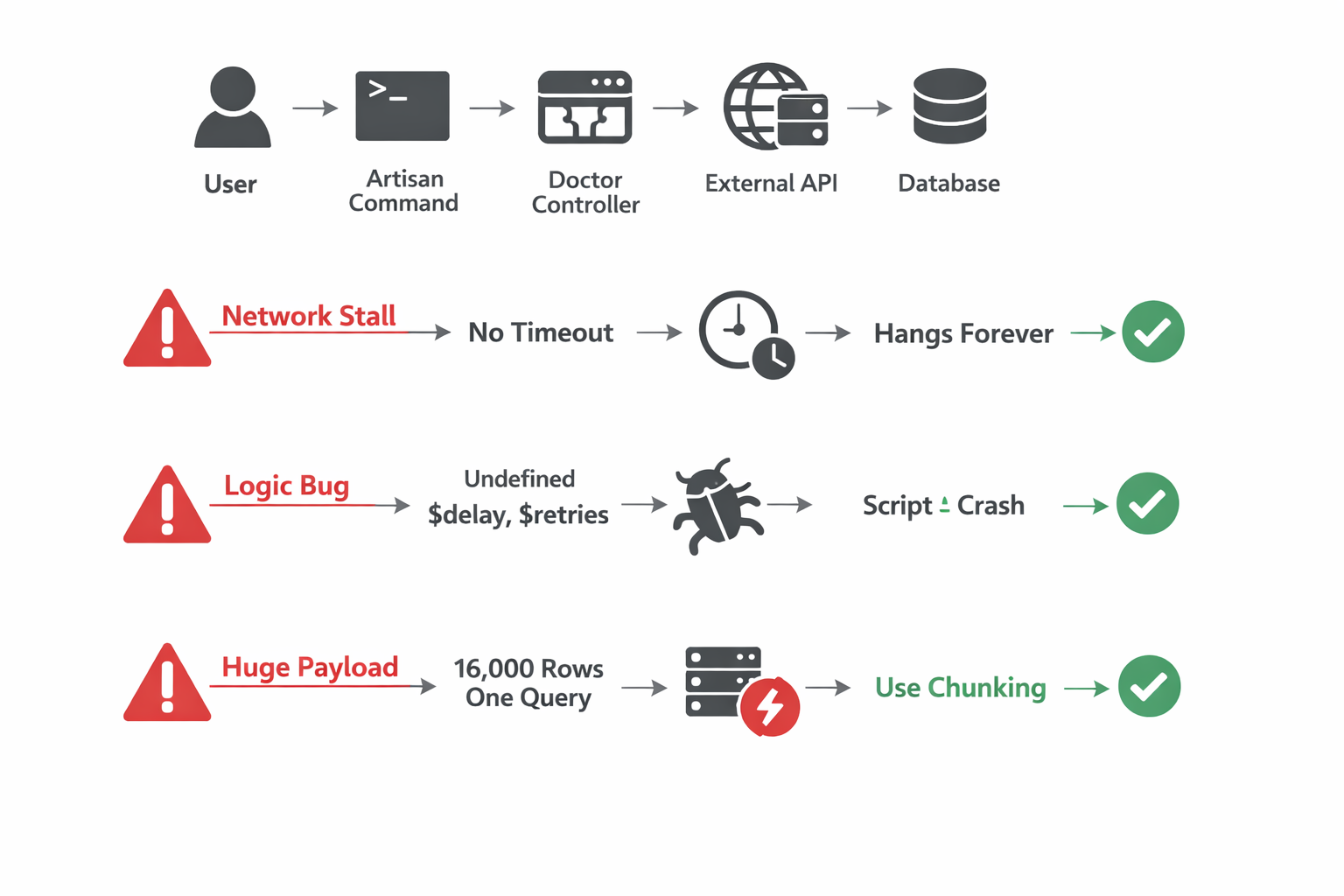
It was three separate failures happening at different layers.
Understanding the Execution Flow
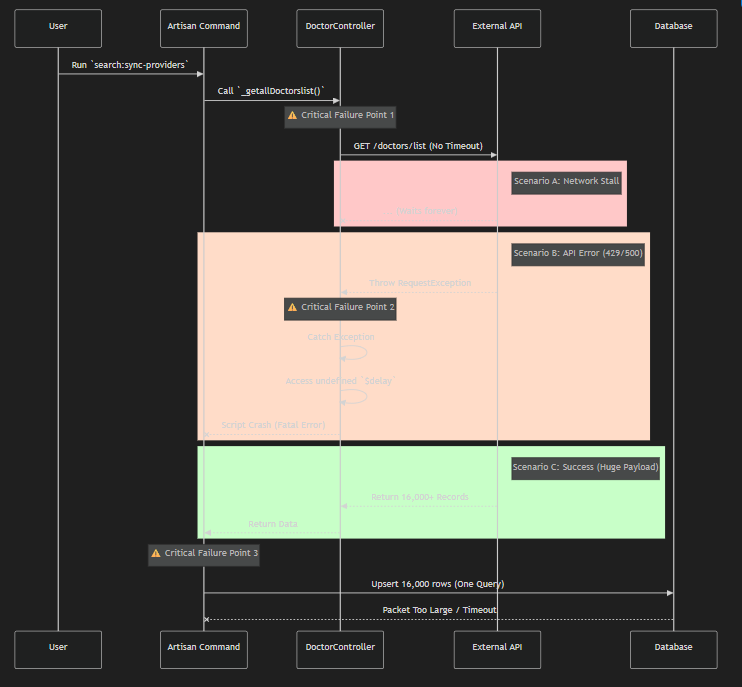
When you run:
php artisan search:sync-providers
Here’s what actually happens:
- Artisan command runs
- It calls
_getallDoctorslist() - Guzzle sends a request to external API
- API returns 16,000 records
- We run
SearchProvider::upsert(...) - Data is stored
- MeiliSearch reindexes
Now let’s see where it broke.
Failure 1: The Infinite Hang (Network Layer)
The Bug
$http = new Client(); // No timeout!
Guzzle has no default timeout.
If the external API:
- Accepts connection
- But never sends data
Then PHP waits… forever.
And in CLI mode, max_execution_time is often unlimited.
What This Means
If the API server hangs or drops packets, your script:
- Never finishes
- Never throws an error
- Just waits
That’s why your terminal showed:
Fetching doctors...
And then nothing.
Fix #1: Add Timeout (Fail Fast Strategy)
$http = new Client([
    'timeout' => 60,
    'connect_timeout' => 10
]);
Now:
- If server doesn’t respond → script fails in 60 seconds
- If connection can’t be established → fails in 10 seconds
- Error is logged properly
This single line fixed the infinite waiting problem.
Failure 2: The Silent Crash (Logic Layer)
Even worse…
When the API actually failed, our error handler was broken.
The Problem Code
catch (RequestException $e) {
    if ($e->getCode() == 429) {
        Log::warning("Retrying in $delay seconds"); // $delay undefined
        $retries--; // $retries undefined
    }
}
Why This Is Dangerous
When API returned 429 or 500:
- Execution entered the catch block
- PHP tried to use undefined variables
- Fatal error occurred inside error handler
- Script exited silently
So the real API error was swallowed.
That’s why logs looked clean — but the script was dying.
Fix #2: Proper Retry Logic
$retries = 3;
$delay   = 2;

while ($retries > 0) {
    try {
        $response = $http->get($url);
        return json_decode($response->getBody(), true);

    } catch (RequestException $e) {
        Log::warning("API failed. Retrying in {$delay} seconds...");
        sleep($delay);
        $retries--;
        $delay *= 2; // exponential backoff
    }
}
Now:
- Retry works properly
- Delay is defined
- Logs show real errors
- Script never crashes silently
Failure 3: The Database Choke (Data Layer)
After fixing networking and logic…
We hit a new wall.
We were doing this:
SearchProvider::upsert($all_16136_records, ...);
One single massive query.
Why This Fails
16,000 records in one query means:
- Massive SQL statement
- Several MB packet size
- High RAM usage
- Risk of:
MySQL server has gone away
General error: 2006
max_allowed_packet exceeded
Even if MySQL doesn’t throw an error, PHP memory usage spikes heavily.
Fix #3: Chunking (The Real Performance Upgrade)
We refactored to process records in batches.
$chunks = array_chunk($items, 500);

foreach ($chunks as $index => $chunk) {

    SearchProvider::upsert(
        $chunk,
        ['external_id'],
        ['name', 'email', 'updated_at']
    );

    $this->info("Synced batch " . ($index + 1));
}
Why 500?
- Safe for MySQL
- Low memory usage
- Fast execution
- Easier debugging
Instead of 1 massive query:
- We run 33 small queries
- Each query handles 500 rows
Before vs After Comparison
| Layer | Before | After |
|---|---|---|
| Network | No timeout | 60s timeout |
| Error Handling | Undefined variables | Proper retry loop |
| Database | 16k rows single query | 500 rows per batch |
| Logging | No progress | Batch progress logging |
| Reliability | Hangs indefinitely | Always completes or fails clearly |
| Performance | Unstable | Syncs in under 1 minute |
Final Result
After all fixes:
- 16,136 doctors synced successfully
- No hanging
- No silent crashes
- No MySQL packet errors
- MeiliSearch indexed properly
- Frontend search works perfectly
And the terminal now shows:
[1/33] Synced batch of 500 providers
[2/33] Synced batch of 500 providers
...
That visibility alone is a huge developer experience upgrade.
The Bigger Lesson (What This Teaches Us)
This bug wasn’t one mistake.
It was:
- A networking configuration issue
- A logic bug inside error handling
- A data architecture problem
Most production failures are layered like this.
Fixing only one layer wouldn’t have solved everything.
Best Practices for Large Laravel Bulk Sync Jobs
If you are building large indexing or sync systems:
Always:
- Set Guzzle timeouts
- Implement retry logic
- Use chunking for inserts
- Log batch progress
- Handle CLI max_execution_time carefully
- Monitor memory usage
Conclusion
If your Laravel Artisan command is hanging:
Don’t assume it’s one issue.
Check:
- Network layer
- Exception handling
- Database query size
- Memory usage
In our case, fixing all three transformed a broken indexing system into a robust, production-ready bulk sync pipeline.
And now it runs fast, reliably, and predictably.