
Limited Time Offer!
For Less Than the Cost of a Starbucks Coffee, Access All DevOpsSchool Videos on YouTube Unlimitedly.
Master DevOps, SRE, DevSecOps Skills!
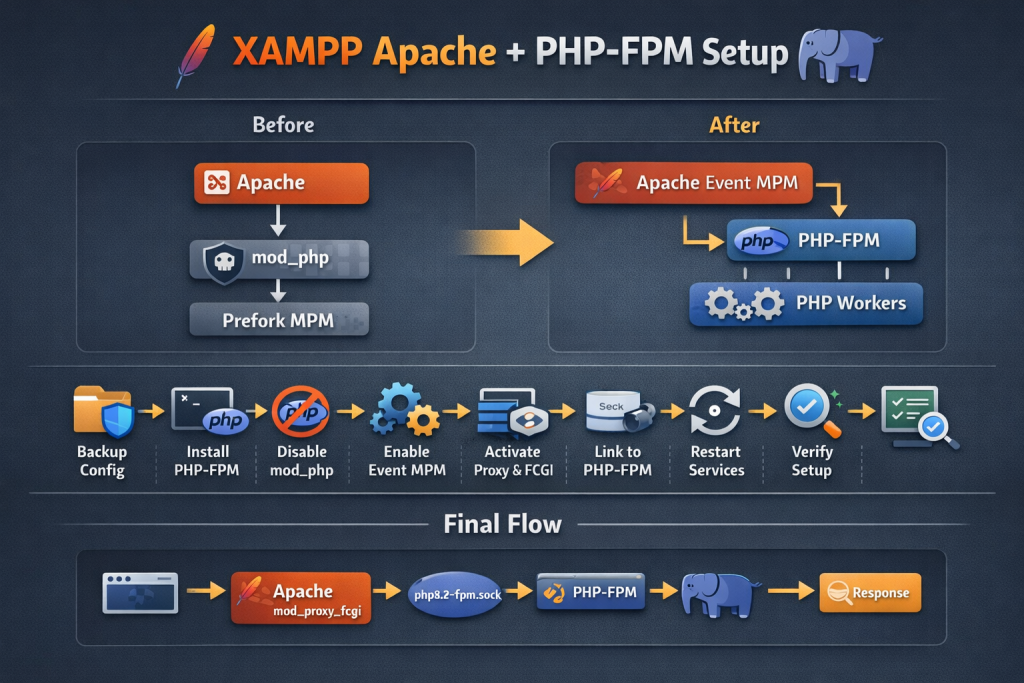
This setup keeps Apache from XAMPP and uses PHP-FPM from the OS. XAMPP’s main Apache config files on Linux are typically /opt/lampp/etc/httpd.conf and /opt/lampp/etc/extra/httpd-xampp.conf. Apache’s event MPM is built to serve more requests simultaneously, and PHP-FPM is PHP’s FastCGI process manager. To connect Apache to PHP-FPM, Apache needs mod_proxy and mod_proxy_fcgi. (apachefriends.org)
What we are doing
Before, Apache was likely using:
- Prefork MPM
- mod_php
After this change, Apache will use:
- Event MPM
- PHP-FPM through FastCGI
This is a common pattern because Apache event MPM is designed to free worker threads faster, while PHP-FPM runs PHP in a separate managed worker pool. (Apache HTTP Server)
Before you start
Run these commands first:
cp /opt/lampp/etc/httpd.conf /opt/lampp/etc/httpd.conf.bak
cp /opt/lampp/etc/extra/httpd-xampp.conf /opt/lampp/etc/extra/httpd-xampp.conf.bak
Also check your current Apache version and loaded MPM:
/opt/lampp/bin/httpd -V
/opt/lampp/bin/httpd -M | grep mpm
This gives you a rollback point before any change. XAMPP documents these Apache config paths for Linux, so these are the right files to protect first. (apachefriends.org)
Step 1: Install PHP-FPM
Run:
apt update
apt install php8.2-fpm
Verify:
php-fpm8.2 -v
PHP-FPM is PHP’s FastCGI Process Manager and is intended to run PHP as a separate service with its own process management. (PHP)
Step 2: Start and enable PHP-FPM
Run:
systemctl start php8.2-fpm
systemctl enable php8.2-fpm
systemctl status php8.2-fpm --no-pager
If the service is active, PHP-FPM is ready to accept requests from Apache. PHP-FPM supports managed worker pools and graceful process control, which is one reason it is preferred for heavier workloads. (PHP)
Step 3: Find the PHP-FPM socket
Run:
ls -l /run/php/
You will usually see something like:
php8.2-fpm.sock
If you do not see it, run:
grep -R "^listen =" /etc/php/8.2/fpm/pool.d/
Use the value shown there as your socket path.
This socket is the local communication channel Apache will use to pass .php requests to PHP-FPM. PHP-FPM pool files define how workers listen and operate. (PHP)
Step 4: Stop XAMPP before editing Apache config
Run:
/opt/lampp/lampp stop
Editing while Apache is stopped reduces confusion and avoids partial reload issues.
Step 5: Disable XAMPP’s built-in PHP module
Open the XAMPP config files and search for PHP-related lines:
grep -nE "php_module|x-httpd-php|AddType.*php" /opt/lampp/etc/httpd.conf /opt/lampp/etc/extra/httpd-xampp.conf
Then edit the file where those lines exist:
nano /opt/lampp/etc/httpd.conf
nano /opt/lampp/etc/extra/httpd-xampp.conf
Comment lines like these if you find them:
#LoadModule php_module modules/libphp.so
#AddType application/x-httpd-php .php
Why this step matters: if Apache still loads mod_php, then PHP is being handled inside Apache itself, which defeats the goal of moving PHP handling to PHP-FPM. Apache prefork is commonly used when non-thread-safe components require it; moving PHP out to FPM is exactly what allows event MPM to make sense. (Apache HTTP Server)
Step 6: Switch Apache from Prefork to Event MPM
Open:
nano /opt/lampp/etc/httpd.conf
Find:
LoadModule mpm_prefork_module modules/mod_mpm_prefork.so
Comment it:
#LoadModule mpm_prefork_module modules/mod_mpm_prefork.so
Now make sure this line is enabled:
LoadModule mpm_event_module modules/mod_mpm_event.so
If it is commented, remove the #.
Apache documents that the event MPM is designed to serve more simultaneous requests by offloading some connection-handling work, while prefork is a non-threaded pre-forking model. (Apache HTTP Server)
Step 7: Enable the modules Apache needs for FastCGI
In the same httpd.conf, make sure these lines are enabled:
LoadModule proxy_module modules/mod_proxy.so
LoadModule proxy_fcgi_module modules/mod_proxy_fcgi.so
LoadModule setenvif_module modules/mod_setenvif.so
Apache’s mod_proxy_fcgi requires mod_proxy, and these modules are what let Apache forward PHP requests to PHP-FPM. (Apache HTTP Server)
Step 8: Tell Apache to send .php files to PHP-FPM
At the bottom of httpd.conf, add this:
<FilesMatch \.php$>
    SetHandler "proxy:unix:/run/php/php8.2-fpm.sock|fcgi://localhost/"
</FilesMatch>
If your socket path is different, use that path instead.
This tells Apache that whenever a .php file is requested, it should hand the request to PHP-FPM over FastCGI instead of trying to execute PHP internally. Apache’s FastCGI proxy module is specifically meant for that job. (Apache HTTP Server)
Step 9: Test Apache config before restart
Run:
/opt/lampp/bin/httpd -t
You want to see:
Syntax OK
Do not restart anything until this passes.
Step 10: Start PHP-FPM and restart XAMPP
Run:
systemctl restart php8.2-fpm
/opt/lampp/lampp start
Then verify Apache is up:
ps aux | grep httpd
Step 11: Confirm Apache is using Event MPM
Run:
/opt/lampp/bin/httpd -V | grep "Server MPM"
Expected result:
Server MPM: event
Apache’s official docs describe event as the MPM intended to handle more simultaneous connections efficiently than prefork in appropriate environments. (Apache HTTP Server)
Step 12: Confirm PHP is running through FPM
Create a test file:
cat > /opt/lampp/htdocs/info.php <<'EOF'
<?php phpinfo();
EOF
Open in browser:
http://YOUR-SERVER-IP/info.php
Check this line on the page:
Server API: FPM/FastCGI
If you see that, Apache is no longer using mod_php for PHP execution.
Final request flow
After setup, the request flow becomes:
Browser → XAMPP Apache → mod_proxy_fcgi → PHP-FPM socket → PHP worker → Response
That separation is the key architectural improvement: Apache handles HTTP connections, and PHP-FPM handles PHP workers. (Apache HTTP Server)
Easy rollback plan
If anything breaks, do this:
cp /opt/lampp/etc/httpd.conf.bak /opt/lampp/etc/httpd.conf
cp /opt/lampp/etc/extra/httpd-xampp.conf.bak /opt/lampp/etc/extra/httpd-xampp.conf
systemctl restart php8.2-fpm
/opt/lampp/lampp restart
If needed, you can also stop PHP-FPM temporarily:
systemctl stop php8.2-fpm
Common issues and fixes
1. Apache does not start
Run:
/opt/lampp/bin/httpd -t
Usually this means:
- wrong module line
- duplicate MPM
- wrong
SetHandlersocket path
2. 503 Service Unavailable
Usually PHP-FPM is not running or Apache is pointing to the wrong socket.
Check:
systemctl status php8.2-fpm --no-pager
ls -l /run/php/
grep -R "^listen =" /etc/php/8.2/fpm/pool.d/
3. PHP files download instead of execute
This usually means:
SetHandlerblock is missingmod_proxy_fcgiis not loaded- Apache config was edited in the wrong file
Check:
/opt/lampp/bin/httpd -M | grep -E "proxy|fcgi|mpm"
4. Apache still shows Prefork
Check whether both MPMs are loaded accidentally:
grep -n "mpm_" /opt/lampp/etc/httpd.conf
Only one MPM should be enabled.
Team checklist
Your team can use this short checklist:
1. Backup XAMPP Apache config
2. Install php8.2-fpm
3. Start and enable php8.2-fpm
4. Find FPM socket path
5. Stop XAMPP
6. Disable mod_php
7. Enable event MPM
8. Enable proxy + proxy_fcgi
9. Add FilesMatch SetHandler for PHP-FPM
10. Run Apache config test
11. Restart php8.2-fpm and XAMPP
12. Verify:
   - Server MPM: event
   - Server API: FPM/FastCGI
Important note for your team
This setup is practical, but it is still a hybrid model: XAMPP Apache + system PHP-FPM. It works, but it is less standard than using a full OS-managed Apache + OS-managed PHP stack. Keep the config changes documented carefully so future team members know that Apache is coming from /opt/lampp while PHP-FPM is coming from the system packages. XAMPP itself documents the main config file locations, which is helpful for this mixed setup. (apachefriends.org)




0 Comments
Most Voted