Skip to content
Menu
DevSecOps Now!!!
  • About
  • Certifications
  • Contact
  • Courses
  • DevSecOps Consulting
  • DevSecOps Tools
  • Training
  • Tutorials
DevSecOps Now!!!

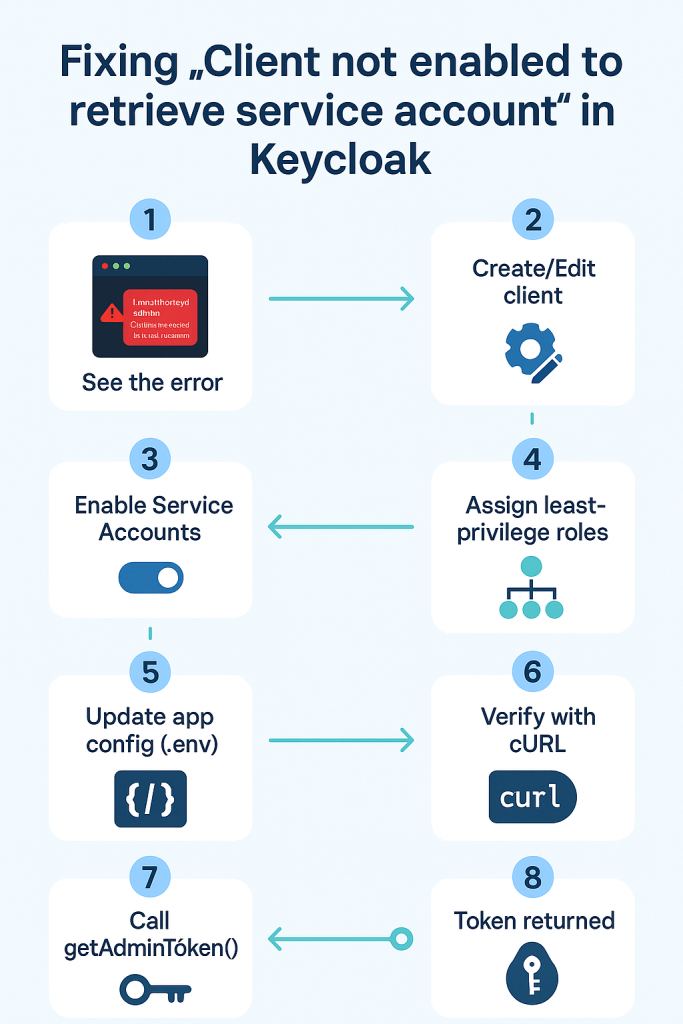
Fixing “Client not enabled to retrieve service account” in Keycloak (with Laravel example)

Posted on October 14, 2025

Limited Time Offer!

For Less Than the Cost of a Starbucks Coffee, Access All DevOpsSchool Videos on YouTube Unlimitedly.
Master DevOps, SRE, DevSecOps Skills!
Enroll Now

Application logs

[KC] getAdminToken POST https://auth.local.com/realms/wizard/protocol/openid-connect/token
[KC] getAdminToken failed {"status":401,"body":"{\"error\":\"unauthorized_client\",\"error_description\":\"Client not enabled to retrieve service account\"}"}
Keycloak admin token error

Meaning
You tried to get a token with grant_type=client_credentials using a Keycloak client that does not have Service Accounts enabled (or isn’t confidential). Keycloak rejects it with unauthorized_client.


Why it happens (root cause)

  • Client Credentials flow uses the service account of a confidential client.
  • If the client is public or Service Accounts are OFF, Keycloak won’t issue a token.
  • Even if Service Accounts are ON, the service account user needs enough realm-management roles for the admin APIs you call (users, groups, clients, roles).

What we want to achieve

  • Use a dedicated admin client (e.g., wizbrand-admin-cli) to call admin REST APIs.
  • Enable Service Accounts and assign least-privilege roles.
  • Keep your app client (e.g., wizbrand-web) separate from admin duties.

Prerequisites

  • Realm: wizbrand
  • Base URL: https://auth.holidaylandmark.com
  • Admin access to Keycloak
  • Laravel env variables available

Fix in Keycloak (UI steps)

  1. Create / Edit the admin client
    • Go to Clients → Create (or open existing wizbrand-admin-cli)
    • Client Type: OpenID Connect
    • Client ID: wizbrand-admin-cli
    • Authentication / Access settings (wording varies by Keycloak version):
      • Client authentication: ON (makes it Confidential)
      • Service accounts enabled: ON
      • (Flows) Standard Flow / Direct Access Grants: not required for service accounts
  2. Copy the client secret
    • Credentials tab → copy Secret
  3. Assign service account permissions (least-privilege)
    • Service Account Roles tab → Assign role
    • From Client = realm-management, add only what you need:
      • view-users, manage-users
      • view-groups, manage-groups
      • view-clients (and manage-clients if you create client roles)
      • view-realm
      • If you create/manage client roles: manage-roles (or use realm-admin for broad access in lower environments)

Tip: start with minimal roles; add more only if a call fails with 403.


Update your Laravel configuration

.env

KEYCLOAK_ADMIN_CLIENT_ID=wizbrand-admin-cli
KEYCLOAK_ADMIN_CLIENT_SECRET=<paste-secret>
KEYCLOAK_CLIENT_ID=wizbrand-web
KEYCLOAK_BASE_URL=https://auth.holidaylandmark.com
KEYCLOAK_REALM=wizbrand

config/services.php (example)

'keycloak' => [
    'base_url'          => env('KEYCLOAK_BASE_URL'),
    'realm'             => env('KEYCLOAK_REALM', 'master'),
    'realms'            => env('KEYCLOAK_REALM', 'master'), // if your code reads 'realms'
    'org_group_prefix'  => env('KEYCLOAK_ORG_PREFIX', ''),
],

Clear config caches

php artisan config:clear && php artisan cache:clear

Verify with cURL first (quick sanity check)

curl -s -X POST \
  "https://auth.local.com/realms/wizard/protocol/openid-connect/token" \
  -d "grant_type=client_credentials" \
  -d "client_id=wizbrand-admin-cli" \
  -d "client_secret=<paste-secret>"

Expected: JSON containing access_token and expires_in.
If you still get 401, re-check: realm, client id, secret, service accounts toggle, and that the client is confidential.


How the Laravel service uses the token (your code)

Your KeycloakAdminService::getAdminToken() calls the same token endpoint with:

'form_params' => [
  'grant_type'    => 'client_credentials',
  'client_id'     => $this->adminClientId,     // wizbrand-admin-cli
  'client_secret' => $this->adminClientSecret, // from env
]

Once Keycloak is correctly configured, the method will return a valid bearer token and the rest of the methods (users/groups/clients/roles) will work.


Post-fix validation checklist

  • getUserByEmail() returns 200 and a user array (or empty list).
  • Creating a group returns 201 (or 204/409 with your fallback logic).
  • Mapping client roles to groups succeeds with 201/204.
  • Logs show:
    • [KC] getAdminToken OK
    • [KC] ... OK for subsequent API calls.

Least-privilege reference

If your code needs to:

  • Read & create users → view-users, manage-users
  • Add to groups / create groups → view-groups, manage-groups
  • Create client roles / composites → view-clients, manage-clients, manage-roles
  • General realm reads → view-realm

For production, avoid realm-admin if possible; use it only in dev/test or during bootstrap.


Optional fallback (only if you can’t use service accounts)

You can implement a password grant fallback using Keycloak’s built-in admin-cli with an admin username/password (less secure; not recommended long-term). Example:

KEYCLOAK_ADMIN_USERNAME=<kc-admin-user>
KEYCLOAK_ADMIN_PASSWORD=<kc-admin-pass>

In getAdminToken(), if client_credentials fails, attempt:

grant_type=password
client_id=admin-cli
username=<user>
password=<pass>

Prefer fixing service accounts; use password grant only as a temporary workaround.


Troubleshooting tips

  • Wrong realm: Token URL must match the realm you’re targeting (here wizbrand).
  • Clock skew: Ensure server time is correct (NTP); skew can cause auth issues.
  • Env not loading: Make sure .env is read by the running PHP-FPM/queue workers; restart if needed.
  • Network/proxy: Confirm your app can reach auth.holidaylandmark.com over HTTPS.
  • 403 after token: You have a token, but missing realm-management roles; add the specific permission tied to the failing API.

Executive summary you can paste in Jira/README

  • Issue: 401 unauthorized_client — Client not enabled to retrieve service account when calling the token endpoint with client_credentials.
  • Root cause: The Keycloak client used for admin API calls was not a confidential client with Service Accounts enabled.
  • Fix: In Keycloak, make wizbrand-admin-cli confidential, enable Service Accounts, and grant the service account realm-management roles (view/manage-users, view/manage-groups, view/manage-clients, manage-roles, view-realm as needed). Update .env with the client secret.
  • Verification: cURL to the token endpoint returns access_token; Laravel logs show [KC] getAdminToken OK; subsequent admin operations succeed.
Post Views: 2,481
  • Client
  • Client not enabled
  • Client not enabled to retrieve service account
  • Client scope
  • Keycloak
Subscribe
Login
Notify of
guest
guest
0 Comments
Oldest
Newest Most Voted
Inline Feedbacks
View all comments
  • Linux Server Diagnostic Commands: Complete Guide for Performance, Network & System Troubleshooting
  • The Ultimate Guide to CDOM – Certified DataOps Manager Certification
  • The Practical Path to AI Reliability: A Guide to the Certified MLOps Manager
  • Master the Machine Learning Lifecycle:Guide to Becoming a Certified MLOps Architect
  • How to Build a Project-Level AI Memory System That Works Across Codex, Claude, and Other AI Coding Tools
  • Certified MLOps Professional: A Deep Dive into the Certified MLOps Professional Certification
  • Certified MLOps Engineer : The Comprehensive Guide to Mastering Machine Learning Operations
  • Codex vs Claude: A Complete Practical Guide for Modern Developers (2026)
  • Certified AIOps Professional Program A Guide to Career Growth
  • Keycloak Multi-Client Architecture with Project-Based Email Validation (Student, Trainer, Company, Consulting)
  • Incorrect definition of table mysql.column_stats
  • Mautic and PHP 8.3 Compatibility Guide (2026)
  • Certified AIOps Engineer: The Complete Career Path and Certification Guide
  • How to Rename Apache Virtual Host Files Safely (Step-by-Step Guide for Linux)
  • AIOps Foundation Certification: Everything You Need to Know to Get Certified
  • DevOps to Certified Site Reliability Professional: A Senior Mentor’s Guide
  • Certified Site Reliability Manager Training, Preparation, and Career Mapping
  • Certified Site Reliability Architect: The Complete Career Guide
  • What Is a VPN? A Complete Beginner-to-Advanced Tutorial
  • How to Install, Secure, and Tune MySQL 8.4 on Ubuntu 24.04 for Apache Event MPM and PHP-FPM
  • Complete Guide to Certified Site Reliability Engineer Career
  • Certified DevSecOps Professional Step by Step
  • Certified DevSecOps Manager: Complete Career Guide
  • Certified DevSecOps Engineer: Skills, Career Path and Certification Guide
  • Step-by-Step: Become a Certified DevSecOps Architect
  • Tuning PHP 8.3 for Apache Event MPM and PHP-FPM on Ubuntu: A Complete Step-by-Step Production Guide
  • Complete Step-by-Step Guide to Configure Apache Event MPM, Create index.php, Set Up VirtualHost, and Fix Ubuntu Default Page
  • Convert XAMPP Apache to Event MPM + System PHP-FPM
  • The Gateway to System Observability Engineering (MOE)
  • How to Finetune Apache and Prove It Works: A Real-World Guide to Testing Performance, Concurrency, HTTP/2, Memory, CPU, and Security

Recent Comments

  1. emmy day on SQLSTATE[42S22]: Column not found: 1054 Unknown column ‘provider’ in ‘field list’
  2. digital banking on Complete Tutorial: Setting Up Laravel Telescope Correctly (Windows + XAMPP + Custom Domain)
  3. SAHIL DHINGRA on How to Uninstall Xampp from your machine when it is not visible in Control panel programs & Feature ?
  4. Abhishek on MySQL: List of Comprehensive List of approach to secure MySQL servers.
  5. Kristina on Best practices to followed in .httacess to avoid DDOS attack?

Archives

  • April 2026
  • March 2026
  • February 2026
  • January 2026
  • December 2025
  • November 2025
  • October 2025
  • September 2025
  • August 2025
  • July 2025
  • June 2025
  • May 2025
  • April 2025
  • March 2025
  • February 2025
  • January 2025
  • December 2024
  • November 2024
  • October 2024
  • September 2024
  • August 2024
  • July 2024
  • June 2024
  • May 2024
  • April 2024
  • March 2024
  • February 2024
  • January 2024
  • December 2023
  • November 2023
  • October 2023
  • September 2023
  • August 2023
  • July 2023
  • May 2023
  • April 2023
  • March 2023
  • February 2023
  • January 2023
  • December 2022

Categories

  • Ai
  • AI Blogging
  • AiOps
  • ajax
  • Android Studio
  • Antimalware
  • Antivirus
  • Apache
  • Api
  • API Security
  • Api Testing
  • APK
  • Aws
  • Bike Rental Services
  • ChatGPT
  • Code Linting
  • Composer
  • cPanel
  • Cyber Threat Intelligence
  • Cybersecurity
  • Data Loss Prevention
  • Database
  • dataops
  • Deception Technology
  • DeepSeek
  • Devops
  • DevSecOps
  • DevTools
  • Digital Asset Management
  • Digital Certificates
  • Docker
  • Drupal
  • emulator
  • Encryption Tools
  • Endpoint Security Tools
  • Error
  • facebook
  • Firewalls
  • Flutter
  • git
  • GITHUB
  • Google Antigravity
  • Google play console
  • Google reCAPTCHA
  • Gradle
  • Guest posting
  • health and fitness
  • IDE
  • Identity and Access Management
  • Incident Response
  • Instagram
  • Intrusion Detection and Prevention Systems
  • jobs
  • Joomla
  • Keycloak
  • Laravel
  • Law News
  • Lawyer Discussion
  • Legal Advice
  • Linkedin
  • Linkedin Api
  • Linux
  • Livewire
  • Mautic
  • Medical Tourism
  • MlOps
  • MobaXterm
  • Mobile Device Management
  • Multi-Factor Authentication
  • MySql
  • Network Traffic Analysis tools
  • Paytm
  • Penetration Testing
  • php
  • PHPMyAdmin
  • Pinterest Api
  • Quora
  • SAST
  • SecOps
  • Secure File Transfer Protocol
  • Security Analytics Tools
  • Security Auditing Tools
  • Security Information and Event Management
  • Seo
  • Server Management Tools
  • Single Sign-On
  • Site Reliability Engineering
  • soft 404
  • software
  • SuiteCRM
  • SysOps
  • Threat Model
  • Twitter
  • Twitter Api
  • ubuntu
  • Uncategorized
  • Virtual Host
  • Virtual Private Networks
  • VPNs
  • Vulnerability Assessment Tools
  • Web Application Firewalls
  • Windows Processor
  • Wordpress
  • WSL (Windows Subsystem for Linux)
  • X.com
  • Xampp
  • Youtube
©2026 DevSecOps Now!!! | WordPress Theme: EcoCoded
wpDiscuz